Customer Ratings & Reviews
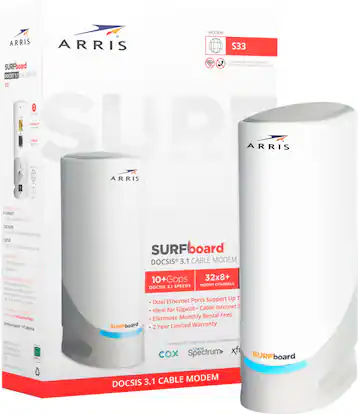 See more images
ARRIS - SURFboard S33 32 x 8 DOCSIS 3.1 Multi-Gig Cable Modem with 2.5 Gbps Ethernet Port - White
- Model:
- S33
- SKU:
- 6425831
Highly rated by customers for:
Customer reviews
Rating 4.6 out of 5 stars with 2130 reviews
Top Mentions
- Checking this box will move you to the filtered review section.
- Checking this box will move you to the filtered review section.
- Checking this box will move you to the filtered review section.
- Checking this box will move you to the filtered review section.
- Checking this box will move you to the filtered review section.
- Rated 5 out of 5 stars
Great Upgrade From SB6141
Sean Posted
I was only able to hit 250/20 on my 10 year old SB6141, this was a great upgrade to take better advantage of the increased allowance of bandwidth Comcast is so graciously delivering unto the peasants in exchange for their economic penance. Paired this with a Ubiquity UDM-SE and I'm getting about 850/30 now for $83/mo.
I would recommend this to a friend - Rated 2 out of 5 stars
Died too early, runs hot
McDuff Posted
Mine only lasted 8 months. Would frequently have to reboot it as it would freeze, would notice it ran warmer than I would have liked. Yesterday it quit completely and will no longer connect to my ISP even after unplugging for several hours to cool. Measured temp at the top of the unit was almost 175 degrees. Hopefully they at least warranty it without issue, as with those temps it is becoming a fire hazard.
No, I would not recommend this to a friend - Rated 1 out of 5 stars
Unreliable Modem, Terrible Support
Vicky Posted
I purchased the Arris Surfboard S33, and it has been a nightmare. The modem disconnects 2-3 times a day, leaving all devices in my home without internet for about 2 minutes each time. This is especially frustrating as I work from home, and I've had important calls dropped because of these constant disconnections. To make matters worse, Best Buy refuses to accept a return even though the modem is under warranty until September 2025. They advised me to contact Arris Surfboard directly. Unfortunately, Arris customer service is only available Monday through Friday ( when I am working ). One day when I finally got through, they insisted on troubleshooting the device, which would take more than two hours, before even considering a replacement. The modem’s light turns orange/red, then blinks, and eventually returns to dark green – a clear indication of a modem issue. Even an Xfinity technician confirmed that the cable line is fine and the modem is at fault. I’m extremely disappointed with both the product and the service ( and Best Buy as well). I’ll never purchase an Arris Surfboard product or buy electronics from Best Buy again. This has been a $200 waste of money.
No, I would not recommend this to a friend - Rated 5 out of 5 stars
Does as says
Tungsten Posted
Remember this is a modem it does not provide wifi. Buy a router for that. Plug in, contact ISP, and you now have internet.
I would recommend this to a friend - Rated 4 out of 5 stars
Well
Sexcmo78 Posted
Very good unit.. Not sure about the cost but so far this is my third Arris modem over a few years.. I don't kno about long-term usage tho.. And Arris wouldn't offer me anything but paying more for warranty and phone support
No, I would not recommend this to a friend - Rated 4 out of 5 stars
Overall Great Gigabit Modem
OHGuy Posted
Overall a solid modem. Occasionally I will need to restart both this and my dedicated router due to connection drops but I belive this has more to do with my ISP than the product itself. YMMV
I would recommend this to a friend - Rated 1 out of 5 stars
broke after 9 months, stuck with a blue light
nurseshelly Posted
Well, I bought this in January and now it's September and it's not working. This is the first one I have had malfunction. When it worked it was great. Now I just have the blue solid light of malfunction and no internet.
No, I would not recommend this to a friend - Rated 5 out of 5 stars
Good modem
Durable Posted
Best modem for the price. No dropped connections, auto updates. You cant customize it or go into the firmware. But it works fine.
I would recommend this to a friend - Rated 5 out of 5 stars
Fast, Reliable, and a Great Upgrade
TheGaryVibes Posted
The ARRIS SURFboard S33 has been an excellent upgrade for my home network. If you’re running a high‑speed internet plan or planning to move into multi‑gig speeds, this modem is absolutely worth considering. Setup was incredibly simple—plug it in, activate it with your ISP, and it’s ready to go. The whole process took only a few minutes, and the modem connected without any issues. Performance is where the S33 really shines. Speeds are consistently fast and stable, even during peak hours when my previous modem would slow down. The 2.5Gbps Ethernet port is a huge advantage for anyone who wants to future‑proof their setup or take full advantage of faster plans. Streaming, gaming, video calls, and smart home devices all run smoothly with no drops or buffering. The compact design is another plus. It doesn’t take up much space, runs cool, and stays quiet. Once it’s set up, it just works in the background without needing attention. That reliability is exactly what you want from a modem. If you’re renting a modem from your ISP, the S33 pays for itself quickly. It’s a strong, dependable choice that delivers the speeds modern households need. Overall, the ARRIS SURFboard S33 is a fast, stable, and future‑ready modem that I’d easily recommend.
I would recommend this to a friend - Rated 5 out of 5 stars
ARRIS - SURFboard S33
I’ve been using the ARRIS SURFboard S33 cable modem and it’s been excellent so far. Setup was straightforward, and it activated quickly with my ISP without any issues. The performance is where this modem really stands out. It delivers consistently fast speeds with no dropouts, even during peak hours. The multi-gig capability (2.5 Gbps port) is a big plus if you have a high-speed plan or plan to upgrade in the future. Build quality feels solid, and it runs quietly without overheating. I also like that it supports DOCSIS 3.1, so it’s future-proof for most cable internet upgrades. Overall, this is a reliable, high-performance modem that’s worth the investment if you want to avoid renting equipment from your provider and get the most out of your internet speed.
I would recommend this to a friend - Rated 5 out of 5 stars
My honest opinion
Head3000 Posted
I recently purchased the Arris modem and I am beyond impressed with its exceptional performance. Not only does it deliver lightning-fast internet speeds, but its sleek and compact design makes it a perfect fit for any modern household. Setting it up was a breeze, thanks to the user-friendly interface and clear instructions. The reliable connectivity it provides has completely transformed my online experience, enabling seamless streaming, gaming, and browsing without any interruptions. With its robust security features, I feel confident about the safety of my network. The Arris modem has truly exceeded my expectations, and I highly recommend it to anyone seeking a top-notch, dependable internet solution.
I would recommend this to a friend - Rated 5 out of 5 stars
Terrific upgrade for gig cable
BillFromKCMO Posted
This is a perfect upgrade for those who want their own modem over what their ISP provides, as it’s both a solid piece of equipment from a model line known for quality, and a marked improvement over previous models on an aesthetic front. So about the modem itself - setup is a breeze and the unit is simple to manage. The worst part about setup, for me, was needing to contact my ISP to provision the equipment; with most providers, you’ll want to use the yellow ethernet jack as it’s the fast one (2.5 gbps versus 1 gbps). Make sure you tighten the coax line with a wrench to prevent as much interference as possible. For current Surfboard modem users, espexially those who have 6000-series modems like myself, the most welcome change is the connection indicator light. Instead of four bright blue and white lights that can light up a room, you get a single indixator that flashes yellow as it connects and stays a dim blue when it is connected. The biggest thing you should do with this modem as soon as you physically set it up but before you contact your ISP to provision it is to log into the modem information page so you can set an admin password for those pages and mitigate any security risks. So why did I buy this, you might ask? My ISP upgraded speeds from around 300 mbps to around 1 gbps. With this upgrade, I needed to replace my aging modem as it wasn’t fast enough to keep up and would drop connectivity. The modem previous to that would also drop connection when my ISP did another speed increase ages ago. In closing, is this modem worth it? Yes, as it’s likely to pay for itself at least twice over during the time you’ll own it. Also, pick this one over a model with gigabit ports as you’ll be able to support faster routers, and therefore faster connections. And if your ISP has you on a data plan faster than 1 gig, invest in a router with a 2.5 gbps WAN port so you can take advantage of that speed.
I would recommend this to a friend - Rated 5 out of 5 stars
Five Star Performance
Otto Posted
The Arris S33 is capable of running two networks (1 up to 2.5 gbps, 1 up to 1 gbps giving it the capability to run two separate routers. It’s DOCSIS 3.1 compliant, small footprint, properly ventilated incompatible with major Internet providers. Set up is easy especially if you already have a router that can handle 2.5 GBPS. Note; make sure it is peared with a router that can handle speed provided by your Internet provider. This is my second Arris. First one worked flawlessly for years. Purchase the second one to handle of a new Internet plan. Best Buy made this purchase easy.
I would recommend this to a friend - Rated 5 out of 5 stars
Easy setup and works well
halfapersona Posted
Setup was super easy and it’s been working great so far. I haven’t had any issues in the two weeks I’ve been using it. It’s also noticeably smaller than my last modem, which I like because it takes up less space. The only thing I’d change is maybe having a few color options, but overall I’m really happy with it.
I would recommend this to a friend - Rated 5 out of 5 stars
Just Works!
ForeverMeek2012 Posted
Recently upgraded my Xfinity internet plan to the Gigabit Extra (1.2 Gbps) and needed to upgrade my cable modem as well. Did some research and found that this is one of those compatible routers and I have always used Arris cable modems and never had any issues. Overall, I was able to contact Xfinity and register the device and so far it has been working good.
I would recommend this to a friend - Rated 5 out of 5 stars
Works great with spectrum
AaronY Posted
This modem works great with spectrum, for months I was having issues with the one they sent so I decided to get this modem, now no disconnects occur and my internet works perfectly. The setup was easy, just plug it in to power and the coaxial, then call the cable company.
I would recommend this to a friend - Rated 5 out of 5 stars
Don't mess with success
BradleyP Posted
I needed a faster modem as I upgraded service with Cox. I've used the Arris Surfboard products for years and had success with them, so a no brainer to step up to the next level. Checked with Cox to find all the compatible devices and this surfboard met the requirements and was easily the best value. Easy to connect/swap out forbthe old device. Didn't get it to automatically register with Cox, but that was a Cox issue, not a Surfboard issue. Had fast speeds and no issues since using it.
I would recommend this to a friend - Rated 5 out of 5 stars
Easy setup, great quality and price.
FirstTCL Posted
The Arris S33 was very easy to set up and has been performing great. I had researched various modems as options for upgrading my existing Motorola modem and I was looking for compatibility with Comcast, quality performance, ease of setup, price and it's ability to handle future service upgrades (speeds). The Arris S33 has it all. I highly recommend it.
I would recommend this to a friend - Rated 5 out of 5 stars
ARRIS SURFboard cablemodem
AZDG Posted
My 10 year old cable modem (Netgear, I think) died in November, after working well. I initially tried to get one of the cellular internet services, but couldn’t get that to work for me. Bought the Arris SURFboard cable modem at Best Buy and got it running in half an hour, including time to contact the cable company to activate the modem on their system. After 7 months, this cable modem is working very well. Highly recommend this.
I would recommend this to a friend - Rated 5 out of 5 stars
So far so good.
Consumer Posted
Just picked up this week. Was the same price as the SB8200. But this one had the 2.5Gps port (Wanted to get something future proof in case I decide to go GB upgrade) Setup was wonky. Had to call Spectrum. Took about 45 min. Their system wouldn't recognize the MAC ID or SN on the device. And couldn't activate it. Eventually it was able to connect on their end. Modem worked fine with computer hardwired in... but my wireless router (Airport Extreme 6th Gen) was having problems. After some resets and waiting for.. minutes... a lot of minutes, My Macbook finally recognized the green light of the modem in airport utility. Through an extended network to another (AE 6th gen) over 30 feet away through window to the other window. I'm on a 200mbps plan.
I would recommend this to a friend