Customer Ratings & Reviews





- Model:
- BIT940800F153
- SKU:
- 6156902
Rating by feature
- Value
Rating 4.2 out of 5 stars
- Quality
Rating 3.9 out of 5 stars
- Ease of Use
Rating 3.8 out of 5 stars
Customers are saying
Customers are enthusiastic about the BOX 2 Smart Home Cybersecurity Hub for its enhanced security features that provide ample protection for connected devices. The easy setup process is also widely appreciated. Some users find the parental control feature useful. While the performance of the device as a protection tool is highly regarded, a few customers express concerns about the annual subscription requirement and compatibility issues with certain devices.
This summary was generated by AI based on customer reviews.
- Pros mentioned:Security, Setup

Great addition to Bitdefender Software
|Posted .This reviewer received promo considerations or sweepstakes entry for writing a review.As a Bitdefender Internet security customer, I was excited to try their next-gen box to extend protection to my wireless devices. It's an innovative solution that combines solid Internet security along with defense against attacks on your devices. Setup took only a few minutes and connecting my devices to the system was also quick and intuitive. Time will tell how effective the entire system is, but I'm impressed with the initial setup of their solution.
I would recommend this to a friend - Pros mentioned:Setup
Good for IOT Devices, Not much for PC/Laptops
|Posted .This reviewer received promo considerations or sweepstakes entry for writing a review.The BitDefender Box 2 sports an interesting premise, internet home security for all devices on your network. It's in a stylish package and looks like (and is in fact) a router itself - though I couldn't quite figure out what other device it reminded me of. So, first impressions aside, let's move to the installation. The install was pretty simple. Like many new internet connected devices that have a subscription component (or maybe to simplify firmware development), setup was via a mobile app, in my case, Android. That was pretty simple and I selected the mode where the Box 2 connects to my router, rather than sitting in between the router and cable modem. In practice, this will turn out to not really matter. Once you get past getting it an internet connection on your network, it pretty much takes over as a dhcp server. This means it administers IP addresses for all devices on your network. Based on my understanding of how the Box 2 works, this is the primary means of protection. By analyzing requests from your devices, it can decide to forward those on to your router or cable modem, or drop them altogether. It's unclear to me at this time whether the BOX 2 also looks at incoming traffic - if so, that would make it a bit more useful than it currently seems. Anyway, the reason I said it didn't matter that I installed it on my router, rather than in-between is that though it takes over as a dhcp server, you only get one choice of subnet. For most users, this is not a big deal. You won't even notice the issue I ran into. And likely with some new routers, even the issue I faced could be mitigated. Essentially, I have devices on my network that I access via IP address rather than a hostname. If my dhcp server cannot make that device available at the same IP address, I then have to go and make changes everywhere that refers to that IP. That's pretty much the problem I ran into. Newer routers or ones with custom firmware may allow you to set a hostname which allows access to the device, regardless of IP, or the device itself may allow that, but this is not a feature of my devices (that I need to access in this manner), my router, or the Box 2 itself. Speaking of the Box 2, it can act as a router itself. So, connected directly to your cable modem, you can then use it as your wifi access point. Given that to use it, it must act as the dhcp server, the only point of continuing to leave my router in the loop is that my router is more powerful (as in greater wifi range) and has home media features which I use. Ultimately though, the Box 2 doesn't really provide protection that firewalls running on a PC OS handles. So, unless you have really old machines that no longer receive updates or aren't protected by anti-virus, this won't do much for them. Where it shines is in protecting your IOT type devices. Things like cameras, thermostats, lights, sensors which tend to have bad security, little to no firewall, and have shown themselves to be easy targets for takeover and use in a botnet. The Box 2 can prevent them from accessing malicious sites. Perhaps with updates in the future, it can handle both incoming and outgoing connections. However, I'm not convinced the Box 2 goes far enough. If a device on my network is compromised, will it prevent spreading to other device on my network? Can it provide protection from incoming connections? And will a software update address the network configuration issues that currently make it a pain for users with custom network setups? Given those open questions, my rating right now is 3 stars. The Box 2 has promise, right now may be too early to tell.
No, I would not recommend this to a friendBrand response from Bitdefender Expert
Posted .Thanks so much for your in-depth review. Although BOX was designed to be a security solution for internet of things devices (on which you cannot directly install a security solution) its protection does not stop there. By owning the BOX, you don’t only get protection for smart devices, but we also bundle in a subscription for Bitdefender Total Security (included in in the packaging) so that you can also protect an unlimited number of your traditional devices that run Windows (PC), Mac, Android or iOS software.

- Pros mentioned:Security
Great IDEA, ok setup, signal issues
|Posted .This reviewer received promo considerations or sweepstakes entry for writing a review.A router with built in security ? What a great idea. Does that mean I don’t need security software on my computer ? no so fast. Personally I would recommend keeping antivirus/maleware/.etc protection on our computer. Things can get through via email, zip files, or plugged in (USB drive). This router is suppose to stop attacks coming from the internet With more and more devices connected to the internet: refrigerator, door lock, IP cameras, TV, tablets, cell phones, printers, speakers etc. these all don’t have protections. So a router like this is needed. Can you imagine someone hacking your networking unlocking your front door or opening your garage ? Setup was ”ok” .. took sometime to things connected to the router. Connection was not as strong as my current router So I ended up connecting my other router to this one..
I would recommend this to a friend - Pros mentioned:Setup
Good all around protection
|Posted .This reviewer received promo considerations or sweepstakes entry for writing a review.I have had the Bitdefender Box2 setup now for a few hours and although I may need to do an update on this review at some point, so far I am very happy with the experience. The packaging is nice, easy to open and contains the device, power cord and an ethernet cable that you need for the setup and permanent connection once properly configured. The setup is very well explained with the included instructions card and the online interface on the website is also very simple to follow. My initial experience with the setup wasn't as smooth as I would have liked due to my configuration not being readily available as an option (wireless router wasn't listed) but I was able to research it quickly and ensure an accurate setup. Once I restarted those devices that didn't automatically reestablish a connection, the app on my phone and on the online dashboard recognized everything. I was able to start a scan on each of the devices and various vulnerabilities were identified that I could action as necessary. It comes with an unlimited number of available connections for the household and provide antivirus software for the most common devices (PC, Mac, IOS and Android). I have not seen any material performance changes to this point and am happy with this experience so far. The upfront cost may dissuade some people but with a year free of protection on an unlimited number of devices, I think you will find this product may be a better option than most stand alone software packages.
I would recommend this to a friend - Pros mentioned:Parental controls
Easy peace of mind
|Posted .This reviewer received promo considerations or sweepstakes entry for writing a review.In this day and age, we all hear about different data breaches, cyber attacks, identity theft, hacks from other countries etc... You can’t be too careful and taking the proper precautions is important, now more than ever. Enter Bitdefender, total Home Network security in one convenient box and app. The app is intuitive, and guides you easily through the process, setup is flexible, you can use your cable modem or your own WiFi modem as a bridge. Once set up, a scan is performed and an initial assessment for each item using your Network is performed, protection is there regardless of operating system, iOS, Mac, PC...doesn’t matter, all is protected. Versatile parental controls are also available to best manage access to the internet for your children. The Bitdefender protection service is included for your first year of use, then you will have to pay $99 annually. Overall, this is your best insurance and tool to protect your Home Network.
I would recommend this to a friend - Pros mentioned:Setup
If you want network security, here it is!
|Posted .This reviewer received promo considerations or sweepstakes entry for writing a review.Make no mistake about it, this is very similar to commercial firewalls that have the capability to keep track of not just intrusions but also blacklist, sites you never want access to or that you don't want to have access to you, to parental controls. It will take care of both wired and wireless network activities with the ability to monitor them remotely. Installation was pretty straight forward with the biggest decision being if you want it to work as your wireless network controller, replace your current WiFi router or just mesh with your current configuration. All depends on your setup but the option is yours. Note that some configs could be a bit confusing but after some trial and error you can find the one that works the best for you. I have not fully exercised all the options on a multitude of devices but so far no issues. Be aware that this is a subscription service with the first year included. Part of what you are paying for is a device that is constantly up to date with the latest threat protection and the ability to monitor or be notified in real time. Overall a good device.
I would recommend this to a friend - Pros mentioned:Setup
Perfect
Posted .This reviewer received promo considerations or sweepstakes entry for writing a review.I put off purchasing the first version of the Bitdefender Box because of middling reviews and just waiting for further refinements. This version delivers. Setup was a breeze and it was easy to get everything setup. I use Ubiquiti Unifi Access Points (APs) already so for me keeping a router was redundant. The Box picked up all the devices on my network instantly and scanned for vulnerabilities. I installed the Bitdefender client software on my computers and things began humming along. I attempted to access some dummy phishing sites and the Box intercepted the URL before my security DNS had time to block it - which was delightful to me. I do think for an 'lay person' this may be challenging but support is free and they pick up almost immediately (I just had to test it out to setup and they were super friendly). Yes - if you bought yourself a $500 Nighthawk that now means it is a glorified AP, but still a very good AP. My only ding? There are not enough (ready: any) customizable settings on the Box itself. I would like to set network wide parental controls instead of needing to manage on a per-device basis on the network module. I also would like to be able to dictate the router's DNS service. Hopefully the customization features of Box continue to improve with time. But at this points, those are little gripes. If you want home security that you really don't need to think about and is unobtrusive (I'm looking at you, Norton), than please consider this!
I would recommend this to a friend Good, but make sure your router can support it
|Posted .This reviewer received promo considerations or sweepstakes entry for writing a review.When I first heard about the Bitdefender Box 2, I was very excited to get one. Here was a device that promised to protect not just my computers, but any device in my house that connects to the internet. So, I decided to get one. The Box is a nice-looking piece of hardware. To set it up, you must download an app for your phone, you can't set it up using a computer. No problem. Once in the app, you simply set up an account using your email address and a new password that you make up, and you're ready to go. Once you power up the Box, it will boot up and begin broadcasting its own wifi signal. Join the new "network" that it just created, and you're ready to continue setting up the box. Setting up the Box is a breeze, but here's where I ran into an unanticipated problem. The preferred configuration is to use the Box with your existing router. To do that, you must put the router in bridge mode. On a dual-band router, this dedicates one of the frequencies to the Box. On a single-band router, this turns your router into an access point. This makes sense, since you're going to be sending all your wifi traffic through the Box. Unfortunately, my router does not allow me to put it into bridge mode. It's simply not an option. So, I sadly realized that the only way I could use the Box would be to use it as a standalone router. I continued the setup to use the Box as my router. This is very simple—just create a name for the new network and give it a password. Your devices join the new network just like they would any other. The signal strength was good, but not great, and network traffic seemed to flow just fine. Adding devices to your secure network is easy as well. From the Bitdefender Central app, send an email to yourself for the proper platform (Android, Windows, Mac, iOS). Go to that device, open up the email, and install the Bitdefender software on your device. It's really a very easy process, and it seems to work pretty well. For me, though, the inability to use my router really makes this a deal-breaker. The Box is not marketed as a replacement for your router like other products are, which I like. But that means that if I use the Box as my router, then I have to forgo the high-end capabilities of my router. Now, if you're coming from a fairly middle of the road router and you were ready for a replacement anyway, you might find that the Box is a more than capable router in its own right. I think it's a pretty good performer. But for me, I've got a really good router already, so I'm not interested in putting it aside. As a result, I didn't get to fully experience what the Bitdefender Box 2 can do for me. If you're in the market for a new anti-malware solution, the $99 subscription that comes with the Box 2 certainly makes this a very good deal overall. But unless you can use it as intended, be aware of its limitations, or just use it as a standalone router.
I would recommend this to a friend- Pros mentioned:Security
Only time will tell
|Posted .This reviewer received promo considerations or sweepstakes entry for writing a review.I really truly want to leave an excellent review for this product, but unfortunately, i don’t get hacked every day or even most days... And the last time i did get hacked it was because of a security hole in the router which allowed (by design) external access. I have since turned off external access on that router, and probably won’t be a problem again, and now — it’s impossible for me to really know whether or not this thing is DOING anything. I can’t say it is, I can’t say it isn’t. On the other hand, the simple fact that nothing is changing (if indeed that is the case) would indicate that it was doing its job.
I would recommend this to a friend - Pros mentioned:Security
Impressive and innovative
|Posted .This reviewer received promo considerations or sweepstakes entry for writing a review.This product came right on time. My free Best Buy antivirus had run out and I was unsure of which direction to go. The fact that I can have protections for all of my devices no matter if I am at home or not is great! The setup process was easy out of the box honestly. Anyone with even minimal experience with technology can set it up because they walk you through step by step. I'm always concerned with vulnerabilities in my home network and on my phone while im out and about. This product helps with all of that and WORKS. I went to a website from my email that I had previously ordered a product from and got an immediate alert that there was a vulnerability on their site and showed me the link that another site was trying to route me to and stopped it immediately and they tried about 6 times to route me there from just one click. Any outside device that tries to connect to your network has to be authorized and youre notified. This is the future of personal cyber security!
I would recommend this to a friend - Pros mentioned:Ease of use
Safe and Secure
|Posted .This reviewer received promo considerations or sweepstakes entry for writing a review.Based on my understanding this will protect your entire home from malicious cyber activity. It has a reasonably easy interface to manage the product. You do need to know how to change your existing router settings to give firewall control to the device. I got everything up and running in about 30 min. I am not a gamer but do stream video and online content. There was no noticeable degradation of speed for all my activities. I also really like that this protects all my devices when I am home and away. In this day in age this is an investment that is well worth it.
I would recommend this to a friend - Pros mentioned:Internet speed
Seems to Work Well With Some Tradeoffs
|Posted .This reviewer received promo considerations or sweepstakes entry for writing a review.The Box 2 seems to be working well now that it has been installed. Installation was not as straightforward as it should have been though. The instructions are fairly well written, but there are no troubleshooting steps on them. I encountered an issue where my Box 2 was connected but with no internet and the only way to fix the issue was to call customer service or try to mess with my network on my own. I called customer service but the line was busy and I left my info for a callback as instructed by their voicemail. Several hours later I got my call back (from Romania - this is a Romanian company) and the helpful tech got me up and running in about a half hour. It involved connecting things in a way that are not shown on the instructions, getting info from router, power cycling modem, Box 2, and router, etc, etc. Once connected to my network, my devices started showing up on the Box 2 app on my smartphone. Most of them. Some didn't show up at first and some cut in and out. Now everything seems to be connected and protected. A major downside to this product is that if you have a good router with lots of features like device prioritization, etc,, you will lose that functionality because the router becomes simply an access point and the Box 2 becomes the router. One final note: the Box 2 hasn't affected the speed of my network at all, which is a good thing. Bottom line, if you have a basic router and don't mind possible snafus while installing, this can give you good peace of mind that your network is safe; or if you don't mind losing some functionality of a really good router, then this product can be good for you.
I would recommend this to a friend - Pros mentioned:Ease of use
Solid protection
|Posted .This reviewer received promo considerations or sweepstakes entry for writing a review.This unit was fairly easy to set up. I did have one unique issue, (had to set up my Mesh router as a bridge) however, when I called customer support I did get connected with someone right away and they walked me through the fix. All customer service should be like this. Once you get this hooked up to your network you then log into https://central.bitdefender.com, log in from any device then simply follow the download instructions for that device. I also put Bitdefender on our smartphones and they are now protected as well. You can protect as many devices as you like. Great piece of mind. I was also able to load parental controls and time limits on my child's devices. Really like that feature. Form this central web site you can see all your devices that are hooked up and know if they are protected or not. I have not noticed any internet slow down so far. Overall great product so far.
I would recommend this to a friend - Pros mentioned:Ease of use
Interesting tool for enhanced web secuirty
|Posted .This reviewer received promo considerations or sweepstakes entry for writing a review.I was skeptical at first about installing this item; I had tried a couple other security devices, and they either didn't work properly, or slowed down my gigabyte network; neither happened with this device, pretty simple install, good tech support when needed, and best of all, every device in my house now, from my thermostat, to my tv and smart watch is protected. So far,.so good, so if you are concerned about security of all the devices in your household, this is definitely worth looking into!
I would recommend this to a friend Unlimited device protection? You're kidding right?
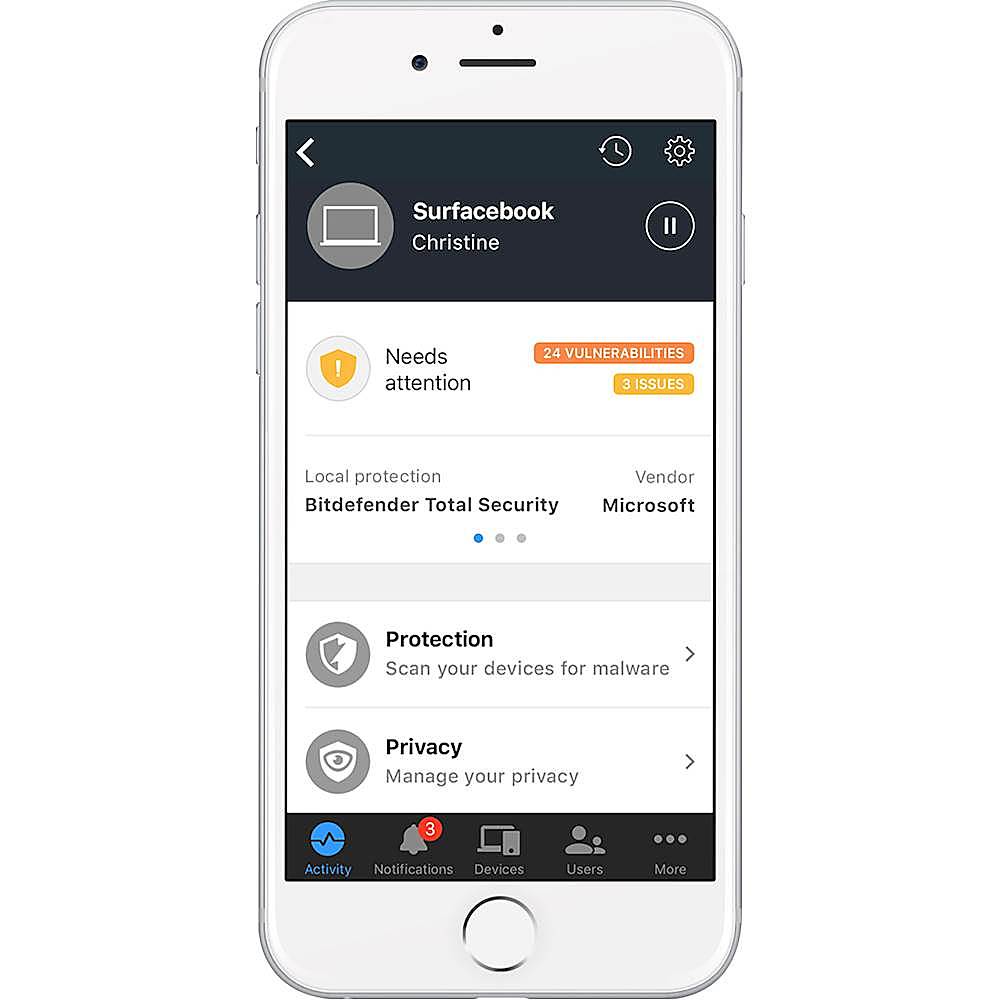
|Posted .This reviewer received promo considerations or sweepstakes entry for writing a review.I've had this box for a few days now and although the installation could have been easier, I really do like this box. I wish i could set this thing up using my PC, but you can only set it up using an Android or Apple wireless device. That is kind of a bummer, but i managed to get it set up nonetheless. Once you plug it in and get it setup to your network, you have to shutdown the wifi on your router. That is the part that was confusing to me. It does give you instructions on how to do this based on your provider and their standard devices, but I purchase my own wireless modem to use with my internet service, so the reset instructions didn't work for me. I ultimately shut down and restarted all of the devices that i was connecting to the Box and it seemed to work. I like how the box does a pretty good job of labelling the devices by type. It recognized my Apple TV with a streaming device symbol in the app, as well as my Smart TV with a TV symbol. Everything that is being protected or are currently unprotected, can be seen in the app. My favorite feature/benefit is that I am able to email download instructions and install Bitdefender on an unlimited number of devices. We have upwards of six laptops/desktops, multiple tablets and phones as well. Purchasing anti-virus software for all of these devices would cost me several hundred dollars per year. The Box includes 1 year of antivirus service and is renewable annually for only $99 for unlimited devices. This alone makes it worth the device for me. It has 4gb of internal storage, but I'm not exactly sure what you can do with that. Im not sure if it can be used as a small server or if its for something else. I have yet to find an explanation or purpose for that. I have not noticed any delays or lag in my network connection, so thus far, I'm happy with this device and would recommend it.
I would recommend this to a friendA $99/yr security blanket
|Posted .This reviewer received promo considerations or sweepstakes entry for writing a review.At face value, the BOX 2 seems like a great idea. Use a dedicated * appliance * to safeguard your family and devices from malware, viruses, inappropriate websites, and hacking. Execution, however, lacks greatly. I had difficulties setting up the BOX initially due to, what I presume, was an error in their Android app. I called support immediately and they couldn't get me around it either. During the initial setup, I 'X'd out of the wizard as I was on the phone w/ them, and the rep couldn't tell me how to get back in to it. "Clear data and try again" they said. I found out later through my own experimentation there's an option buried in the settings to re-launch the BOX setup wizard. When they couldn't get me running, they simply told me to try an iOS device. Luckily my wife has one, or what would've been the choice?? The app experience, specifically logging in, differs on these platforms which further complicated matters. On Android I was able to login/create an account w/ my Microsoft Account credentials. On iOS this wasn't an option. On to the actual usage. Before the BOX, I had a Netgear Orbi 2-unit setup to blanket my house in solid wifi coverage no matter where you were. My internet connection is fiber, so the Orbi acts as my modem and my router by simply logging in as a PPPoE connection. None of the BOX's setup instructions addressed this scenario, other than telling me I should plug the box in to my Orbi, clone the network, and shut off my Orbi's wifi - a non-starter of a solution. No matter, after some playing around on the BOX mobile app (the * only * way to configure the unit) I discovered you can give the BOX the PPPoE credentials and it, too, can act as the modem & router for your network. I coupled this with the "passthrough" ethernet ports on the BOX to devise a setup where I can still use my Orbi's mesh wifi coverage, but at least get some network protection from BOX. Said another way, my box now sits *between* my Orbi and the outside world, and I don't use its wifi access point for anything. This is another sticking point; you can't shut off the BOX's SSID broadcast - seems a silly oversight for something that's supposed to be a security appliance. So, in my setup I have [world] - BOX - Orbi - [my devices] in order to still benefit from the mesh wifi coverage the Orbi provides (and I require) while still gating my network from outside attackers (I hope?). My fear here is that should somebody get in to my Orbi's wifi network, it'd be "behind" the BOX and therefore unprotected; this is, I guess, why they say you want the BOX to be your new wifi AP - but that just isn't an option for me. After some more research and sleuthing the forums I found I had to turn my Orbi in to AP mode instead of Router mode. This gave me the coverage of the Orbi, but a direct line to the BOX; exactly what I needed. The downside? I lost the Circle parental controls of the Orbi and since the BOX doesn't have VPN capabilities (another odd thing for a security appliance to be missing) I can't use my VPN service to protect all my internet traffic anymore either. On top of this, I've got no experience with BitDefender and was surprised when I went in to my account after setting up the BOX to discover "Subscription: Active | 365 days" next to the BOX unit in my profile. It’s not clear to me that I have to pay for this year after year and, if so, I won't be keeping it. In my opinion the only reason I spent hundreds of dollars on a security appliance is to avoid ongoing subscription fees. Otherwise it should just be offered like an ISP modem rental. Moreover, online chat support couldn't even directly answer this question - they had to ask me to fill out a form they could send over to the BOX support people who would "get back to me". Just more wastes of my time. 3 days later I received the reply that indeed, BOX only works as long as you pay a $100 yearly subscription fee. I won't be renewing. Especially since Netgear is said to be upgrading their Orbi offering w/ built-in BitDefender security in the near future for only $70/yr. With respect to its performance, after a week protecting my home network it shows having blocked only 1 "phishing" attempt. In order to see the details of this attempt, I had to log in to BitDefender Central, look at the Notifications area, and the only details I got were "url: <url here>, type: phishing". Bottom line: It's a nice security blanket but is more of a black BOX than something you can really prove is worth the $99/yr subscription. Customer support was woefully inept in the two interactions I had with them within 24 hours of receiving my device.
No, I would not recommend this to a friendSeems great!
|Posted .This reviewer received promo considerations or sweepstakes entry for writing a review.Disclaimer: I received this item for free in exchange for my honest review of the item. This item was quick and easy to set up - you download an app on your phone and it walks you through all the steps to set it up, plus there are written diagrams that come in the box to help you figure the wiring out, which helps a lot for those (like me) who need visuals. I have mine set up to be a wireless router, to save on valuable outlet space in my vintage apartment, but you can also set it up so that it uses a separate router, if you prefer. One thing that irked me about setting it up with all 3 is that they all have to be plugged into each other via ethernet cable, which meant they all had to be plugged in right next to each other, and it just wasn't gonna work in my space. I haven't noticed any outright protection (I don't exactly want to test it too much in terms of security just in case!), but I will say it is nice to get a notification on my phone any time a new connection is made on the network, and then it scans the new phone/computer/iPad/etc and tells you whether there are any concerns. The other thing that I've noticed is the wireless signal from the Box is very strong - I remain connected (not necessarily with a good, functioning connection) to my home network at least a block away from my apartment, which has its pros and cons. All in all, aside from the annoying set up to use a separate router, it seems to be a good component to network security!
I would recommend this to a friend- Pros mentioned:Security
It took some effort
|Posted .This reviewer received promo considerations or sweepstakes entry for writing a review.It took a bit to get this set up, partly because when I got it I didn't really understand how it works, and partly because I'm not the most techie person in the world. Now that it is set up, though, I feel quite a bit safer. The box keeps me from going to sinister sites, and keeps the bad folk from everything on my network. As far as I'm concerned, it was worth the effort.
I would recommend this to a friend Excellent with Terrific Customer Support
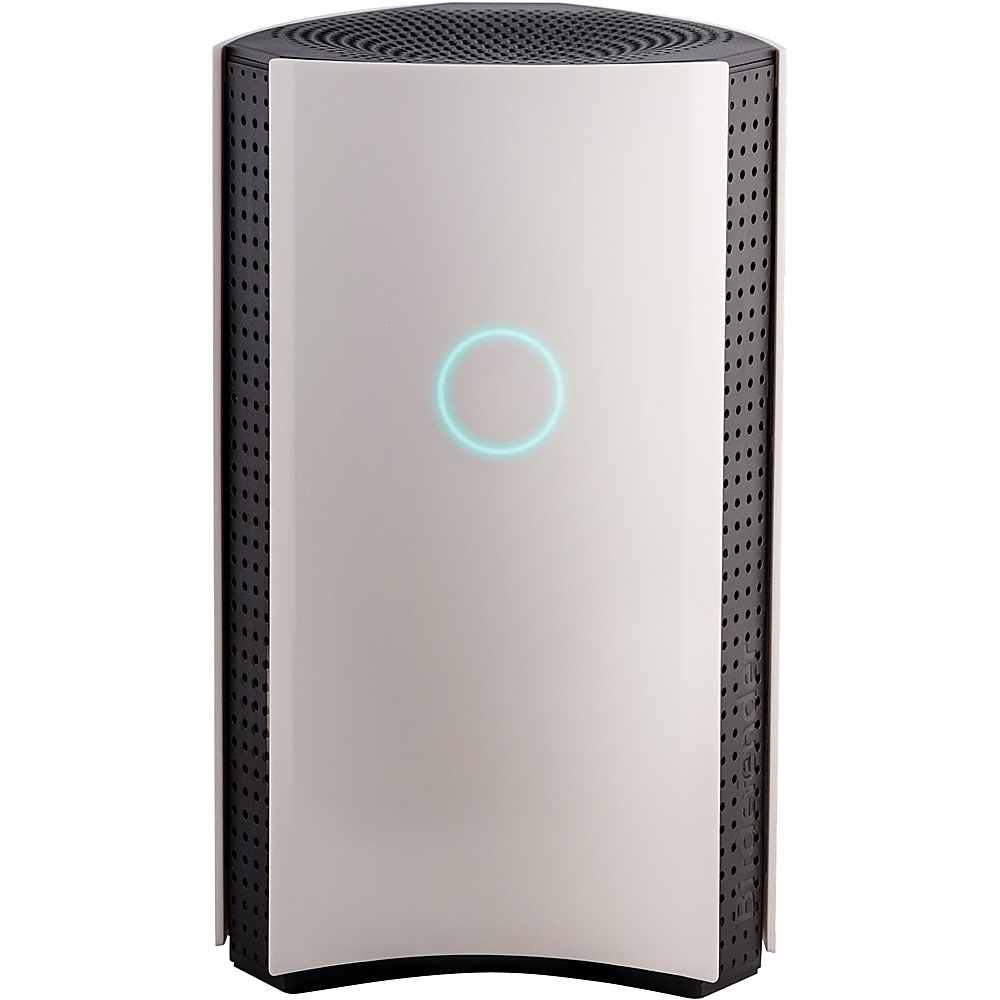
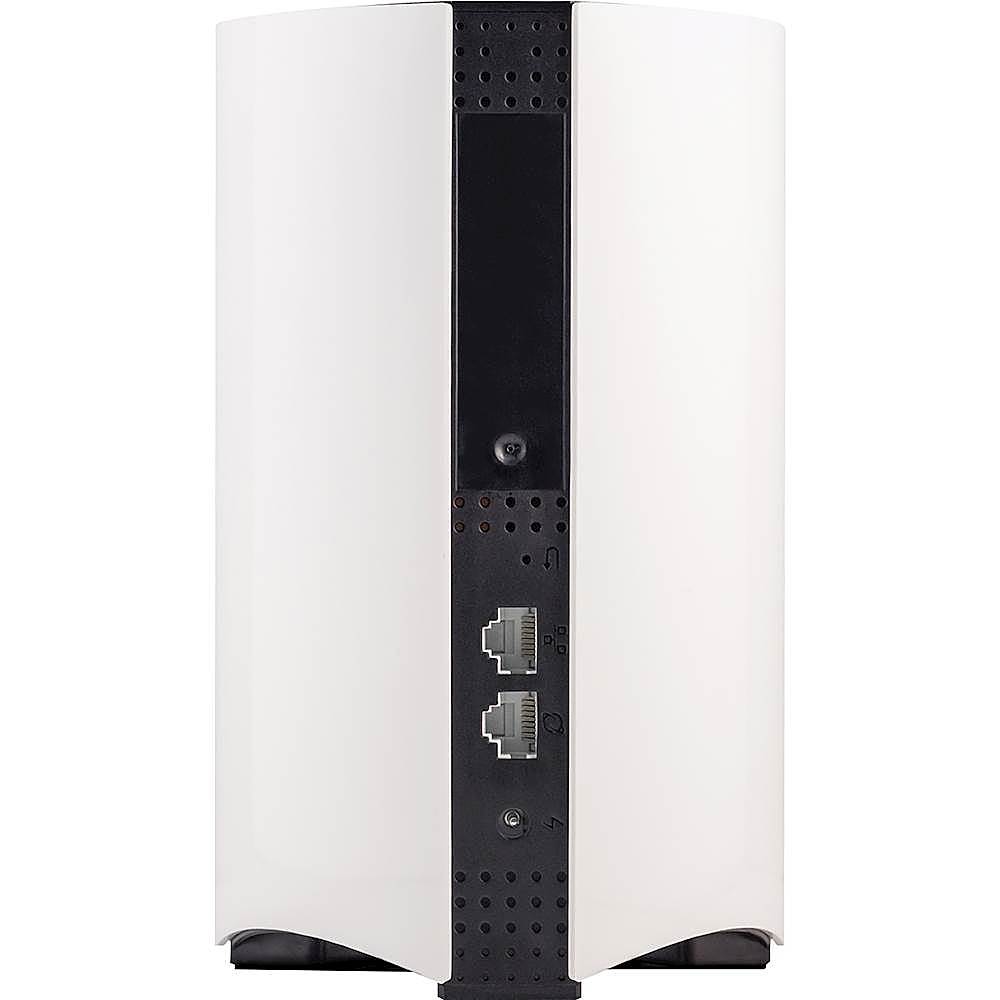
|Posted .This reviewer received promo considerations or sweepstakes entry for writing a review.I'm going to break this review into several sections, giving each a letter grade and an explanation for the grade I've chosen: Aesthetics A- The packaging is really nice and makes a statement to a potential purchaser. Happily, it is functionally boxed and the set-up instructions and other information are right on top, making installation planning easier. The unit itself is, well, less dramatic than other similar devices offered by other manufacturers. It's got an Apple-like simplicity of design, with three ~7" tall white panels, one of which has the status indicator showing. And yet, it seems a bit bulky and unsophisticated, but aesthetics are, of course, in the eyes of the user. And in this case, it may be a case that function is driving the form. Setup C- Despite the step-by-step instructions which appear very straightforward, I quickly got hung-up on the steps. There are 2 major issues. First, jargon (how many of us really know how to step up our router in "Bridge/AP Mode"?) [But see next section!] Second, legibility. You must enter a password that is on a VERY small label in VERY small font (.5?) on the back of the device. If you are over 30, I suggest a magnifying glass! Technical Support A++. When I got stumped I knew I needed some help and the support line number is prominently displayed several places. I called and was told that no agents were available and to leave a message with name, etc. Reluctantly, I did so, thinking I've experienced this put-off before. Surprise! A really patient, helpful, and encouraging rep called me about 20 minutes later and talked me through where I got stuck and insisted on staying on with me to make sure I completed everything successfully. What a reassuring man, and he never once made me feel stupid, even if at times I must have seemed so. GREAT customer support! Functionality A. Within a few minutes after completing set-up, the app showed me which devices it had checked and their status. Very clear, very simple. The fact that I was able to set up the Bitdefender Box 2 without having to change any passwords on my many connected devices made it much more likely it will be used and appreciated. In sum: So far, it is really an excellent safeguard in a day and age when such reassurances give a person some sense of security and control.
I would recommend this to a friendMight be good, no true Bridge Mode
Posted .This reviewer received promo considerations or sweepstakes entry for writing a review.I bought this for the bridge mode feature to sit between my UTM firewall/router and my access points. Problem is, it doesn’t have a true IP pass through bridge mode. The bitbox needs to run as a DHCP server to function. So if you need a true bridge mode, this is not the product. I heard the bitbox works well if you want to disable your expensive router as an access point only.
I would recommend this to a friend