Customer reviews
Rating 4.7 out of 5 stars with 10 reviews
(10 customer reviews)to a friend
Customers are saying
Customers frequently mention the impressive temperature control of the product, with many users reporting significant drops in temperature under load. While some users find the product to be quieter than Intel's stock cooler, others feel that the difference is negligible.
This summary was generated by AI based on customer reviews.
- Pros mentioned:Cooling
Rated 5 out of 5 stars
So happy I could cry.
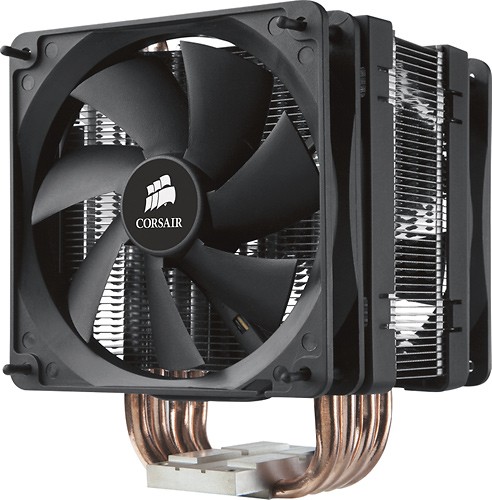
Posted .This reviewer received promo considerations or sweepstakes entry for writing a review.My push pin cooler was not making even proper contact and causing high heat with freezes and and crash on full load. Temps used to be 43 c idle and 89 c full load (prime 95 stress test). computer was starting to freeze and restart upon first 10 min of gaming and video rendering. NOW!!!!!!!!!!!!!!!!!!!!! 28 c idle and 56 c full load. So happy I could cry. Even my MSI pro-E x58 north bridge chipset, which gets up to 76 c (and know for it high heat) went down to 64 c max under full load, thanks to the extra cooling of the 2 fans. I notice only slightly quieter then intel's stock cooler. But I don't care, I can render with handbreak and temps never go over 56 c. The air flow even dropped my video card temp 5 c and northbridge chipset over 10 c. The fins are curved-in on one side to create a space that the fan doesn't get to close to to allow proper airflow. I would have to say directions for fan placement could of been better documented for newbies. The corsair logo side of the fan is the side the air will flow out from. bare black side pulls air in. So corsair logo goes to curved-in fins and the logo out fan goes to the fins that are curved outward. You will understand when you open the box. Logo out fan faces the back of the case or what ever way you air exhausts air out of the case. Also the rubber washers go on the plastic separator that is located on the back bracket for intel. Again lack of documentation. Fans go on heatsink after motherboard is screwed back in case and wires are plugged in. Yes you will have to pull motherboard out to get this on. So what. if that is to much work for you, then don't get this heat-sink. You can't dock it stars for your lack of initiative to do it properly. Follow directions on screwing the heat sink on. one turn per screw going around clockwise till it is tightened in place to insure that it makes even contact. It comes with silver paste. Guys if you complain this woman made it work just fine. Defiantly big. I have an Antec 900 case and it just barley fits with half inch from the side panel. I love the snap on fans. This design was well thought out. No led lights (I like that). watch out if you have high profile ram, or a large northbrige heatsink....measure. Specs: i7 930 MSI pro-e x58 6gb DDR3 1600 ram Kingston-x casl 8 NVIDIA gtx 275 PSU corsair 750 watt case Antec 900
I would recommend this to a friend - Pros mentioned:CoolingCons mentioned:Size
Rated 5 out of 5 stars
Great air cooling
||Posted .This reviewer received promo considerations or sweepstakes entry for writing a review.This thing is a monster. So if your tight on space probably not the cooler for you. I've seen this cooler run a 2500k i5 at 21c idle, my 3570k idles at a mere 26c. The stock fans cool very well but they are quite loud if your going for the silent pc thing. if you pick up some of corsair's new sp120's you can quiet it down and get even better performance. All in all this is a spectacular air cooler. If you plan on doing extreme overclocking water is still your best bet. But for the light overclock this thing rocks.
I would recommend this to a friend - Pros mentioned:CoolingCons mentioned:Size
Rated 5 out of 5 stars
Great Air Cooler
Posted .This reviewer received promo considerations or sweepstakes entry for writing a review.This is a great air cooler for the price. The fans are quiet at full speed, especially with the motherboard or a fan controller slowing them down when not needed. I had this on my over clocked Q8200 core2quad(2.9GHZ), idle ~30C and full load 42C. Now it's on my over clocked i7 950 (4.14 GHZ), idle ~43C and full load 62C. I did lap the base of this heat sink as the direct contact heat pipes are fairly uneven, this dropped temps on my core2quad by 6C and would have been an even bigger difference on the i7. The only cooler I found that has performed better is the H70, which is twice the cost and uses water. This thing is huge so measure first and be prepared to possibly lose a RAM slot depending on your motherboard layout. I have a mid tower case and have less than 1/4" between the heat sink and my case's side panel, even had to move my side fan to the outside of the case.
I would recommend this to a friend - Pros mentioned:Cooling
Rated 5 out of 5 stars
Tough to beat.
Posted .This reviewer received promo considerations or sweepstakes entry for writing a review.I have had this for a couple months now. Living in Texas, the temps get very hot here so I thought I would try this over the Scythe Ninja rev. B I had been using for the past 3 years. This A70 achieved temperatures about 3C degrees on average lower than the Scythe, and I didn't have to lap it. I still might just to see if it was worth it, but currently, no real reason too. Running a Q6600 @ 3ghz on it. Current ambient temperature in the room is 72F. Core Temp 0.98 is reporting temps of 37C at slightly just above idle ( streaming video at the moment). Max temp I have seen so far is 66C and that was when it was 82F in the room when I installed this HSF and running Prime95. When gaming, average temps are around 55-57C. Only issue I have is that my case uses tooless case fan holders. The brackets extended out to far for me to use the second fan by like 1/4". Still, the rear case fan sits pretty close to the HSF anyway so the second fan is probably not needed.
I would recommend this to a friend - Pros mentioned:Cooling
Rated 4 out of 5 stars
Effective!
Posted .This reviewer received promo considerations or sweepstakes entry for writing a review.This unit is a beast, the footprint is huge and I have it squeezed into a tower case, the side panel cleared with just a quarter inch. But it works, I have a Phenom X6 which ran hotter than I prefer. Dropped the temps a solid10c under load. Unless you lay the computer on the side, you need to support this monster to keep the surface area flush with the CPU. (I worked a slide-mount bracket on the side panel) . Mounting : The clip on bracket works for the AMD processors, no need to remove the Mobo and mount the brackets, but leave the fans off to install or you cannot access the release/clamp lever. Con: Fan orientation (direction is not selectable, the fans point either towards the power supply unit or GPU's. I prefer to point out the back in keeping with normal case airflow, but I pointed towards the PSU, the PSU runs a little hotter, but not too hot. Large footprint, needs bracing to maintain max contact with CPU, fan direction limited
I would recommend this to a friend - Pros mentioned:CoolingCons mentioned:Size
Rated 5 out of 5 stars
Excellent Heatsink
Posted .This reviewer received promo considerations or sweepstakes entry for writing a review.Keeps my i7 920, which is OC'd to 3.6ghz, running below 50c even under full load. This thing is massive and unless you have a full tower case you might not be able to use a side fan. The fan noise is very low even at the max fan speed. Very happy with this product.
I would recommend this to a friend Rated 5 out of 5 stars
Great Heatsink for Full Tower cases
Posted .This reviewer received promo considerations or sweepstakes entry for writing a review.Do not underestimate the size of the heatsink. I have an NZXT Phantom full tower case and this fan fits very well inside of it. I docked some score off of the compatibility for this reason. But grading the heat sink for what it is, a heat conducting unit, it is superb. Keeps my AMD Phenom II 940 at a low 34 degrees Celsius at idle. At 100% burn in (all four cores working at 100%) it only goes up to 38 degrees Celsius. When overclocked to 3.6Ghz the unit only goes up to about 50 degrees Celsius. Case: NZXT Phantom (Full Tower) Mother board: ASUS MA379T-Deluxe RAM: 2 sticks of 2GB PC2 8500 OCZ Reaper Video: 2 Power Color Radeon 5830's running in crossfire CPU: AMD Phenom II 940 Quad Core ~3.6GHz
I would recommend this to a friendRated 5 out of 5 stars
Great air cooling solution with 120mm standard fan
Posted .This reviewer received promo considerations or sweepstakes entry for writing a review.A capable CPU cooling system. (Temps are at the end of the review) Installation: This thing is tall, I installed it in a full tower case (Thermaltake Armor+) and still had only about 1 inch between the top of this cooler and my access panel. It cleared my ram banks on my mobo (Rampage II Extreme) but with about 3/8" to spare my ram benefits from some of the fan overblow. The mounting bracket is solid and installs easily. The directions did not say what to do with the washers that came with the installation kit, I put them on the screw posts prior to inserting them into the mobo figuring it would keep the metal plate from putting leveraged pressure on the cooling block behind the cpu. I used the included thermal paste although I added four very small dots (1/8") about 1/4" in from the corners of the cpu in addition to the pea sized dot in the middle the instructions called for (though my "pea" was more like a popcorn kernel. This is because with a heatpipe design sometimes the thermal paste gets channeled out in the grooves on mounting surface since it is not perfectly flat to allow for even spread of the paste. Make sure you tighten the mounting nuts in turn and in order. failing to do this will result in a skewed installation and poor cooling since the downward force on the cpu will not be consistent at all points. Due to the back plate you will have to remove your motherboard from its mounts to install this unit (unless your mobo tray allows access behind). Also make sure you orient the exhaust fan toward your main exhaust in your case. There are arrows on the fans to indicate exhaust and intake (in general fans always exhaust on the side of the fan where the wires are). Benefits: I like that this cooler uses standard 120mm fans. This means if you have to replace a fan (because they do fail) you have literally hundreds of choices and are not stuck trying to get a particular type of fan (shroudless etc...). I use an external fan speed controller so that I can dial in the speed based on my use. Limitations: Unless you have a mid or full tower case I doubt you would have the space you need to install this cooler. The push/pull design means that you must replace your fans with pairs of identical fans otherwise the cfm may not match and you could lose efficiency. Also the instructions leave something to be desired, they are pretty basic and are not very helpful. The A70 is a capable air cooler. With maximum load temperatures just 10 degrees above what the stock cooler for an i7 920 (at stock speeds) idled at. The temperature breakdown is below: All temps in degrees C. Ambient/Idle/Prime95 99.1% (after 30 min.) Stock Cooler i7 920 stock speed: 20/44/87 (Fan Speed variable) Corsair A70 i7 920 stock speed: 20/31/54 (Fan Speed 1600 rpm) This cooler does a lot better than the stock Intel cooler. You can really tell the benefits of the added surface area looking at the delta between ambient and idle and full load. With prime 95 running for 30 minutes there was only a 23 degree change, vs. a 43 degree change using the stock cooler. This was using the fans at their quiet range of 1600 rpms. If I max out the fans (3000 rpm) the temps leveled out at about 20/28/48. But with the fans maxed out it is fairly noisy, whereas at 1600 rpm, it is not even as loud as my exhaust fan. Specs: i7 920 Asus Rampage II Extreme Mobo 3 x 2 Gb G-Skill ram Nvidia GTX 295 GPU Sound Blaster X-Fi Fatality Platinum Sound Tagan 1100 w PSU Thermaltake Armor+ Full Tower 2 x 300 GB Velociraptor 10000 rpm HDD (raid 0) 1 TB Seagate 7200 rpm HDD Scythe External fan controllers
I would recommend this to a friend- Pros mentioned:Cooling
Rated 5 out of 5 stars
Such a great cooler!
Posted .This reviewer received promo considerations or sweepstakes entry for writing a review.Got rid of my cooler that came with my phenom and got this, under load with stock cooler was 60c's, now under load now is 28c's!!!!! What a great product does the job well.
I would recommend this to a friend Rated 3 out of 5 stars
It works great
Posted .This reviewer received promo considerations or sweepstakes entry for writing a review.I own a Workstation with the LGA 1366 Socket however it is a Xeon Processor which led to a few distinct instillation issues that are resolvable. First the backplate will not fit, you can fix this by removing the pins and using them without the backplate. Second was a motherboard fan header that uses 5 pins I had to repin the connector and ran a PWM Sensor and Control wires from a seperate fan and ran just the power and ground from the supplied Corsair fans to the CPU fan header plus an additional ground wire. Third is the actual room on the motherboard and in the case for the heatsink and fans. I only use 3 of the 6 rams slots so the issue with the fans blocking ram slots never came up. The case should be a full tower and more importantly 7.5" - 8" wide to accept this cooler.
I would recommend this to a friend