Customer Ratings & Reviews

















- Model:
- i7445-5333BLU-PUS
- SKU:
- 10347264
Rating by feature
- Battery Life
Rating 4.5 out of 5 stars
- Speed
Rating 4.5 out of 5 stars
- Display
Rating 4.6 out of 5 stars
Good laptop
||Posted . Owned for less than 1 week when reviewed.This reviewer received promo considerations or sweepstakes entry for writing a review.Perfect for my needs, I’m able to hook up an external monitor.
I would recommend this to a friendIssues
||Posted .This reviewer received promo considerations or sweepstakes entry for writing a review.BIOS update crashed, new motherboard by Geek Squad, just to have another BIOS issue. All within the first year of having it. Unsure if just unlucky, but don’t think I’ll buy Dell again.
No, I would not recommend this to a friendDefinitely worth it
||Posted . Owned for 3 weeks when reviewed.This reviewer received promo considerations or sweepstakes entry for writing a review.Best laptop I have ever purchased. Quality is really nice.
I would recommend this to a friendFingerprint not working
||Posted . Owned for 3 months when reviewed.This reviewer received promo considerations or sweepstakes entry for writing a review.Fingerprint features stop working after 4 months, call Dell and is a night mare, Cat access to it because won’t take any passwords
No, I would not recommend this to a friendDell Inspiron 14
||Posted . Owned for 3 weeks when reviewed.This reviewer received promo considerations or sweepstakes entry for writing a review.Slows down after short while but also has a impairment to corner screen for no apparent reason
No, I would not recommend this to a friendDell
||Posted . Owned for 3 weeks when reviewed.This reviewer received promo considerations or sweepstakes entry for writing a review.I had to get a replacement end of Jan after I purchased in Dec 2024. Also had to have Geek Squad to do a hard reset.
No, I would not recommend this to a friendUnreliable performance
||Posted . Owned for 10 months when reviewed.This reviewer received promo considerations or sweepstakes entry for writing a review.Would only recommend for like high school-level work. Low on RAM which makes it unreliable and slow when you have many apps of windows open. Had constant performance issues.
No, I would not recommend this to a friendDell laptop review
||Posted . Owned for 1 week when reviewed.This reviewer received promo considerations or sweepstakes entry for writing a review.I had a Dell laptop for over 5 years and thought this would be a good fit compared to the one I previously had. However, the mouse didn’t pick up my fingers touch to move, would overheat with only one tab opened, and the worse part was that it didn’t connect to the wifi at all. Unfortunately I had to return it.
No, I would not recommend this to a friendBrand response from YourDellTeam
Posted .Hello Valued Customer,
We greatly appreciate your feedback and express our gratitude for taking the time to provide a review for your Dell Inspiron 14 2-in-1 Touch Laptop. We are sorry to hear that you were not completely satisfied with your product and made the decision to return it. That is not the type of feedback we like to hear from our customers, or the type of product Dell intends to deliver. We have noted the details of your statement and will use them to improve current and future products.
We really hope that you would give Dell an opportunity when making your next purchase, even if this specific product was not an ideal fit for you.
If you are experiencing any issues or have any concerns or questions, please do not hesitate to get in touch with Dell using the information provided below so that we can help you resolve the issue to your satisfaction.
Chat or call: https://bit.ly/DellSupportTeam
Phone number to Dell: 1-800-624-9896
Best,
Minhaj@Dell
Upset with the Situation
||Posted . Owned for 2 weeks when reviewed.This reviewer received promo considerations or sweepstakes entry for writing a review.I needed a new computer, and when I went to the store, the vendor offered me this computer which I thought was a good one. The price wasn’t bad because they had a discount on it, but I was trying to save some money and the worker offered me an open box option which was a little bit cheaper and said that it was worth it as the new one. When I opened the computer to start setting up the things on it, it gave me a huge headache. It had some issues and was asking me to take to Dell, so they could fix it. Long story short, don’t fully go to what the workers at the store say, try to get some second opinion.
No, I would not recommend this to a friend- Cons mentioned:Fan noise
Damge product
||Posted .This reviewer received promo considerations or sweepstakes entry for writing a review.The laptop makes a bad noise, like something is stuck in it.
No, I would not recommend this to a friend Dell
||Posted . Owned for 1 week when reviewed.This reviewer received promo considerations or sweepstakes entry for writing a review.Hard to set up. No instructions came with. Specifically nothing about laptop.
I would recommend this to a friendBrand response from YourDellTeam
Posted .Hello MaryM,
Thank you for taking the time to leave a review of your Dell Inspiron 14 2-in-1 Touch Laptop. We are sorry to hear that you are not completely satisfied with your laptop as you were facing difficulty in setting it up. That is not the type of feedback we like to hear from our customers. We have noted the details of your statement and will share it with our quality team for improvements on current and future products and services.
Below I have provided a few links to help you with information about your new laptop:
Inspiron 15 3520 Setup and Specifications : https://url.dell.com/1db14b
If you are experiencing any issues or have any concerns or questions, please do not hesitate to get in touch with Dell using the information provided below so that we can help you resolve the issue to your satisfaction.
Chat or call: https://bit.ly/DellSupportTeam
Phone number to Dell: 1-800-624-9896
Best,
Minhaj@Dell
Not enough memory
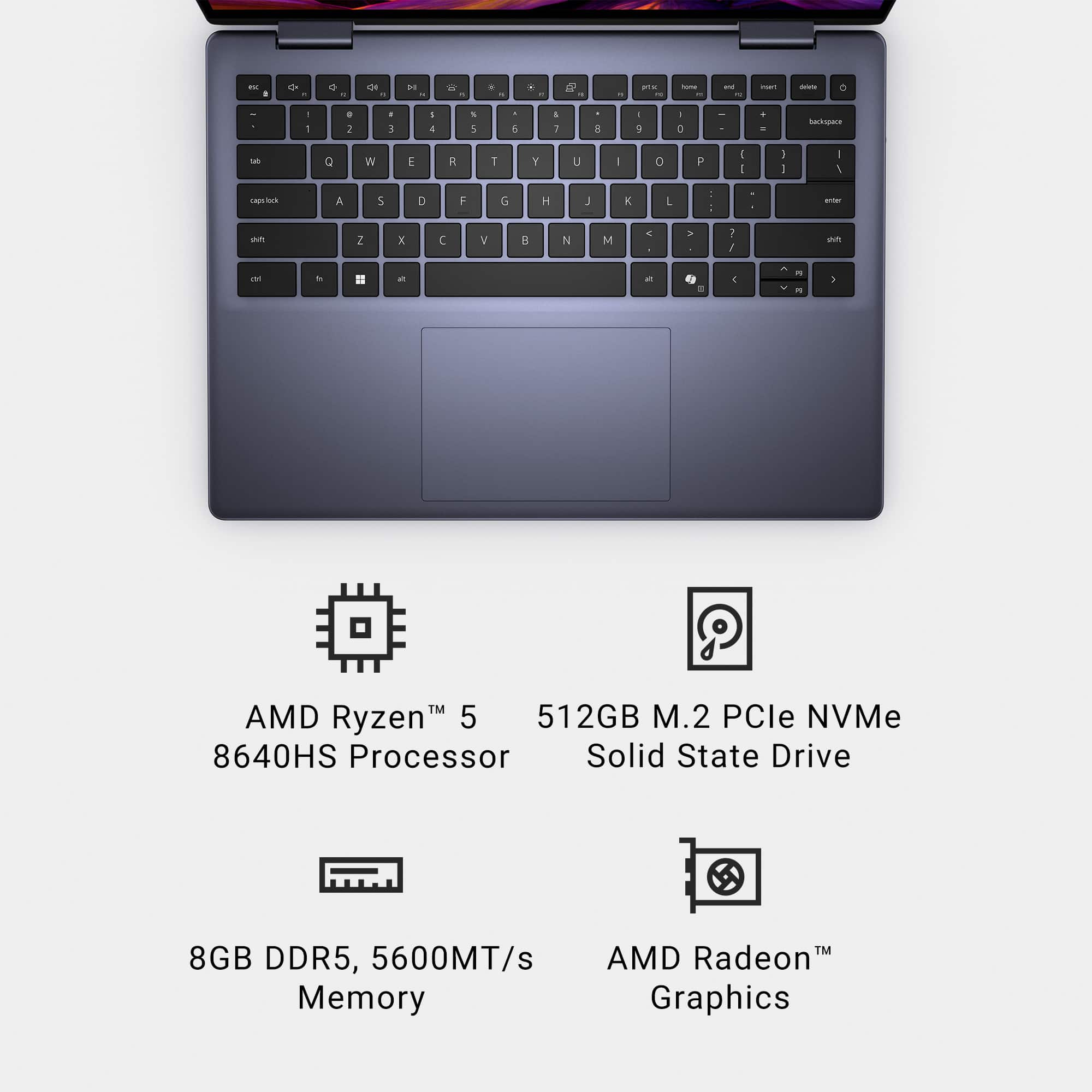
||Posted . Owned for 2 weeks when reviewed.This reviewer received promo considerations or sweepstakes entry for writing a review.Didn’t have enough memory to run an analytical program with database so I had to upgrade to 16 RAM
I would recommend this to a friendBrand response from YourDellTeam
Posted .Hello JayS,
Thank you for taking the time to leave us your review. We sincerely apologize for the trouble you have encountered with your Dell Inspiron 14 2-in-1 Touch Laptop. This is certainly not the type of feedback we like to hear from our valued customers, or the type of product Dell intends to deliver.
Your feedback will be shared with our quality team for consideration in future enhancements in products.
If you are still experiencing issues, with a little more information from you, we would like to help you resolve the issues you may be facing to your satisfaction. Please do not hesitate to get in touch with a Dell representative using the information provided below.
Chat or call: https://bit.ly/DellSupportTeam
Phone number to Dell: 1-800-624-9896
Best,
Minhaj@Dell
Keyboard and mouse stopped working the third week
||Posted . Owned for 2 months when reviewed.This reviewer received promo considerations or sweepstakes entry for writing a review.The laptop went into a permanent tablet mode in the third week of usage. Dell support was contacted four times in four days, and effectively were useless, with scripted feel-good lingo but no real skill to fix anything. From last five days, I've been waiting on the "return" of my system, which was taken in by Dell for failure analysis. A nightmare case of bad product and worse technical support - I AM WITHOUT A WORKING LAPTOP FOR TWO WEEKS NOW, WITH NO STATUS-UPDATE FROM DELL SUPPORT YET ON RETURN.
No, I would not recommend this to a friendDud computer
||Posted . Owned for 1 year when reviewed.This reviewer received promo considerations or sweepstakes entry for writing a review.This is a horrible computer. It stopped working after six months.
No, I would not recommend this to a friendDisappointed
||Posted .This reviewer received promo considerations or sweepstakes entry for writing a review.The computer didn’t have a WiFi driver installed on it when I took it home so I returned it.
No, I would not recommend this to a friendPoor battery
||Posted . Owned for 2 weeks when reviewed.This reviewer received promo considerations or sweepstakes entry for writing a review.Seems to be a good unit but the battery will not last more than a couple of hours.
I would recommend this to a friendNot worth
||Posted .This reviewer received promo considerations or sweepstakes entry for writing a review.Didnot like the screen resolution and lags most of the time
I would recommend this to a friendDisappointed!
||Posted . Owned for 3 weeks when reviewed.This reviewer received promo considerations or sweepstakes entry for writing a review.They didn't even try to follow directions to my apartment. They didn't even call to get help with directions. I did get the refund, but wanted my order.
No, I would not recommend this to a friendComplete Crap
||Posted . Owned for 4 months when reviewed.This reviewer received promo considerations or sweepstakes entry for writing a review.Save your money! I bought this hunk of garbage in September 2024, and on February 12, 2025, I got the blue screen of death! Then Dell states that the warranty doesnt cover software, only hardware and that my laptop was defective, but there was nothing they could do.
No, I would not recommend this to a friendI fon’t recommend it.
||Posted . Owned for 1 week when reviewed.This reviewer received promo considerations or sweepstakes entry for writing a review.The fist day it was working perfectly, but at the next day it started to malfunction. The audio didn’t work at all. It was really really slow (the internet was perfectly fine ) but the videos in YouTube we’re been so slow ! It doesn’t support many windows open( i only had YouTube and another window open). The battery also didn’t last at all. I fully charge it and turn it off and turned back on next day. And it said didn’t had any battery to power on. I don’t recommended at all. The
No, I would not recommend this to a friendBrand response from YourDellTeam
Posted .Dear AlexandraH,
We value your feedback and want to thank you for taking the time to leave a review. We sincerely apologize for the numerous issues you have encountered with your Dell Inspiron 14 2-in-1 Touch Laptop. This is not the type of feedback we like to hear from our customers, or the type of product Dell intends to deliver.
We have noted the details of your statement and your feedback will be shared with our quality team for consideration in future improvements. We always strive to get better and reviews like yours are helping develop products our customers love.
Below I have provided steps with the full article that can help you resolve the audio issues of your laptop.
1. Check the audio ports for damage, and clean the ports
2. Restart your Dell computer
3. Check the connection (external speakers, headphones, or earphones)
4. Check volume settings and set the default playback device for low or no sound
5. Run the Microsoft Sound Troubleshooter
6. Reinstall or Update the chipset, audio, and BIOS drivers
7. Run a hardware diagnostic test
8. Download and install Microsoft Windows updates
9. Perform Windows System Restore
10. Restore the computer to factory default settings
How to Troubleshoot No Sound on Computer or Audio Playback Issues: https://url.dell.com/096932
How to Improve the Performance of a Dell Laptop Battery: http://dell.to/2vfXWf4
We'd also recommend the troubleshooting steps in the link to help improve your computer's overall performance and speed : https://dell.to/3n29QjE
If you continue to experience any issues or need further assistance with recommendations, please take a moment to call or chat to speak with a representative at your earliest convenience using the information provided below so that we can help you to your satisfaction.
Chat or call: https://bit.ly/DellSupportTeam
Phone number to Dell: 1-800-624-9896
Best,
Minhaj@Dell