Customer Ratings & Reviews


- Model:
- PB-12W
- SKU:
- 6474290
to a friend
Customers are saying
Customers often highlight the convenient outlet spacing, allowing them to accommodate various devices, including those with larger power bricks. The surge protection capabilities are also frequently praised for safeguarding valuable electronics. Many appreciate the inclusion of USB ports for added charging convenience. While some users suggest improvements like USB-C ports and individual outlet control, the overall feedback is positive.
This summary was generated by AI based on customer reviews.

Surge protector Of the Future
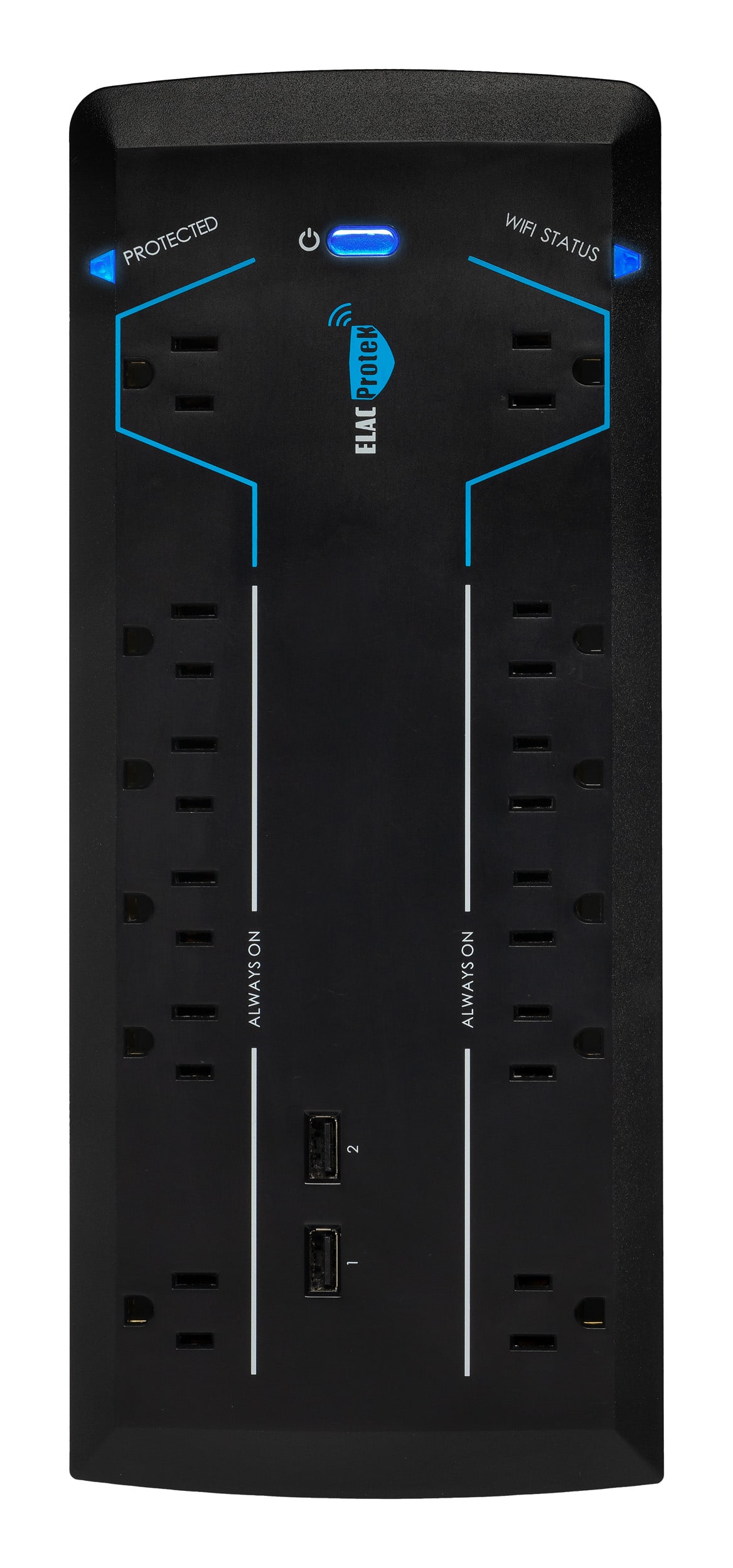
|Posted .This reviewer received promo considerations or sweepstakes entry for writing a review.This is my first venture into the world of wifi surge protectors. I wasn't sure if I wanted or needed one but the more I researched them the more I realized what they could do. First you will want to download the free app from the iOs or Android store. You will create an account and then you are ready to add your surge protector to the app. The app walks you through the steps to connect the device to your wifi network, easy as pie. Once connected you can now control the wifi outlets from your mobile device, turning them on or off as desired. Also you can schedule times for the outlet to power on and off. This is fantastic if you want to schedule a light to be on or off at certain times of the day. So far I am very pleased with the unit. The protector has 5 outlets, 2 of them are wifi enabled, and then you get 2 additional USB chagrin ports that provide 2.4 amps of power. I also like the end of the plug that goes into the wall outlet, it is sleek and fits fairly flush to the wall.
I would recommend this to a friendGreat Design!
|Posted .This reviewer received promo considerations or sweepstakes entry for writing a review.The Protek PB12W has a sleek, low-profile design and is Bluetooth capable! Includes 12 outlets - 10 with constant power and 2 controlled via the app, or Google/Alexa. The app was easily downloaded and the device paired quickly. Includes a wifi-light to indicate when it's connected to your network and working properly. Features built-in noise filtration designed to reduce noise caused by static electricity and/or your power company, and a surge protector rated for 15 amps and 3600 joules. Six-foot power cord with "flat" plug makes it easy to plug in and locate wherever you need power protection. Overall, a great product!
I would recommend this to a friendWorks as advertised, easy setup
|Posted .This reviewer received promo considerations or sweepstakes entry for writing a review.This surge protector works as advertised. The main feature I was interested in is the WiFi control (2 outlets). Using the ELAC app for setup was generally straight forward, although I was not able to use the "Auto Scan" feature for setup. I had to manually add the surge protector to my home network, but that wasn't hard. After connecting to the network, the WiFi outlets worked great. The power conditioning is also a nice feature. I'm using this surge protector with some particularly sensitive equipment and I've seen a noticeable difference between this and other surge protectors.
I would recommend this to a friendWorks, but product design/app could be better
|Posted .This reviewer received promo considerations or sweepstakes entry for writing a review.In the three days I was given for testing the ELAC ProteK PB-12W, it worked fine for me with all outlets occupied and heavy daily power use. Setup of the smart features was reasonably easy and quick. I connected the device to Google Home and was able to control the WiFi-controlled outlets with my smart home devices with quick response times. The countdown and scheduling controls provided in the app are a nice bonus. I do, however, have some quibbles with the design of the unit and the associated app. Physical design issues: - Having two USB-A charging ports might have been nice in 2010, but for a new product in 2022 I expect and would have liked at least one USB-C port. The vast majority of my USB-charged devices have USB-C charging cables. - While this unit could have presented the two WiFi-controlled outlets as separate devices that could be controlled independently, they chose instead to have them controlled concurrently as a group which limits their utility. - Regarding the non-WiFi-controlled outlets, the 1:4 ratio of wide-spaced outlets to tight-spaced outlets is rather unaccommodating. App issues: - The app instructs the user to interact with a ‘reset’ button on the device for WiFi setup, while providing a generic picture that bears absolutely no resemblance to the unit. None of the labels on the back of the product box indicate a ‘reset’ button. Further, the physical unit *does* have one button labeled ‘RESET’, but this is *not* the button you need to press during this setup process. Add to this the fact that the button you *do* need to press doesn’t really look like a button and could easily be assumed to just be an indicator light, and you have the huge potential to confuse many people trying to configure this device. - Poor user-interface design practices were used. As examples, users must enter the WiFi access point name manually instead of selecting from a list, and the email address field isn’t designated as such, so relevant on-screen keyboard shortcuts are not present. Also, poor English is used which can be slightly hard to follow. - The three-step process for readying the device for WiFi setup could have–and probably should have–been designed as a single-step process. - The privacy policy indicates overzealous logging. Notably, it mentions: “When you interact with our Product, we automatically collect device information, such as the MAC address of your devices, IP address, wireless connection information, operating system type and version, application version number, push notification identifier, log files, and mobile network information.” Also, “We may collect information about your real-time precise or non-precise geo-location when you use our specific Products or Services.” I can’t say this is particularly exceptional, but at the same time, I feel like users shouldn’t have to settle for this level of logging for a product like this.
No, I would not recommend this to a friend