Customer Ratings & Reviews
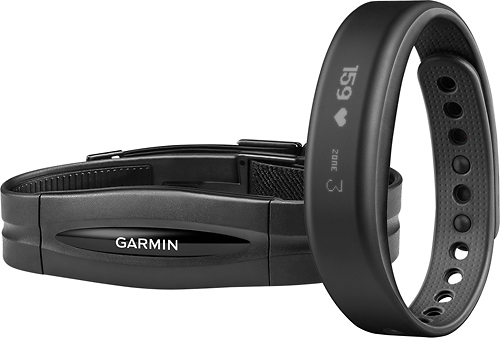
- Model:
- 010-01317-40
- SKU:
- 8151151
to a friend
Customers are saying
Customers frequently mention the positive aspects of the Vivosmart Activity Tracker, particularly praising its heart rate monitor, battery life, and notification features. Many users also appreciate its ease of use and water resistance for swimming and other activities. However, some customers express concerns about the display's readability in sunlight and occasional syncing issues. A few also note challenges with the accuracy of step tracking.
This summary was generated by AI based on customer reviews.
Really like the integration
Posted .This reviewer received promo considerations or sweepstakes entry for writing a review.I'm using a Samsung S4 w/Lollipop and so far everything I've set up (hangouts, email, etc) as a notification has showed up, so maybe the latest Connect or vivosmart updates have resolved the issues reported by others. Really like being able to have the phone on silent and get notices on the vivosmart and keep on top of things.
I would recommend this to a friend- Cons mentioned:Display
Paying to Be a Beta Tester
Posted .This reviewer received promo considerations or sweepstakes entry for writing a review.I was so anxious to get this new tracker, only to be sadly disappointed. To begin with, it took me an hour and a half to get the device to pair with my phone. I then discovered a bug where calories burned were highly estimated if you used the included heart rate monitor. My screen is constantly freezing when I try to wake it. Sometimes I'll just glance down and the band will be on and frozen. It is difficult for it to recognize my tapping the off option to turn off the alarm in the morning, and then it tends to freeze immediately for about five minutes. This morning in the middle of my workout, it decided to freeze on the Find Your Phone in the options menu (which supposedly you have to double tap to turn on the band, then press and hold to get the menu to come up, then choose your option, yet I did none of this). My phone was going off for 4 minutes at 5:45 in the morning because the band wouldn't respond. There is supposed to be an update this week that I am hoping will fix my issues. I will update my review if it does.
No, I would not recommend this to a friendBrand response from GarminProductExpert
Posted .I’m sorry to hear about the various issues you experienced with the vívosmart. I would definitely recommend using Garmin Express to update the software on your device, as they may have addressed the issues you described: http://j.mp/GRMNExpress. Should the issues persist, it would be beneficial to contact our support team so we can investigate further: www.garmin.com/us/support. Again, I’m so sorry to hear about the trouble you’ve experienced—but I definitely appreciate your feedback. Thank you so much! (KS)

Great product when it works
Posted .This reviewer received promo considerations or sweepstakes entry for writing a review.I purchased the Vivosmart with heart rate monitor last September. From the very beginning I had difficulty with the heart rate monitor picking up my heart rate even with trying all the troubleshooting options. It works about 50% of the time. I wear the wrist band ever day and take it off when showering or washing my hands. In the past 45 days the wrist band has been acting up where it randomly scrolls through the screen without being touched and not responding to touch. For the past week it has ceased working completely when touched and I can only see one screen. I'll be reaching out to BestBuy/Garmin for warranty information as I'm really disappointed this purchase only lasted 6 months and never worked 100% from the beginning. When this product works it's wonderful but the reliability is very poor. I've read similar reviews on the Garmin website for the Vivosmart.
I would recommend this to a friendSome things great, others not so much.
Posted .This reviewer received promo considerations or sweepstakes entry for writing a review.The mileage seems accurate to me, it Syncs with my cell phone just fine. The alarm feature works great, and it's a nice way to see what time it is digitally. Unfortunately this is where my fondness for the Vivosmart ends, and my disappointment begins. The step count feels way off to me. I guess I should have just went out and gotten a pedometer. But one of the key reasons I bought this was because of the move bar. I loved the idea of it and if you get it right when it goes off, you just take a walk around your house and it goes off fine. But if you are busy doing something, and you wait into that first hour, no amount of walking resets it. I biked 5 miles one day, and walked 3 miles another day after my move bar hit two hours, and it did not reset, until the next day. I've looked online and other people have had the same problem. If you were attracted to this via the move bar, I absolutely would not recommend it.
No, I would not recommend this to a friendBrand response from GarminProductExpert
Posted .Thank you for providing feedback about your experience with the Vívosmart HR activity tracker. The move bare is based on accelerometer data from the Vívosmart HR. Unfortunately, biking is not able to be recognized as steps since your writs stays in a fixed position much of the time. The move bar should reset from walking and certainly after 3 miles. If you are still experiencing this issue please reach out to Garmin Support (www.garmin.com/support). We strive for customer satisfaction and are here to assist you with your concerns. Thank you. ^SJT
- Pros mentioned:Notifications
Looks better on paper than on the wrist
Posted .This reviewer received promo considerations or sweepstakes entry for writing a review.I returned my vivosmart within 24 hours of buying it. Why? I wear glasses and the screen quality looked like as if I was looking at it without my glasses on. Using the watch is awkward. It works best having the face of the watch on your palm side vs on back of your hand. I liked how i can get notifications and choose which apps get notifications . However, I wish i could turn off the "Walk" alerts. Atlas, i couldn't. I was annoyed with the watch, the interface, the app I didn't even bother to attempt using the Heart monitor. I will be moving on to the next smart device from another maker.
No, I would not recommend this to a friendBrand response from GarminProductExpert
Posted .Sorry to hear about the issue you are having with the vívosmart. There are many way to adjust the display of the vívosmart so it may not be so awkward. For example you can set which wrist you are using it on, the band orientation and the screen orientation. There are 8 different combinations to view the screen.
As far as the walk alerts go you can also disable this under the Garmin connect site, under device settings, display settings and visible screens. Under that menu you can disable move bar (while still keep steps and goals.) With the move bar gone, there will not be an alert for inactivity.
If you have any more questions or feedback please let us know: http://www.garmin.com/us/support/
Thanks.
~JH