Customer Ratings & Reviews

Customer reviews
Rating 2.9 out of 5 stars with 9 reviews
(9 customer reviews)to a friend
Rated 1 out of 5 stars
Bad product no support from manufacturer
||Posted .This reviewer received promo considerations or sweepstakes entry for writing a review.This product could be really nice if Hauppauge would support it. It isn’t supported by the manufacturer any more and DOESN’T work with WinTV or WinTV extended which is one reason you buy this is to stream all your cable channels that you get with the Cable card to your tablets, phones, or PC from another location. I did get this working and it worked great with Windows Media Center but once your PC restarted the drivers would disappear and then the product would stop working. I have a very nice state of the art gaming PC and home servers on various version of windows and on all of those the product stopped working after the PC or server restarted.
No, I would not recommend this to a friendRated 1 out of 5 stars
Product did not work
||Posted .This reviewer received promo considerations or sweepstakes entry for writing a review.I have used a Hauppauge DCR-2250 PCI tuner card for the past few years and it worked fantastically. When I recently purchased a Dell XPS 8700, I was disappointed to find that the old PCI card was not compatible. When I purchased another Hauppauge product, I was expecting the same great performance. Not so with this unit. I spent hours on the phone with customer service to no avail. The driver told me that I needed a USB connection to the device, so I purchased a USB-USB cable. Still didn't work. Ultimately it was easier to get rid of this product and just go to streaming TV instead of trying to use it to connect to cable.
No, I would not recommend this to a friendRated 3 out of 5 stars
Works but needs improvement.
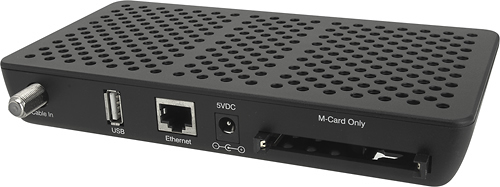
||Posted .This reviewer received promo considerations or sweepstakes entry for writing a review.When you click on a program in the guide you do not subscribe to you have to reinstall drivers constantly. Installation ease depends on how much you know about windows and medie center. I would recommend the WinTV-DCR-3250 CableCARD 3-Tuner Set-Top Box to a friend but caution them about flaws.
I would recommend this to a friendRated 5 out of 5 stars
Perfect solution!
||Posted .This reviewer received promo considerations or sweepstakes entry for writing a review.Turn your computer in to a TV. This was a big money saver for our vacation home.
I would recommend this to a friendRated 1 out of 5 stars
Busted on Arrival
||Posted .This reviewer received promo considerations or sweepstakes entry for writing a review.When plugged into a USB port for programming, every computer I plugged it into does not recognize the device (totaling about 5 computers so far ranging from Windows XP to Windows 7). The computer doesn't even make the notification sound to indicate a USB device was plugged in. Now I will have to go though trouble-shooting with Hauppauge and get an RMA and wait for shipping... not happy here... about any of this.
No, I would not recommend this to a friendRated 4 out of 5 stars
Great TV tuner for my PC
||Posted .This reviewer received promo considerations or sweepstakes entry for writing a review.I had to work with the technical staff and went back and forth. I finally installed software from online instead of DVD and it then worked fine. I love having HD tuner and ability to record 3 at one time!
I would recommend this to a friendRated 1 out of 5 stars
Almost constant Digital Static
Posted .This reviewer received promo considerations or sweepstakes entry for writing a review.I had the DCR-2650 for about 2 years. I had Comcast out to the house several times.They rewired my premises. They changed out the cablecard. I had big problems with digital static (pixilation) and missing channels. The tuner would crash when recording half way through sporting events (especially when I wasn't home). I missed most NASCAR race finishes since I work on Sundays. I talked with Happauge numerous times, installed betas, RMAd the device twice. I also cold booted the device thousands of times. I reinstalled the drivers over and over. It never worked right. Comcast told me finally that I had faulty equipment. It seems that there is a problem with the fact that it uses a USB interface. I finally decided to try the SiliconDust Homerun Prime 3 channel tuner. I have had NO problems anymore. DO NOT buy this tuner. There are recertified Silicondust network based tuner out there.
No, I would not recommend this to a friendRated 5 out of 5 stars
Flexible recording device
Posted .This reviewer received promo considerations or sweepstakes entry for writing a review.This device is awesome. I can record up to 3 shows at once and do it all over my network. I would say that setting it up can be a bit difficult and my guess is that poor reviews reflect that. However, once you have it set up properly it does everything you would want. I think its required to run via Windows Media on a PC. That is how I do it.
I would recommend this to a friendRated 5 out of 5 stars
3 cablecard Tuner/Network and 2 Tuner/USB reveiw
Posted .This reviewer received promo considerations or sweepstakes entry for writing a review.I like this Recorder better (purchased in 2014) than the 2-tuner USB unit (used since 2012). Both units work fine (MS updates and cable partner are weak links - and some messing around with setup happens over time). Both units require a cablecard from the cable company ($2 per month for card vs table top box for TV @ $6/month - my cable fees). All the premium channels you subscribe to are available to record. If you use Windows 7 or 8 the Media Center will use a tv-guide like tool to schedule your programming (Internet access required). If you use Windows 10 or Macintosh a $10 add-on tool (software) is required, and you will need to manually setup the recording schedule (does not update off Internet). If you like HD TV you will want large hard drives. (4330 hours of standard TV or 640 hours of HD TV fits on a 6TB hard drive.) Media Center can record a 1 hour HD show on single layer DVD (4.5 GB) media. It does take about 100 minutes to burn a DVD. (I have done it, but I just purchased more Hard Drives - Notebook with Thermaltake BlacX Docking Stations eSata, 2TB max, or USB 3.0 Dual, no Max size, work nicely.) Note: if you are a satellite TV subscriber: these are not the units you are looking for.
I would recommend this to a friend