Customer Ratings & Reviews
- Model:
- D9L20A#B1H
- SKU:
- 4973400
to a friend
Customers are saying
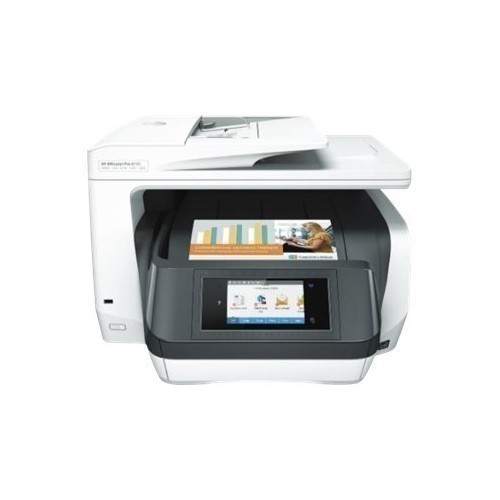
Customers regard the OfficeJet Pro 8730 as easy to use and set up, praising its user-friendly interface and straightforward installation process. The printer's speed is another highlight, with users specifically mentioning the fast and high-quality scanning capabilities. There were no negative customer comments reported.
This summary was generated by AI based on customer reviews.
- Pros mentioned:Ease of use
Working for office of 6
||Posted .This reviewer received promo considerations or sweepstakes entry for writing a review.Easy to setup and attach to network. I like the scan both sides of page.
I would recommend this to a friend - Pros mentioned:Print speed
Great printer - nice features
||Posted .This reviewer received promo considerations or sweepstakes entry for writing a review.Upon review of other brands, I chose to stay with HP. This printer is a replacement for my previous HP all-in-one printer.
I would recommend this to a friend Very good printer
||Posted .This reviewer received promo considerations or sweepstakes entry for writing a review.Was pleased this printer came in white.where the printed paper is released is very clever compared to other printers.
I would recommend this to a friend- Pros mentioned:Print speed
Great Printer
||Posted .This reviewer received promo considerations or sweepstakes entry for writing a review.Easy printer to set up. Good speed and output. Lots of features to work with. Love it !!
I would recommend this to a friend - Pros mentioned:Ease of use
Great printer
||Posted .This reviewer received promo considerations or sweepstakes entry for writing a review.This is very easy to setup and use. Connects to Wifi. Saving the file directly to a USB is good.
I would recommend this to a friend - Pros mentioned:Print speed
Great printer
||Posted .This reviewer received promo considerations or sweepstakes entry for writing a review.Best HP printer every owned. Scan feature is very fast.
I would recommend this to a friend - Pros mentioned:Print speed
Great aio
||Posted .This reviewer received promo considerations or sweepstakes entry for writing a review.Great aio printer just like the version before it.
I would recommend this to a friend - Pros mentioned:Ease of use
Great printer for family use
||Posted .This reviewer received promo considerations or sweepstakes entry for writing a review.Use it for everything, work, personal tasks. Great.
I would recommend this to a friend HP - OfficeJet Pro 8730 Wireless All-In-One Instan
||Posted .This reviewer received promo considerations or sweepstakes entry for writing a review.Our print needs are modest, maybe 20 pages a month. Rarely have need for photo or other special papers. Bottom line, perfect for modest needs, but I can't comment about it's ability to handle heavy volume and demanding graphics/photo printing.
I would recommend this to a friendExcellent printer
||Posted .This reviewer received promo considerations or sweepstakes entry for writing a review.This printer runs circles around my previous one. With this model there is no need to hunt for a different one.
I would recommend this to a friendGood computer for home
||Posted .This reviewer received promo considerations or sweepstakes entry for writing a review.Printer does a good job, but it's a little bigger than the previous Officejet 800 series printer we had.
I would recommend this to a friendHp printer
||Posted . Owned for more than 2 years when reviewed.This reviewer received promo considerations or sweepstakes entry for writing a review.This printer has been great for us. We have had no issues and very good color reproduction
I would recommend this to a friendGood printer
||Posted .This reviewer received promo considerations or sweepstakes entry for writing a review.I replaced an expensive Canon office printer with this HP. So far it has worked just as well.
I would recommend this to a friendSo far so good
||Posted .This reviewer received promo considerations or sweepstakes entry for writing a review.So far I enjoying my printer. No complaints right now
I would recommend this to a friendGreat printer for high volume of work
||Posted .This reviewer received promo considerations or sweepstakes entry for writing a review.I would recommend this printer for those that have a home office and require a large amount of printing.
I would recommend this to a friendGreat Printer
||Posted .This reviewer received promo considerations or sweepstakes entry for writing a review.There were no reviews, but the money was worth it.
I would recommend this to a friendHigh hopes than nothing
Posted .This reviewer received promo considerations or sweepstakes entry for writing a review.Got this printer in April 2018, loved it. By Dec 2018 hated it. Said it had paper jams, none. Couldn't print, restart, reboot tried several ways, uninstalled and tried to re-install and couldn't get past paper jam error, but no paper problem. Nothing worked. Totally frustrated.
No, I would not recommend this to a friendcuts off images in documents
Posted .This reviewer received promo considerations or sweepstakes entry for writing a review.I was very pleased with this HP - OfficeJet Pro 8730 Wireless All-In-One UNTIL I went to print a document which had an image in it. It enlarges the image and then crops it, so that part of the image is cut off. *Many, many* people have reported this same problem on various HP printers and HP cannot seem to come up with a satisfactory solution. One technician told me to increase the resolution which I did to 150 ppi and that worked but I have 1000s of images which I use for various graphic projects and I'm NOT going to increase the resolution on every one. It looks like I may have to return this unit.
No, I would not recommend this to a friendBrand response from HP Team
Posted .Hi Susan,
I'm sorry that the printer is not printing the images as well as it does everything else. It is probably because the images are sized for the screen, not for a printout. That is why the technician advised you to up the resolution.
In order for your images to print high-quality, most graphic designers say that the resolution should be at least 300 dpi. You can check this on photo editing software. Many people send photos at 72 dpi—but that resolution is meant for webpages, not printouts.
If you have other concerns you can contact us at: hp.com/contacthp
Mary
HP Care
hp.com/support
No REAL Life IN Cartridges
Posted .This reviewer received promo considerations or sweepstakes entry for writing a review.Says get 2,000 pages without refilling, I've been through two sets of cartridges, and am not getting anywhere close to that. More like 100 to 200 pages at most, (if that). Very disappointed, as I originally looked for a printer with a good cost per page. I need to look harder next time.
No, I would not recommend this to a friendBrand response from HP Team
Posted .Hi Nolan,
I'm sorry to hear that you were disappointed with the page yield. The estimates of pages printed are based on industry standards. How the cartridge will perform in real life situations will vary quite a bit..
I can certainly understand wanting to find more affordable options for your printing! Toward that end, you might be interested in trying Instant Ink. Details about the pay-by-the page plans can be found here: instantink.com
In the meantime, here is some information that might help get your ink to last longer:
- A high-density print (like a photo) will use the ink more quickly than a low-density print (a text-only document), especially if the paper is highly absorbent and the environment is dry.
- Using the draft and black only settings on your printer can help save ink.
- Shutting the printer down between uses can help. However, always use the power button on the printer itself to turn it off. That will let the printer 'park' itself so that the cartridges are protected from excess drying.
- If you suspect there was something wrong with the cartridge, you are always free to contact the seller to ask for refund or replacement.
If a defective genuine HP cartridge is not replaced by the seller and is still within the warranty end dates on the cartridge, you can reach out to us for support anytime. hp.com/contactHP
Mary
HP Care
hp.com/support
Chinese garbage
Posted .This reviewer received promo considerations or sweepstakes entry for writing a review.This printer is Chinese garbage. The software is slow and glitchy as can be. Do yourself a favor and buy an American made printer.
No, I would not recommend this to a friend