Customer Ratings & Reviews

- Model:
- NS-PS4DRC101
- |
- SKU:
- 2351009
Customer reviews
Rating 4.4 out of 5 stars with 749 reviews
(749 customer reviews)to a friend
Customers are saying
Customers are delighted by the ease of use, attractive design, and battery life of this product. Many appreciate its compact size and affordable price, along with its space-saving and organizational benefits. However, some users experienced issues with connection reliability and controller compatibility. A few also noted concerns about the stability of the charging stand.
This summary was generated by AI based on customer reviews.
- Pros mentioned:Ease of use, Size
Rated 4 out of 5 stars
Decent charging unit
||Posted .This reviewer received promo considerations or sweepstakes entry for writing a review.Does the trick. I can keep the charging unit close by me rather than always having to use the charging cable. I keep two controllers and when one of the batteries is getting ready to die I switch them out. Convenient for sure.
I would recommend this to a friend Rated 3 out of 5 stars
Looks nice, works fine but kind of awkward to use
||Posted .This reviewer received promo considerations or sweepstakes entry for writing a review.The product works as designed and looks lind of cool, however it's that same cool looking design that makes it a little akward to use. First, you have to plug an adapter onto each of your PS4 remotes (new to PS4 so I am not sure if this is common design) and then you have to set them into their "cradle" (for lack of a better term). Trying to set the remotes into the cradle without touching any buttons - which will turn the PS4 on again - or hitting the adjacent remote buttons and get it seated properly to charge can be somewhat challenging. I have only had the charger since Christmas and it has worked just fine.
I would recommend this to a friendRated 4 out of 5 stars
Got lucky
||Posted .This reviewer received promo considerations or sweepstakes entry for writing a review.The staff at Best Buy truly look out for the customers.. Got this item cause stores within 100 miles where all out of single changer.. Comes handy with two controllers..
I would recommend this to a friendRated 5 out of 5 stars
Awesome charging station
||Posted .This reviewer received promo considerations or sweepstakes entry for writing a review.This is a great dual charging station. The dongles attach to the usb charging port on the controllers and don't get in the way during game play.
I would recommend this to a friend- Pros mentioned:Charging speed, Design, Size
Rated 5 out of 5 stars
Convenience and efficiency is key
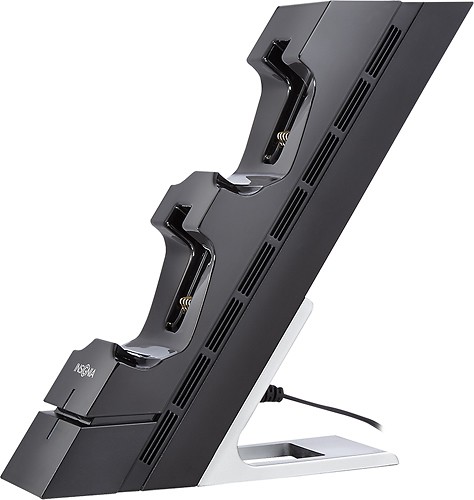
||Posted .This reviewer received promo considerations or sweepstakes entry for writing a review.I purchased this the same day as my ps4 about 4 days ago. I was hesitant to buy one since you can always charge your controllers using the chord the ps4 comes with. Boy was I wrong!! The convenience and efficiency of this charging station is incredible!! Lights on the front of the device let me know when my controllers are fully charged, the adapters are small and don't affect the feel of your ps4 controller, and it doesn't take too much extra space. Coolest part in my opinion is the option to lay it down or stand it up, and when lying down it has the same depth and slanted features as your ps4,therefore matching up perfectly. I would highly recommend investing in one of these!! (or in my case, 2 so I can charge all controllers at once)
I would recommend this to a friend - Pros mentioned:DesignCons mentioned:Controller compatibility
Rated 4 out of 5 stars
Does what it needs to
||Posted .This reviewer received promo considerations or sweepstakes entry for writing a review.It looks nice... The position the controls have to be in though sometimes can be a hassle though. The fact you have to have little back pieces on each controller can be inconvenient too but it is better than having to find the controller's charging port. I would say overall its a good buy and looks better than most without taking up too much space.
I would recommend this to a friend - Pros mentioned:Charging speedCons mentioned:Connection
Rated 4 out of 5 stars
Works great, connection just a little sensitive
||Posted .This reviewer received promo considerations or sweepstakes entry for writing a review.I looked at both this one & the Sony. I went with the Insignia for 2 reasons: First, it was on sale for about $10 less than the Sony. Second, i liked that the controllers were stacked rather than side by side. It just seemed more streamlined. It has charged really well, but i am always concerned it is not making a great connection. Several times I have put it on the charger & the light went on, but as soon as I walked away I noticed it was off. While this hasn't caused a major issue, it is just a little inconvenient to have to double check the connection every time I put the controller on to charge.
No, I would not recommend this to a friend - Pros mentioned:Design, Ease of use
Rated 4 out of 5 stars
Stylish and beats cords!
||Posted .This reviewer received promo considerations or sweepstakes entry for writing a review.This product is more stylish than the version from Playstation, but it does have a couple setbacks. If I were to go back and buy one of these again, I would go with the Playstation brand instead because the controllers connect on the bottom, next to the headphone plug, by pushing down, and release by pushing down (like an SD card). With this one, you have to attach a little clip onto the micro USB plug on the top of the controller. The clip can be attached while you are using the controller, but there is still that extra part. The controller then just rests on the diagonal mount. It does work great, and is cool looking! So I will not knock that this is a great product, but I would prefer the Playstaion brand version.
I would recommend this to a friend - Pros mentioned:Charging speed
Rated 5 out of 5 stars
Great Value
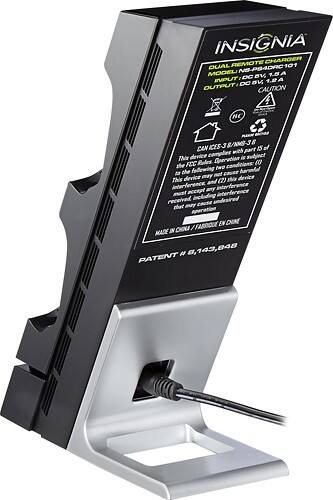
||Posted .This reviewer received promo considerations or sweepstakes entry for writing a review.This is a great charging station for the dualshock 4. It doesn't take up much space and it plugs into an outlet verses having a USB chord like similar ones I found online (which I consider a plus). Price is great on this too!
I would recommend this to a friend - Pros mentioned:Charging speed, Size
Rated 5 out of 5 stars
Works perfectly, love wireless charging!
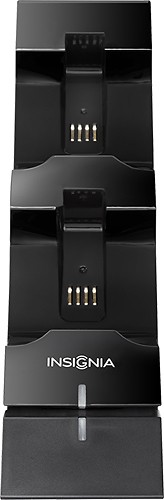
||Posted .This reviewer received promo considerations or sweepstakes entry for writing a review.Bought this because we got sick of plugging our controllers in over and over. The batteries on our PS4 controllers last only about half as long as our PS3 controllers that are 8 years older... This item comes with two little "dongles" that plug into the charging port on the controller, and those dongles are what contact the wireless charging dock to charge the controller. The dongles don't affect how I grip the controller at all, they are pretty unobtrusive. The stand has a small footprint and charges both controllers at the same time. Highly recommended product, especially for the meager price!
I would recommend this to a friend - Pros mentioned:Battery life, Charging speed
Rated 5 out of 5 stars
Great Device/ Inexpensive
||Posted .This reviewer received promo considerations or sweepstakes entry for writing a review.Needed a charging dock that would fit in my limited space, work well, and wasn't ridiculously priced. I did not want to have cords coming out of PS4 cause of my puppy in training at the time and they aren't long enough to reach to couch. This charging dock charges quickly and controllers hold the charge for long periods of time. Design is a slight pain to lock into charging place but the indicator light lets you know so it really isn't a big deal. Great buy! (plus i think i got it on sale :))_)
I would recommend this to a friend - Pros mentioned:Ease of use, Size
Rated 4 out of 5 stars
Hard to lock controllers into charger
||Posted .This reviewer received promo considerations or sweepstakes entry for writing a review.To place controllers into the charger, you have to first insert a small connector - then place in charger. The small connector does not always stay in place, and it is not always easy to get into charger. Why couldn't the small connector have been part of the charger - so you could just insert the controller directly in the device? We do like the look and size of it, though - as it is easy to hide behind our TV while not in use.
I would recommend this to a friend - Pros mentioned:Charging speedCons mentioned:Stability
Rated 4 out of 5 stars
Great way to display custom controllers!
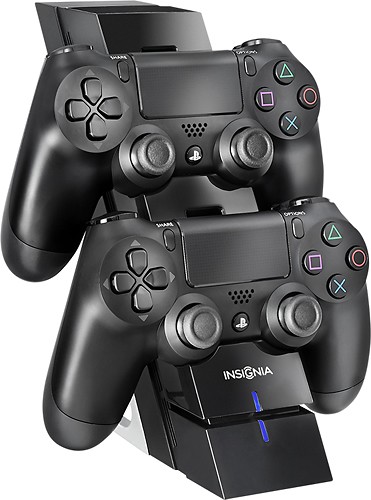
||Posted .This reviewer received promo considerations or sweepstakes entry for writing a review.Love the style and look of this stand works great with a vertical PS4. My controllers look amazing on it and they are always charged when i want to play. Best part is that it reduces wires and the nasty mess that creates so everything so clean. My only problem is that its tends to want to tip over when you put the controller on the top slot if you don't have a controller on the bottom one, but that is just a minor flaw.
I would recommend this to a friend - Pros mentioned:Battery life, Charging speed, Size
Rated 4 out of 5 stars
Charges quickly, doesn't take up much table space
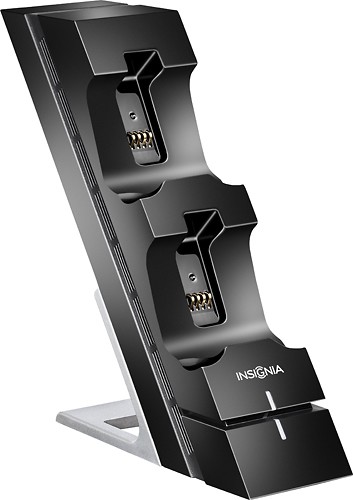
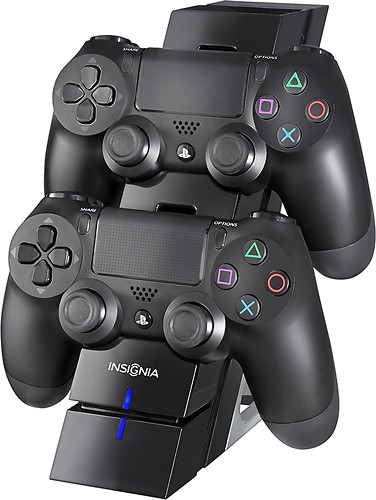
||Posted .This reviewer received promo considerations or sweepstakes entry for writing a review.This charges my Dualshock 4 controllers quickly and doesn't take up much table space because it is arranged vertically. It comes with two small dongle-like adapters that plug into the micro-USB connector on each controller. You will leave the dongle in place all the time as it fits snugly to the controller and will not fall off accidentally during play. When you are done playing and ready to charge, you just turn off the controller as normal, and rest the bottom of the controller in the cradle, then as it rocks into place, the electrical connectors on the dongle come into contact with the electrical connectors on the charging stand. Voila, the light bar on the controller will pulse with orange light while charging, then turn off when the controller battery is fully charged. The battery stand itself has a blue led bar for both charging ports that lights up when a controller is charging and goes dark when fully charged or no controller is mounted in the cradle.
I would recommend this to a friend - Pros mentioned:Battery life, Design, Size
Rated 5 out of 5 stars
Great Charger
||Posted .This reviewer received promo considerations or sweepstakes entry for writing a review.Battery pack does not interfere with control usage, takes up very little space, looks great.
I would recommend this to a friend - Pros mentioned:Design, Ease of use
Rated 5 out of 5 stars
Insignia Dual Controller Charger for the PS4
Posted .This reviewer received promo considerations or sweepstakes entry for writing a review.In this video I review the Insignia Dual Controller Charger for the PlayStation 4. This is a great option for PS4 owners who want to charge two controllers simultaneously. This compact design allows you to place the kit where ever you desire. Keep your PS4 controllers ready for play with the Insignia Dual Controller Charger for the PlayStation 4. Hope you enjoy the video. Be sure to subscribe to the MiGadgetGear channel on YouTube for cool tech videos! Check out the video here: http://youtu.be/qQyWur_QI_M
I would recommend this to a friend - Pros mentioned:Design
Rated 5 out of 5 stars
Great concept for a charger!
||Posted .This reviewer received promo considerations or sweepstakes entry for writing a review.I purchased this charger after seeing it on a display in the store. The charger has 2 clip on adapters for the controllers that allow them to charge from the back of the controller. They are very streamlined and are hardly noticeable on the controllers. This allows the controllers to sit more securely in the charging station and reduces the possibility of them falling out of the station. I am impressed on the stability and space saving design this charging station.
I would recommend this to a friend - Pros mentioned:Charging speed, Ease of use, Size
Rated 5 out of 5 stars
Gets the job done!
||Posted .This reviewer received promo considerations or sweepstakes entry for writing a review.This product is easy to use. It has a good sized tower. It also charges the controller properly as well.
I would recommend this to a friend - Pros mentioned:Charging speed, Design
Rated 5 out of 5 stars
Performs as expected
||Posted .This reviewer received promo considerations or sweepstakes entry for writing a review.Works as advertised... The only disadvantage is that there are these little pieces that have to be attached to the controller for charging... They get in the way just slightly as they are on the back... You could take them off while playing, but, then risk losing or misplacing them... Not enough to really hinder game play... You just notice they are there... Otherwise perfect... Would recommend and would purchase again...
I would recommend this to a friend - Pros mentioned:Design, Ease of use
Rated 5 out of 5 stars
Great
||Posted .This reviewer received promo considerations or sweepstakes entry for writing a review.Love this charging station. Great price and very convienient and stylish looking too.
I would recommend this to a friend