Customer Ratings & Reviews
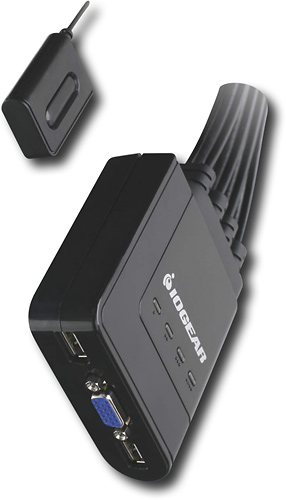
- Model:
- GCS24U
- |
- SKU:
- 9246997
Customer reviews
Rating 4.3 out of 5 stars with 58 reviews
(58 customer reviews)Rating by feature
- Ease of Use4.0
Rating 4.0 out of 5 stars
Customers are saying
Customers regard the 4-Port USB KVM Switch positively for its easy setup, functionality, and affordability. Many users appreciate the simple plug-and-play installation process, while others commend its reliable performance. The price point is also seen as a major advantage, with customers noting that it offers great value for its features.However, some users have expressed concerns about the button used to switch between computers, finding it less convenient compared to other methods.
This summary was generated by AI based on customer reviews.
- Pros mentioned:Usb
Rated 1 out of 5 stars
Couldnt get it to work continously
||Posted .This reviewer received promo considerations or sweepstakes entry for writing a review.I had 3 computers that I wanted to put on 1 monitor, mouse, and keyboard. I hooked everything up, but one computer wouldn't come up...I tried changing the order of the cables...that seemed to work, until the next day, then two of my computers wouldn't work on the switch. I could never get all my systems working at the same time after that. I returned the item.
No, I would not recommend this to a friend Rated 4 out of 5 stars
Great quality for a inexpensive KVM
Posted .This reviewer received promo considerations or sweepstakes entry for writing a review.So far I really like this KVM. Only a few items that I wish were different. One is the button push to change over. It seems like a nice feature, but liked the old scroll lock twice more, and now have to find the button on my desk to switch over. The other is that it doesn't integrate sound like some of the other KVMs. Neither are deal breakers, just some slight annoyances.
I would recommend this to a friendRated 4 out of 5 stars
Good KVM switch
Posted .This reviewer received promo considerations or sweepstakes entry for writing a review.Needed a KVM to reduce 4 monitors down to 1, this one was perfect. I works well, the only reason I did not give it 5 stars is because the switch is very light weight plastic, and feel that this will be the first thing to go on it.
I would recommend this to a friend- Pros mentioned:Price
Rated 4 out of 5 stars
good price for a good unit
Posted .This reviewer received promo considerations or sweepstakes entry for writing a review.Please with everything (this is my 5th IOGear KVM. My nth IOGear item) I like IOGear units. Price is good and for home use the best. My only con on this item (and it is my own fault) it only switches with a button no hot-key. that will make it a bit less useful.
No, I would not recommend this to a friend - Pros mentioned:Compatibility, Usb
Rated 4 out of 5 stars
maximum functionality for minimum price
Posted .This reviewer received promo considerations or sweepstakes entry for writing a review.I was looking for an inexpensive KVM that works and found it in this device. Works flawlessly on my windows XP machines. Occasionally repeats characters sent to my server with SBS2003 installed. Not sure what the problem is.
I would recommend this to a friend - Pros mentioned:Ease of use
Rated 3 out of 5 stars
Works pretty well.
Posted .This reviewer received promo considerations or sweepstakes entry for writing a review.I use it to connect 2 laptops and get them off the desk and out of the way. It was quick and easy to plug in but I find that the monitor doesn't always kick in fast enough. I have to cycle through the 4 ports a few times and snap the laptop cover shut a couple times. Also, since I only have 2 hook ups the remaining 2 KVM cables just take up space. I wish the unused cables could be disconnected but they're hardwired in.
I would recommend this to a friend - Pros mentioned:Usb
Rated 5 out of 5 stars
Fits the bill
Posted .This reviewer received promo considerations or sweepstakes entry for writing a review.A great and simple KVM. Fits the bill for small server racks.
I would recommend this to a friend Rated 3 out of 5 stars
Great concept, just not quite there yet
Posted .This reviewer received promo considerations or sweepstakes entry for writing a review.The first thing I noticed was the size. Great form to hide between my desk and the wall keeping my desk clean of clutter. After using it for a few days I had a few issues with new computers booting up while connected to it. If I were to just remove the VGA connection and go directly from the PC to the monitor it would boot up. Keyboard and mouse would continue to work thru the KVM. Kind of weird but still playing with it. My main gripe with the KVM is with the little button that you use to switch between devices; at first I thought it was an awesome idea but now I'm not liking it. I find it very difficult to determine which device I'm viewing. The point of the button is to allow you to hide all the cables, but the lights are on the main base. And when you have the issues I'm having with boot up issues then you find yourself constantly pressing the button to find the computer. I really like the concept, just wish it worked better. I'll recommend it and keep using it until I find a better option. Just note that it could be better.
I would recommend this to a friend- Cons mentioned:Delay
Rated 3 out of 5 stars
Well, it works
Posted .This reviewer received promo considerations or sweepstakes entry for writing a review.This KVM works, but it's not perfect. I'm only using 3 of 4 ports, but I must cycle through all four ports regardless of the fact one is not in use. Also, the delay sometimes for the USB keyboard/mouse to be recognized again upon changing computers/ports can be quite long some times (like 10 seconds). If your switching to a computer where something like a Skype call is coming in and wan to mouse click the answer button then you can't count on being successful before it goes to voicemail--I found that out. Also, I have a Vista system that just will not recognize the keyboard if I used the KVM, so I had to set up a separate keyboard for that system--kind of defeats the purpose of the KVM there! However, all in all it works as it should.
I would recommend this to a friend - Pros mentioned:Ease of use, Price
Rated 5 out of 5 stars
KVM works great
Posted .This reviewer received promo considerations or sweepstakes entry for writing a review.The KVM was easy to install and easy to use and all at a good price
I would recommend this to a friend - Pros mentioned:Usb
Rated 4 out of 5 stars
Good KVM switch
Posted .This reviewer received promo considerations or sweepstakes entry for writing a review.I was hoping to use this with several Computers and using 2nd Ports on Dedicated monitors and in this setup Only my Macbook Pro switched properly Widows tried to reconfigure the desktop each time I switched.
I would recommend this to a friend - Pros mentioned:Usb
Rated 4 out of 5 stars
Decent KVM Switch
Posted .This reviewer received promo considerations or sweepstakes entry for writing a review.I bought KVM switch to connect two computers but it can connect expand up to 4 computers using the same keyboard and mouse. Wish it had the option to connect the speaks too
I would recommend this to a friend Rated 5 out of 5 stars
Works Great
Posted .This reviewer received promo considerations or sweepstakes entry for writing a review.Have the KVM switch hooked up to 3 computers, running XP, WIN7, and Server2008. Very easy setup, just plug and play. I have a standardi usb mouse and keyboard hooked up to it, and a 23" wide screen LCD running at the highest resolution (1680 x 1050).
I would recommend this to a friend- Pros mentioned:Ease of use
Rated 5 out of 5 stars
great product
Posted .This reviewer received promo considerations or sweepstakes entry for writing a review.Plug and play at its finest. Does everything it is supposed to
I would recommend this to a friend Rated 5 out of 5 stars
IOMEGA IS THE MOST CONVENIENT AND ECONOMICAL
Posted .This reviewer received promo considerations or sweepstakes entry for writing a review.IVE PREVIOUSLY USED OTHER KVM'S SWITCHES AND THIS BY FAR IS THE BEST SWITCH I HAVE EVER USED.
I would recommend this to a friendRated 5 out of 5 stars
Great combo computer setup!
Posted .This reviewer received promo considerations or sweepstakes entry for writing a review.Is great for setting up one good egronomic station
I would recommend this to a friendRated 5 out of 5 stars
IOGEAR 4-Port USB KVM Switch
Posted .This reviewer received promo considerations or sweepstakes entry for writing a review.KVM 4 ports will be great if it can toggle using keyboard too like the 2 ports KVM.
I would recommend this to a friendRated 2 out of 5 stars
Works But...
Posted .This reviewer received promo considerations or sweepstakes entry for writing a review.Product works as advertised. It does what it says it does. In the future, I will look for a KVM switch that doesn't have only a push button to select the different computers.
I would recommend this to a friend