Customer Ratings & Reviews
- Model:
- GCS632U
- |
- SKU:
- 6191569
Customer reviews
Rating 4 out of 5 stars with 143 reviews
(143 customer reviews)Rating by feature
- Ease of Use4.2
Rating 4.2 out of 5 stars
Customers are saying
Customers frequently mention the ease of use and the convenient USB connectivity of the MiniView Micro 2-Port USB Plus KVM Switch. Many appreciate its compact size and the included cables' length. However, some users experienced compatibility issues, particularly with certain operating systems and keyboards. A few reported instances of the product malfunctioning after a period of use.
This summary was generated by AI based on customer reviews.
- Pros mentioned:Ease of use, Usb
Rated 5 out of 5 stars
Does what it says, and more
Posted .This reviewer received promo considerations or sweepstakes entry for writing a review.Great product. Using XP legacy box w/monitor to an NT network, and a Win764 box w/monitor for the new network just built. I have one keyboard and one mouse (both wired). It is picky about the USB for the XP, find the one closest to the PS2 port and use it. Leave your two monitors hook up to each box, no need to use the hook-up to the cables that came with the KVM, it will find it anyway. Very Happy.
I would recommend this to a friend - Pros mentioned:Ease of use, Usb
Rated 4 out of 5 stars
Easy KVM Switch to use
Posted .This reviewer received promo considerations or sweepstakes entry for writing a review.Had to purchase many of these for our stores. Easy to use. Must use USB keyboard and mouse - doesn't like the USB adapters on PS/2 keyboard or mouse.
I would recommend this to a friend - Pros mentioned:Ease of use
Rated 4 out of 5 stars
KVM Switch
Posted .This reviewer received promo considerations or sweepstakes entry for writing a review.I'm not a computer savvy guy, and when a friend suggested a KVM switch rather than buy another monitor for my second computer, I was hesitant. She recommended this particular item because of my ineptness with hardware. I found the directions easy to understand, and had it installed in minutes. Not one problem resulted, and I started no fires.
I would recommend this to a friend - Pros mentioned:Size
Rated 4 out of 5 stars
Excellent basic KVM
Posted .This reviewer received promo considerations or sweepstakes entry for writing a review.Pros: Relatively inexpensive, small, keyboard switching, and audio support Cons: Cable is a little bulky This is a great KVM solution for anyone that simply wants to share a keyboard, mouse, and monitor between 2 computers. The built-in keyboard switching is a major plus as some comparable models require a separate switch to be used.
I would recommend this to a friend - Pros mentioned:Ease of use
Rated 5 out of 5 stars
Worked Perfectly
Posted .This reviewer received promo considerations or sweepstakes entry for writing a review.When I went to purchase a switch box for my 2 computers I thought this one was perfect. I read the reviews here and then I became very hesitant on it as so many people seemed to be having problems with it. But I wanted the sound feature so I figured I could always return it if it didn't work right. Well, I'm here to tell you it worked perfectly! I followed the instructions and made sure all the equipment was off. I plugged all the cables in and crossed my fingers. I fired up my XP computer first and as Windows loaded up (past the login screen) the mouse and keyboard stopped working, but that was because Windows was automatically loading the drivers for the Box and when it said your hardware is now ready, it was. It worked like a champ. So I shut the XP computer down and fired up the VISTA computer. Again, the same exact bootup sequence and it was working great. I then powered up the XP computer (both on now) and tried quickly hitting the Scroll Key twice to switch between the computers - and it did. I've had this for several days now and it has been working great and I love that it has the sound connectivity. I think $10 cheaper on the price and a different placement of the cable connections on just 1 side - not 3 would make this item a solid 5 stars. Just follow the setup instructions and maybe do it how I did and you shouldn't have any problems.
I would recommend this to a friend - Pros mentioned:Usb
Rated 5 out of 5 stars
Very good so far
Posted .This reviewer received promo considerations or sweepstakes entry for writing a review.I'm using it with desktop (Win7# and laptop #WinXP). At first I was worried because laptop wasn't getting mouse or keyboard input after first booting, but after WinXP auto-installed drivers, it started working perfectly. It switches between computers in about 2-3 seconds. Keyboard is a mechanical Das Keyboard and mouse is through Microsoft Wireless Desktop Receiver 3.1A. Something that wasn't obvious to me until I got it was it has separate inputs for keyboard and mouse, but it combines them into a single USB connection going to computers. Used less than a day, but have been switching back and forth often. Hope it lasts.
I would recommend this to a friend - Pros mentioned:Ease of use
Rated 5 out of 5 stars
Great KVM Switch!
Posted .This reviewer received promo considerations or sweepstakes entry for writing a review.I very seldom contact vendors regarding products, but my experience with this KVM switch has been so perfect and painless that I felt compelled to write in. The installation was quick and flawless. I followed the directions provided and everything worked exactly as described. I have connnected an old XP with a new Windows 7 computer, and moving between the two is quick and efficient. It is pure pleasure to have a piece of technology work perfectly every time.
I would recommend this to a friend - Pros mentioned:Usb
Rated 4 out of 5 stars
Great for Pricepoint
Posted .This reviewer received promo considerations or sweepstakes entry for writing a review.Lets say everyone uses iTunes or Windows Media Player... with digital rights letting you only have one locaton for media storage. If I'm listening to music, I might want the sound to be locked on to one computer while I work on the other... but sometimes I might want to switch the source. Just something that bothers me... but otherwise a great device.
I would recommend this to a friend - Pros mentioned:Ease of use
Rated 5 out of 5 stars
Excellent tool for two computer setup
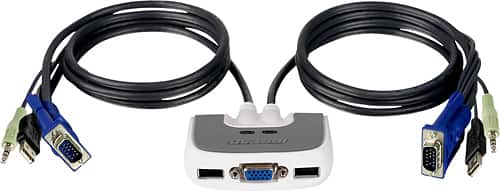
Posted .This reviewer received promo considerations or sweepstakes entry for writing a review.IOGEAR MiniView Micro 2-Port USB Plus KVM Switch with Built-In 6' Cables was easy to set-up. The only problem was the plug and pray feature of windows had a problem with the initial set-up. A quick view of FAQ at the 1OGEAR website cleared that up real quick. It is a pleasure to use two computers (one for email and word processing and one for digital photo editing) via one keyboard, mouse and monitor. I'm also glad I spent the extra bucks for the unit that combines the audio too. A GREAT PRODUCT. My only negative comment is the six foot cables. They could be shorter. With two PC's set side by side six feet of connecting cable just adds to the clutter under my desk.
I would recommend this to a friend Rated 4 out of 5 stars
Finally a KVM that works for Gaming PC's
Posted .This reviewer received promo considerations or sweepstakes entry for writing a review.I had the older version with the PS/2 connections and it worked flawlessly for business apps. Well I have a laptop and a Gaming PC and switching is very easy on the older one and now on this one. With the older one 1st-person shooter games (all of them) would stop running even when holding down the up-arrow key. I programmed many keys to be forward/run and it was like the key depressed would loose focus on the key??? Well lived with that 1 year, cause these cost a lot until now. The new IOGEAR with the USB connections do not have that flaw.. SO I am very happy. Only one downside, I have the Logitec G15 gaming board and its not recognized via its software. Oh well..
I would recommend this to a friendRated 4 out of 5 stars
limitation
Posted .This reviewer received promo considerations or sweepstakes entry for writing a review.I have loved this KVM as long as my mouse and Keyboard were plugged in via 2 usb ports on the KVM. (about 2 years) I now have a wireless keyboard and mouse set that use one usb port. This KVM cannot handle the unified connection. Using the Mouse input it will allow the keyboard and mouse to work on ONE computer but does not hear the keystroke to change to the other computer. So buyer beware that in order for this model to work you have to have the mouse and keyboard plugged in separately to the KVM. (I was trying to use a Microsoft Wireless Optical Desktop Set 4000)
I would recommend this to a friendRated 3 out of 5 stars
Not Wireless/Gaming Compatible
Posted .This reviewer received promo considerations or sweepstakes entry for writing a review.Received this as a gift, and it works all right with most keyboards. However, if you have a gaming keyboard (ex. Logitech G-series gaming keyboard) or high-end wireless keyboard (again, Logitech), don't use this switch. With the G-Series keyboards, you lose the functionality of the LCD screen and G-Keys. With the high-end wireless (notably the "Logitech Unified" wireless accessories) you lose the entire keyboard. The Keyboard will work fine if you connect it to the Mouse port, and the Mouse to the Keyboard port, but then you lose swapping functionality. All in all, a decent device to have if you have the bare-bones basic keyboard/mouse setup, but anything else and you should probably opt for a manually swappable device (which, ironically, kind of defeats the purpose of wireless peripherals).
No, I would not recommend this to a friendRated 4 out of 5 stars
Good for switching between Ubuntu and Wndws 7
Posted .This reviewer received promo considerations or sweepstakes entry for writing a review.Strengths - the switch worked without having to install anything onto either of my computers. The automatic key combination is scroll lock scroll lock. It works with my mouse, keyboard, monitor, and speakers. Weaknesses - The speaker cord is too short to reach my desktop and my laptop the way it is designed so I had to get an extension cable, but other than that I have no issues.
I would recommend this to a friend- Pros mentioned:Ease of use
Rated 5 out of 5 stars
Simple & Convenient
Posted .This reviewer received promo considerations or sweepstakes entry for writing a review.Bought this originally at another on-line seller, but it ended up DOA so ended up having to return. Bought at Best Buy this time for simple local return should there be another problem. Price was a bit higher but convenience was worth it. Ordered on-line, picked up in the store - quick and easy operation. Hooked up the switch and it worked perfect the first time with my wireless mouse and keyboard. The built in hub only uses one USB connection on the computer to give you both mouse and keyboard - very nice. Audio switch over worked great. Just tap the ScrLk twice to shift between computer - I like it.
I would recommend this to a friend - Pros mentioned:Ease of use
Rated 5 out of 5 stars
great buy
Posted .This reviewer received promo considerations or sweepstakes entry for writing a review.I've had it for a few weeks now, and I am satisfied. This was recommended by our computer technician to make our computer cramped computer room easier to use. We only have room for 1 monitor, so I was unplugging the VGA from one PC to the other, and wow is this so much better, I didn't realize until I got the device that I could also use it o combine key boards, mice, and speakers.... more functionality than the cheaper model. Very pleased
I would recommend this to a friend Rated 5 out of 5 stars
Works As Advertised
Posted .This reviewer received promo considerations or sweepstakes entry for writing a review.Had some difficulty getting this to work, but once I got it working, it seems to do as advertised. I am using a Logitech MX3200 Wireless Keyboard/Mouse and I am able to use it with both my PCs and use the hotkeys on the keyboard. The one thing to note is that the MX3200 keyboard does not have a 'Scroll Lock' key. However, if you use 'FN and Pause/Break' this works as Scroll Lock and allows the 'hotkey' switching. Very pleased with it so far.
I would recommend this to a friend- Pros mentioned:Ease of use
Rated 4 out of 5 stars
Easy to set up
Posted .This reviewer received promo considerations or sweepstakes entry for writing a review.If you have two computers and one keyboard, mouse, monitor and speakers, this is a great device. Easy to connect and use.
I would recommend this to a friend - Pros mentioned:Usb
Rated 5 out of 5 stars
Works great
Posted .This reviewer received promo considerations or sweepstakes entry for writing a review.This replaced an ancient KVM switch that didn't have USB ports. I like that it does sound and microphone switching as well as keyboard and mouse. You can switch computers with a keyboard shortcut, a desktop icon, or the physical buttons on the device.
I would recommend this to a friend Rated 4 out of 5 stars
OK for MACs - not ideal, but what is?
Posted .This reviewer received promo considerations or sweepstakes entry for writing a review.works well - but has some weirdness on a MAC. The software won't load onto anything - says it's not compatible. With the download of a free utility called 'USB Overdrive' it works MUCH better. Only drawback so far is that the eject button on the keyboard still does not work. If someone would actually engineer and produce a switch FOR A MAC - I'd buy it. Until then - this one is serviceable.
I would recommend this to a friendRated 4 out of 5 stars
Great - But not for Wireless Combos
Posted .This reviewer received promo considerations or sweepstakes entry for writing a review.I was skeptical of this product, but it works great! I really like the fact that I do not have to load software on any of my computers that use this. I am using this with a work station (desktop) and a docking station that I use 4 different computers in - works flawlessly. The only draw back is that it does not work with a "wireless keyboard & mouse" combo as one reader stated...
I would recommend this to a friend