Customer Ratings & Reviews
- Model:
- GCS632U
- |
- SKU:
- 6191569
Customer reviews
Rating 4 out of 5 stars with 143 reviews
(143 customer reviews)Rating by feature
- Ease of Use4.2
Rating 4.2 out of 5 stars
Customers are saying
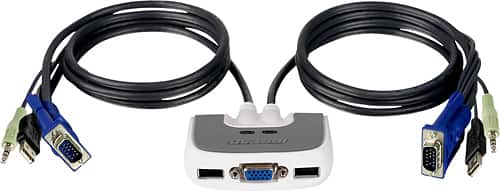
Customers frequently mention the ease of use and the convenient USB connectivity of the MiniView Micro 2-Port USB Plus KVM Switch. Many appreciate its compact size and the included cables' length. However, some users experienced compatibility issues, particularly with certain operating systems and keyboards. A few reported instances of the product malfunctioning after a period of use.
This summary was generated by AI based on customer reviews.
Rated 4 out of 5 stars
Great Product
Posted .This reviewer received promo considerations or sweepstakes entry for writing a review.I thought I would post since many of the reviews claim it doesn't work with a mouse, keyboard combo. I have a logitech mx 3200 and it works great with this kvm switch. I was a little hesitant after reading some of the other reviews but am now glad I made this purchase. I can now just throw my work laptop on the docking station and with this switch I am ready to go.
I would recommend this to a friend- Cons mentioned:Compatibility
Rated 1 out of 5 stars
Worst KVM ever used
Posted .This reviewer received promo considerations or sweepstakes entry for writing a review.This is the worst KVM I've ever used, and I've used a lot. As another reviewer stated it does not work with wireless keyboard/mouse combos that use a single USB cable. That will teach me to read reviews first next time. I used it with a wired mouse and even that was flaky. You can not hot-plug a USB mouse. If the mouse is not connected during boot it will not be initialized. And even then it would randomly lose the mouse. The unit I bought had loose connections in one of the video cables causing funky colors unless I held the cable "just right". I will return it tomorrow. These are very very cheaply made. Spend a little extra for better quality. Buyer beware.
No, I would not recommend this to a friend - Cons mentioned:Keyboard
Rated 2 out of 5 stars
Not a reliable KVM switch
Posted .This reviewer received promo considerations or sweepstakes entry for writing a review.This KVM does not have a manual switch, so you have to rely on the keyboard hotkey combo to switch machines. It probably works reliably about 60% of the time, which is pretty bad for such a simple device. Sometimes it will switch the video but the mouse and keyboard fail, leaving you with no option except a hard reboot. Also, when the PC is booting up, if there is any need to go into the BIOS, it's likely the keyboard won't be available. When it's working, it does what it is supposed to do. Otherwise, you will be out of luck.
No, I would not recommend this to a friend Rated 3 out of 5 stars
Inconsistent
Posted .This reviewer received promo considerations or sweepstakes entry for writing a review.Controlling two laptops running Windows XP Pro SP3 Works OK (sometimes) with separate USB mouse and keyboard devices. Very inconsistent with wireless USB keyboard/mouse combo. Does not work well with computers booting out of hibernate mode. Often, it just quits working altogether. Disconnecting the unit completely for several days seems to re-set it, then re-connect and restart the computers one at a time from shut-down mode (this was the advice from an email from IOGEAR tech support), then it works again for a while. This is the worst KVM switch I've ever used, but it may be because of my wireless keyboard/mouse combo. I wish it had a manual switch button in addition to the hotkey function. I wouldn't recommend it for use with a setup like mine.
No, I would not recommend this to a friendRated 5 out of 5 stars
Works like a charm
Posted .This reviewer received promo considerations or sweepstakes entry for writing a review.I had successfully used the IOGEAR GCS612A PS2 switch to support two PS2 equpped computers. The replacement for one of the computers came with no PS2 ports. I bought the GCS632U to support the new USB only configuration. When I connected the switch initially, the older PS2 equipped computer recognized the monitor but failed to recognize the new USB keyboard or mouse. However, after I plugged in the mouse and keyboard directly into the PS2 computer, the computer automatically updated the drivers for each. When I subsequently integrated the IOGEAR GCS632U, the switch worked liked a charm. I'm now back able to switch between the two computers issue free. IOGEAR has a great product in this switch.
I would recommend this to a friend- Pros mentioned:Ease of use
Rated 5 out of 5 stars
Very easy to set up and to use
Posted .This reviewer received promo considerations or sweepstakes entry for writing a review.Great item for the price, it was easy to set up. I use it constantly for a year now, and have not had many issues. only once it stopped working, so I unplugged all the cables and reconnected them again, and Voila! started working like a charm.
I would recommend this to a friend Rated 5 out of 5 stars
Worked right out of the box
Posted .This reviewer received promo considerations or sweepstakes entry for writing a review.I was a little skeptical about buying these with all the reviews and things I have heard. I purchased one for use with two computers, two monitors, and one wireless keyboard and mouse. I didn't have the need to switch monitors since I would be using the two I had. Right out of the box I plugged both the KVM and wireless USB keyboard and mouse into it and it worked awesome. Switching using the scroll lock is easy, no lag time at all. I have been running it for a week now problem free.
I would recommend this to a friend- Pros mentioned:Ease of use
Rated 5 out of 5 stars
GR8 PURCHASE!!
Posted .This reviewer received promo considerations or sweepstakes entry for writing a review.Talk about a desk organizer!?! These things are remarkable! Flawless, easy to use and install. Why spend extra money on monitors, speakers,mice and keboards just to clutter a desk? (provided your pc's are next to eachother). A pc builders dream tool too.
I would recommend this to a friend - Pros mentioned:Ease of use
Rated 5 out of 5 stars
A Good 2-Port KVM Switch
Posted .This reviewer received promo considerations or sweepstakes entry for writing a review.It's nice to find a product that actually works as advertised, and was really easy to connect. That describes this Iogear KVM switch. I connected my old ps/2 hp with a usb dell. It's great to share one keyboard, mouse and speaker set!
I would recommend this to a friend Rated 5 out of 5 stars
Cool product
Posted .This reviewer received promo considerations or sweepstakes entry for writing a review.this switch works great with seamingly any operating system. only recomendation I have is to READ THE MANUAL, its your friend here, dont leave ill advised reviews based on how you think it should be setup then complain when it doesnt work!!! I give this a 4 on durability because it does seem a little flimsy. it is picky about which port you plug the keyboard and mouse into ( in manual). and no your wireless keyboard and mouse will likely not work, use wired. overall good product as always from iogear.
I would recommend this to a friendRated 4 out of 5 stars
Works Great with wireless combo
Posted .This reviewer received promo considerations or sweepstakes entry for writing a review.At first, I couldn't get it to work. I called the support number and it only took a minute to find out that I had selected the wrong USB port on the unit. Why didn't I think of that? So be sure to use the one that is for the keyboard if you have a combo with just one USB connection.
I would recommend this to a friend- Pros mentioned:Ease of use
Rated 5 out of 5 stars
Quick and Easy
Posted .This reviewer received promo considerations or sweepstakes entry for writing a review.We had it up and running in 10 minutes; eliminated the clutter of two monitors, keyboards and mice on limited desktop real estate. Glad we found out about it.
I would recommend this to a friend Rated 4 out of 5 stars
works well
Posted .This reviewer received promo considerations or sweepstakes entry for writing a review.I originally purchased the IOGear GCS42UW6 and had to return it because my other USB devices failed when it was plugged in. This model works well with my keyboard/mouse setup. 4/5 for this one is because of other IOGear device not working the first time.
I would recommend this to a friend- Pros mentioned:Usb
Rated 5 out of 5 stars
Great for the price
Posted .This reviewer received promo considerations or sweepstakes entry for writing a review.Plugged it into a linux laptop and windows desktop. Worked without issues. My mouse is wireless and I was concerned it wouldn't work well with that but to my surprise it did.
I would recommend this to a friend Rated 5 out of 5 stars
Great product, if the stars align for you
Posted .This reviewer received promo considerations or sweepstakes entry for writing a review.Quite simply, this KVM is an excellent alternative to a pricey docking station for my company-furnished laptop. The main feature, USB connectivity, solves some issues with PS/2 based KVMs, but may introduce new issues, as some users have noted with cordless keyboards and mice. The only way you can say for sure is to be ready to return this if it doesn't meet your demands. No shame in that. As for me, running a standard, corded USB keyboard and standard, corded USB mouse, I couldn't be more happy.
I would recommend this to a friendRated 2 out of 5 stars
Some annoyances, other KVM switch is better
Posted .This reviewer received promo considerations or sweepstakes entry for writing a review.I first tried the KVM switch without audio and loved it, so I decided to get the one with audio for added functionality. Well to my surprise, the one with audio is not nearly as good as the one without. There are two major issues I have found with this. First issue: Wireless mouse doesn't work very well with one of the computers. I noticed that often times, the wireless mouse (Logitech) will only move vertically and not horizontally when I boot up the computer. After doing a little research, IOGear claims this is because wireless mouses are a little more advanced and the KVM switch is only meant for basic wired mice. They recommend KVM switches with "DDM" for wireless mice. The DDM KVM switches are upwards of $130! The other IOGear switch never had any issues with the wireless mouse from what I experienced. Second issue: The screen goes black for about 5 seconds intermittently. This problem is very annoying. I determined the switch to be the source of the problem after I plugged the monitor directly into the back of one of my computers. The problem disappeared. This issue did not occur with the other IOGear KVM switch. As a result, I will be going back to the more basic KVM switch. Plus I like it that the other KVM switch had a button for going between monitors; whereas this particular unit requires you to double tap the 'Scroll Lock' key.
No, I would not recommend this to a friendRated 4 out of 5 stars
great cable
Posted .This reviewer received promo considerations or sweepstakes entry for writing a review.it works well but i kind of wish the usb cable was longer its hard to connect usb and montor because their on two differnt side im glad i can use my keyboard mice and monitor
I would recommend this to a friend- Cons mentioned:Keyboard
Rated 2 out of 5 stars
IO Gear KVM Switch
Posted .This reviewer received promo considerations or sweepstakes entry for writing a review.I've owned two of these now, and am delightfully unimpressed. I use it to switch between my work laptop and home desktop. The first one went bad after a couple weeks, the usb keyboard quit working. I returned it and replaced it with the same. Now, six months later, the keyboard has quit working again. Very frustrating!!
No, I would not recommend this to a friend - Cons mentioned:Compatibility
Rated 2 out of 5 stars
I've had 3 and all go bad
Posted .This reviewer received promo considerations or sweepstakes entry for writing a review.I've had 3 now and they've all just quick working. I had one that I sent in for warranty replacement, took a little convincing that it needed to be replaced. I had it for about 6 months and it quit, I bought my current one and it has stopped working. You'd think after 7 years they could figure out how to make them work.
No, I would not recommend this to a friend Rated 5 out of 5 stars
Very Nice Product
Posted .This reviewer received promo considerations or sweepstakes entry for writing a review.This product is highly recommended. I used it in two applications for a client needing access to two desktops from one work station. They both work like a charm. It's easy to switch between the two computers. All functions; monitor, keyboard, mouse, and sound, work on both machines.
I would recommend this to a friend