Customer Ratings & Reviews
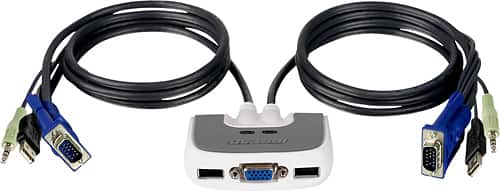
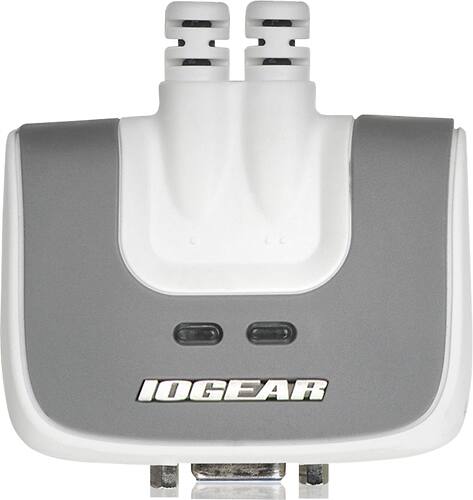
- Model:
- GCS632U
- |
- SKU:
- 6191569
Customer reviews
Rating 4 out of 5 stars with 143 reviews
(143 customer reviews)Rating by feature
- Ease of Use4.2
Rating 4.2 out of 5 stars
Customers are saying
Customers frequently mention the ease of use and the convenient USB connectivity of the MiniView Micro 2-Port USB Plus KVM Switch. Many appreciate its compact size and the included cables' length. However, some users experienced compatibility issues, particularly with certain operating systems and keyboards. A few reported instances of the product malfunctioning after a period of use.
This summary was generated by AI based on customer reviews.
- Pros mentioned:Ease of use
Rated 2 out of 5 stars
Horrible Reliability
Posted .This reviewer received promo considerations or sweepstakes entry for writing a review.This unit while easy to setup, only lasted about 2 months before the keyboard port went out. Replaced it with a new unit, and the same thing happened again. When it was working it switched quickly, and worked both with my pc and mac. It was just a disappointment that it could not stay working.
No, I would not recommend this to a friend Rated 2 out of 5 stars
Worked okay for awhile
Posted .This reviewer received promo considerations or sweepstakes entry for writing a review.This unit worked okay for awhile, then one day it just quit switching the audio and video between my two systems; however, the keyboard functionality continued working just fine. So, I have been using my Kensington 'Share Central' unit for the 'time being'; however, although it has a printer port, there is no video or audio capability with the Kensington. Now that I've added an additional box, I'll be purchasing a four-port unit by Belkin. Like the Kensington 'Share Central', the Belkin does have the Hot-Key function, as well as manual mode...which the IOGEAR lacks. The Belkin also seems to have one of the better reviews.
No, I would not recommend this to a friendRated 5 out of 5 stars
Works great and affordably priced
Posted .This reviewer received promo considerations or sweepstakes entry for writing a review.This product is much better than a similar product made by Belkin. I recently upgraded and was glad that I did. The best feature of this product is the ability to switch between computers instantly. The Belkin model takes between 15-20 seconds per switch.
I would recommend this to a friendRated 1 out of 5 stars
If you have a Mac, avoid IO Gear
Posted .This reviewer received promo considerations or sweepstakes entry for writing a review.I have a home office setup with two Macs that I need to switch between with one keyboard, mouse and monitor. I looked on Best Buy's web site and found this item that does switch USB based K/M and video with audio and is "Mac Compatible". I purchased it at my local Best Buy, brought it home to read the instructions. The instructions detailed a procedure to bring the device into something called "Hot Key Mode" to use with Macs. There's this key combo that seems relatively easy to pull off which is holding the "Clear" key on the 10 key for 2 sec, while holding you then press "-" (minus) key then release "-" first and Clear within a second of each other. I tried 20 or so times myself re-reading the description again and again to make sure I was doing it correctly. Getting no love, I called tech support. The tech was a nice guy (obviously a little weathered from supporting their products) and he had me try to do this "Hot Key Mode" multiple times. Nothin. He was sure I was doing it wrong which I can understand but it's really not that hard. I asked if we could try anything else and he said we could but it required a PC USB keyboard. Well, I don't have one of those and I'm not buying one to fix this defective device. I'll be returning it promptly to Best Buy in favor of the Belkin product that does the same thing but hopefully actually works. I should note at one point I have also purchased a USB to Serial Port converter from IO Gear that was "Mac Compatible". It absolutely did not work at all on any of the Macs I tried and I returned it in favor of a Keyspan which is all I trust for this function anymore. Long story short, IO Gear likes to pretend their products are compatible with Macs but in fact, they are not. This will be the last thing I buy from them and I would recommend anyone using Macs avoid their products.
No, I would not recommend this to a friendRated 5 out of 5 stars
Great for connecting laptop
Posted .This reviewer received promo considerations or sweepstakes entry for writing a review.I have one at work and it works great so I decided to buy one for home. Only trouble I had was I mixed up USB cables and I thought the keyboard was connected but it was not. After correcting my mistake it works great.
I would recommend this to a friendRated 5 out of 5 stars
Have my laptop and desktop hooked up to dt monitor
Posted .This reviewer received promo considerations or sweepstakes entry for writing a review.Hooked up my desktop and laptop to desktop monitor. Switches between them easily by double taping the Scroll Lock Key. When using the laptop I now have two screen available for use at one time.
I would recommend this to a friendRated 1 out of 5 stars
Not Exactly...
Posted .This reviewer received promo considerations or sweepstakes entry for writing a review.Basic problem of this device is it 'emulates' a keyboard and mouse, rather than passing-through your specific device information. As a result, if you have a wireless keyboard/mouse desktop kit that only uses a single USB port on your computer (as I do), you can only use one device. There are 2 usb ports on the KVM switch, one is dedicated to mouse, the other to keyboard. If you plug your desktop combo USB to the keyboard port, your keyboard works but not your mouse. If you plug in to the mouse port, the mouse works, but not the keyboard. It seems not to care about wireless -- but the inability to use both a keyboard and a mouse makes this device absolutely useless to me. While I didn't play around with it too much, I believe that my multimedia keys on my keyboard would not work, either (again, it emulates a standard keyboard, rather than passing through the actual device you own). In short - if you have a keyboard/mouse combo and/or a keyboard with extra keys, this device is not for you. If I find a KVM switch that works for me, I'll try to come back here and update this review. Until then, I'd have to recommend staying away from this particular device to those who have a combined keyboard/mouse, and recommend caution to anyone with enhanced keys (such as multimedia).
No, I would not recommend this to a friend- Cons mentioned:Compatibility
Rated 1 out of 5 stars
Don't Buy
Posted .This reviewer received promo considerations or sweepstakes entry for writing a review.I bought this to replace a kvm I had for 7 Yrs. This one lasted 7 mins. Would not display win vists or 7.Worked with mac for a few mins then would not switch anymore.Very poor customer support fron iogear. If you need a switch don't pick this one. I got a refund because this is the only one bestbuy had in store.
No, I would not recommend this to a friend Rated 1 out of 5 stars
Doesn't work with Wireless Keyboard/Mouse
Posted .This reviewer received promo considerations or sweepstakes entry for writing a review.I installed the KVM using my wireless keyboard and mouse. I turned on my 1st desktop and the keyboard and mouse worked fine. I turned on my 2nd desktop and the keyboard on my 1st desktop stopped working. I switched over to my 2nd desktop and discovered that only my keyboard worked on that one. So I have 2 desktops connected to IO Gear's KVM. The keyboard works on 1 and the mouse works on the other. I called IO Gear and was informed that the KVM does not always work with wireless keyboard/mouse. No where is this mentioned in any of their documentation or specifications. I wasted several hours dealing with this and I hope I can save someone else time and effort. If you have a wireless keyboard/mouse - don't buy an IO Gear KVM.
No, I would not recommend this to a friendRated 1 out of 5 stars
WARNING! does not support all mouse/USB functions
Posted .This reviewer received promo considerations or sweepstakes entry for writing a review.This unit has really great potential however it's only useful if you're running a very basic setup using factory standard equipment. In my setup I use a Logitech mouse and a jog/shuttle wheel thing for video editing; the I/O gear unit only passes basic mouse functions like click, right-click scroll wheel but not scroll wheel left or scroll wheel right. There is also control panel software for the Logitech mouse and the I/O gear product prevents this software from seeing the mouse so you lose the ability to map specific functions to the buttons on the mouse. And my jog/shuttle wheel video editor thing just plain doesn't work at all through the KVM switch. yet somehow in the manual (page 5) they advertise "complete compatibility with Mac and Sun" which is completely not the case. I would definitely say avoid this one unless you're using the mouse that came with your computer and you have no extra USB devices.
No, I would not recommend this to a friendRated 5 out of 5 stars
Excellent KVM
Posted .This reviewer received promo considerations or sweepstakes entry for writing a review.Use these at work with many flavors of PC and several different models of Sun workstation. Excellent rock solid product.
I would recommend this to a friend- Cons mentioned:Compatibility
Rated 1 out of 5 stars
Don't buy this item
Posted .This reviewer received promo considerations or sweepstakes entry for writing a review.The first one of these I had for about a month and it just stopped working. I figured okay it was a lemon but would try another one. The 2nd one only worked for a week before it stopped working. I would not recommend this product for anyone who wants it to work long term or at least longer than a month.
No, I would not recommend this to a friend Rated 5 out of 5 stars
A must on any workbench
Posted .This reviewer received promo considerations or sweepstakes entry for writing a review.Great addition to our workbench! Sound as well as keyboard, mouse and video ... nice!!
I would recommend this to a friendRated 2 out of 5 stars
won't work for 2 macs
Posted .This reviewer received promo considerations or sweepstakes entry for writing a review.This requires <scroll lock> key to work. The instructions say you can remap it to the <ctrl> key but I was unable to get it to do that. If you have 2 macs, buy a kvm with a button.
No, I would not recommend this to a friend- Cons mentioned:Compatibility
Rated 1 out of 5 stars
Burned out in 3 days
Posted .This reviewer received promo considerations or sweepstakes entry for writing a review.Bought this for my CFO. Initially hooked up keyboard to wrong port, so wouldn't switch. When we figured that out it worked for 3 days, then wouldn't light anymore.
No, I would not recommend this to a friend Rated 2 out of 5 stars
MiniView Micro 2-Port USB Plus KVM Switch with Bui
Posted .This reviewer received promo considerations or sweepstakes entry for writing a review.I tried to use this between my laptop dock (work pc) and my Mac. The package states it is mac compatible but I could never get the keystrokes to work. I bought a manual kvm switch instead and am much happier.
No, I would not recommend this to a friendRated 1 out of 5 stars
Totally worthless
Posted .This reviewer received promo considerations or sweepstakes entry for writing a review.Unfortunately I wasn't able to give this unit no stars. The first unit worked for a couple of weeks and then quit. I returned it to Best Buy and they said it was not their problem but an equipment problem and it was past their return date. After arguing for some time they gave me a replacement unit. It didn't work at all. I would definitely not recommend this unit.
No, I would not recommend this to a friendRated 1 out of 5 stars
Returning it
Posted .This reviewer received promo considerations or sweepstakes entry for writing a review.while it does connect to both CPUs, every time i switch between computers it is unable to initial handle the level of screen resolution so it pushes it down to the lowest possible. When you have a window open and go from one computer to the other and back, the window is outside the screen, but you can't adjust or close the window. There is no software download and the tech people are unhelpful.
No, I would not recommend this to a friendRated 1 out of 5 stars
Only 15 minutes until it died
Posted .This reviewer received promo considerations or sweepstakes entry for writing a review.I bought this item with high hopes. Plugged everything in and used it for a few minutes with mixed results. The display was a bit "fuzzy", like it was out of focus, but useable. The switch itselft was pretty hot, but not dangerously so. After about 15 minutes the display became dim and staticky. I thought my monitor died, who would think a part you just bought would be a problem! After troubleshooting, it was the brand new switch. I highly recommend you buy something else. This item is piece of junk.
No, I would not recommend this to a friendRated 1 out of 5 stars
Failed within two weeks
Posted .This reviewer received promo considerations or sweepstakes entry for writing a review.Would not display the screen and stopped switching back and forth from computer to computer within the first two weeks of use. The unit completely shut down. IO customer support had me on hold for over an hour and seems to be useless.
No, I would not recommend this to a friend