Customer Ratings & Reviews


- Model:
- JCD382
- SKU:
- 6115810
Rating by feature
- Value
Rating 4.1 out of 5 stars
- Quality
Rating 4.3 out of 5 stars
- Ease of Use
Rating 4.4 out of 5 stars
Customers are saying
Customers have good things to say about the Ultra Drive Mini Dock's ease of use, plentiful ports, compact size, and generally good performance. Many appreciate the additional USB ports it provides for their MacBooks. However, some customers experienced issues with compatibility, connection stability, and the device's tendency to overheat. A few also felt the price was a bit high.
This summary was generated by AI based on customer reviews.
- Pros mentioned:UsbCons mentioned:Price
Good product for MacBook Pro
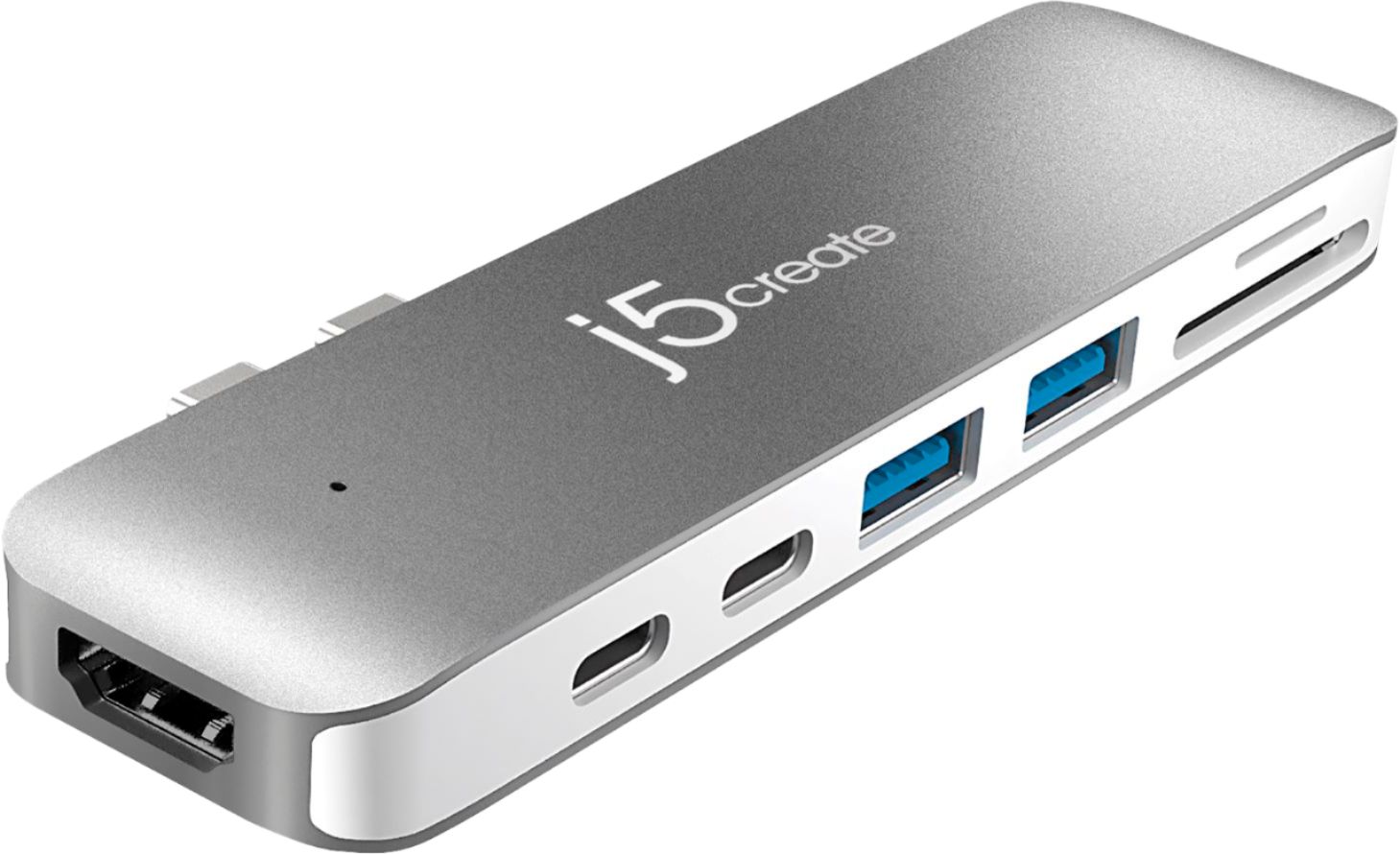
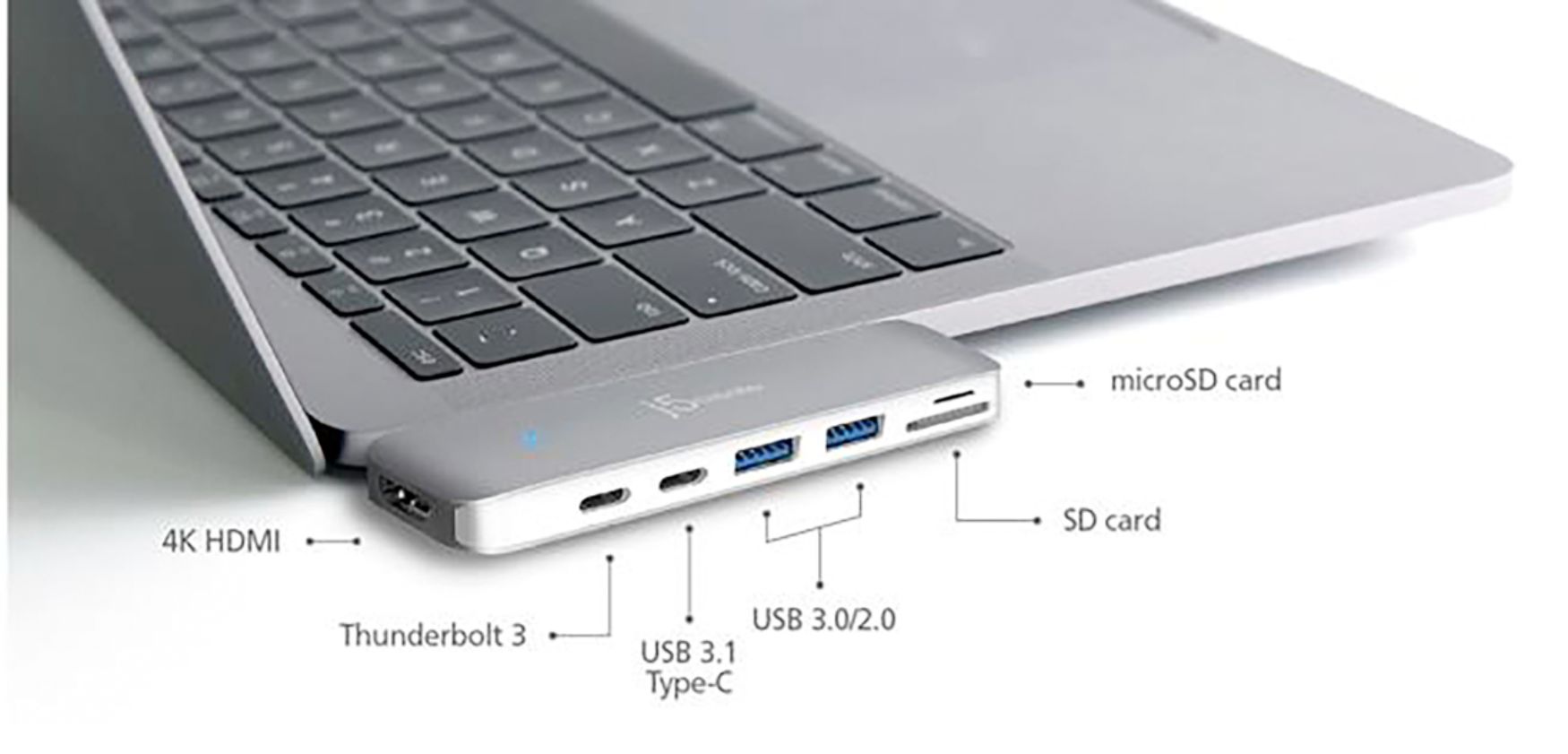
||Posted . Owned for more than 2 years when reviewed.This reviewer received promo considerations or sweepstakes entry for writing a review.This is a must have product if you own a MacBook Pro to extend its ability to connect with external devices. This mini dock hosts 1 HDMI port, 1 Thunderbolt 3 port, 1 USB 3.1 C and 2 USB-A ports. Additionally, has one SD and one micro-SD slot. A price is bit high but has got a lot of utility.
I would recommend this to a friendBrand response from J5create Team
Posted .Hi,
We appreciate your enthusiastic recommendation of the JCD382 mini docking station. This is a great addition to newer Mac Books that do not have many ports built in.
Thank you,
j5create
- Pros mentioned:UsbCons mentioned:Heat
Great addition to my MacBook
||Posted . Owned for 6 months when reviewed.This reviewer received promo considerations or sweepstakes entry for writing a review.The additional ports help me through my work day on my MacBook. I can plug in my charger, HDMI cable, and multilpe USB ports at the same time with ease. It gets warm easily so I give it a rest in the middle of the day, but it's great if you work on a laptop all day.
I would recommend this to a friendBrand response from J5create Team
Posted .Hi Sam!
That's great to hear! with everything going on in the world, it's important to be able to connect quickly and easily and I'm glad that this has let you do it. I'll pass your feedback onto my team so that we can continue to improve.
Thanks,
j5create
- Pros mentioned:Ports, Size
very handy
||Posted . Owned for 1 week when reviewed.This reviewer received promo considerations or sweepstakes entry for writing a review.It's really handy, doesn't take up too much space next to the laptop. really has all the ports that I could need. The only things I could see being drawbacks are the two bits that stick out and that it has either too many ports for some people or too few for others.
I would recommend this to a friendBrand response from J5create Team
Posted .Very handy is a great characteristic of the JCD382 due to it's plug and play nature; for recommendations on other devices that may provide more or less ports, we recommend contacting the support team, their information can be found on the packaging and a representative will be happy to assist.
Thanks,
j5create
- Pros mentioned:Ease of useCons mentioned:Heat
On sale
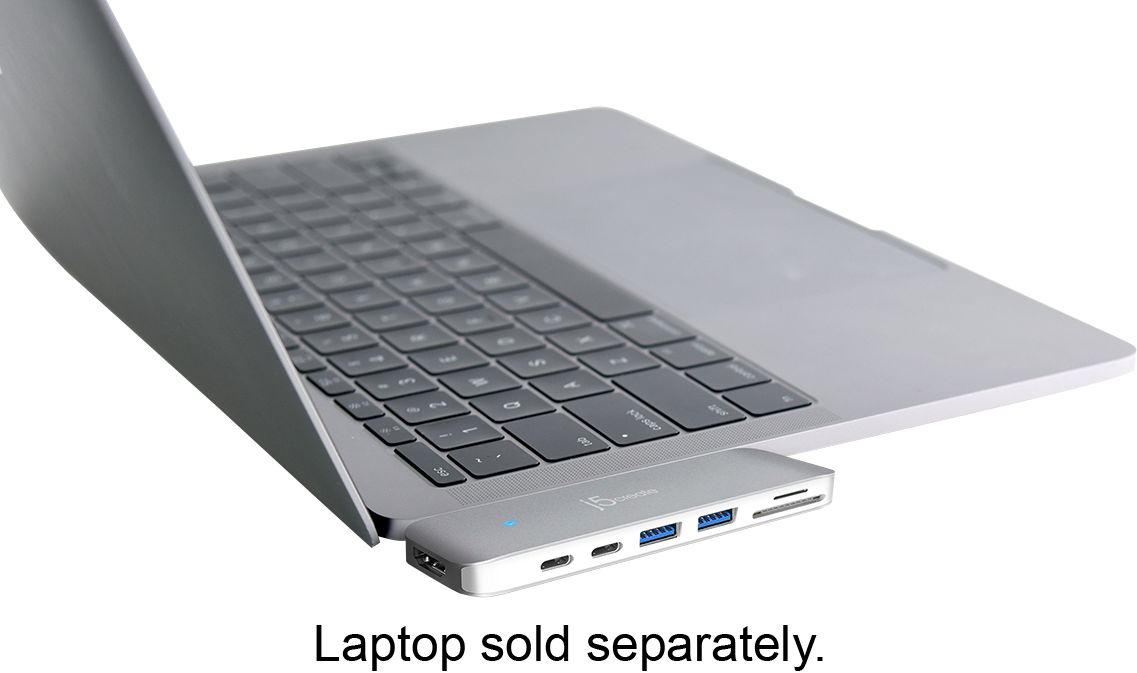
||Posted . Owned for 1 week when reviewed.This reviewer received promo considerations or sweepstakes entry for writing a review.I purchased this ultra drive for the new MacBook 16” and caught it on sale at the same time. It is easy to use and simple input into the left side of the MacBook and you are all set. The blue light will indicate once it is powered up and there you go more access to extra inputs and so forth. I’ve tested keeping it plugged in for 8 hours and it doesn’t get hot or slow down the responsive time to my mouse or hdmi when plug into it. I would recommend if your buying that new Mac and you just have type c connections.
I would recommend this to a friendBrand response from J5create Team
Posted .Hello Danny,
We appreciate the recommendation. I am happy to hear that you found the mini dock easy to use. I hope that you have a good day.
Cheers,
j5create
- Pros mentioned:PortsCons mentioned:Price
pricey, but good!
||Posted .This reviewer received promo considerations or sweepstakes entry for writing a review.A little pricey, but it does the job and provides 7 ports!
I would recommend this to a friend - Pros mentioned:Usb
Ultra Drive
||Posted .This reviewer received promo considerations or sweepstakes entry for writing a review.However the ultra drive does add a little bit of an extra appendage to your new sleek MacBook, it really does add functionality and extra purpose. Just like the elder MacBooks, MacBook Pros, it offers regular USB ports along with photo disks and what I like about it, it has an HDMI port for easy connectability to your television. I didn’t realize there are many things you can do with video through your laptop being connected to your smart tv. The only thing I wish is the need for this device when apple seems like they are always coming up with new ways for you to have to purchase external devices and new ways for us to have to purchase different types of charging and connectability cords and devices. Seems like that should be regulated in some way... but, it is what it is... I’m Not dissatisfied with the performance of this ultra drive.
I would recommend this to a friendBrand response from J5create Team
Posted .Thank you for reviewing the JCD382; due to the variety of ports on the mini dock i.e. HDMI, thunderbolt 3, SD card reading, USB Type-A ports for peripherals it is a highly sought out adapter - it's simple PnP nature will have you up and running in seconds.
Gratefully,
j5create
- Pros mentioned:UsbCons mentioned:Compatibility
Helps extend the utility of MacBook Pro
||Posted . Owned for 1 month when reviewed.This reviewer received promo considerations or sweepstakes entry for writing a review.My relatively new MacBook pro only has USB-C inputs/outputs, and now that I am working at home, I lost my usual docking station. This dock enables me to use a wireless mouse, connect to a full-size monitor, and charge my phone all at once, and for ~ half the price of the docking station at work. The only negative (not enough to lose a star in the review) is that I had to take the bottom protective cover off of my Mac to insert the docking station. It's a small price to pay for a product that helps so much.
I would recommend this to a friendBrand response from J5create Team
Posted .Hi and thank you for the input on the mini dock, we are pleased to hear it is working to your satisfaction. If interested, we would value the opportunity to discuss other adapters we have in stock that connect via a cable allowing you keep the cover on and not have to remove it. Our support information can be found on the packaging and a representative will be ready to help.
Respectfully,
j5create
- Pros mentioned:DesignCons mentioned:Compatibility
Clever Device
||Posted . Owned for 1 month when reviewed.This reviewer received promo considerations or sweepstakes entry for writing a review.The device plugs into your USB 3 double ports and enables a multitude of inputs. Well designed and constructed, very useful. Will not work if you have protective covers for a Macbook Air
I would recommend this to a friendBrand response from J5create Team
Posted .Hello,
Great to hear that you like the mini docking station for your Mac. It does have a tight tolerance alongside your computer so any kind of case on the keyboard portion will cause it to not connect. Thank you for the feedback.
Cheers,
j5create
- Pros mentioned:UsbCons mentioned:Heat
Everything you need all in one!
||Posted . Owned for 1 month when reviewed.This reviewer received promo considerations or sweepstakes entry for writing a review.Has everything you need all in one add on accessory. Includes hdmi, sc card port, microSD port, two USB ports and two usb c ports. Only thing is it does get a little hot after time.
I would recommend this to a friendBrand response from J5create Team
Posted .Reed2312, in regards to the JCD382 becoming warm, this is considered normal as electricity passes through. In the case where it is smoking or harming you, please reach out to the support team and an agent will gladly help. If necessary we will offer an exchange under the manufacturer's two year warranty.
Appreciatively,
j5create
- Pros mentioned:UsbCons mentioned:Charging
Just what I needed
||Posted . Owned for 1 month when reviewed.This reviewer received promo considerations or sweepstakes entry for writing a review.I needed a way to connect my SD card to transfer files. One downside is that it wouldn’t charge my phone in the adapter very well
I would recommend this to a friendBrand response from J5create Team
Posted .Hi Mitch, when it comes to charging peripherals, we recommend our "JUP" series devices as they can handle multiple gadgets at once.
Sincerely,
j5create
- Pros mentioned:Ease of use, Size
Connect your Mac to everything
||Posted . Owned for 1 month when reviewed.This reviewer received promo considerations or sweepstakes entry for writing a review.This is such a small device and yet is so powerful. It's easy just to pop in to the side of your Mac and allows you to connect everything you can think of.
I would recommend this to a friendBrand response from J5create Team
Posted .For Mac users needing additional monitors, pass through charging, SD card reading and more, look no further - the JCD382 will make a lasting impression, thanks for the feedback!.
Regards,
j5create
- Pros mentioned:UsbCons mentioned:Price
Great product
||Posted .This reviewer received promo considerations or sweepstakes entry for writing a review.If you have an apple and want to use USB ports. This is a must have. It's also useful to connect it straight to the TV using a HDMI cable. It is a little pricey though
I would recommend this to a friendBrand response from J5create Team
Posted .Adding capabilities i.e. SD card reading, HDMI and USB ports for accessories to your Mac has never been easier. The JCD382's unique PnP design adds it all in seconds!
Cordially,
j5create
- Pros mentioned:UsbCons mentioned:Connection
Nice addition for your Mac
||Posted .This reviewer received promo considerations or sweepstakes entry for writing a review.With two usb, one hdmi, and a sd card reader, it has what you need. My only concern is the port that connects to the Mac is a bit fragile.
I would recommend this to a friendBrand response from J5create Team
Posted .Appearing fragile is definitely a cause for concern and we understand. Rest assured, the JCD382 will insert all the way into your Mac securing tightly. In the case where the USB-C connectors are not providing a snug connection and are loose, we recommend contacting support printed on the casing to speak with a rep and possibly exchanging it with the manufacturer's 2-year warranty.
Respectfully,
j5create
- Pros mentioned:Design, Ports, Size
Works well and thin. Well designed for travel
||Posted . Owned for 2 weeks when reviewed.This reviewer received promo considerations or sweepstakes entry for writing a review.Works well and thin. Well designed for travel. All the ports you need.
I would recommend this to a friendBrand response from J5create Team
Posted .All the basic needs built into one is what makes the JCD382 a must-have for Mac users needing to read SD cards, augment monitor connectivity and more.
Appreciatively,
j5create
- Pros mentioned:SizeCons mentioned:Compatibility
Good Accessory
||Posted .This reviewer received promo considerations or sweepstakes entry for writing a review.I really like how compact this dock is. The only downside is it can no be fully plugged in if you have a case on the bottom of your computer.
I would recommend this to a friendBrand response from J5create Team
Posted .Customer reviews are always welcome as they help us improve. In regards to the JCD382 not working if the cover is on, we apologize for the inconvenience as the USB-C male ends require full insertion for functionality. Models such as the JCD383 connect via a cable and should work with a case on. If you would like more information on the hub, please reach out to support and a rep will be more than happy to answer any questions or concerns you may have.
Respectfully,
j5create
- Pros mentioned:DesignCons mentioned:Compatibility
Must have
||Posted .This reviewer received promo considerations or sweepstakes entry for writing a review.Works great nice design. Only thing I do not like about it is I can not have my case on the bottom of my computer when I’m using it.
I would recommend this to a friend - Cons mentioned:Connection, Price
Buyers beware
||Posted . Owned for 3 weeks when reviewed.This reviewer received promo considerations or sweepstakes entry for writing a review.This thing killed one of my external hard drives within 2 disconnections so I had to exchange it for another one. Also this thing randomly disconnects my external hard drive for no reason. I'd go with something cheaper. You also have to make sure its plugged in all the way firmly. Even if you're pulling out the external, keep your hand pushed on the dock otherwise both will pull out.
No, I would not recommend this to a friendBrand response from J5create Team
Posted .Hi Steven, I apologize for the inconvenience you experienced with your hard drives. Depending on the power requirement of the hard drives, they may or may not work. The mini dock's USB ports are intended for mostly mice, keyboards, flash drives and web cameras. Because the power is obtained from the computer's USB ports, it becomes divided amongst the whole dock, therefore leaving less and less power available for peripherals such as hard drives. We recommend connecting directly to the computer instead. We apologize for the inconvenience and if you have any questions or concerns, please reach out to the support team and a rep will gladly assist.
Respectfully,
j5create
- Pros mentioned:UsbCons mentioned:Heat
Small but mighty addition
||Posted . Owned for 1 month when reviewed.This reviewer received promo considerations or sweepstakes entry for writing a review.I initially purchased this because I wanted to be able to connect an SD card from a Doxie for scanning documents, but it's also been useful for connecting a second monitor without any trouble. My only complaint is that it does heat up more quickly than I'd like, so I'd advise only using this when you need it - not all day every day.
I would recommend this to a friendBrand response from J5create Team
Posted .Hey and thanks for the review on the JCD382. When it comes to the warm touch, we can assure you this is normal due to electricity running through it. If in the case the mini dock is harming you, we strongly suggest calling in, speaking with a rep and seeking an exchange under the manufacturer's two year warranty.
Respectfully,
j5create
- Pros mentioned:Usb
Excellent Mac Accessory
||Posted .This reviewer received promo considerations or sweepstakes entry for writing a review.This little jewel works great. Just plug into your MacBook and presto you have all the inputs that unit is missing. Works great for SD & USB.
I would recommend this to a friend - Pros mentioned:Size
A lot of functionality in a small package
||Posted . Owned for 2 weeks when reviewed.This reviewer received promo considerations or sweepstakes entry for writing a review.I purchased this dock for my 2019 MacBook Air once it became my primary work from home device during the pandemic. Being able to add in an HDMI port and a couple of USB A ports is invaluable. I did have to combine with another dongle to be able to get a second monitor, and thankfully that dongle also had a thunderbolt charging port so it all worked and I kept my laptop charged. I only have a small amount a feedback to provide to the j5create guys. It would be nice to maintain thunderbolt 3 ports instead of 1 thunderbolt 3 and 1 usb-c (though this could be a technological limitation). Additionally, I know it would make it a little bit larger, but being able to squeeze a second HDMI port (on the opposite side) would be a game changer. I love how small and unobtrusive this dock is, I just leave it attached all the time. Unfortunately, for me to hook up to 2 external displays, I have to keep another dongle in the pocket (the apple digital av one at that, so I can continue to charge my device while getting another HDMI connection).
I would recommend this to a friendBrand response from J5create Team
Posted .Hi Tom!
Thanks for the feedback! I'll pass it along to my team so that we can continue to improve on our devices and ensure that they meet our customers evolving needs.
Thanks,
j5create