Customer Ratings & Reviews


- Model:
- JCD382
- SKU:
- 6115810
Rating by feature
- Value
Rating 4.1 out of 5 stars
- Quality
Rating 4.3 out of 5 stars
- Ease of Use
Rating 4.4 out of 5 stars
Customers are saying
Customers have good things to say about the Ultra Drive Mini Dock's ease of use, plentiful ports, compact size, and generally good performance. Many appreciate the additional USB ports it provides for their MacBooks. However, some customers experienced issues with compatibility, connection stability, and the device's tendency to overheat. A few also felt the price was a bit high.
This summary was generated by AI based on customer reviews.
- Pros mentioned:Ports
Great little gadget for the Mac Book Pro.
||Posted . Owned for 1 month when reviewed.This reviewer received promo considerations or sweepstakes entry for writing a review.The amount of ports it has for different devices is convenient. Has worked really well thus far.
I would recommend this to a friendBrand response from J5create Team
Posted .MacBook Pro users needing to augment SD card readers, HDMI and USB ports for peripherals can rely on the JCD382 to get the task done - simply insert and enjoy!
Cordially,
j5create
- Pros mentioned:Ease of use, Size
Basic and Simple
||Posted . Owned for 3 weeks when reviewed.This reviewer received promo considerations or sweepstakes entry for writing a review.I bought this docking unit because of the Covid-19 pandemic so I can set my boss up at his home office. He is not in any way shape or form Technologically adept. He was able to pretty much plug and play and get this going. If you don't have a lot of accessories it's the perfect docking station.
I would recommend this to a friendBrand response from J5create Team
Posted .Hello,
I am happy to hear that you got your boss’s work from home setup up and running. This adapter is plug and play so it is easy to use. We appreciate you taking the time to post a review.
Have a good day,
j5create
- Pros mentioned:UsbCons mentioned:Compatibility
Wonderful Fix for the Mac
||Posted . Owned for 3 weeks when reviewed.This reviewer received promo considerations or sweepstakes entry for writing a review.I love this as a way to add the various ports to the new Mac. The only areas- make certain it is fully plugged in as well as the cables plugging into it. It doesn’t have a large tolerance. Also, if you want a case on the Mac, this will prevent it from working as it is snug down the side.
I would recommend this to a friendBrand response from J5create Team
Posted .Having a cover on the Mac has been a known issue for the JCD382; we have other devices that work with Mac as well and will connect via a USB-C cable and therefore the cover will not be an issue anymore. If interested, we would love the opportunity to discuss some of the available devices, feel free to contact the support team on the packaging for more information.
Respectfully,
j5create
- Cons mentioned:Compatibility
Underwhelmed. Good concept. Works Sporadically
||Posted . Owned for 3 weeks when reviewed.This reviewer received promo considerations or sweepstakes entry for writing a review.I bought this on the recommendation of a sales associate in the store. He assured me that it was apple certified and was the best option to meet my needs. I had purchase a hard plastic cover for my Mac Book Pro which interferes with the proper seating of the dock. This is less of a concern. The main concern is that the dock works at times and doesn't other times. I initially thought it was because I had it linked with an additional dock for some other items, but found when my printer is directly connected to the dock it still has issues in connecting for printing at times.
I would recommend this to a friendBrand response from J5create Team
Posted .Aggieblue, I regret to hear about your troubles using the JCD382. When it comes to higher wattage requiring devices such as printers, we recommend connecting those directly to the computer instead of the mini dock; the mini dock is intended for mostly mice, keyboards, flash drives, web cams. In regards to a cover on your Mac, this would unfortunately have to be removed in order for the JCD382 to make a proper connection. Alternatively, the JCD383 would be a good choice since it connects via a cable and would not require that you remove the hard case. For further information, please feel free to reach out to us.
Respectfully,
j5create
- Pros mentioned:Usb
Easy port replicator
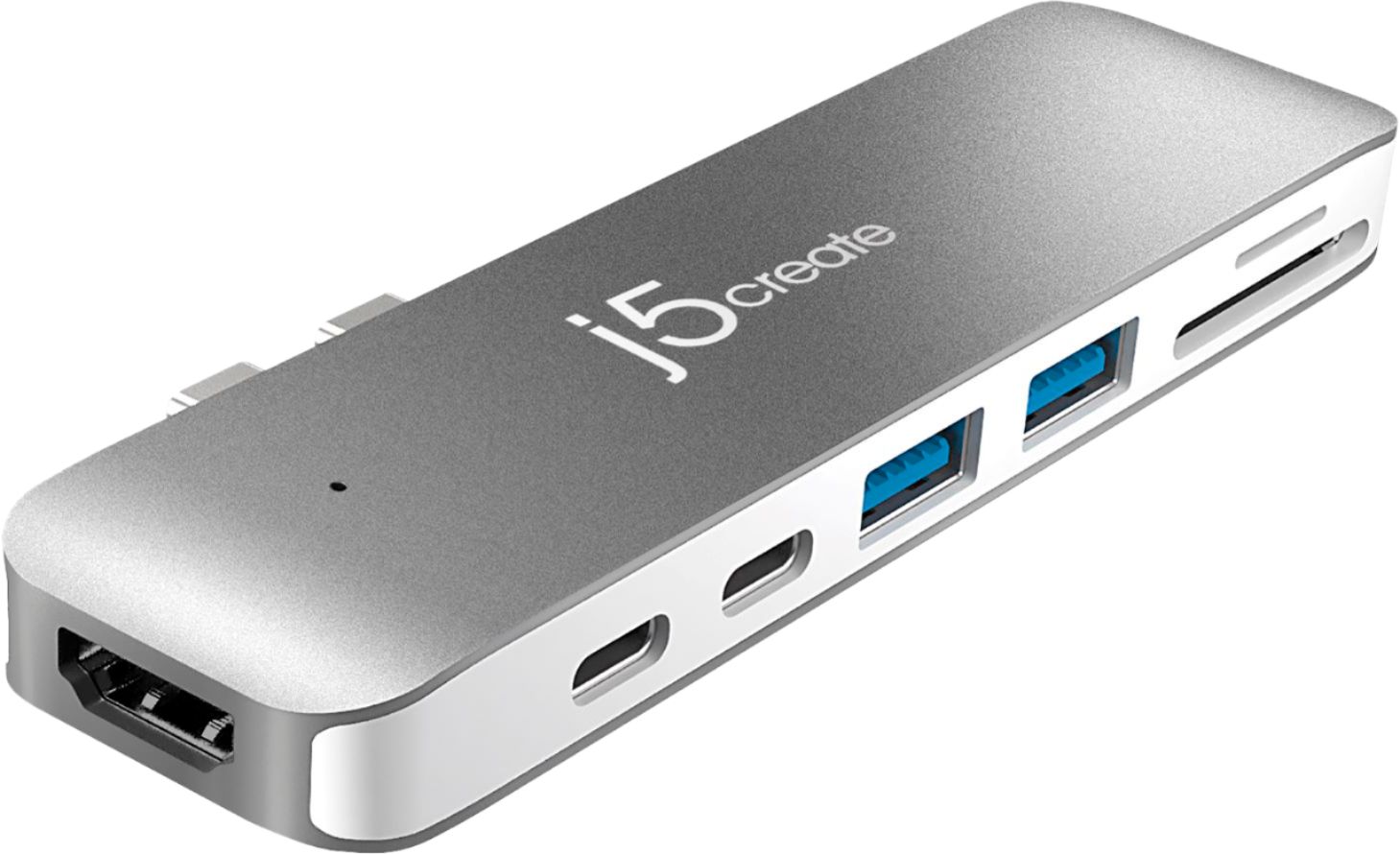
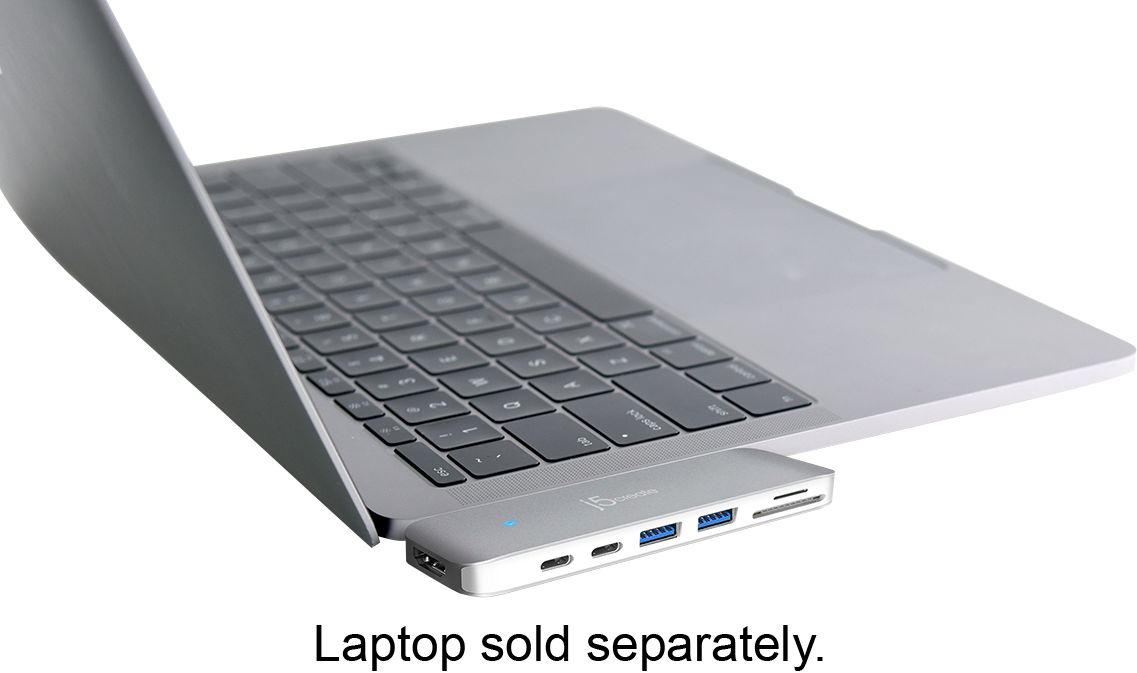
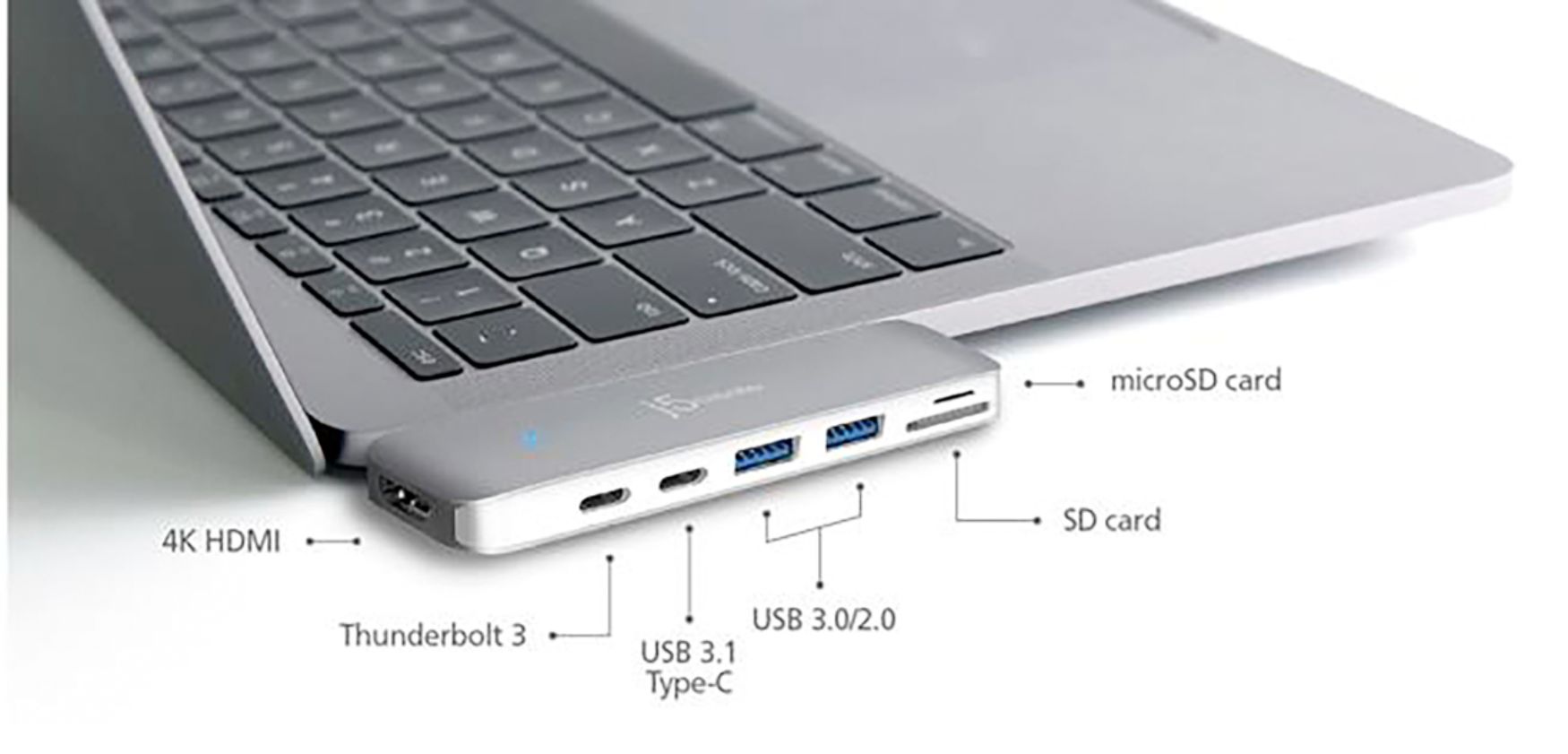
||Posted . Owned for 4 months when reviewed.This reviewer received promo considerations or sweepstakes entry for writing a review.This is a small easy to attach, unobtrusive port replicator for Ipads. It plugs into the two USB 3C or Thunderbolt connectors on the side of the laptop. It has two USB 3 ports, one USB 3C port, HDMI port, SD and Mini SD card readers. The issue I've had with this and two other very different replicators, is a brief disconnect of the USB ports while doing large file transfers.
I would recommend this to a friendBrand response from J5create Team
Posted .Hello,
We are happy to hear that you are pleased with the mini docking station. This mini dock is a great solution for newer laptops that have a limited selection of ports. I hope that you have a good day.
Thanks,
j5create
- Pros mentioned:Usb
Can’t use with a cover
||Posted .This reviewer received promo considerations or sweepstakes entry for writing a review.I have a Mac Pro with the USB C connections. Since most things that connect to this needs other ways to connect this was a great solution. It worked fine until I got a cover for my Mac. Now it cannot get close enough to the connections so I had to buy extenders. I still like the fact that it lets me hook up pretty much anything I want. Would just have preferred it to fit without having to use adapters with my cover.
I would recommend this to a friend - Cons mentioned:Compatibility, Connection
Uggghhh
||Posted .This reviewer received promo considerations or sweepstakes entry for writing a review.No be transparent, this product had no chance of getting a good review from me before I even opened the box. The fact that you have to buy an adapter for a $1,500 laptop just infuriates me not to mention that it's another $100 out of your pocket. Okay, now that my rant is out of the way here is some more objective commentary. This unit has been spotty at best in terms of actually working. The reason being, that it does not always stay connected to the laptop. If I have the laptop on a surface other than a counter or a desk, the adapter will not stay connected. So when I want to use a thumb drive or connect other devices like a Fitbit or or my iPhone I have to make sure my computer is on a hard, flat surface. The one good thing about this product is that fortunately I do not need to use it that often. I've resorted to using the cloud or e-mail to transfer files for the most part. If I had to do it over, I would not make this purchase.
No, I would not recommend this to a friendBrand response from J5create Team
Posted .Spending alot of money on different adapters and still not accomplishing your intentions is inconvenient and frustrating, we're sorry to hear you feel that way. We have other devices available and if possible, we would love the opportunity to discuss them with you. Our support information can be located on the casing and an agent will be ready to help.
Sincerely,
j5create
Very Good, but still has Faults
||Posted . Owned for 1 month when reviewed.This reviewer received promo considerations or sweepstakes entry for writing a review.It’s sleek and sturdy- the two reasons you buy a hub like this one instead of others. My mom has had one like this for over a year now, and doesn’t fit quite snugly anymore. —I’ve had mine for only a month or so, but it clicks into place every time and stays. So far so good. It DOES have one thunderbolt 3 port which can charge your laptop at full speed, and that it’s nice. Other do not, and they don’t bother to tell you they’re lacking it either- so watch to make sure you’ve got Thunderbolt 3, NOT JUST usb C. What I don’t like, is that it’s a bit finicky as to what it will power and not power. I used a CD drive to install music software onto my computer, but the USB A port is only strong enough to power it for like 30 seconds. My girlfriends 2015 MacBook powered the drive with no problem. My work around was to use my big hard drive that plugs into the wall and use the ports off of that, and route it to my computer. Otherwise the SD card transfer speeds and USB C ports work just fine on it and it feels quite sturdy, taking up less space than other dangly dongle docks. It’s a good unit, if you want one this style, definitely go for this one, but be prepared to workaround with some power issues for older devices.
I would recommend this to a friendBrand response from J5create Team
Posted .We apologize for the inconvenience this may have caused; connecting a CD drive unfortunately requires more power than what can be provided through the mini dock as it's power is obtained from the computer's USB port and as it becomes divided amongst all the ports on the dock, it leaves very little power left over just enough to power devices such as mice, keyboards, flash drives, webcams. It is recommended to connect CD drives directly to the computer instead. We recommend contacting the support team on the packaging for obtaining a different device that is self-powered and potentially will work for the setup.
Respectfully,
j5create
- Pros mentioned:Design, Ports
J5 hub
||Posted .This reviewer received promo considerations or sweepstakes entry for writing a review.Slim design, seamles fit. Perfectly expands ports on MacBook. No regrets
I would recommend this to a friendBrand response from J5create Team
Posted .Slim design, easy connection to your Mac makes the JCD382 a must have - the no driver required nature makes this a popular choice.
Regards,
j5create
- Pros mentioned:Usb
Very Good
||Posted .This reviewer received promo considerations or sweepstakes entry for writing a review.Was skeptical about grabbing this but needed a lot more ports for the MacBook Pro. I always have two external hardiness plugged up at the same time pulling and dragging info off of both pop them. Didn't think it would work so well but its flawless. No complaints here.
I would recommend this to a friendBrand response from J5create Team
Posted .No complaints is what we aim for and we're glad to hear the JCD382 is what you were looking for, Whodey!
Regards,
j5create
- Pros mentioned:Ease of useCons mentioned:Compatibility
Works best with computer shell protectors.
||Posted . Owned for 2 weeks when reviewed.This reviewer received promo considerations or sweepstakes entry for writing a review.Designed to fit snuggly against the side of the laptop. Does not work well with a MacBook with a cover shell. Even a thin shell will hamper use. Must get two short extension cables to connect for successfully use. Once connected works well.
No, I would not recommend this to a friendBrand response from J5create Team
Posted .Hi AlSi, thank you for your feedback and we apologize that the JCD382 doesn't work well with a protective case onto a computer. If you have any question, feel free to contact us by phone, email or live chat. Respectfully, j5create.
- Pros mentioned:Ports, Size
Great Little Dock
||Posted .This reviewer received promo considerations or sweepstakes entry for writing a review.This great little dock matches my Macbook Pro perfectly and, when using it, if feels as though it was one with the laptop. It is also small and compact to throw in my laptop case when I'm not using it. It includes all of the essential ports that you should need.
I would recommend this to a friendBrand response from J5create Team
Posted .Essential ports are important when needing to get work done and we're glad to hear the mini dock is working to your needs.
Gratefully,
j5create
- Cons mentioned:Connection
Nice adapter for Mac book
||Posted . Owned for 10 months when reviewed.This reviewer received promo considerations or sweepstakes entry for writing a review.It’s fast and it works good. Downside it’s easy to disconnect from computer. I have a case on the Mac book but thus device does not fit with case. As I said if you use the adapter and lift your computer to move it more likely it will disconnect. I recommend for the price as well the other that has a cambie connection.
No, I would not recommend this to a friendBrand response from J5create Team
Posted .Nice and very handy distinguishes the mini dock, for Mac owners needing more capabilities - this is the device for you!. Feel free to contact support on the packaging for concerns, warranty information, questions and a representative will be happy to assist, thanks!
Regards,
j5create
- Pros mentioned:Size, Usb
Excellent product ... necessary for any MacBook
||Posted . Owned for 2 weeks when reviewed.This reviewer received promo considerations or sweepstakes entry for writing a review.Given the lack of USB ports on all MacBook products a small yet effect item like this is necessary. It provides accessibility to charge your computer or iPhone while also having USB ports and its small enough to carry utilizing minimal space.
I would recommend this to a friendBrand response from J5create Team
Posted .Utilizing minimal space and for those lacking USB ports makes the JCD382 a smart add on - simply insert, watch the blue LED illuminate and enjoy.
Gratefully,
j5create
- Pros mentioned:PortsCons mentioned:Connection
Good Idea-Poor Execution
||Posted .This reviewer received promo considerations or sweepstakes entry for writing a review.The idea behind this product seems to be solid. It adds needed ports to the new style macbook pro model, in an easy single plug in style. However making it work is a different story. First there can not be a hard shell case on the computer,as the unit will not plug in completely if there is. Secondly, when it is plugged in without the case there appears to be lots of intermittent connections. When plugging in an external drive for example the computer would only recognize it after wiggling the connection several times. This may be due to the unit taking up two ports on the computer, and not getting a good connection to both at the same time. Again this seems like a good idea, but needs more work for it to get a reliable connection, and work properly
No, I would not recommend this to a friendBrand response from J5create Team
Posted .Purchasing a device to meet expectations and instead gives more problems is inconvenient; we understand and apologize. We would value the opportunity to troubleshoot this and see if we can offer a solution. Our support information can be found on the casing and a rep will be ready to help.
Respectfully,
j5create
- Pros mentioned:Ports
Just what I needed
||Posted .This reviewer received promo considerations or sweepstakes entry for writing a review.I waited forever to buy a new Mac, well actually it was until my computer would not power up anymore. But I didn't want to buy something for which I would have to get a bunch of adapters. Grief! But this thing did the trick. It has all the ports I need and allows me to power my computer while still using the other ports.
I would recommend this to a friendBrand response from J5create Team
Posted .Mac users looking to add monitors, charging, SD card reading and USB ports for peripherals, look no further; with the mini dock, you can have it all - simply insert to the side of the computer, watch the blue LED light turn on and you're done.
Sincerely,
j5create
- Cons mentioned:Price
Must have for Mac users.
||Posted .This reviewer received promo considerations or sweepstakes entry for writing a review.This is a nice add on to have for MacBooks. It does everything it says giving you several connection options with out having to sacrifice thunderbolt connections. My only complaint is price on these things. They seem to be rather high and you have to have them to connect your memory cards and thumb drives to your MacBook. Still worth it.
I would recommend this to a friendBrand response from J5create Team
Posted .Hello TheDeadAlchemist, thank you for the input on the JCD382 and it's capabilities. The JCD382 definitely provides great capabilities for Mac users with it's simple plug and play nature. We do apologize for the price on the JCD382, we do have other devices if you are interested in learning of them. ** Please feel free to contact the Technical Support team on the packaging for further assistance or if you have any other questions and someone will be glad to assist you. Thank you.
- Pros mentioned:Ports, Size
Mini Dock is Perfect!
||Posted . Owned for 10 months when reviewed.This reviewer received promo considerations or sweepstakes entry for writing a review.Mini Dock is fantastic. it has all the ports that I have needed so far at work and my home. It is small and not bulky. I love how it plugs right in and theres no cable or chord.
I would recommend this to a friendBrand response from J5create Team
Posted .We're glad to hear the Dock is a perfect device for your computer. Thank you for your feedback.
- Pros mentioned:UsbCons mentioned:Compatibility
Works for some things but not all/
||Posted . Owned for 1 month when reviewed.This reviewer received promo considerations or sweepstakes entry for writing a review.This dock is not as compatible as I would have liked it to be, doesn't allow for charging as it said it could. It does give 2 USB ports however, which the MacBook Air does not have, so I can use a thumb drive to transfer data back and forth.
I would recommend this to a friendBrand response from J5create Team
Posted .Hello Teton, the JCD382 provides the user with two USB-C ports in which the USB-C port to the right is for simple data transfer only and the USB-C to the left is Thunderbolt 3 which provides either charging, display output, data transfer. We apologize for the inconvenience this may have caused you. Please feel free to contact us at your earliest convenience with our information on the packaging for
Technical Support with questions, comments, concerns
regarding your j5create device and someone will be more than happy to further assist you and potentially provide a solution to your situation.
We also provide both Spanish and English speaking Technical Support. Thank you.
- Pros mentioned:Usb
Great accessory!
||Posted . Owned for 1 month when reviewed.This reviewer received promo considerations or sweepstakes entry for writing a review.What is there to say about this adapter that isn't already said in the manual. It snaps right onto the side of my MacBook Pro to give me 2 USB C, 1 USB A, 1 full size HDMI, a micro SD and full size SD card reader. There are a few things to mention..... Please read the instructions. You would think that this is a pretty simple item to use, which brings me to my second point. Only one of the USB C ports can be used to charge through. It's the top one, marked Thunderbolt 3. If you try to charge through the standard USB C, you'll burn the unit up. Beyond that, this thing works exactly as advertised. It's a little pricey for not being an Apple product, but it definitely works.
I would recommend this to a friendBrand response from J5create Team
Posted .Hi Brent!
That's great! With everything going on in the world it's important to be able to connect quickly and easily and I'm glad that this has let you do it.
Thanks,
j5create