Customer Ratings & Reviews
- Model:
- 90FN006NUS
- SKU:
- 5578757
to a friend
Customers are saying
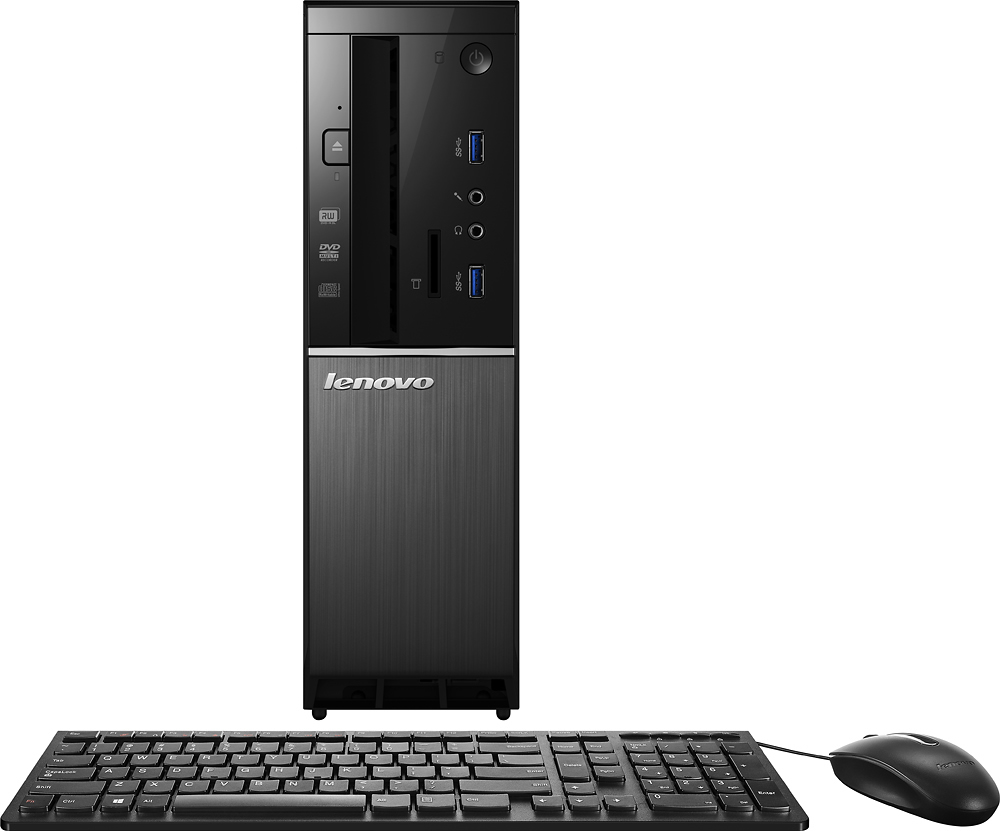
Customers often highlight the 510S-08ISH Desktop's strong performance, attractive price, and convenient size. Many also appreciate its ease of setup and sufficient storage capacity. While some users expressed preference for a different operating system, the positive feedback on performance and value outweighs these concerns. The ample hard drive space is also frequently praised.
This summary was generated by AI based on customer reviews.
Great pc
||Posted .This reviewer received promo considerations or sweepstakes entry for writing a review.We got this pc for my grandmother so that she can do her basic tasks and games. So far we have not had any problems with it at all
I would recommend this to a friend- Pros mentioned:Price
Great Value
||Posted .This reviewer received promo considerations or sweepstakes entry for writing a review.I needed a new tower for basic office work and internet access and He recommended this one for the value aspect and it has been working great.
I would recommend this to a friendBrand response from Lenovo Product Expert
Posted .Thank you for choosing the Lenovo IdeaCentre 510s desktop. We are pleased to hear that the value and performance of the IdeaCentre 510s meets your computing needs so well.

- Pros mentioned:Speed
Good computer for streaming
||Posted .This reviewer received promo considerations or sweepstakes entry for writing a review.So far so good as the processor seems fast enough to deliver quality audio and video streams.
I would recommend this to a friendBrand response from Lenovo Product Expert
Posted .Thank you for choosing the Lenovo IdeaCentre 510s desktop. We are pleased to hear that the performance of the IdeaCentre 510s meets your computing needs so well.
- Pros mentioned:Size
Nice basic computer
||Posted .This reviewer received promo considerations or sweepstakes entry for writing a review.Good little computer for using Facebook and e-mail. Also handles the lite office app's too.
I would recommend this to a friendBrand response from Lenovo Product Expert
Posted .Thank you for choosing the Lenovo IdeaCentre 510s desktop. We are pleased to hear that the IdeaCentre 510s is working out so well for you.
- Cons mentioned:Windows 10
hard to tell ( too new) but like it so far
||Posted .This reviewer received promo considerations or sweepstakes entry for writing a review.except for Windows 10, ugh. wish Microsoft would fix the inability to turn off auto update.
I would recommend this to a friendBrand response from Lenovo Product Expert
Posted .Thank you for choosing the Lenovo IdeaCentre 510s desktop. You can turn off automatic updates in Windows 10. You will still get alerts when there is an update, but you decide when and if you want to install the update. This gives you the opportunity to create a restore point on your device before you allow the update. It also lets you choose a time for the update that is convenient for you. Just click on the magnifying glass icon on the bottom left of your Windows 10 screen. Type "automatic updates" in the search window. Click on "Windows Updates Settings" from the list of choices. Select "advanced options". Under "Choose how updates are installed" click on the dropdown menu and choose the way you want to receive update alerts.
- Pros mentioned:Performance
Lenovo
||Posted .This reviewer received promo considerations or sweepstakes entry for writing a review.Purchase this computer as an upgrade, it's a huge improvement from our previous computer
I would recommend this to a friendBrand response from Lenovo Product Expert
Posted .Thank you for choosing the Lenovo IdeaCentre 510s desktop. We are pleased to hear that the IdeaCentre 510s meets your computing needs so well.
Good product for the price
||Posted .This reviewer received promo considerations or sweepstakes entry for writing a review.I have purchased economical towers from Best Buy in the past and have had very little problem with them. My last one was an EMachine that lasted seven years before crashing. This Lenovo should last at least this long, if all goes well. It has only been two months and the unit is functioning properly, with little lag on start up. I am please with this purchase and shall do this type of purchase again in the future.
I would recommend this to a friendBrand response from Lenovo Product Expert
Posted .Thank you for choosing the Lenovo IdeaCentre 510s desktop. We are pleased to hear that the performance of the IdeaCentre 510s meets your computing needs so well.
- Pros mentioned:Price
Good buy for the price
||Posted .This reviewer received promo considerations or sweepstakes entry for writing a review.I got the computer at a great price so it was a good deal. Overall it's a littler slow.
I would recommend this to a friend - Pros mentioned:Price
Great value!
||Posted .This reviewer received promo considerations or sweepstakes entry for writing a review.Easy set-up, great price, works great! If you need basic computer to run office, get web, etc, this is a great one and the price was best.
I would recommend this to a friendBrand response from Lenovo Product Expert
Posted .Thank you for choosing the Lenovo IdeaCentre 510s desktop. We are pleased to hear that the value and performance of the IdeaCentre 510s meets your computing needs so well.
Don't know what you want
||Posted .This reviewer received promo considerations or sweepstakes entry for writing a review.STILL LEARNING. Never could load WEBROOT I was comfortable with Vita so I'm a dinosaur.
I would recommend this to a friendBrand response from Lenovo Product Expert
Posted .This system comes with a free trial of McAfee virus protection. You will need to uninstall this and be sure Windows Defender is turned off before you can install Webroot. Only one virus protection software package can be on the device. With regard to learning your way around Windows 10, you may want to try YouTube.com (just type that address in your browser address window). There are hundreds for free instructional videos there about Windows 10. Just type Windows 10 Introduction in to the YouTube search window. You can watch free videos there that will show you the basics all the way up to tips and tricks videos and they're all free.
- Pros mentioned:Price
Good value
||Posted .This reviewer received promo considerations or sweepstakes entry for writing a review.It's a good computer for the price and the small size is easy to set out of the way
I would recommend this to a friendBrand response from Lenovo Product Expert
Posted .Thank you for choosing the Lenovo IdeaCentre 510s desktop. We are pleased to hear that the value and performance of the IdeaCentre 510s meets your computing needs so well.
- Pros mentioned:Price
Good Value
||Posted .This reviewer received promo considerations or sweepstakes entry for writing a review.Good bang for the buck. Not a gaming computer, but works well for all other tasks.
I would recommend this to a friendBrand response from Lenovo Product Expert
Posted .Thank you for choosing the Lenovo IdeaCentre 510s desktop. We are pleased to hear that the IdeaCentre 510s meets your computing needs so well.
Great computer
||Posted .This reviewer received promo considerations or sweepstakes entry for writing a review.It's not the most powerful computer out there but easy setup and works great.
I would recommend this to a friend- Pros mentioned:Ease of use
Nice for a basic computer
||Posted .This reviewer received promo considerations or sweepstakes entry for writing a review.Easy to setup works well for intended use. Fast start up and operates easily.
I would recommend this to a friendBrand response from Lenovo Product Expert
Posted .Thank you for choosing the Lenovo IdeaCentre 510s desktop. We are pleased to hear that the IdeaCentre 510s is working out so well for you.
- Pros mentioned:Performance
Perfect little PC
||Posted .This reviewer received promo considerations or sweepstakes entry for writing a review.Very pleased with this. Runs smooth. Loads everything super fast. No issues. Been using it every day for about 10 hours.
I would recommend this to a friendBrand response from Lenovo Product Expert
Posted .Thank you for choosing the Lenovo IdeaCentre 510s desktop. We are pleased to hear that the performance of the IdeaCentre 510s meets your computing needs so well.
Great Fast Simple Computer
||Posted .This reviewer received promo considerations or sweepstakes entry for writing a review.Bought this to use as a media server..Upgrade the memory and it works great
I would recommend this to a friend- Pros mentioned:Performance
Simple office PC that works
||Posted .This reviewer received promo considerations or sweepstakes entry for writing a review.This was a budget purchase and was able to get it refurbished. Works great for simple office computer. No issues yet.
I would recommend this to a friend - Pros mentioned:Performance
Good PC
||Posted .This reviewer received promo considerations or sweepstakes entry for writing a review.This is the second Lenovo system i buy, and i like it much better than HP . I would buy again, if i need another one.
I would recommend this to a friendBrand response from Lenovo Product Expert
Posted .Thank you for choosing the Lenovo IdeaCentre 510s desktop. We are pleased to hear that the IdeaCentre 510s is working out so well for you. We appreciate your loyalty to the Lenovo Brand.
- Pros mentioned:Size
Does everything you expect and more
||Posted .This reviewer received promo considerations or sweepstakes entry for writing a review.It is small and fits where it needs to go, does it all and does it well
I would recommend this to a friendBrand response from Lenovo Product Expert
Posted .Thank you for choosing the Lenovo IdeaCentre 510s desktop. We are pleased to hear that the features and performance of the IdeaCentre 510s meets your computing needs so well.
- Pros mentioned:Ease of use
Very good basic computer
||Posted .This reviewer received promo considerations or sweepstakes entry for writing a review.Good processing speed, easy setup, space saving design. No complaints!
I would recommend this to a friendBrand response from Lenovo Product Expert
Posted .Thank you for choosing the Lenovo IdeaCentre 510s desktop. We are pleased to hear that the IdeaCentre 510s meets your computing needs so well.