Customer Ratings & Reviews
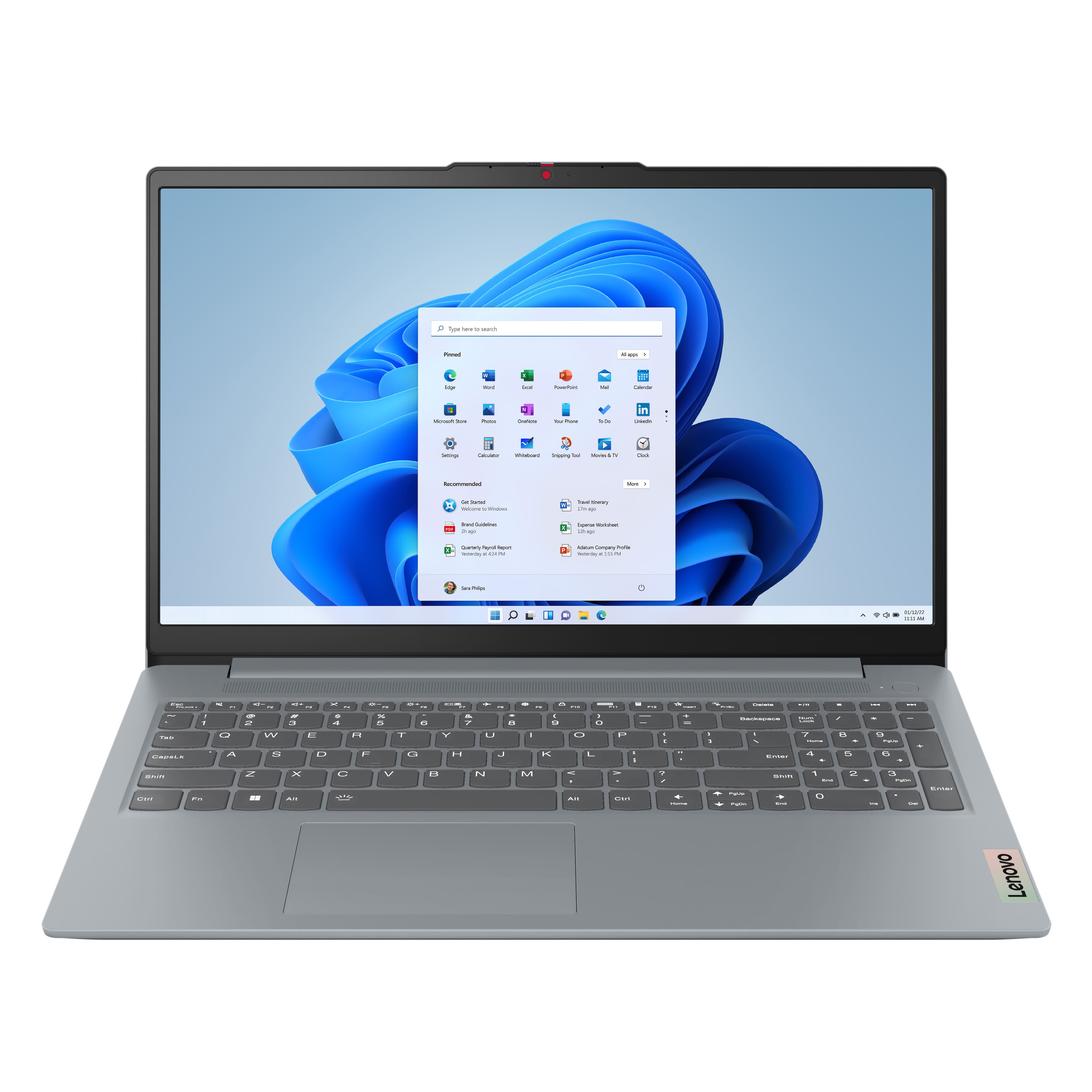

![Sure, here is the corrected and grouped text from the image:
---
**Top Row:**
- Esc
- Fn
- F1
- F2
- F3
- F4
- F5
- F6
- F7
- F8
- F9
- F10
- F11
- F12
**Number Row:**
- 1
- 2
- 3
- 4
- 5
- 6
- 7
- 8
- 9
- 0
- -
- =
- Backspace
**Letter Row:**
- Tab
- Q
- W
- E
- R
- T
- Y
- U
- I
- O
- P
- [
- ]
- \
- Delete
**Letter Row:**
- Caps Lock
- A
- S
- D
- F
- G
- H
- J
- K
- L
- ;
- '
- Enter
**Letter Row:**
- Shift
- Z
- X
- C
- V
- B
- N
- M
- ,
- .
- /
- Shift](https://pisces.bbystatic.com/image2/BestBuy_US/images/products/f79b3ed3-e46f-4e66-923f-76d4538361a2.jpg)


- Model:
- 82XM00LMUS
- SKU:
- 11000248
Rating by feature
- Battery Life
Rating 4.7 out of 5 stars
- Speed
Rating 4.7 out of 5 stars
- Display
Rating 4.7 out of 5 stars
Customers are saying
Customers enjoy the IdeaPad Slim 3 for its overall performance, processor speed, and portability. Many appreciate the convenience of the touchscreen and the impressive battery life. The screen size and sleek design are also well-received, however, some customers have noted that the RAM is not upgradeable.
This summary was generated by AI based on customer reviews.
Lenovo IdeaPad Slim Ryzen 7 16GB RAM
||Posted . Owned for 3 weeks when reviewed.This reviewer received promo considerations or sweepstakes entry for writing a review.The soldered 16GB of RAM seems more than adequate. Also the Ryzen 7 has 16 threads so apps seem to run really fast. For most people this Lenovo is a good buy for the money.
I would recommend this to a friend- Pros mentioned:Touchscreen
Great laptop, isn't laggy.
||Posted .This reviewer received promo considerations or sweepstakes entry for writing a review.Excellent computer, works well. Touch screen is a great bonus. The computer isn't laggy at all.
I would recommend this to a friendBrand response from Lenovo Product Expert
Posted .Hey CharlieDVan,
Thank you for choosing Lenovo and for sharing your feedback with us!
We are pleased to read that you are satisfied with your purchase.
Please don't hesitate to reach out to us via the Q& A section of this product page or contact Lenovo Support should you have any questions or need assistance.
Regards,
Lenovo
Lenovo
||Posted . Owned for 1 week when reviewed.This reviewer received promo considerations or sweepstakes entry for writing a review.I have been very pleased with this product. It has met and surpassed my expectations for a laptop. It is very user friendly.
I would recommend this to a friendBrand response from Lenovo Product Expert
Posted .Hi JasonB,
Thanks for choosing Lenovo and for sharing your feedback with us!
We are glad to read that you are quite pleased with your IdeaPad Slim 3 and that it has exceeded your expectations.
Please feel free to reach out to us via the Q& A section of this product page should you have any questions or need assistance.
Best,
Lenovo
- Pros mentioned:Touchscreen
amazing
||Posted .This reviewer received promo considerations or sweepstakes entry for writing a review.A very good value mid-range laptop. For the price you’re getting a strong CPU, ample RAM/SSD, a decent 15.6″ screen (touchscreen adds flexibility), and a comfortable build for everyday use. As long as you accept some trade-offs (display color coverage, cooling under heavy load, battery compared to ultrabooks), you’ll get a dependable machine that’s great for work, study and general entertainment.
I would recommend this to a friendBrand response from Lenovo Product Expert
Posted .Hi,
Thanks for choosing Lenovo and for sharing your feedback with us!
We are glad to read that you are satisfied with your purchase.
Please don't hesitate to reach out to us via the Q& A section of this product page or contact Lenovo Support should you have any questions or need assistance.
Regards,
Lenovo
Nice little laptop
||Posted . Owned for 1 month when reviewed.This reviewer received promo considerations or sweepstakes entry for writing a review.Laptop works very nice. The battery life is pretty impressive too. So far so good, I would recommend it.
I would recommend this to a friendBrand response from Lenovo Product Expert
Posted .Hi,
Thanks for choosing Lenovo and for sharing your feedback with us!
We are pleased to read that this IdeaPad Slim 3 is working quite nicely for you and that your experience with it has been good thus far.
Please feel free to reach out to us via the Q& A section of this product page should you have any questions or need assistance.
Best,
Lenovo
Review
||Posted . Owned for 1 month when reviewed.This reviewer received promo considerations or sweepstakes entry for writing a review.great for day to day tasks. Lightweight and efficient operating power to run multiple tasks. Would recommend for the price to product ratio.
I would recommend this to a friendSolid laptop for a good price
||Posted . Owned for 1 month when reviewed.This reviewer received promo considerations or sweepstakes entry for writing a review.Honestly a very solid laptop for a reasonable price. It is fast, fits easily in my bag, has usb c connections as well. It is easy to pair with headphones and the number pad is awesome for my job.
I would recommend this to a friendBrand response from Lenovo Product Expert
Posted .Hey HannahM,
Thank you for choosing Lenovo and for sharing your feedback with us!
We are glad to hear that this IdeaPad Slim 3 has been solid for you.
Please feel free to reach out to us should you have any questions.
Best,
Lenovo
- Pros mentioned:Touchscreen
Great Slim Laptop
||Posted .This reviewer received promo considerations or sweepstakes entry for writing a review.This laptop is perfect for travel. Love the touchscreen. It is very slim. I highly recommend.
I would recommend this to a friendBrand response from Lenovo Product Expert
Posted .Hey MarthaF,
Thank you for choosing Lenovo and for sharing your feedback with us!
We are pleased to read that you are satisfied with your purchase.
Please don't hesitate to reach out to us via the Q& A section of this product page or contact Lenovo Support should you have any questions or need assistance.
Regards,
Lenovo
Lenovo IdeaPad Slim 3 (Ryzen 7, 16GB, 512GB SSD) R
||Posted . Owned for 2 months when reviewed.This reviewer received promo considerations or sweepstakes entry for writing a review.Overall, this version of the IdeaPad Slim 3 offers very good value. It delivers strong everyday performance, decent storage and RAM, and looks good without being overly heavy. For its price bracket, it does many things right, with trade-offs that are reasonable for users without very demanding needs. If you go for this model, manage your expectations on the display and audio, but for general usage it should serve well for several years.
I would recommend this to a friendBrand response from Lenovo Product Expert
Posted .Hi RajivT,
Thanks for choosing Lenovo and for sharing your feedback with us!
We are pleased to read that this IdeaPad Slim 3 offers great value to you and that it meets your needs.
Please feel free to reach out to us via the Q& A section of this product page should you have any questions or need assistance.
Best,
Lenovo
Fast!
||Posted .This reviewer received promo considerations or sweepstakes entry for writing a review.Finally, doing everyday tasks and homework is so much easier on this laptop. Haven’t tried video games but I wouldn’t be surprised if they worked.
I would recommend this to a friendGood Value and Quality Laptop
||Posted .This reviewer received promo considerations or sweepstakes entry for writing a review.Overall happy with my new laptop! I had to procure a laptop for my new job and while I have a Macbook Air for personal use I am a PC person when it comes to work. I bought this on sale and it was a bargain. I love the size and overall how its been running 3 weeks in to my new job. If you are looking for a budget friendly and efficient laptop I highly recommend this model!
I would recommend this to a friendBrand response from Lenovo Product Expert
Posted .Hi,
Thanks for choosing Lenovo and for sharing your feedback with us!
We are glad to read that you are satisfied with your purchase.
Please don't hesitate to reach out to us via the Q& A section of this product page or contact Lenovo Support should you have any questions or need assistance.
Regards,
Lenovo
- Pros mentioned:Touchscreen
Good Value
||Posted . Owned for 1 month when reviewed.This reviewer received promo considerations or sweepstakes entry for writing a review.Great value for the price. Screen and keyboard are very good and speed is excellent.
I would recommend this to a friendBrand response from Lenovo Product Expert
Posted .Hey Jim1,
Thank you for choosing Lenovo and for sharing your feedback with us!
We are pleased to read that you are satisfied with your purchase.
Please don't hesitate to reach out to us via the Q& A section of this product page or contact Lenovo Support should you have any questions or need assistance.
Regards,
Lenovo
New Computer
||Posted . Owned for 1 month when reviewed.This reviewer received promo considerations or sweepstakes entry for writing a review.Product addressed all my needs for a laptop. Did not overspend for a laptop with options that I did not need. Performs well.
I would recommend this to a friendLenovo IdeaPad Touchscreen Laptop
||Posted . Owned for 3 weeks when reviewed.This reviewer received promo considerations or sweepstakes entry for writing a review.My laptop is working like a dream. I like that it is not heavy to transport and the speed is on point.
I would recommend this to a friendBrand response from Lenovo Product Expert
Posted .Hi ZENAH,
Thanks for choosing Lenovo and for sharing your feedback with us!
We are pleased to read that you are liking your IdeaPad Slim 3.
Please feel free to reach out to us via the Q& A section of this product page should you have any questions or need assistance.
Best,
Lenovo
A good purchase
||Posted . Owned for 3 weeks when reviewed.This reviewer received promo considerations or sweepstakes entry for writing a review.This does what I need it to do, and the price point was great. I like that it's light, and the screen is a size I'm happy with. I do wish the speaker quality was a little higher, but overall, I'm happy with my purchase.
I would recommend this to a friendBrand response from Lenovo Product Expert
Posted .Hey LaurenO,
Thank you for choosing Lenovo and for sharing your feedback with us!
We are glad to hear that this IdeaPad Slim 3 meets your needs and that you are happy with your purchase overall.
Please feel free to reach out to us should you have any questions.
Best,
Lenovo
- Pros mentioned:Performance
Awesome Purchase
||Posted . Owned for 2 weeks when reviewed.This reviewer received promo considerations or sweepstakes entry for writing a review.First time using Lenovo laptop! Wow! It’s so quick and easy to use! So happy I took the chance!
I would recommend this to a friend Best present ever.
||Posted . Owned for 2 weeks when reviewed.This reviewer received promo considerations or sweepstakes entry for writing a review.This computer is the best choice for all my wife needs. I purchased it for my wife's Christmas present and I also purchased one last year for my birthday. I have to tell you it has the very best battery life.
I would recommend this to a friendGreat deal!
||Posted . Owned for 2 weeks when reviewed.This reviewer received promo considerations or sweepstakes entry for writing a review.My wife really likes this laptop so far! She is happy to have her own laptop instead of a hand-me-down!
I would recommend this to a friend- Pros mentioned:Touchscreen
10/10 WOULD RECOMMEND
||Posted . Owned for 1 month when reviewed.This reviewer received promo considerations or sweepstakes entry for writing a review.I love this laptop; this is the best laptop I ever purchased. Its touch screen is a nice size if you are a college student and have a bunch of assignments like me. A perfect feature of this laptop is the touch screen option if you get tired of using the mouse you can always just touch the screen lol. 10/10 I WOULD BUY IT AGAIN!!!
I would recommend this to a friendBrand response from Lenovo Product Expert
Posted .Hi,
Thanks for choosing Lenovo and for sharing your feedback with us!
We are glad to read that you are satisfied with your purchase.
Please don't hesitate to reach out to us via the Q& A section of this product page or contact Lenovo Support should you have any questions or need assistance.
Regards,
Lenovo
Very good laptop. Super fast, good storage capacit
||Posted .This reviewer received promo considerations or sweepstakes entry for writing a review.Very good laptop. Super fast, good storage capacity, and lightweight.
I would recommend this to a friend