Customer Ratings & Reviews




- Model:
- EA9500
- SKU:
- 5171100
Rating by feature
- Value
Rating 3.9 out of 5 stars
- Quality
Rating 4.2 out of 5 stars
- Ease of Use
Rating 4.4 out of 5 stars
Customers are saying
Customers are pleased with the AC5400 Tri-Band WiFi 5 Router's impressive range, ease of use, and strong performance, citing consistently positive experiences with setup and signal strength. Many appreciate the extensive coverage and numerous Ethernet ports. However, some customers note that the router is large and expensive. A few users mentioned occasional connection issues.
This summary was generated by AI based on customer reviews.
- Pros mentioned:Range, SetupCons mentioned:Size

This might be the last router you will ever need.
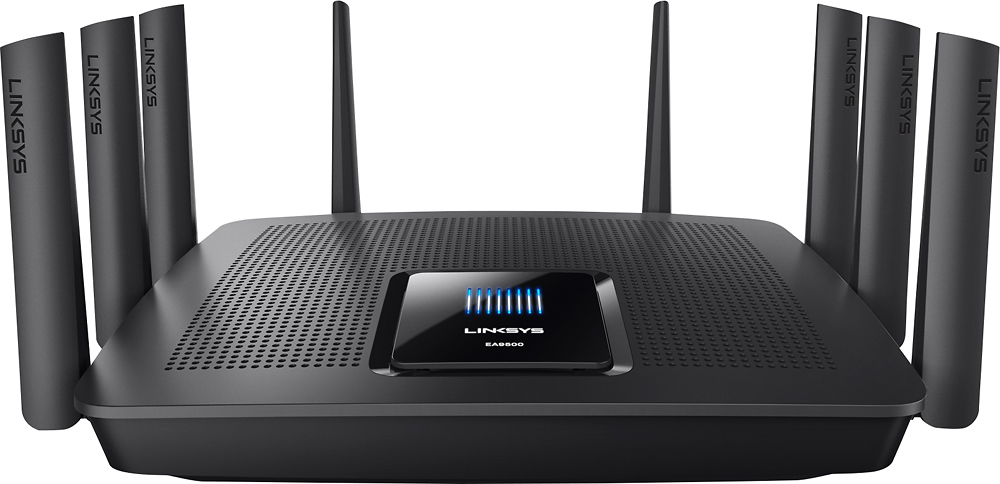
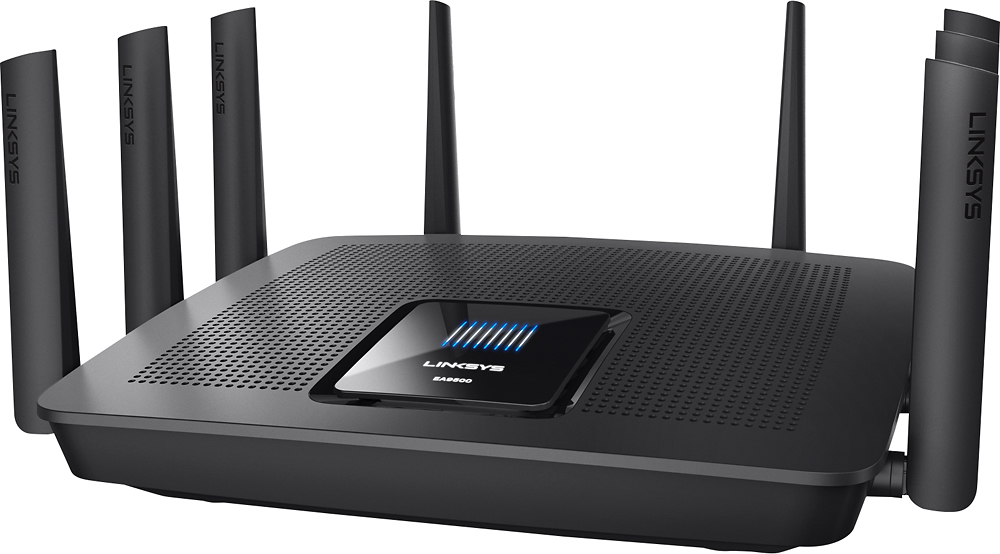
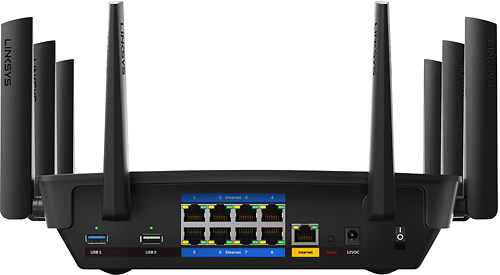
|Posted .This reviewer received promo considerations or sweepstakes entry for writing a review.A good in-depth understanding of network technology is something that I wish I had, but simply don't. I need a router that I can just plug in and trust to manage all of my many network devices without tons of troubleshooting to get everything working properly. I try to take advantage of every feature of my home network by using computers, tablets, and phones to surf the internet, by using streaming devices such as a smart tv or blu ray player for services like Netflix and VUDU, or by using the PLEX app to stream movies from my media server throughout the house. I also make use of a network printer, and play games online with the Xbox One, PS4, and Wii U. Like most people I want these devices to just work, but to do that you need a good and reliable router. This review is for the LINKSYS EA9500 MAX-STREAM™ AC5400 TRI-BAND WI-FI ROUTER. Can it handle all of these devices and still provide the fast, and reliable experience you are looking for? In short, yes. It effortlessly exceeded my expectations, but the most important part is that it is easy to set up and use. The Positive - What I like: Right away upon unboxing the device you can see the quality that Linksys is known for. Let me get this out of the way: This is EASILY the biggest router I have ever seen in my life. It's huge! There is no mistaking this devices high end nature though. It has more antennas than a tractor-trailer (EIGHT!), and yet still manages a sleek look that you won't mind having on display with the rest of your equipment. Fit and finish is excellent. Is it worth your valuable desk space? Read on. Setting up the Linksys was a breeze. Simply connect it to your modem with an ethernet cable, use as many of the eight supplied ethernet ports as you need to connect your wired devices, optionally add an external hard drive to the usb 3.0 port to easily share data over your home network, or connect your printer to the usb 2.0 port. Supply it with power, and the setup process begins. No CD (and therefore no optical drive) required. The quick start guide has four easy to follow steps. It was equally easy to use. The LINKSYS SMART WI-FI app for Android and Apple devices makes managing your home network a simple task right from your phone. Here you can see a map of all of the devices on your network, set a priority for the devices you use the most, and manage the security of your home network quickly and easily. Signal strength and range of WiFi is also excellent, and this cannot be overstated. We tested it by using multiple devices simultaneously without interference or any kind of buffering. It has seriously breathed a new life into our network and devices. A+ Linksys! Guest access works as intended, and allows visitors to connect to the internet without gaining access to your home network. The Negative - What I don't like: Simply put - price. Although this is a premium device it may be hard to convince people what the extra money is getting them over the plethora of more affordable competitors including other devices in the Linksys family. Size. It is very large, and it is not meant to sit vertically so clear a spot. In short the Linksys EA9500 just works. It has a premium price tag, but as these connected technologies become more and more integrated into our lives and our homes this expense is becoming more of a necessity if you want to make sure you will have good performance and productivity out of your network connected devices now and in the future. I would definitely recommend this device.
I would recommend this to a friend - Pros mentioned:Ease of use, SpeedCons mentioned:Size
New King of the Routers
|Posted .This reviewer received promo considerations or sweepstakes entry for writing a review.This might be the last router you need to buy for a very long time. I replaced a Linksys WRT1900AC with this new EA9500, and I was blown away. The WRT1900AC was no slouch, and for a time was the old King of the Routers, but the new EA9500 simply outperforms it in every way (that matters to me at least.) The router is big, very big, the biggest router I personally have ever used. It almost doubles the size of the WRT1900AC. But it runs silent and cool considering all the updated specs inside, not to mention a whopping 8 gigabit LAN ports. I'll be honest, I do run a mix of both LAN and Wireless clients, and this router gives you the flexibility to have more than enough of each. Setup was amazingly simple. Most Linksys routers are very easy to unbox, plug in and get going right away, but I thought because of the sheer nature of this model, it might take a little bit more time/config etc. before I was up and running. That was not the case at all. I simply powered down my network, replaced my WRT with the EA9500, cycled everything back up, and ran through the necessary quick setup steps that the router takes you too, which you can do via mobile or computer browser, and that was it, up and running at full speed. I was back online in less than 5 min. The Linksys Web interface is very good and easy to use. It is very easy to navigate the various feature sets and functions of the router and make changes. I love the fact that you can have the router auto-assign a 5GHz channel to your devices so you get the best available performance based on traffic, and it's set to this option by default. However you can edit that setting to not do that, and what you get are two 5GHz channels to choose from when connecting devices. So if you don't want to allow the router to assign the 5GHz traffic for you, you can manually configure the traffic yourself, based on your preferences. Now on to what really matters - the coverage and speed! My home is 4000 sq feet two story, and with this router I have no dead spots. The coverage is amazing, whether inside the house, or even out in the garage or yard. In fact I was able to drive to the exit of my neighborhood and cross the street into the next neighborhood before dropping connection. The speed is incredible. I get max speed on all my devices further in my house than I ever have before. And in the areas of the house where full strength cannot be achieved (too many walls or internals disrupting signal path) my speed is still so good that i wold never notice a drop in performance of my devices. I use Xfinity Broadband with a 120 Mbps downstream and 20 Mbps upstream plan, through a Motorola SB6121 modem. All of my household devices are able to run max speed and performance concurrently while connected. Whether surfing, gaming, streaming or downloading, all devices show max performance. I'm extremely impressed with the coverage and speed of this router. The beamforming, media prioritization and guest network are all great features that Linksys continues to make better, however the EA9500 allows the user to block HTTPS sites. While that may not seem like a big deal, most social media sites are HTTPS, so it allows parents the ability to block those types of sites if they need to, and most other routers on the market don't or can't do this. So in general, the coverage and speed are amazing. The feature set and ease of use make this router somewhat future proof for most homes, and should be the last router you need to buy for quite a long time!
I would recommend this to a friend - Pros mentioned:Range, Setup, Speed
A MONSTER AT HANDLING TRAFFIC!
|Posted .This reviewer received promo considerations or sweepstakes entry for writing a review.I've been using Linksys AC1900 for the past couple of months and I been extremely satisfied with that product. When I got the chance to try a newer Linksys EA9500 I was ecstatic! This is one darn good router. This one essentially takes the AC1900 and throw even more features at you. First off MU-MIMO allows multiple WiFi devices at once all at the same speed. This means that as the signal is broadcast, it offers full bandwidth potential to one wireless device at a time. Paired it up with another Linksys product a Wi-Fi Range Extender with the same technology and it worked like a charm. I don't have High Speeds from my internet so I can't test the full potential of what it can handle speed wise but when I do have it handles that with ease. Another thing to note is that this router comes with three year warranty PLUS three years of tech support, which to me is amazing. I own many tech devices and 11 WiFi devices all connected to the same network in home. I take the router out the box and followed the quick start guide. VERY SIMPLE and easy to understand, the last step takes you to their website which allow you to do an auto setup or go through the process manually (I did auto.) Just like that I was online and ready to go with not even 2 minutes of my time gone. It's pretty much the same set up process as the Linksys AC1900. Within the settings of the router there are a host of manual options to do, Such as hook up an external HDD to the USB. You can also set up an FTP if you like in which I have done. There are 8 (!) Ethernet ports on the back of this router which makes it a dream of many wired connections which I am using all 8 of them. I have an Nvidia Shield Tablet which I set up on the 5GHz network to my gaming PC with a 980 Ti. I can stream games from the PC to the tablet without a hitch. This has always been a problem for me having lag and stuttering. It works and it works well which has me excited to continue using. Linksys EA9500 made for heavy traffic devices that is apparent. All of my devices remain at the same speed, which by the way the range is really strong. No matter where I was in the house I had all WiFi signals connected at all times especially with my work smartphone and private smartphone. The router is nothing short of fantastic and Linksys done a great job yet again. This is THE best router I have ever used in my life and would recommend easily to friends and family.
I would recommend this to a friend - Pros mentioned:Performance, SetupCons mentioned:Size
Awesome Next Generation Router
|Posted .This reviewer received promo considerations or sweepstakes entry for writing a review.First, a disclaimer: I received this router as part of the Best Buy Tech Insider program at no cost in exchange for my honest review of the product. This router is my first 802.11ac router. It replaces an old reliable 802.11n router. The first thing I noticed when I received the product was the size. It’s fairly large compared to my previous routers and seems very well built. There are no mounting holes on the bottom of the unit so I don’t think it’s possible to mount it on the wall so you might need to clear some extra desk space for the router. One of the really nice things about this router is the 8 LAN ports. Most routers have only 4 LAN ports. Having 8 LAN ports is really useful if you want more than 4 devices directly connected to your router without using another external switch. In my case, I had more than 4 devices (Plex Media Server, multiple NAS boxes, workstations etc.) and this was a really important feature I wanted in any router I might own. Another very nice feature is having a USB 3.0 port for attaching hard drives. This was a big improvement over my previous router which only had USB 2.0 ports. This, along with the dual core processor, made a huge difference in performance. With my old router, I saw a maximum transfer rate of about 12 MB/s. With the new router, I sometimes saw transfer rates of 60 MB/s on the attached hard drive. Setup was extremely easy. I disconnected my old router and plugged in my new router. I then typed 192.168.1.1 in my web browser on one of my directly connected computers and followed the instructions. The set-up program discovered that there was something wrong and could not access the internet. When it tried to diagnose the problem, it recommended that I turn off my cable modem for 2 minutes and then turn it back on again and wait another 2 minutes. After performing this action, I was able to access the internet and everything was working great. From there on, I manually entered settings from my old router so it would use my old SSIDs and passwords. I really like Linksys’s Smart Wi-Fi interface and it made setting things up very easy. And I love the Network Map which gives a visually representation of all the devices connected to the router. The visual graph makes it easy to determine whether a device is connected to the 2.4 GHz band, the 5 GHz band, or is wired directly to the router. You can also click on the device to see information such as its IP address and to give it a unique name. The Linksys is a 3 band router. It has one 2.4 GHz band and two 5 GHz bands that are combined as one. So, the router presents two SSIDs to the world. One SSID for the 2.4 GHz band and another SSID for the combined 5 GHz band. If you have a 5 GHz device, the Linksys uses “Smart Connect” to choose the best 5 GHz band for that particular device. I think you can manually disable Smart Connect to have two individual 5 GHz bands (for a total of three SSIDs) but I did not actually try this. In the 6 days since I’ve setup the router it’s been very reliable and compatible with most of my existing equipment. Signal strength throughout my 3 story townhouse was strong and varied between 3 and 5 bars. I’m on Comcast Performance Internet plan (25 Mbps / 5 Mbps) and SpeedTest shows that I am getting 30 Mbps / 5.99 Mbps. My Dell work laptop had no problem wirelessly connecting to the 5 GHz band and VPNing into work. My Kindle Fire HD 7 also connected through the 5 GHz band and performed well. My Apple TV steamed videos flawlessly while connected to the 2.4 GHz band. My Insignia Flex Elite 7.85, Nook HD+, HP Stream 8, Toshiba Thrive, and LG Stylo all connected to the 2.4 GHz band and played videos from YouTube very smoothly. I did experience some problems with my Acer Iconia A1-840 tablet. For some reason, it kept dropping the connection to the 2.4 GHz band. I guess it just doesn’t like the new router. Luckily, my home still has another 2.4 GHz wireless access point for it to use. My Roku 3, Android TV, and Amazon Fire TV streamed movies and shows with no problems. I fired up my PS3 (which is directly connected to the router) and played a little bit of Defiance and everything was super smooth. My Tivo’s (located on separate floors) were able to transfer shows between them with more zip than in the past. Streaming videos locally from my Plex Media Server has been great. Everything has been silky smooth. I wanted to see the best wireless performance I could get with this router so I went out to Best Buy and bought a Linksys WUSB6300 AC1200 USB 3.0 (using a Realtek chipset) and a Netgear A6210 AC1200 USB 3.0 (using a Ralink chipset) wireless adapter for testing with my computers. From past experience, I have sometimes noticed that some chipsets in wireless adapters work better with a particular router than others. One chipset might work well with one router but not with another and vice versa. From the third floor of my townhouse, the Linksys adapter reports a link speed that varies from about 200 Mbps to about 650 Mbps with a signal strength of 4 bars while the Netgear adapter reports a link speed ranging from 58.5 Mbps to about 866.5 Mbps with a signal strength of 3 bars. Early in the testing, both the Linksys and Netgear adapters seemed to have some minor stability issues as I’ve seen both exhibit a pattern of disconnecting and reconnecting a couple of times but become very stable as time went on. It almost seems like the router is learning more about how to best connect to the adapters the longer they are connected. Both adapters seem to be stable and work well with the router. With either adapter, I was getting similar transfer rates of about 21 to 28 MB/s when transferring files between my computers upstairs and the NAS downstairs. The theoretical maximum transfer rate for a 100 Mbps wired ethernet connection is 12 MB/s so I am getting faster than wired 100 Mbps ethernet with either adapters! This is the first time I have achieved such speeds wirelessly and has been kind of a holy grail for me. I am giddy with happiness over the results. During my 6 days of testing, this has the best experience I have ever had with any router. This router was very easy to set up, it is very compatible and inter-operable with most of my existing equipment, and it provided a big performance boost over my previous router. It is the best router I have ever used.
I would recommend this to a friend - Pros mentioned:Speed
High Hopes Dashed - Consistently Drops Connection
||Posted .This reviewer received promo considerations or sweepstakes entry for writing a review.After Apple announced they are stopping support for the Time Capsule Router, I began researching a high speed, robust Router. I have 97 wireless devices connected & many wired streaming devices throughout a 5,000 square foot home that are spread over 3 floors. I bought the Linksys - EA9500 Max-Stream AC5400 Tri-Band Wi-Fi Router based on specifications, positive reviews & good experience with Linksys equipment. I pay for 300 Mb/s from my ISP. I achieved 324Mb/s with this Linksys Router, initially, with a Mac Pro directly connected by Cat 7. Naturally wireless speed fell off minimally in intervals of approximately 25 feet. Speed is this Router's strongest point. The Linksys App is very easy to use & listed each device connected. After 8 hours, I was cautiously optimistic with the results. Then Amazon Fire TV's began to experience connection issues & they are wired with CAT 6. Next, Philips HUE, the most robust electronics I own, suffered Hub connection issues with both hubs. Then Arlo security cameras dropped out. Then NEST Cameras would drop out & would need to be rebooted each time. Then BAS connected fans & lights would lose connection, requiring many reboots. Finally, Nixplay Frames would lose wireless internet connection. See Speed Test I posted & note speed would swing from high speed to dial up speed, back & forth. Then it began to switch from 97 devices connected to 0 devices connected, back and forth. At this point, I called Linksys. I strained to comprehend English spoken by the very helpful person from Linksys (located offshore). I was asked questions for an hour! I asked for a Level 2 technical support person, but she told me they would have to call me back & that would be between 24 and 48 Hours. I advised the Linksys contact that I could not leave my internet in shambles for 24-48 Hrs because at this time, the situation had grown worse. One minute, the Linksys App showed 97 connected devices. One minute later, it dropped to 0 devices & alerts rang out throughout the house from the many connected devices, that had lost their connection. I explained that I would restore the older Apple Time Capsule & would return this Linksys which I had just bought yesterday. She said Sorry, that is all she can do. As promised, I returned the Linksys to Best Buy, who graciously refunded my purchase & even apologized for the inconvenience! (I love Best Buy!!). 24 hours later, Linksys Level 2 Technical Support called. I explained that my need for their service had expired; I had returned the Router to Best Buy. Surprisingly, Linksys Level 2 called again 24 hours later! Conclusion: The Linksys - EA9500 Max-Stream AC5400 Tri-Band Wi-Fi Router delivers High Speed Internet, offers impeccable specifications & appears to be ready for battle. However it left me disappointed on the sidelines. If you have or plan to add a high number of wireless devices, I recommend you make certain you can return this Router, should it perform for you as it did for me. Meanwhile, the venerable Apple Time Capsule is up and running with 0 drop-outs.
No, I would not recommend this to a friendBrand response from Linksys Staff
Posted .Hi, Gadgetguy11,
The settings of the router could've affected its capability to simultaneously handle multiple devices. Despite your decision for returning the router, we would like to look into your experience with our Support team as it would help us improve our services. We'd appreciate if will email us the case number at [email protected] along with your phone number and the link to this post for our reference.
Regards,
Irish
Linksys Support
- Pros mentioned:Performance, Range, Setup
Absolute Best Router Hands-Down
|Posted .This reviewer received promo considerations or sweepstakes entry for writing a review.This is an excellent router with great functionality for any user, and especially the heavy user. Summary at the end for a quick overall review. I have used many routers from low to high-end and this is one of the best. Setup-Software (5/5): The Linksys EA9500 is perfect for users with any type of device with set up as easy as an Apple Airport. With Apple Airports, you have to download additional software if you do not have an Apple PC/Laptop. Other non-apple routers use similar setup procedure as this router but the EA9500 has the best setup that is very intuitive and looks nice. Setup-Connections (4.8/5): Absolutely great. EIGHT gigabit ports! Finally a company that recognizes the importance of having enough ethernet ports. Includes USB 2.0 and 3.0 which can allow for external storage devices on the network. The only problem is that I have not seen any information on using the USB port to hook-up a printer for wireless printing. Easy hook-up to modem through ethernet connection. The router was out of the box and fully functioning (including set up time) within 10 minutes! Connectivity and Range (5/5): The connection is super quick and the range is the best I have seen. Compared to an Apple Airport Extreme and ASUS AC1900, I am getting at least 50% greater range outside the house, which is approximately 3k-4k square feet! My devices connect immediately. Performance (5/5): Fast speeds and no lag. Power users with many devices and multiple simultaneous streams will not be disappointed. I have tested with three streams and online gaming active with no issues. Videos look as great as ever. I have not noticed and considerable lag when gaming, other than what is expected from the game itself. With at least 8 devices on ethernet plus 6+ more on wireless, this unit does not disappoint. Summary (5/5): This router will satisfy every buyer. Its probably not as useful to a small household user with only three devices on the network, but you'll be very satisfied regardless. Heavy users will have great connectivity with flexibility. No lag, beyond excellent range, and easy set up. This unit is big and heavy, a very telling sign of great quality and performance. Very good product.
I would recommend this to a friend Very good range, no lost signal
||Posted .This reviewer received promo considerations or sweepstakes entry for writing a review.I was using a Dlink router that was given to me by my cable company but it kept losing its connection to the network and had to be restarted sometimes several times each day. It also had a very short wireless range. So I looked at specification for wireless routers on the internet and found that the Linksys had the best reviews. That was not surprising because I had used a wired Linksys in the past and liked it very much. This Wireless Linksys is somewhat more expensive than other brands but my experience has been that when I buy a good product I soon forget what it cost because I am so happy with its performance but if I buy a bad product I never forget how much I paid for it and often wish I had never bought it.
I would recommend this to a friend- Pros mentioned:Performance, Range, SetupCons mentioned:Size
Excellent Tri-Band Wireless Router
|Posted .This reviewer received promo considerations or sweepstakes entry for writing a review.I have had the router installed a week now. You will notice right away when you take the wireless router out of the box that it is fairly large. Initial setup and installation was pretty easy using the setup wizard. Not sure if it is required, but I setup a LinkSys Smart Wi-Fi account during setup. It uses this account to log into and configure the router post setup. One bonus to the account is the ability to remotely mange the router which is nice. One con to the creating the account was that it would not let me use any special characters when setting my password (not cool). Quick Note: During my initial configuration I got an error a few times that said it could not connect to the router to configure it even though I was on the local network and connecting to the UI via the local LAN IP address. The error stated the device was not connected to the internet which was false as I could connect to anything on the internet with any of the devices I had already setup to connect to the new router. I don’t get the lights on the top of the router. I would be nice if they were labeled and gave specific status information. Pretty much all settings and configuration options are what you would expect from this kind of a wireless router. The interface is a little slow to refresh as you click through things when configuration but not a big deal. One thing I did not like was that it would not allow me to set access to the UI via the local IP to only HTTPS or have an automatic redirector to a secure version. I like the network map feature and the ability to fully update the information for all connected devices on my network. Not a big deal but I wish they had more graphical icons for the connected devices. When setting up my DHCP reservation I noticed you couldn’t use special characters including spaces (again not a huge deal but would be nice). One bug I saw during the initial setup was that all of the security settings showed enabled but all check boxes were not checked (which is what you have to do to disable). After a few times they stayed checked and enabled. A couple of settings options I don’t like is the inability to configure the logs and alerts to be sent to an email address. I wish it had this feature. I also noticed that I never see anything listed in the Security Log. I am used to seeing some information logged with all home and enterprise class routers I have worked with over the years. Not sure if this is a bug. Another setting option I don’t like is that you can add only three devices to the Medial Prioritization options. I have 16-30 devices connected to my network at any given time. It would be nice to add more than just three. Wireless signal strength on all bands is excellent and stable. We have a 3200+ ft2 brick house with a pretty large yard and the router sits in my office on the second floor towards the middle/front of the house. I have not found any weak or dead spots anywhere in my house and I can get a pretty good signal most anywhere in my yard as well. So far I am pretty impressed. I had to dis/reconnect a few of my devices 2-4 times to get them to successfully connect but once they did I have had not issues since. The unified wireless network names is a nice feature. Let the device and its wireless adapter decide which radio to connect to. One thing I noticed was the 2.4GHz auto channel select seemed to pick a heavily used channel. It doesn’t look like it is affecting wireless performance but there always seems to be 2-4 neighboring wireless networks on or close to the same channel it selects. All in all I am pretty happy with the performance of the EA9500. I had a Netgear AC1900 R7000 and the wireless signal strength and overall performance tests are a bit better on the EA9500 so far. I had a couple of low signal areas in my house and I could not get as good of a signal in the far reaches of my yard like I can with the EA9500.
I would recommend this to a friend - Pros mentioned:Range, SetupCons mentioned:Price, Size
King of all routers!
|Posted .This reviewer received promo considerations or sweepstakes entry for writing a review.Thumbs up: Very fast wifi connection. Able to stream 4k content with ease. Thumbs down: The price tag is a bit steep for a home network solution. The range can be affected by interference from your neighbor(s)’ wifi router. Also, the router runs really hot, and so it needs to be set up in a well-ventilated area. The bottom line: A very spendy router for those who want everything a router has to offer and more. Setup: The router was very easy to setup. No initial computer input needed. Just power-up the router, hookup your Internet line to it, find the router’s name in your list of wifi choices and type in the provided password. Like most routers, you do have an option of making admin changes via a website. The website provides for you to change things like router names, wifi passwords and other more advanced settings that 99% of regular uses will not need to revise. There is also a handy iOS app that can monitor and manage the router from your phone. The handiest part of the app is the ability to create a guest network for when your friends want to mooch off your wifi without giving out your actual password. In the box: Comes with the router, power cable, small Ethernet cable and some manuals. Form Factor: The router is fairly large when compared to moderately priced $149 routers. Due to the size, you won’t be able to hide this router or blend it with your home furnishings. In other words, embrace the 8-legged box and mount it to the wall with pride. Overall impression: I live in a densely populated townhome area. When searching for wifi, there are easily 20+ wifi routers to pick in the list. My two-level home is setup with the cable coming into the 2nd floor, and so the wifi router resides on the 2nd floor. I’ve always had connectivity issues with my old router when trying to use wifi from the 1st floor living room. With this new router, I have no connectivity issues anywhere in the 1700 sq ft home. I maintain a solid 150+ mbps connection anywhere in the home on a 5ghz connection. That’s impressive since hardline only gets me little over 160mbps speeds. Using my iphone 6s+ as the test subject, it connects via 5 ghz AC to the router. Even though the wifi bars never show full signal, I still maintain the 150+ mbps connection. This is probably due to the router’s ability to “beamform”. This allows the router to focus its signal towards my phone’s direction. The speeds I’m getting are way more than Youtube, Pandora or 4k Netflix will ever need. The only gripe I have was that I was hoping that I would be able to connect to my wifi when I’m outside and near the home. I immediately lose signal on the 5ghz within 10 paces outside. It’s the same problem with the 2.4 ghz band. I believe it’s not really the router’s fault but the over saturation of radio interference from all the neighbors’ devices. There are numerous routers in my area that are on the adjacent channels, and it “cross talks” with the preferred 1,6,11 channels selection in 2.4 ghz. Like some articles online say, the most ideal way to collaborate with all your neighbors is to be on channels 1,6,and 11. Bottom line: I would recommend this wifi router because straight out of the box it’s fast. If you have spent the extra money to get the fastest Internet speeds, don’t limit your streaming performance by bottlenecking your connection speeds with a cheapie router! This router satisfies the inner geek.
I would recommend this to a friend - Pros mentioned:Ease of use
Fantastic Router!!!!
||Posted .This reviewer received promo considerations or sweepstakes entry for writing a review.Very user friendly, very simple set up and adjustments can be made very simply by using the supplied information that comes with the unit.
I would recommend this to a friend - Pros mentioned:Range, Speed
Phenomenal Router
|Posted .This reviewer received promo considerations or sweepstakes entry for writing a review.The Linksys Max-Stream AC5400 is a POWERHOUSE router that has it all. This device can easily power numerous devices simultaneously throughout ones household without blinking an eye. Numerous family members can be gaming and streaming, computing, surfing the internet and talking on multiple cell phones without any loss of speed or data. WOW! Installation and hook up of the Max-Stream Router was a breeze and Linksys has tech support phone number to answer questions that you might have. This router can do it all. It has a Smart Wi-Fi app for your cell phone which affords you the options of monitoring your network, devices, guest access and even has parental controls. You can access and direct control of this device from anywhere. The router signal strength in my home is extremely strong which is enhanced by 8 antennas which this unit has. I also tested the signal strength with a laptop and cell phone outside the confines of my home by walking down the street. My devices were picking up the router signal at a distance of 350 feet which means that if you have a larger home you should have no problem with fading signals, weak reception and dead areas. Fantastic Range. I'm not going to bore you with specifications of this device, but this Max-Stream AC5400 is packed with state of the art technology that won't disappoint. Upgrade your old router now. This device is a winner!
I would recommend this to a friend - Pros mentioned:Ease of use
Supercharge tri-band router for ultra streaming
|Posted .This reviewer received promo considerations or sweepstakes entry for writing a review.The Linksys Max-Stream AC5400 Mu-MIMO Gigabit Router with MU-MIMO (model EA9500). For fair disclosure, I consider myself to be a novice techy….I know just enough to be dangerous, but not enough to be an expert. Tech and Spec. According to the supporting documentation, published white papers and other articles, the Linksys EA9500 Max-Stream AC5400 is designed to provide WiFi to multiple users and devices simultaneously, which is called( Mulit-User MIMO (Multi-User, Multiple-Input, Multiple-Output or MU-MIMO). The EA9500 is targeted to help users get the most use for both online gaming, large file uploads, streaming of videos & movies and other media without the lag or cut off. The router has three bands. Two 5GHz bands and one 2.4GHz band. The Gigabit router has eight Gigabit network ports and two USB ports (one USB 3.0). Another plus to this router is its compatible with Mac, Windows 7, 8 & 10. The form of this new gigabit router is very nice. It’s kind of intimidating at first with all the antennas and its new form size. Its a bit larger than their normal form and it has 8 external adjustable antennas. This router has the ability to manage multiple streams of data with the use of the eight adjustable external antennas which makes it possible for Linksys’ Beam-forming technology to direct the Wi-Fi signals to each of the wireless devises connected to the router. This allows for the signal to provide increased coverage and reception. An additional new improvement I can see is they have increased the stability of the unit and improved airflow under the unit with larger foot pads. My Experience To be fair in my review and to give Linksys a fair shot to test out the ease of setup I removed the old router and all of the connections I had to see how easy it would be to setup following the Quick Start Guide. I am replacing an older Linksys router that is about 14 months old. I’m the type of person that when something is supposed to be easy to do or setup…it never is for me …it never works. So let me just save everyone some time and tell you ….setup was a snap. It worked on the first try and it went perfect. Upon opening the sealed box the typical clean packaging is in play. Very well protected and all the item you need are in very plane site and easy to unpack. The setup guide is a very simple 4 step setup process. One of the nice new features in the setup is how Linksys created a very easy to see and understand process to make sure you know the router is connected. They have created a process that lets you know the router is ready for setup with a blue LED on the top of the unit. The LED’s scroll across the top as its looking for the connection and when the unit is connected the blue LED’s stop and the Linksys log appears. This is a nice simple to understand interface during setup that lets you visually see you are connected and ready to start the next step. Setup is pretty straight forward with step 1 replacing and uncommenting any existing routers if you have them and plugging in and powering up the router. Step 2 connecting the router to your internet cable which Linksys has clearly labeled. Step 3 connecting to the internet and assigning the wireless network with the default network name and password to setup up the connection. Then finally, step 4 connecting to LinksysSmartWIFi.com to make all of your connections and setup tweaks. One nice setup feature they have applied is the required renaming of the default Network and the Password in order to proceed. I still know people that use the default router setup as their admin setup; this is a great feature they have put in place. A nice new feature during the setup process is the ability to manage the login credential to the 3 channels either independently of each other with unique access codes or with a check box to allow the router to manage them as with one access code. Linksys continues to use the LinksysSmart WiFi interface with this new router. Now I like the Smart WiFI setup Linksys originally created. But Linksys made some improvements to the interface. The new big change is with the Network Map which is a really nice new feature. You now get to see the router and all the connections visually. For most that won’t seem like a big change, but it is. You can now see all the connections and which band they are on as it labels it and shows you the signal connection as live and disconnected from the router. In addition, another cool feature is the ability to filter in the Network Map. You can filter out those items you don’t want to see from a drop down menu with some standard filters. This is great to track down particular connections you need to focus on without the distraction of the other connections. Priority assignment of connections. Now for my household we have about 15 items connected at all times and it can almost double when people come over. Another nice feature is the ability to assign priority to connected devices. So if you want to make sure you have a connection with a particular device or to stream a video or have other people guaranteed to be connected in general, you have the ability to manage and prioritize the connections. Overall, I really think this new Network Map is a great feature. The rest of the LinksysSmart WiFi interface is pretty much the same with the exception of the ability to see and manage a network connected device and media to stream. Currently, I am replacing my NAS device with a new unit I am building. So for now I don’t have any information on this. But from the specs and the streaming we have done this router can easily handle the demands of a NAS. It has 2 USB ports one is a USB 3.0. Signal Strength. The signal strength is very strong. I have a rather large 2 story home with a basement. Before the new router the signal strength on the second floor was at best 50% of the wifi bars on the second floor. In the basement it was less about 30%. With the new router we have increased our signal strength to just about 75% to 80%. In the basement it has gone up to about 60% In addition, we utilize our outdoor space and before we barely got any signal outside the house. Now we have at least 40% signal strength out on our patio. I would say that this new router has clearly made a big difference for us. In addition to signal strength, we have also been testing the load capacity of the new router. I can say that we have deliberately have been pushing the load limits, downloads and streaming with positive outcomes. At one time we had two videos streaming from Netflix and about a dozen users all on with multiple devices that included, Ipads, Kindles, xbox, cell phones and Ipods all at one time. No one had any lag, buffering or connection interruptions. With my old router, I would have had the lag, buffering and disconnect with that many on at one time putting that much demand to my network. Overall, I am quite impressed and very satisfied with the new router. I would recommend this to those that need the power to manage multiple devices and anyone that is trying to stream 4K or Ultra HD . I am planning on adding the Linksys Max-Stream AC 1900 WiFI Range Extender model RE 7000 to see what improvements can be accomplished with this other new technology from Linksys.
I would recommend this to a friend - Pros mentioned:Ease of use, Range, SpeedCons mentioned:Size
Very good wireless and wired router
|Posted .This reviewer received promo considerations or sweepstakes entry for writing a review.First I will start with this, this router is big. much larger than any of the previous wireless routers i have ever had. So if your are purchasing a router to fit in a compact space this may not be the right choice. Now that that is out of the way lets get on with the good stuff. This is one of the best wireless routers I have ever used. It was very easy to set up, the web interface for settings is clean and easily understandable but the device still has plenty of options that a small office systems admin would need for settings. In my home use it is one of the quickest set ups for a wireless network I have ever had. It took maybe 10 minutes from un-boxing to running with an internet connection. The range on this router is way better than anything else I have had in the past and that is even in an apartment complex with 60+ other routers in range. The tri-band wireless helps to weed out the channels that are noisy to provide a better wireless signal. The speed with this router has been great. Even with 12 + devices on the wireless at any given time I can still regularly pull speeds that match what I get on my fully wired computer. We currently receive 75 Mbps internet and regularly pull 80+ Mbps on our wired computer when running a speed test. But until this router we could not get the same speed on our wireless devices. With this router that has changed. I can now get the same connection speeds that my wired computer gets on my wireless devices. One last comment, even with the size of this router it is still a good looking piece of hardware. Unlike some other routers that tend to look odd with strange angles and other odd design features Linksys did there homework and created an aesthetically pleasing device that I don't mind having in my living room or in a place where it is visible. Overall this is a very good router, the speed the range and the looks all add up to a device that I am glad i have and am able to use.
I would recommend this to a friend - Pros mentioned:Range, Speed
A Beast - Excellent
|Posted .This reviewer received promo considerations or sweepstakes entry for writing a review.Our home network handles upwards of twenty devices. A mixture of 5GHz, 2.4GHz, and wired gigabit devices ranging from phones, tablets, PC’s, streaming, game consoles, printers, NAS and so on. To say the least, it is an extremely active environment, with heavy loading of movies streaming from the Internet and streaming services in the evening. Have continued to look for technical solutions to provide more smooth bandwidth to our home and garage devices in the Wi-Fi jungle, that continues to grow. When I speak of the Wi-Fi Jungle I am not so much speaking of our home but all the neighboring usage, it is truly a jungle out there and it throttles back the bandwidth. There is only so much pie to go around. Over the last two years have used two WRT 1900ac(s) routers that perform extremely well, but was not a complete solution for our needs. When I first read about the EA9500 advancements I knew I had found what I was looking for, dual 5GHz bands along with a strong 2.4GHz band. Tri-Band Quad Stream Wi-Fi with speeds up to 5.3 Gbps, Beamforming technology providing focused directed Wi-Fi to your mobile devices. This Beast Packs a Tremendous amount of Punch. The EA9500 provides for further Wi-Fi performance with the MU-MIMO technology, I cannot take advantage of this yet (my devices do not have the tech) as this will be rolling out in newer device products coming to market. I will of course have my eye on adding the MU-MIMO tech to my network mix, always room for improvement, plus my kid loves seeing the Wi-Fi Scanner showing the strength of our Wi-Fi in the neighborhood/Jungle. Setup: If you are familiar with Linksys’s Smart Wi-Fi interface you will feel very much at home and the setup should be a breeze. Personally I manually setup my routers but they do have the Smart Setup Wizard which will walk you quickly through the setup. My plan for switching from my network WRT 1900ACS router to the EA9500 was simply Snipping screen shots of all the setup screens and creating a short document to use in setup. Simple and fast. My thoughts on the EA9500 can be summed up in one word, Wow! Never has our network worked so smoothly (especially at night when we have dueling movie streaming). The signals are very strong and covers my entire home, and the router placement is in a corner room office. The banding of the two 5GHz streams is fantastic, though you can separate them and manage two separate streams if you need. Important point for me was the expanding of the Ethernet Ports to Eight, I now (at the moment) no longer need an additional switch for wired connections at the router, though there are two Linksys switches at the entertainment center and at the kid’s desk. There is a separate Internet connection port making the Ethernet port total nine all running at gigabit. Looks great and professional on the office desk, on the corner of course as this is no small router, it has a significant footprint. Additionally, we have a detached garage that sits 88’ (actually measured with tape) from the router in the house to the workbench in the garage. The signal must travel through two house walls, deck structure, garage walls and obstacles in the garage, benches, stacked storage boxes, etc. There is a decent signal in the garage from the EA9500 which I have picked up with a Linksys Range Extender (I am presently testing a RE6700 and RE700 extenders in the garage and both are slamming out five bars)! Great for streaming music to my Bluetooth speaker, keeping the phone connected to Wi-Fi or laptop connection. Have not gone into all the technical info, it is there to read and it is exciting stuff. Can tell you I spent decades in IT managing systems supporting up to six thousand users, given all the equipment I have worked with this box has me excited. It is good stuff and fills my home with Five Bars of Wi-Fi. User Manual: is rather simple, where I would enjoy more detailed documentation. The Help System within the router does provide more detail than you will find in the User’s Manual. Have been running the router several days and it is rock solid managing our network. Plus, it looks cool. Highly recommended if you have the need to run a large network environment, or just enjoy being the fastest kid on the block.
I would recommend this to a friend - Pros mentioned:Range, Speed
Linksys AC5400 Router Is a Server in Disguise
|Posted .This reviewer received promo considerations or sweepstakes entry for writing a review.Was thrilled to receive this complimentary Linksys AC5400, MU-MIMO Gigabit Router, especially, since I was in the process of upgrading my ISP bandwidth and also setting up a small office with VOIP to my existing residential network. The eight Gigabit Ethernet and two USB ports offered me more connections for my office electronics while enabling me to connect all of my home network devices utilizing Tri-Band Wi-Fi, with next generation Wave2, Multi User-MIMO. WooHoo! The Linksys AC5400 Tri-Band Router offers these most important features: Three Wi-Fi bands of 1000Mbps at 2.4Ghz and (2) 2166 Mbps at 5Ghz 1.4Ghz dual core processor Ports – 8 x Gigabit LAN, 1 x Gigabit WAN, 1 x USB 3.0, 1 x USB 2.0 Security – WPA / WPA2 encryption with SPI firewall network protection Beamforming Technology Eight external antennas – adjustable vertically and horizontally WPS button for pairing and Wi-Fi On / Off button and A/C power switch Smart Wi-Fi App, IOS or Android, for mobile, remote access and control Activity lights on top of unit indicating On / Off Three year warranty and three year tech support First, I replaced my old cable modem for one that now provides me 32 X 8 channels, up to 1.4GBps download speeds and 240 Mbps upstream. Next I upgraded all of my existing network cable connections from CAT-5 to CAT- 6. In order to take advantage of my Linksys AC5400 Gigabit Ethernet network upgrading to CAT-6 insured that all of my office devices would not suffer any kind of performance losses if I still used CAT-5. While in this process of upgrading my network I located the Linksys AC5400 in a bedroom, now converted into my office, near the center of the house. The old router was located near the entertainment devices. So now, it was extremely important for me to receive the strongest Wi-Fi signals possible from my new Linksys AC5400 router. After setting-up my office devices in the converted bedroom it was time to configure my Linksys AC5400 Router. Although setting-up this router is simple, I would suggest you take additional time to go through all of the feature-packed settings to get the optimum out of this router. I followed the instructions in the Linksys 'Quick Start Guide', which is included in the packaging with the main unit. Again, it was simple and easy to configure this router by connecting to the Linksys web-based, set-up. You can establish your 'Smart Wi-Fi Account' and create a secure password for remote connectivity and control at this time. I named the 2.4 and 5.0 Ghz networks, separately, and enabled the 'guest access'. I went on to configure my network's security and firewall. I used the WPA2, which for now, is the most secure. After enabling the firewall I tested the router's firewall configuration using GRC's Shield UP!. It tested 'secure'. You can assign up to 155 IP addresses, by default 50 are designated. I changed my setting to100 for now. I used the VLAN to connect my VOIP home service without a hitch. YooHoo! After prioritizing several of my media devices to 'high priority' and the rest to 'normal' I logged each device into the network of my choosing. High priority for me is the living room smart tv, because we stream internet movies and programs routinely. The game room is next because the Grand kids are playing purchased and on-line games over the net. Some of my devices are legacy and would only log into the 2.4 Ghz network, Several I had to pair with the WPS button on the side of the AC5400 router. Under the 'Wireless' setting in the web-based configuration you are furnished a router pin to use with WPS pairing if your device asks for one. My home office includes five connected devices: MAC desktop computer; MS desktop computer; external hard drive storage, connected to the USB 3 port; laser printer connected to the USB 2 port; and VOIP phone. My Wi-Fi home network serves eighteen devices: three smart TV's; two streaming devices; an I-Pad; two I-Phones; an Android phone; two tablets; two laptops; Wi-Fi speaker; all-in-one printer; Wi-Fi home security system; Wi-Fi thermostat; and a Wi-Fi sewing machine, which is displayed as a 'hidden network'. It took about an hour to log-on all these devices to the network, 2.4 or 5 Ghz, that I chose for each. However, most of these devices are on the 5. Ghz networks. After a month of using all of my devices, and, especially working in my new home office, I am super-pleased with the range, speed, and features of this Linksys AC5400 router. I do not have any deadspots, and, amazed that this router can handle all of my devices simultaneously with great speed. At this time I am not able to take advantage of the MU-MIMO capability since none of my devices have that feature. But, I am eagerly looking forward to this Fall when many new devices will be introduced with MU-MIMO capablility. This router sort of 'future-proofs' your home network for many years. One of my older laptops, which is dual band Wi-Fi, may be a prime candidate for the MU-MIMO USB adapter. I will be looking into that since it is available at my local Best Buy, and, I would love to see how effective this technology actually is. Looking forward to review this Linksys MU-MIMO USB adapter soon. In the last month of operation using this router my home network has been transformed into one dynamic server with great range and speed. I can go outside with any of my mobile devices: the phones, tablets, or I-Pad and still be connected for approximately 250 feet on 5 Ghz before it drop to 2.4 Ghz. I am super-impressed with the features of this router, which allows all of my devices, whether in the office or elsewhere in my home, to share, transfer photos, files, or, any other content without being directly connected by cable. It even allows the connected printer to be shared also. If you have a large house or area to serve, and, or, many devices, and, or, setting-up a home office to your network as I did. Please consider the Linksys AC 5400 Tri-Band MU-MIMO Router. It is pricey, but, you get what you pay for, that is, if you want the 'best', most powerful, and 'future-proofed' router available. I highly recommend it.
I would recommend this to a friend - Pros mentioned:Setup
A monster router
|Posted .This reviewer received promo considerations or sweepstakes entry for writing a review.First of all, this thing is a beast. It's the most substantial consumer router I've ever seen. It weighs almost 4 pounds and is about a foot across. It has 8 massive antennas that surround 3 of the four sides. And Linksys did not skimp on the ports. There are 8 Ethernet ports, not counting the one for an Internet connection. It also has two USB ports for connecting devices to the network. When plugged in and connected, the logo and 8 status indicator bars on the top of the device will glow white. For as big and powerful as it is, I think it looks pretty sleek. Did I mention it has 8 antennas? I'm no longer worried about signal strength in my house. Daunting physical appearance aside, the device is pretty easy to set up. Linksys has come a long way with router software, and the web app they provide to do the guided setup is actually pretty good. My previous experience with router software has been less than positive, so this is a nice change. Also, for any smartphone owners (and you probably are if you are buying this router for your home), Linksys has an app to manage your router's settings. While it doesn't have every option you can get through a desktop browser, it's pretty complete and will suffice for most users. If you want a top of the line router that is powerful and doesn't require advanced network certifications to set up, this is the one for you. I'm looking forward to taking advantage of the advanced features available with this router and keeping it for quite some time.
I would recommend this to a friend - Pros mentioned:SpeedCons mentioned:Size
Fast, Nearly Perfect 8 Port Gigabit Router
|Posted .This reviewer received promo considerations or sweepstakes entry for writing a review.Let me just start off by saying this router is huge for a consumer device, and that’s a good thing. It’s substantially larger and heavier than most small business routers I install for work and faster. I cringe when routers are very small and light because they typically means they are typically underpowered and will tend to overheat. This thing is at least twice the size of the average consumer wireless router. It’s even a little bigger than most enthusiast routers. It also has some real weight to it which I would assume would be due to some real metal used for heat dissipation and that’s big plus in my book. Another plus is it looks to use a large passive cooling system which is more reliable than the tiny fans of the active coolers. If I am correct, that means this router will last a long time and stay stable since most of my routers in the past typically get worse with age due to heat stress when they get pushed and mine even stays in an air conditioned closet. Besides noticing the size you will notice how many antennas it has. There are a total of eight which is great and is the reason why it is Tri-Band Quad Stream. For power users the bummer is that the antennas are not able to be upgraded or replaced. I suspect that is because you don’t just start relocating the different antennas of a Tri-Band MU-MIMO router to random parts of your house because they are typically tuned to work as connected. That said, if you want maximum speed and strength and have a huge house or you need to put this to the far end with lots of walls you might want to invest in their companion repeater. In my case I have a slightly larger than average house and needed to install it to one end. I can say the signal reached just fine although speed dropped down. The good news is I was still able to achieve near max speed of my internet, which is no small feat for WiFi since my connection is 400Mb. So far this the first WiFi able to actually utilize my internet. You do have to use the 5GHz range as the 2.4GHz range cannot support full speed. My last Dual-Band MU-MIMO router was good but just couldn’t seem to fully max things out. The MU-MIMO has been doing a nice job of keeping max speed on all my devices, which according to the interface is 25. So far I haven’t observed streaming of multiple devices degrading the quality. Now for a small downside. This router claims to be able to handle wireless AC up to 5.3Gbps total with one being 1000Mbps at 2.4GHz and two being 2166Mbps at 5.0GHz. I tried every device I have including a new Surface Book and, being right next to the box, the highest link speed I could achieve was 866Mbps. Now best case scenario that means actual theoretical speed could be as high as half the link speed or 433Mbps which is far lower than the roughly 1083Mbps, 2166Mbps/2, you would expect from the ratings on the box. It’s still strange that I could not at least get the link speed of 2166Mbps when standing within 2 feet. Of course wireless includes a lot of variables and this is still far faster than most people would ever need for wireless but it’s worth noting. Of course these speeds are rough estimates though because I was able to achieve 344Mbps on a speed test when I had a link speed of 450Mbps. Either way, comparing to others I have used, it feels faster. For anything but the most hardcore gamers the wireless should work great but you might also find the built in 8 port Gigabit switch handy. I think for power users that is a standout feature in this price range. Every other router I’ve had in this range only comes with 4. For gamers this router gives you good speed both wired and wireless assuming you have a good adapter on the computer side. My ping times on wireless are usually in the low 20s. I rarely used hardwired anymore so I can’t comment on wired ping times. The processor should be able to keep up with even the heaviest gaming and although I have not been able to full stress test it, based on my experience with different routers I don’t see this having any trouble. If you are a power user and want to adjust every feature you should get all the important ones. Just don’t expect to adjust things like transmit power or anything like that. It has the standard features such as QoS adjustments (called Media Prioritization), port forwarding, and UPnP. For QoS you get a limited number of slots so you can’t go full power user on it and the Download Bandwidth must be manually entered. Other routers I have had could dynamically measure speed and adapt automatically. Another nice aspect is that even comparing this to my old AC1900 wireless router, which I thought was fast, this is faster. Before I was getting fast enough speeds to where the website was the issue, or so I thought, but this router seems to just be able to pipe through web pages even faster. Some websites are noticeably faster. The router does have a built-in speed test functionality but it’s funny because it can’t actually keep up with the router. You can see my comparison picture showing the built in speed test versus a third party. The router was able to easily handle my 400Mbps internet where their speed test would show speeds of only 10-20Mbps. If you have a fast connection and use the built in speed test you are likely going to see abnormally slow speeds. Don’t believe them. For my configuration I am happy they keep this basic and include an embedded website for administration. I say this because I purchased a router that required a smartphone app and being a Windows Mobile user I was left without a way to set it up. I couldn’t even use a regular computer to configure it which was frustrating. However; this router can be configured via a smartphone app, for iOS and Android. For those like me who can’t use the app the nice part is you can just plug in a computer, turn on the router and browse the internet. It will bring you directly to the router configuration when you first try to go online. You can type IP address if you want to but for those less techy it just brings you their configuration wizard. You can stick with the easy method and create a cloud connected account or you can take full control and remove cloud connectivity. I like having the option to keep my settings out of the cloud so having the option is nice. You can use this as a WiFi Access point if you really want to but you lose most of the functionality. It turns into a purpose built access point with nearly all features gone including QoS, Cloud controls, and guest WiFi are gone. That said, if you just need fast WiFi for yourself and are already happy with your router this can still fit the build even if it might be a bit of overkill. Overall since installing this router has been very stable, fast, and has had good range. Even though this router is not perfect it does seem to strike a nice balance of features, performance and price and that is how I based my rating. I’ve been very happy with the performance. As with any of my other reviews I will post updates in the comments of my review if I discover something new. Pros Feels sturdy and like it’s built to last Plenty of antennas for speed and coverage 8 Port Gigabit Switch! 2 USB Ports Fast Dual Core MU-MIMO Tri-Band Quad Stream Very Stable Easy to set up with most configuration options available Has been able to handle anything thrown at it without slowing Still has an embedded website for configuration Has cloud connectivity but doesn’t require it Cons Fixed Antennas Large size can make it hard to install in certain locations Only 1 port is USB 3 Link Speed does is not as high as claimed even no new devices No Windows App
I would recommend this to a friend - Cons mentioned:Size
Next level WiFi!
|Posted .This reviewer received promo considerations or sweepstakes entry for writing a review.This router is capable of 5ghz on AC band and 2.4/5ghz on N band. At 10.5 inches wide and approx 9 inch in depth, it is no small router! Fitted with 8 antennas, this thing is capable of reaching into all the nooks in your house! One of the things I really like about this router is that it has 8 ethernet ports for all the wired devices. Though I use this for its wireless capability, I always hook as much stuff up to it and while you can always get a switch for that, I appreciate the fact that I don't need to sacrifice another electric socket (that the ethernet switch would use). Linksys' online interface continues to excel. It is extremely easy to use and I was up and running in 5 minutes with a few clicks. I did register just so I could access my network from away but I've never gotten spammed or gotten junk mail from linksys so no problems there. I've had many, many routers in the past and I can say that this is undoubtedly the best one. It'll handle HD and 4k streaming as well as all the gaming you can throw at it, only limited by your internet speeds. Tri-band with 4 simultaneous AC bands with MU-MIMO technology as well as 2 USB ports in the back (1 is USB 3.0 the other is 2.0), 8 ethernet ports and much more.... what more could you ask for?! This is a serious investment that will last you a long time but will likely leave you satisfied.
I would recommend this to a friend - Pros mentioned:Performance, Range, Speed
Overkill for Most, Underkill for the Rest
|Posted .This reviewer received promo considerations or sweepstakes entry for writing a review.The EA9500 is Linksys’s ultra-high end WiFi router. I still remember the days when $100-200 routers were the high end - now if you’re buying $200 routers, you’re decidedly in the mid-range for most manufacturers. The EA9500 is a tri-band monster that brandishes 8 external adjustable antennas, 8 gigabit LAN ports, USB 3.0, and the latest and greatest 802.11ac standards. The SoC used is Broadcom’s BCM4709C0, which offers an interesting 5 core setup, a dual core Cortex-A9 main CPU with dedicated Corex-A7’s per each WiFi band. Like other recent Linksys CES hardware, the EA9500 is a Wave 2 802.11ac WiFi devices. The biggest change with wave 2 is MU-MIMO. What does MU-MIMO do? Well the more WiFi clients you have the ‘slower’ your wireless network gets since each transmit and receive happens as a timeslice of airtime. If you have 4 clients, client 1 sends/receives, then client 2 sends/receives etc. This all happens so fast you don’t notice. But the more clients you add, the slower you get. 802.11ac’s MU-MIMO helps solve this by allowing groups of clients to exist. Wireless clients group together and are allowed to receive at the same time (802.11ax will introduce send and receive MU-MIMO). All this fanciness is great since more and more of our devices rely on WiFi in the home. The downside: MU-MIMO requires that the client support the technology, and as of the initial release, there aren’t many clients. But hardware manufacturers keep pushing bigger and fancier routers, and eventually the clients will catch up. I once felt like AC was almost unnecessary since so few clients supported 802.11ac, but now almost all my clients are AC, so this router’s time will come. Throw on top of that the EA9500 also features band steering for it’s dual 5Ghz bands, meaning it can intelligently balance large amounts of clients between the two radios. The advantage of buying a router like this is future proofing, and handling a boatload of high bandwidth clients. Hardware It used to be that 5Ghz suffered range issues, any more than a single wall would usually leave you with too little signal. In fact my WNDR3700’s 5Ghz network would oftentimes drop out or barely work. However, that is no longer the case as most of the 5Ghz devices I’ve worked with recently push strong 5Ghz signal much further. This is no exception with the EA9500, as I had no range issues, even with the router placed in one corner of my 3000+ sqft house. Having 8 external antennas certainly helps it’s case, but it is still impressive to have such good range. Even more impressive is what 802.11ac can deliver with just a little signal. If you haven’t jumped on the AC train yet, it’s time! The EA9500 has an interesting accompaniment of 8 LAN ports in addition to the single WAN port. This build in switch actually leads to an interesting theoretical advantage over most AC routers - potentially multiple wired link aggregated clients. While I’ve already seen a 3x3 client peek out a gigabit wired connection, I could imagine a 4x4 client could actually keep it pegged under right circumstances. With 8 ports, you could hook up a NAS or computer and use link aggregation on the wired network to actually go beyond the limitations of a single wired connection and be able to do 2Gb. I never thought I’d be saying it, but you could actually use the greater bandwidth provided by the wireless connection. Unfortunately I do not have a 4x4 client, nor a spare NAS with link aggregation to test this theory, but it definitely gives perspective on why you’d want a larger switch on one of these bad boys. I stumbled across a review saying this wasn’t a feature of this router, but link aggregation/teaming is usually a feature of the client, not the switch, so I see no reason it wouldn’t work (I effectively team 2 NICs on my Windows Server 2012 R2). In my real world testing, I found quite speedy WiFi with 802.11ac clients. Even in a 2x2 device could manage 70MB/sec. A 3x3 MacBook Pro was able to peek out gigabit wired at 110Mb/sec which was an eye-openner. These speeds were observed copying to my Windows based NAS. Unfortunately I saw similar or worse performance for the SMB and FTP though USB shares when compared to the EA7500. For testing I used a USB 3.0 drive (same one I referenced in the EA7500 review). Copying to and from I saw read and write over SMB at 20-30 MB/sec and 15-25MB/sec respectively. FTP generally started out slow but increased in speed as the transfer went on. I saw peaks around 50-60MB/sec read, and around 25-30MB/sec write. While these numbers are in the same ballpark as the EA7500, they are still a disappointment compared to dedicated NAS hardware. Hardware wise, I find the SoC disappointing. Broadcom’s BCM47094 dual core + 3 cores is certainly capable. While this setup brings quite a bit of raw compute power, the Cortex-A9 BCM47094 main CPU isn’t as theoretically powerful as what you find in the EA7500, which is a bit of a disappointment. That said, I doubt it matters given the software, but one would guess if something like OpenVPN was ported to the firmware, that you’d see better throughput on the EA7500. I can’t be certain of that (as many things factor into that), but it’s a theory I feel somewhat confident in based on my knowledge of ARM CPUs. Furthermore the flash and RAM found on this device (256MB RAM, 128MB flash) is adequate, but not category leading. Does it matter? Again probably not, but WRT series has double the RAM. For me a tri-band router has always been a bit of a silly undertaking, but I can start to understand the appeal when you're suggesting this for a very large household. As it stands today I have around 15 WiFi clients most on the 5Ghz band, and I'm a small household. I can imagine a household with 3 teenagers and friend along with 2 adults and their devices would bring a much larger foot-print. Tri-band is a niche, and if you need peak performance from multiple high-end clients, it actually makes sense, otherwise it's a bit overkill. Software Firmware wise, you’ll find the standard Smart WiFi interface, the same found on the EA7500. This interface is a far cry from the WRT-54G days of yesteryear. Here we have a modern single page web app, with JQuery, Ajax, and -gasp- HTML5. The user experience is much better than other brands of consumer routers I’ve used (I’m looking at you Netgear with your ugly tables, and iframes). That said - my comments on this interface both criticism and compliments have not changed. Smart WiFi exceeds at making hard thing easy, but lacks some degree on common sense such as transport security on guest networks. Once again VPN is absent. Conclusion I can’t keep from feeling that the EA9500 is a bit of a let-down. Yes, the hardware is amazingly capable, but I can’t but keep from feeling that some of the hardware and software is disappointing for it’s price point. Don’t get me wrong - I praised the ease of use and parental features found in the EA7500’s firmware, which is identical to the EA9500’s. It was really good as far as stock firmwares go, however even in the EA7500’s price range I said it was a bit lean on features. Unfortunately there’s no VPN, no printer (AirPrint or otherwise) support, only basic NAS (SMB and FTP) with no personal ‘cloud’ access, and only very basic diagnostic tools. As one of my peer reviewers pointed out, if you change the device to AP mode, USB capabilities go out the door - and in fact almost all features go out the door (as the focus in the firmware is QoS, access control, etc - related to gateway/router functionality). This is again forgivable on lower end devices, and excusable on more expensive devices that might keep a degree of ‘ease of use’ over feature bloat. Now here we are looking at a $400 router that essentially adds another 5GHz band and an additional antenna per band, but that’s it. To add insult to injury, most of your WiFi clients won’t and for the foreseeable future support 4x4:4 - meaning the claims of 2166 require clients that are few and far in between. Most devices are going to be 1x1 (most phones), 2x2 (iPads, higher end tablets, Retina MacBook, most ultrabooks), or 3x3 (MacBook Pro, high end Windows). Who has a 4x4 client? Very few unfortunately. 4x4 specs have been out for over 10 years (part of the 802.11n spec), but I have yet to see one client in person. Essentially, if you don’t seek out and find one of these high end clients - ostensibly to connect several wired devices from one location ala client-bridge mode, you’d be wasting the potential of this router. I like the direction Linksys was going with the EA7500. It offered MU-MIMO future-proofing, but provided compatibility with almost all 802.11ac WiFi clients with a very fast SoC. It offered a simple, intuitive interface for home users that met realistic needs. A $200 MSRP fell in line with other high end devices, but I could forgive some of the features it missed since it excelled at the fundamentals you would want in a router. However when we work our way up to the EA9500, we double our price point, add hardware that only enthusiasts would need without backing it up with software enthusiasts would want. If I’m blowing $400 on a router I expect it to be an appliance that can fill multiple roles. That said, unless you have very specific needs, you’ll be better off with the EA7500. The EA9500 is a solid performer, and I cannot help but underscore how solid the WiFi performance is. But at it's MSRP, it's no match for many of the competitors out there.
I would recommend this to a friendBrand response from Linksys Staff
Posted .Hi, Aarondr,
Thank you for a very detailed product review. It is true that you can take advantage of the router's full features if you have a MU-MIMO-ready device. You might not have one right now but who knows if you'll decide to get one in the future.
We understand your feedback about the router's chip and we'll surely relay it to the Engineering team; same goes with what you think about some features that should be functional with the Linksys Smart Wi-Fi app.
Talking about the transfer speed, it may have been affected by some interferences if you have tested it using your wireless devices. This might be too basic but have you tried optimizing the wireless settings?
Feel free to send us an email at [email protected] if you want to share more observations or for assistance. We'd be happy to hear from you and don't forget to indicate your full name, phone number, location, and the link to this post.
Regards,
Linksys Support
- Pros mentioned:Range, Setup, Speed
Powerful BeefyBeast Tri-Band Gigabit MUMIMO Router
|Posted .This reviewer received promo considerations or sweepstakes entry for writing a review.Linksys EA9500 Max-Stream AC5400 Tri-Band Wi-Fi Gigabit MU-MIMO Router-Black by Belkin Intro: This tri-band quad-stream (4 simultaneous streams per band) wireless gigabit router provides 3 independent Wi-Fi band radios—two 5GHz (higher bandwidth w/less range) & one 2.4GHz (longer range w/less bandwidth)—for reliable, efficient, fast home/home office networking. You can enjoy lag-free videoconferencing & fast file transfer in your home office while the family streams 4K or HD media in the living room. You can also connect your PCs, smart TVs, laptops, tablets, & smartphones. The router comes w/8 pre-installed adjustable external antennae, 8 gigabit LAN ports, 1 WAN port, 2 USB ports (2.0 & 3.0), 802.11ac standards, & a generous 3yr warranty w/3yr of tech support. Security includes WPA/WPA2 encryption & SPI firewall. Setup: The setup process was smooth, mainly because we’d previously set up a similar Linksys router. (Our ISP-provided DSL modem/router requires detailed changes to accommodate a separate router; so, be prepared to contact your carrier for assistance if you have this situation.) The unit has a large footprint (13” x 11” & antennae that rise 6” above the shelf it sits on), but it’s very powerful & worth the additional space required. The router includes a status panel w/8 LED bars that flash when the router is booting up or performing a firmware upgrade, & they remain solid when the router is up & running. Interface: The Smart Wi-Fi interface is easy to use. The mobile & web-based app allows remote, albeit basic managing/monitoring from anywhere. The new visual network map provides an at-a-glance image of what’s connected to your network. Guest Access allows you to create a separate PW-protected Wi-Fi network for up to 50 guests. Parental Controls are also included. Connectivity: Beamforming technology focuses the Wi-Fi signal to each device on the network & helps provide stronger signal strength/coverage. The Smart Connect feature is designed w/automatic band steering for load balancing among your connected devices for optimum performance. And the Device Priority feature allows you to tell the router to give priority to streaming content over downloading a large file (w/file transfer speeds already enhanced via the Max-Stream 1.4GHz dual-core processor). Still, the importance of proper configuration can’t be overstated! After using the Wi-Fi analyzer app, optimizing the wireless router settings, tweaking the channels for both frequency bands (after 1st utilizing auto-channel detection), repositioning the antennae to better align w/our networking environment, & ensuring we’d upgraded to the latest firmware—we’re finally experiencing stable/reliable connections (w/o drops or buffering) w/all our devices across all family members (leveraging the MU-MIMO technology). Yep, the router is pushing the signal thru walls & at good distances away, even allowing us to walk around in our back yard while maintaining solid connections, w/the doors/windows closed. (Note: you may need to try setting a fixed channel on both networks to minimize signal interference in your area.) Conclusion: The basic but beefy hardware handles high bandwidths & manages all our home-networked devices simultaneously. Although sophisticated users likely will be disappointed w/the limited configuration & real-time monitoring options, for the avg. family that wants to enjoy all their connected devices, all at once, in multiple rooms, throughout the house, this router gets the job done. The Future: This cutting-edge router may well provide more capability/capacity than you currently need, but it does offer future-proofing as you increase the # of connected devices in your home, as the individual capabilities of your newer devices require greater bandwidth, & as your ISP’s bandwidth to your home/home office improves. However, this future could just as well offer reasons not to ‘overinvest’ in a router at this higher price pt., as several companies have already responded to these home network demands by developing the next iteration/evolution in wireless routers—including the newer ‘mesh’ home networking SYSTEMS that utilize multiple 'nodes'—which are designed to provide even higher connection speeds, greater signal strength, extended range/broader coverage areas, & better signal stability/reliability.
I would recommend this to a friend