Customer Ratings & Reviews
- Model:
- 920-005973
- |
- SKU:
- 1817185
Customer reviews
Rating 4.4 out of 5 stars with 70 reviews
(70 customer reviews)to a friend
Customers are saying
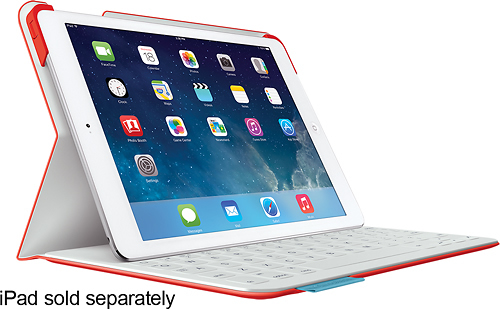
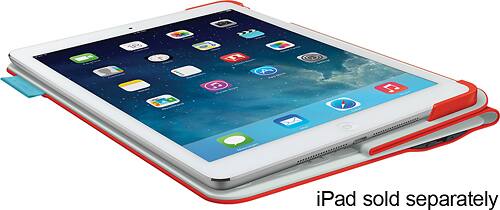
Customers are delighted by the FabricSkin Portfolio Keyboard Case's high-quality keyboard, ease of use, and long battery life. Many appreciate its attractive colors and protective qualities, along with its lightweight design. The convenient stand feature also receives positive feedback. While some mention added bulk, the overall response highlights a positive user experience.
This summary was generated by AI based on customer reviews.
Rated 4 out of 5 stars
Great design but some tech minor tech problems
||Posted .This reviewer received promo considerations or sweepstakes entry for writing a review.Some units seem to have defects but Best Buy did exchange willingly.
I would recommend this to a friendRated 3 out of 5 stars
Great Prodcut
||Posted .This reviewer received promo considerations or sweepstakes entry for writing a review.Love the way it looks, The keys are a bit strange to tap and sometimes you feel weird typing. Need to charge it a lot because it dies soon.
I would recommend this to a friendRated 2 out of 5 stars
good product if only bracket doesn't break
||Posted .This reviewer received promo considerations or sweepstakes entry for writing a review.this is the second replacement - needing a third one since the left bracket by the on/off switch broke again. Notified Logitech about issue and I'm told that they are not aware of the bracket breaking...it's the first time they are hearing it...you kidding me??? If they only read the reviews here, on Amazon, on their own site...wow! If the brackets didn't break, I would definitely give it a 5.
No, I would not recommend this to a friendRated 2 out of 5 stars
elastic in 4 corners to hold device
||Posted .This reviewer received promo considerations or sweepstakes entry for writing a review.I wanted a sturdy kindle cover. Not many options in store for the kindle fire HDX. The major problem is the corner elastic. Second problem is that the closing flap intrudes on front of screen in portrait and landscape view. I will keep my eye out for another to replace this but I am tired of spending the money on these accessories for devices.
No, I would not recommend this to a friendRated 1 out of 5 stars
Ipad cover
||Posted .This reviewer received promo considerations or sweepstakes entry for writing a review.Bluetooth doesn't work! It was fully charged. Must be a defect item.
No, I would not recommend this to a friend- Pros mentioned:Battery life, Keyboard quality, Protection
Rated 5 out of 5 stars
Great cover/keyboard
Posted .This reviewer received promo considerations or sweepstakes entry for writing a review.Had this cover for over one year, only now doing first recharge of the keyboard! No problems whatsoever, keyboard auto-links via Bluetooth flawlessly and quickly. Much better for writing than on-screen keyboard, and the cover gives extra assurrance of no damage to the iPad. Did a lot of research, very happy with this purchase.
I would recommend this to a friend Rated 4 out of 5 stars
Good, but could be better
Posted .This reviewer received promo considerations or sweepstakes entry for writing a review.I own several Logitech products (remotes, keyboards, etc.) and this one fits in right with the rest...a good product that does what it says it will do, but a little more attention to detail would make it much better. I use an iPad Air for note-taking, emailing, etc. that would be too much to ask of my iPhone 5 (or my eyesight) but too little to warrant taking my MacBook Pro along. But the 'glass keyboard' on the iPad is irritating to use, especially for those of us who are 'touch typers'. This keyboard fits the bill in many instances. The right side of your iPad slides into two plastic guides on either side of the pad (that forms your top anchor), and the remainder of the iPad is free to fold, lay flat, or stand up. The left-side guide covers your power button but it's reproduced in a button in that guide. The bluetooth connection only becomes active when the iPad is unfolded and placed just above the top row of keys (the magnet will guide you gently but decisively to an invisible line where the magnet provides the bottom anchor). Emails longer than a line or two are handled well with this unit, and it provides more protection than a simple 'smart cover' magnetic latch. Those used to Mac OS will be happy that certain shortcut keys that are not normally associated with the iPad are resurrected (yes, that means the command-z 'Undo' key - YEAH!). Cutouts for controls and cameras retain those functions. So what's wrong? Nothing that can't be fixed: 1) The keyboard is a good compromise to size, but it has some quirks to those of us who 'touch type'. The 'home' key on the keypad is right where you'd expect the '1' key, and that pushes all the numbers to the right a little. I've kicked myself out of an email several times when I was trying to reach the '1' key, only to hit 'home' instead. You can get right back to where you left off, but it's an annoyance. Also, in the interest of size, the 'Q' key does double duty as the tab (using the fn key). Those who are used to flying through a form online by tabbing will find this irritating to remember to push the function key (bottom left of the keyboard). 2) The guides that hold in your iPad get loose over time, especially if you have to remove your iPad from the Logitech a lot to place it in a charging cradle, etc. Not that your iPad is in any danger of sliding out of the case - the fold that is opposite the guides will keep it intact - but sliding out does mis-align the power button. Thus, repeated presses of the power button resulted in nothing because the iPad slid out a little. 3) The keyboard battery has a very good life, but has no 'fuel gauge' to reference, so I find myself plugging it in every couple of weeks just to be sure. Would have been nice to have a quick led-based fuel gauge, or even an app that would provide the same function. The button near the microUSB charging port on the case's right side only resets the Bluetooth.
I would recommend this to a friendRated 3 out of 5 stars
giving 3 stars
Posted .This reviewer received promo considerations or sweepstakes entry for writing a review.Loved this keyboard until two plastic holders broke. First it cracked on one side, when it broke, and recently the other side broke too. Nothing supports the ipad. Had this keyboard for about two years.
I would recommend this to a friendRated 5 out of 5 stars
Best in its Class*******
Posted .This reviewer received promo considerations or sweepstakes entry for writing a review.I have bought this case at BB and I've had it for about two weeks now and so far so good. I have tried Belkin, Targus and Smart Case and so far this is the one with its keyboard it's fully functional. If you buy it you won't regret it.
I would recommend this to a friendRated 1 out of 5 stars
Would not connect to iPad
Posted .This reviewer received promo considerations or sweepstakes entry for writing a review.I have tried 2 of these keyboards thinking that the first one may have been defective, but found the same issue with both. The keyboard is supposed to automatically turn on when it has a magnetic connection with the the iPad. I was able to get the keyboard to turn on once so that I could pair the device but after that it stopped working. Not sure if the magnet sensors were bad but I opted to go with the Belkin keyboard and have had no issue. Logitech normally has amazing products but this keyboard was a big headache.
No, I would not recommend this to a friend