Customer Ratings & Reviews
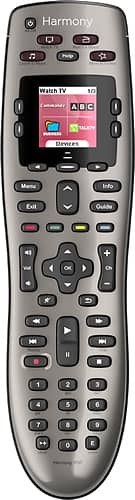

- Model:
- 915-000159/915-000160
- |
- SKU:
- 9837565
Customer reviews
Rating 4.4 out of 5 stars with 7679 reviews
(7,679 customer reviews)Rating by feature
- Value4.3
Rating 4.3 out of 5 stars
- Quality4.6
Rating 4.6 out of 5 stars
- Ease of Use4.2
Rating 4.2 out of 5 stars
Customers are saying
Customers are satisfied with the Harmony 650 8-Device Universal Remote's ease of use, compatibility, and price. Many appreciate the setup process and customization options, along with features like the backlight and macro programming capabilities. However, some users point to areas needing improvement, such as battery life and button size. Concerns were also raised regarding the remote's responsiveness.
This summary was generated by AI based on customer reviews.
Rated 3 out of 5 stars
Ok universal remote
||Posted .This reviewer received promo considerations or sweepstakes entry for writing a review.Too complicated for me to program/use. I was disappointed given the advances in technology.
No, I would not recommend this to a friendRated 3 out of 5 stars
Average but better than most universals
||Posted .This reviewer received promo considerations or sweepstakes entry for writing a review.They are average as they do not adjust to all challenges in the trouble mode.
I would recommend this to a friendRated 3 out of 5 stars
Very confusing for 82 yr. old
||Posted .This reviewer received promo considerations or sweepstakes entry for writing a review.It was necessary for me to call out the Best Buy Geek Squad twice to help me thru my muddle.
I would recommend this to a friendRated 3 out of 5 stars
Difficult to set up but nice to use
||Posted .This reviewer received promo considerations or sweepstakes entry for writing a review.Needed the GEEK Squad to set up this product. It took him over an hour to figure it out!
No, I would not recommend this to a friendRated 3 out of 5 stars
Not the Best
||Posted .This reviewer received promo considerations or sweepstakes entry for writing a review.It is a lot easier to just use our remote for the direct tv then to use this one.
No, I would not recommend this to a friendRated 3 out of 5 stars
it ok
||Posted .This reviewer received promo considerations or sweepstakes entry for writing a review.sometimes some equipment will turn on and sometime some won't. The you have to trouble shot.
I would recommend this to a friendRated 2 out of 5 stars
Not impressed
||Posted . Owned for more than 2 years when reviewed.This reviewer received promo considerations or sweepstakes entry for writing a review.Hard to program, especially if you need to replace one. You need to log in their app on your computer to program, then download from the computer to the remote. For that much work, I should have bought a handful of single device remotes.
No, I would not recommend this to a friendRated 3 out of 5 stars
So So Remote
||Posted .This reviewer received promo considerations or sweepstakes entry for writing a review.It took 45 min to set up and does not always work.
No, I would not recommend this to a friendRated 2 out of 5 stars
Doesn't work half the time
||Posted .This reviewer received promo considerations or sweepstakes entry for writing a review.This is my second harmony remote and maybe my last. I programmed this correctly and always have to use the help button to get the correct input, it will turn on the correct input and then go back to the wrong one regularly. Once it's got the activity up and running it's great. But that's not why you buy these.
No, I would not recommend this to a friendRated 3 out of 5 stars
Awesome when it works
||Posted .This reviewer received promo considerations or sweepstakes entry for writing a review.It works I consistently. I can live with it but it drives the Mrs crazy.
No, I would not recommend this to a friend- Pros mentioned:Ease of useCons mentioned:Response time
Rated 4 out of 5 stars
Once programmed, its great
Posted .This reviewer received promo considerations or sweepstakes entry for writing a review.Using with: Panasonic 60, Pioneer 5.1 receiver, PS3, AppleTV, FiOs HD DVR. Overall: The programming takes a couple tries, It took me 4 re-runs to make it perfect. Setup: Plug remote into computer with cable provided. You need the model numbers for each of your devices.The program that Harmony initially starts you with DOES NOT setup everything, only the basic devices and simple activities. You'll have to re-run/edit the setup and select "Manual" then you will be presented with more options. The "customize buttons" option shows on the main menu screen, and from there you can adjust the way the Harmony remote works. I had to re-run/edit the set-ups multiple times to adjust everything to my liking, most users if not all will do too. Build: The remote feels solid, but a few drops and I worry about it, especially the screen. It has backlighting keys that show up automatically when you pick it up (thanks to the built in accelerometer). Buttons are decently large and easy to navigate. The screen is not great quality but it gets its message across to the user. Actual use: Once programmed, using the remote is easy. However there is a waiting time. This model only has one IR blaster built-in where the higher end ones have multiple. This means it turns on each device one a time, which the user does NOT have to initiate each. Scenario: User hits the "Watch TV" activity button, Tv switches on, cable box switches on, Receiver switches on, inputs on all devices are switched, sound from receiver is on, and finally user begins watching TV with all devices in correct modes. This process takes about 10 seconds with the remote always pointed at the screen. If users wish for the activity to respond faster, only option is to buy the higher end Harmony remotes with multiple IR blasters. If the remote seems to have missed a device or you switched between activities and something is not on/off, push the "help" button on the top of the remote screen and it will walk you through a short "fix" selection. Device suport: Tvs- any/most will work Receivers- any/most will work Game systems- most will require seperate IR/bluetooth adaptor AppleTV/media center devies/Pcs- requires button customization and in some cases a separate IR/bluetooth receiver. You can check for your device compatabilty on Harmony's website Go to the following link. http://myremotesetup.com/EasyZapper/New/Main.asp?WebProcessAction=Start&ReturnUrl=%2FEasyZapper%2F%2E%2FNew%2FProcSpice%2Flanding%2Easp&ClassId=PrSpice%2EProcSpice&RelativePath=ProcSpice%2F Note: Yes, to those with digital video recorders (DVRs), there is an option to select to keep your DVRs on all the time without messing with the other devices.
I would recommend this to a friend Rated 3 out of 5 stars
a little difficult
||Posted .This reviewer received promo considerations or sweepstakes entry for writing a review.all devices in one remote does't always start tv right away function keys not labeled well
I would recommend this to a friendRated 3 out of 5 stars
Must program
||Posted .This reviewer received promo considerations or sweepstakes entry for writing a review.You have to program with your computer any time you change equipment
No, I would not recommend this to a friendRated 2 out of 5 stars
VERY COMPLICATED TO SET UP AND TO USE.
||Posted .This reviewer received promo considerations or sweepstakes entry for writing a review.I FOUND THE SET UP TO BE CUMBERSOME AND A REAL HASSEL. THERE WAS NO CABLEENCLUDED IN THE PACKAGE, YET YOU HAVE TO HAVE A CABLE TO ATTACH THE REMOTE TO A COMPUTER IN ORDER TO SET IT UP. INSTRUCTIONS ON THE INTERNET WERE LIMITED AND NOT EASY TO ACCOMPLISH. NOT AN AMATUER FRIENDLY DEVICE. NOT AT ALL AS EASY TO USE AS THE HARMONY 360.
No, I would not recommend this to a friendRated 1 out of 5 stars
horrible
||Posted .This reviewer received promo considerations or sweepstakes entry for writing a review.this expensive remote would be easy to use - if it worked!!!!! a few weeks ago, the Geek Squad came in to set up our TV and, as it turns out, to set up the remote control - the GS explained that we cannot try and fix the remote ourselves because the GS must program the remote by hooking it up to their computer - they set it up the day they installed the system and all was great... about 2 weeks after installation my wife had a problem and hit the "HELP" button - as shown by the GS and as the remote had done the first couple of weeks of use, we were supposed to see a question in the window to which we would answer "yes" or "no"... however, after only a couple of weeks the window and the Help button both stopped working - we will now have to call the GS and have them come out here to figure out what happened - is it a programming error? or is it a lemon of a remote? or is this remote simply a piece of junk?
No, I would not recommend this to a friendRated 1 out of 5 stars
Only for the most simple of systems, BAD setup
||Posted .This reviewer received promo considerations or sweepstakes entry for writing a review.It seems like this MIGHT work well if you had a very simple system, like only a cable box, DVD player and TV. Once you get afield from that this thing is a prescription for frustration and headache. The app that is required to be used to setup is cumbersome, slow, oftentimes loses communication with the remote and offers very few options to actually customize this supposedly customizable remote. The remote itself suffers greatly by comparison to Logitech's higher end models, and even Logitech's older simpler models which were a breeze. Does not work well AT ALL with any Apple product... if you have an Apple TV I recommend avoiding this remote at all costs because it just plain does not work unless you "fool" it to believing it is a specific model of MacMini. All in all, if I had gotten around to returning this before Best Buy's 15 day deadline, I would have dumped it entirely.
No, I would not recommend this to a friend- Pros mentioned:Compatibility, Customization, Price
Rated 5 out of 5 stars
Nice gadget for techies
Posted .This reviewer received promo considerations or sweepstakes entry for writing a review.The Harmony 650 is a curious device. For most purposes, it does indeed replace the remotes provided with each device, but you will want to keep the separate remotes handy. When you need to do something unusual, such as turning on or off only one device, it is easier to use the device’s remote than to go through the screen to find the power toggle on the Harmony. Harmony's database of codes for devices is extensive, and included all four of the devices I use, including a ten-year-old home theater system. Initial setup was, therefore, very easy, with no need to train the Harmony remote. The web interface that must be used to program the Harmony is a little confusing at first, with separate sections for the buttons and the screen. The actions associated with about half the buttons and everything on the screen can be customized to individual preferences. This customization can include scripts that are a series of commands. The brains behind this technical wizardry appears to reside in Logitech's computers, so when you are finished with setup and customization you need to connect the Harmony remote to a PC and download the instructions to it. Overall, it is a very clever device that does everything claimed. However, it is far from a necessary accessory, and more of a gadget for the technically inclined. I give it a top rating not because it is the greatest gadget in the house, but because it does well what it is supposed to do. At a $40 special sale price it is good value.
I would recommend this to a friend Rated 3 out of 5 stars
reccommended universal remote
||Posted .This reviewer received promo considerations or sweepstakes entry for writing a review.The idea behind this remote is good but the keys are very small for older people.
I would recommend this to a friendRated 3 out of 5 stars
Difficult to program
||Posted .This reviewer received promo considerations or sweepstakes entry for writing a review.This remote is a bit difficult to coordinate all of the buttons.
No, I would not recommend this to a friendRated 3 out of 5 stars
Ok
||Posted .This reviewer received promo considerations or sweepstakes entry for writing a review.It’s ok, to many functional buttons to remember...
I would recommend this to a friend