Customer Ratings & Reviews
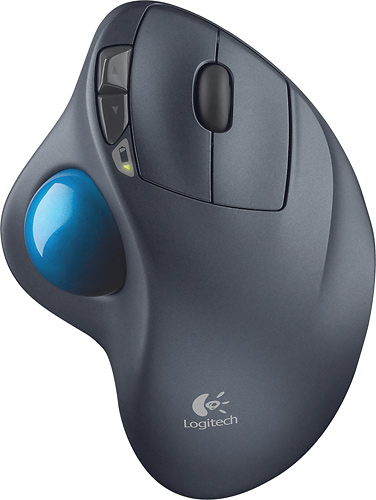
- Model:
- 910-001799
- |
- SKU:
- 1260761
Customer reviews
Rating 4.7 out of 5 stars with 6320 reviews
(6,320 customer reviews)Rating by feature
- Value4.6
Rating 4.6 out of 5 stars
- Quality4.7
Rating 4.7 out of 5 stars
- Ease of Use4.7
Rating 4.7 out of 5 stars
Customers are saying
Customers are impressed with the M570 Wireless Trackball Mouse's ease of use, wireless functionality, and ergonomic design. Many appreciate the trackball feature and report positive experiences with battery life and the mouse's size. While some users mention needing space and potential button issues, the overall feedback highlights the product's ease of use and comfort. The responsiveness and accuracy are also frequently praised.
This summary was generated by AI based on customer reviews.
- Pros mentioned:Ergonomics, Wireless
Rated 5 out of 5 stars
The most ergonomic mouse
||Posted .This reviewer received promo considerations or sweepstakes entry for writing a review.If you have a thumb on your right hand, this is the most ergonomic pointing device you can use. The device remains stationary allowing you to properly support your forearm and wrist. All that you need to move is your right thumb and first two fingers. The trackball can be adjusted to move across the display with just one motion (except for widescreen monitors, with need an additional motion). The wheel makes for easy scrolling up and down on webpages. Wireless makes it easy to locate it anywhere on your work surface. Spend a few minutes using this mouse and you will not want to use a traditional mouse.
I would recommend this to a friend - Pros mentioned:Trackball
Rated 5 out of 5 stars
Excellent product
||Posted .This reviewer received promo considerations or sweepstakes entry for writing a review.No exaggeration, these Logitech trackballs have saved me from tendinitis for almost 20 years. I ordered this to replace the last one that eventually wore out. There are other style trackballs available but if you have repetitive stress injury, I highly recommend this particular model.
I would recommend this to a friend - Pros mentioned:Ease of use
Rated 5 out of 5 stars
Have always used this versus a traditional mouse.
||Posted .This reviewer received promo considerations or sweepstakes entry for writing a review.Great product superior to wired version and have always used the track ball for easier movement and more detailed control of cursor. I plan to purchase an additional one for my other computer. Would feel lost if this product ceased to be manufactured. Thank you for having it in stock.
I would recommend this to a friend - Pros mentioned:Trackball
Rated 4 out of 5 stars
The best of all trackballs
||Posted .This reviewer received promo considerations or sweepstakes entry for writing a review.I have been using this model of trackball mouse for years. My only complaint it that the buttons wear out after about 2 years and I have to buy a new one. I am a frequent computer user so I expect some wear and tear. Otherwise, when in good condition, this mouse is the best I have used in my life. I love trackballs over regular mouse and will never go back. Also, Best Buy had the best price....even beat Amazon.
I would recommend this to a friend - Pros mentioned:Ease of use
Rated 5 out of 5 stars
Best mouse I have ever owned!
||Posted .This reviewer received promo considerations or sweepstakes entry for writing a review.I first purchased this mouse to help with my carpal tunnel issues. It worked so well, I have used it ever since on all my computers. It is also great for limit space areas where you may not have a good smooth surface to work from as it is a track ball and does not need to move around. .
I would recommend this to a friend - Pros mentioned:Battery life, Wireless
Rated 5 out of 5 stars
Comfort in the palm of your hand
||Posted . Owned for 3 weeks when reviewed.This reviewer received promo considerations or sweepstakes entry for writing a review.The M570 trackball is wireless & ergonomic. Very efficient and allows precision in cursor movement with a range of 30 feet. It has a battery life of 18 months, AA size battery. There is a battery life indicator that lets you know when you’re about to run out of battery. Switch on bottom to turn off. The mouse has 4 buttons (left/right click and previous/next page buttons & scroll wheel. Can be used for gaming as well. Highly Recommended. Best Buy will price match if you find this model cheaper as well as an other merch you intend to buy.
I would recommend this to a friend Rated 4 out of 5 stars
Not bad, but could do with more features
||Posted .This reviewer received promo considerations or sweepstakes entry for writing a review.I've been using Logitech mice for years (they generally last about 3 years of heavy use before I need to replace them for failed left click buttons) and bought this to try and alleviate some right arm pain that seemed worse after a session at the computer. Here's what I've found: 1. The arm pain (which I've had since pulling a muscle in a dog-ball throwing incident about 3 months ago) was significantly better after about 2-3 days of using the trackball instead of a mouse. 2. I can't navigate across my 2 screen setup as fast as I did with the Performance MX Mouse. 3. Every few days, it's a good idea to pop out the ball, clean the roller pads and polish the ball for a few seconds in order to avoid a little stickiness in the movement. 4. I really wish there were more buttons. On the Logitech Performance Mouse MX which I've used for the last year or so, along with the usual left/right/centre click, I had 4 extra buttons (plus the usual left, right & centre click, and the scroll left/scroll right), which I used for Forward, Back, Copy, & Paste. The M570 only has 2 extra buttons - and I miss the additional functionality. 5. Logitech's excellent free-spinning scroll wheel is another missing feature. I've had this on my mice for the last decade, and love the ability to quickly scroll through a spreadsheet. Overall, the reduced arm strain overrules the missing features, so I'd rate this more like 3.5, rounded up to 4. It would get 5 stars and I'd happily pay double for the same device with 2 extra buttons and a better scroll wheel.
I would recommend this to a friend- Pros mentioned:Ergonomics, Trackball
Rated 5 out of 5 stars
One of Logitech's best!
||Posted .This reviewer received promo considerations or sweepstakes entry for writing a review.Using this with my Mac Mini! Forgot how comfortable a Trackball was. Works great with my Mac, and I have no hand strain after sustained use. Price is super affordable.
I would recommend this to a friend - Pros mentioned:Ease of use, Ergonomics
Rated 5 out of 5 stars
The best pointing device
||Posted .This reviewer received promo considerations or sweepstakes entry for writing a review.I have been using the Logitech trackman in its various versions since they first came out. It is the only pointing device I’ll buy. It doesn’t require you to physically move its location (like you do a mouse) when using it and therefore it requires less space and no mousepad. you move the curser by moving the ball with your thumb. It is ergonomically designed and is more comfortable to use than any other pointing device I’ve seen. The only downside I can possibly see about this device would be if you are left-handed since there isn’t a left-hand version.
I would recommend this to a friend - Pros mentioned:Ergonomics, Wireless
Rated 5 out of 5 stars
Once you rollerball...
||Posted . Owned for 1 month when reviewed.This reviewer received promo considerations or sweepstakes entry for writing a review.I LOVE this mouse! I have a history of neck problems so spending my days sliding a mouse all over my desk was a recipe for painful disaster that no PT could fix. I took a chance on a new idea, and could not be happier! The ergonic design is easy on my hands, and the rollerball is smooth and precise. As a bonus, it is wireless so that I can easily stand at my desk. This is the third of these mice that I have bought - one for work, one for my home desktop, and one for my laptop. Take that leap of faith - you can't go wrong!
I would recommend this to a friend - Pros mentioned:Ease of use, Ergonomics
Rated 5 out of 5 stars
Great state of the art tool.
||Posted . Owned for 1 month when reviewed.This reviewer received promo considerations or sweepstakes entry for writing a review.I wasn't a big fan of trackballs when I first used them, some 20 years ago. Getting used to doing much of the moving work with just the thumb after years of generic mice wasn't fun. Skip ahead to today: the M570 is well-designed and comfortable. It reflects what seems to be the state-of-the-art in terms of functionality. And it's a good deal more fun to use to than the clunky trackball I used as an AV tech two decades ago. Worth your time and your bucks (and it won't take that many, either).
I would recommend this to a friend - Pros mentioned:Wireless
Rated 4 out of 5 stars
Pretty good
||Posted .This reviewer received promo considerations or sweepstakes entry for writing a review.This is a very comfortable mouse, but I wish that it was designed just like the Logitech wired version, which has the trackball in the center of the device, rather than the side. It is harder to modify which fingers you choose to use, which I need to do to avoid stress issues. I wanted to go wireless with devices which would use the same receiver, so this was the combination I used...this mouse and the Wave Keyboard.
I would recommend this to a friend - Pros mentioned:Ease of use
Rated 5 out of 5 stars
Love this mouse.
||Posted .This reviewer received promo considerations or sweepstakes entry for writing a review.Call me old school but a rollerball mouse is my go-to device. I have it on all my home computers and even bought two as backups. I have used the same use for the 4 or so years with no issue. A good tip is remove the ball once a month and clean the sensors.
I would recommend this to a friend - Pros mentioned:Ease of use, Ergonomics
Rated 5 out of 5 stars
Best ergonomic mouse
||Posted .This reviewer received promo considerations or sweepstakes entry for writing a review.A co-worker and I both have issues with our hands and wrists due to typing all day. Our company nurse suggested another ergonomic mouse with the track ball, however, it didn't have the scroll wheel to scroll the page up or down. So it was pretty much useless. I was at Best Buy one day looking at Macbooks and saw this mouse that has the scroll wheel. I took the chance and purchased it and I love it! It was so easy to get used to. The fact that the mouse stays in one place and it has the scroll wheel made it worth purchasing. If you have issues with your hands/wrists, this is a good choice for you.
I would recommend this to a friend - Pros mentioned:Ease of use
Rated 5 out of 5 stars
great for your hand~!!!!
||Posted .This reviewer received promo considerations or sweepstakes entry for writing a review.this is the perfect way to relieve you from the stress that causes using a normal mouse. Takes a couple of hours to get used to it, but once you have done it, its just great. I use this one in the office and a normal one at home, that way i take stress out from my hand.
I would recommend this to a friend - Pros mentioned:Ease of use
Rated 5 out of 5 stars
I love it!
||Posted .This reviewer received promo considerations or sweepstakes entry for writing a review.I use this mouse daily for everything, but mainly games. I chose a trackball mouse over a regular mouse because with these you never have to extend your arm or run out of mouse pad space. It just stays in one spot, I love it. Very easy to get used to.
I would recommend this to a friend - Pros mentioned:Battery life, Ergonomics
Rated 5 out of 5 stars
You will love it or hate it, I love it!
||Posted .This reviewer received promo considerations or sweepstakes entry for writing a review.I love this mouse so much I have 3 of them, 2 for home, ( desktop and laptop) and 1 for work. People who use my computer at work have been known to cringe when they see my Logitech trackball mouse. Half hate it and half love it. For that reason I keep a regular Logitech cordless mouse at my desk as well. I would say if you have never used a trackball style mouse to try one out if possible at a store or someone who has one to get the feel of it. I found it an easy transition and less tiring to use for long periods of time than my traditional mouse.
I would recommend this to a friend - Pros mentioned:Ease of use
Rated 5 out of 5 stars
Cool mouse
||Posted . Owned for more than 2 years when reviewed.This reviewer received promo considerations or sweepstakes entry for writing a review.Great Trackball! Love it and I brought (2), for work and home. Not all over the place like the traditional mouse. Very relaxing
I would recommend this to a friend - Pros mentioned:Wireless
Rated 5 out of 5 stars
Nice update
||Posted .This reviewer received promo considerations or sweepstakes entry for writing a review.I have always liked trackball mice but this wireless trackball is so much better than the others I have had. Not only is it wireless, it also is controlled by the thumb. It goes well with my laptop and since the base is motionless I can use it on even the smallest tables.
I would recommend this to a friend - Pros mentioned:Ease of use
Rated 5 out of 5 stars
Great Mouse
||Posted .This reviewer received promo considerations or sweepstakes entry for writing a review.I Love this mouse. I don't have to keep moving it since it is a trackball. It connect easily with the Logitech unifying software/adapter. I use one unifying usb adapter and connects both my mouse and keyboard
I would recommend this to a friend