Customer Ratings & Reviews
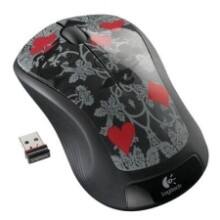
- Model:
- M310
- |
- SKU:
- 3925784
Customer reviews
Rating 4.7 out of 5 stars with 15391 reviews
(15,391 customer reviews)Rating by feature
- Value4.8
Rating 4.8 out of 5 stars
- Quality4.7
Rating 4.7 out of 5 stars
- Ease of Use4.8
Rating 4.8 out of 5 stars
Customers are saying
Customers find value in the product's ease of use, overall performance, and convenient size, along with its competitive price, wireless functionality, and long battery life. Many also appreciate its ergonomic design and variety of colors. However, a small number of customers have reported concerns regarding the scroll wheel, occasional lag, and its weight or sensitivity.
This summary was generated by AI based on customer reviews.
Rated 5 out of 5 stars
Awesome mouse!!
||Posted .This reviewer received promo considerations or sweepstakes entry for writing a review.The device has nice design and looks slick !! It's easy to use and has a great battery life !!!
This review is from Logitech - M310 Wireless Optical Ambidextrous Mouse - Wireless - Black
I would recommend this to a friend- Pros mentioned:Price
Rated 4 out of 5 stars
Fast easy purchase to replace work mouse
||Posted .This reviewer received promo considerations or sweepstakes entry for writing a review.Left my mouse in the airport again and work wouldn't replace a second time so got this to replace the Logitech they had bought me and paid $40 for. Just as good, lighter and cheaper. Great buy!
This review is from Logitech - M310 Wireless Optical Ambidextrous Mouse - Wireless - Peacock Blue
I would recommend this to a friend Rated 5 out of 5 stars
Super easy to set up
||Posted .This reviewer received promo considerations or sweepstakes entry for writing a review.Using with work laptop so do not have to use laptop touch pad as often. Works great.
This review is from Logitech - M310 Wireless Optical Ambidextrous Mouse - Wireless - Black
I would recommend this to a friendRated 5 out of 5 stars
Works Great!
||Posted .This reviewer received promo considerations or sweepstakes entry for writing a review.I was looking for a wireless mouse for my laptop, this one works for me and it was on sale.
This review is from Logitech - M310 Wireless Optical Ambidextrous Mouse - Wireless - Peacock Blue
I would recommend this to a friendRated 5 out of 5 stars
I only will buy the Logitech M310 wireless mousse
||Posted . Owned for 1 month when reviewed.This reviewer received promo considerations or sweepstakes entry for writing a review.Logitech M310 is the second one I've owned in the past 13 years. LOVE this particular model!!! Excellent action. Great for those of us with hands that on some days are a little less "flexible"..;)
This review is from Logitech - M310 Wireless Optical Ambidextrous Mouse - Wireless - Silver
I would recommend this to a friend- Pros mentioned:Overall performance
Rated 5 out of 5 stars
Good mouse !!
||Posted .This reviewer received promo considerations or sweepstakes entry for writing a review.I bought it as a gift for a friend. He liked it very much. Good purchase for the price.
This review is from Logitech - M310 Wireless Optical Ambidextrous Mouse - Wireless - Silver
I would recommend this to a friend - Pros mentioned:Overall performance
Rated 5 out of 5 stars
Great Mouse
||Posted .This reviewer received promo considerations or sweepstakes entry for writing a review.I love these mice. They always fit well with the hand and last a long time.
This review is from Logitech - M310 Wireless Optical Ambidextrous Mouse - Wireless - Peacock Blue
I would recommend this to a friend - Pros mentioned:Wireless
Rated 5 out of 5 stars
nice mouse
||Posted .This reviewer received promo considerations or sweepstakes entry for writing a review.The wireless mouse has been working just fine and feels good in my hand.
This review is from Logitech - M310 Wireless Optical Ambidextrous Mouse - Wireless - Peacock Blue
I would recommend this to a friend - Pros mentioned:Ease of use
Rated 5 out of 5 stars
MOUSE FOR COMPUTER
||Posted .This reviewer received promo considerations or sweepstakes entry for writing a review.EASY SET UP, SO SMOOTH TO USE, LOVE THIS MOUSE, ALSO, THE SHAPE, IS PERFECT FOR MY HAND.
This review is from Logitech - M310 Wireless Optical Ambidextrous Mouse - Wireless - Black
I would recommend this to a friend Rated 5 out of 5 stars
Excellent mouse
||Posted .This reviewer received promo considerations or sweepstakes entry for writing a review.Love the feel and build. The mouse has been used with two different laptops and has worked well both
This review is from Logitech - M310 Wireless Optical Ambidextrous Mouse - Wireless - Peacock Blue
I would recommend this to a friend- Pros mentioned:Overall performance
Rated 5 out of 5 stars
Solid choice for wireless mouse
||Posted .This reviewer received promo considerations or sweepstakes entry for writing a review.This little unit has worked seamlessly since purchase. Highly recommend.
This review is from Logitech - M310 Wireless Optical Ambidextrous Mouse - Wireless - Silver
I would recommend this to a friend - Pros mentioned:Overall performance
Rated 5 out of 5 stars
What a great price on this Logitech mouse!
||Posted .This reviewer received promo considerations or sweepstakes entry for writing a review.My grandkids keep taking my mice! Great quality and at this price put 2 in stock!
This review is from Logitech - M310 Wireless Optical Ambidextrous Mouse - Wireless - Silver
I would recommend this to a friend - Pros mentioned:Ease of use
Rated 4 out of 5 stars
Works great
||Posted .This reviewer received promo considerations or sweepstakes entry for writing a review.This mouse is perfect for taking on the road in my laptop bag. The unified controller means that I can use one dongle for this mouse as well as the desk-bound mouse that is larger. Just what I needed.
This review is from Logitech - M310 Wireless Optical Ambidextrous Mouse - Wireless - Peacock Blue
I would recommend this to a friend - Pros mentioned:Ease of use
Rated 5 out of 5 stars
works ok
||Posted . Owned for 3 weeks when reviewed.This reviewer received promo considerations or sweepstakes entry for writing a review.wireless mouse works OK. easy to use, connects ok. basic design.
This review is from Logitech - M310 Wireless Optical Ambidextrous Mouse - Wireless - Black
I would recommend this to a friend Rated 5 out of 5 stars
SouthLand Security
||Posted . Owned for 4 months when reviewed.This reviewer received promo considerations or sweepstakes entry for writing a review.Works great with the SouthLand Security Streaming Camera System.
This review is from Logitech - M310 Wireless Optical Ambidextrous Mouse - Wireless - Peacock Blue
I would recommend this to a friend- Pros mentioned:Overall performance
Rated 5 out of 5 stars
SouthLand Security
||Posted . Owned for 4 months when reviewed.This reviewer received promo considerations or sweepstakes entry for writing a review.Works great with the SouthLand Security Streaming Camera System.
This review is from Logitech - M310 Wireless Optical Ambidextrous Mouse - Wireless - Silver
I would recommend this to a friend Rated 5 out of 5 stars
Works like it should!
||Posted .This reviewer received promo considerations or sweepstakes entry for writing a review.Nice wireless mouse! Works exactly like it should. Comfortableto to use, and no issues.
This review is from Logitech - M310 Wireless Optical Ambidextrous Mouse - Wireless - Silver
I would recommend this to a friend- Pros mentioned:Wireless
Rated 5 out of 5 stars
Excellent mouse
||Posted .This reviewer received promo considerations or sweepstakes entry for writing a review.Excellent product. I was able to use it a second later I plugged the wireless receiver into my computer.
This review is from Logitech - M310 Wireless Optical Ambidextrous Mouse - Wireless - Silver
I would recommend this to a friend Rated 3 out of 5 stars
M310 wireless mouse clicks.
||Posted . Owned for 1 month when reviewed.This reviewer received promo considerations or sweepstakes entry for writing a review.Review: This mouse works fine. Comes with a starter battery which will probably has a long time. I turn off the battery switch when not using the mouse. I didn't expect the roller wheel to have a click feel. I am used to a mouse with a smooth no-click feel. Going into device settings does not take away the click feel, just changes how many lines of writing the screen moves up or down
This review is from Logitech - M310 Wireless Optical Ambidextrous Mouse - Wireless - Peacock Blue
No, I would not recommend this to a friend- Pros mentioned:Ease of use
Rated 5 out of 5 stars
works great
||Posted . Owned for 3 weeks when reviewed.This reviewer received promo considerations or sweepstakes entry for writing a review.cordless mouse - simple to install and easy to use and navigate
This review is from Logitech - M310 Wireless Optical Ambidextrous Mouse - Wireless - Silver
I would recommend this to a friend