Customer Ratings & Reviews
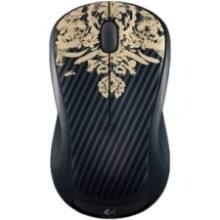
- Model:
- M310
- |
- SKU:
- 3925875
Customer reviews
Rating 4.7 out of 5 stars with 15385 reviews
(15,385 customer reviews)Rating by feature
- Value4.8
Rating 4.8 out of 5 stars
- Quality4.7
Rating 4.7 out of 5 stars
- Ease of Use4.8
Rating 4.8 out of 5 stars
Customers are saying
Customers recognize the product for its excellent overall performance, ease of use, and convenient size, often highlighting its great battery life, wireless functionality, and value for money. Many also appreciate its good ergonomics and the variety of available colors. However, some users have reported concerns regarding the scroll wheel becoming stiff, occasional lag, and a lack of super sensitivity, with its very light weight also being noted.
This summary was generated by AI based on customer reviews.
Rated 5 out of 5 stars
Plug and play
||Posted .This reviewer received promo considerations or sweepstakes entry for writing a review.I got this for my mom, who still had a track ball. All I had to do was plug in the USB. Her computer is old and she has dial-up, so I am happy it was so easy.
This review is from Logitech - M310 Wireless Optical Ambidextrous Mouse - Wireless - Peacock Blue
I would recommend this to a friendRated 5 out of 5 stars
work mouse
||Posted .This reviewer received promo considerations or sweepstakes entry for writing a review.Was na inexpensive and works well, I have used several of these for work applications and have not had any problems.
This review is from Logitech - M310 Wireless Optical Ambidextrous Mouse - Wireless - Peacock Blue
I would recommend this to a friendRated 5 out of 5 stars
Good wireless mouse, small plug in
||Posted .This reviewer received promo considerations or sweepstakes entry for writing a review.The Logitech - M310 Wireless Scroll Mouse has worked well. The plug in to the computer has a small profile and can remain in place in the bag.
This review is from Logitech - M310 Wireless Optical Ambidextrous Mouse - Wireless - Black
I would recommend this to a friend- Cons mentioned:Scroll wheel
Rated 3 out of 5 stars
Mouse trap!
||Posted . Owned for 1 month when reviewed.This reviewer received promo considerations or sweepstakes entry for writing a review.This mouse is a standard mouse but the scores wheel is super annoying and very loud!
This review is from Logitech - M310 Wireless Optical Ambidextrous Mouse - Wireless - Silver
No, I would not recommend this to a friend Rated 5 out of 5 stars
glad I bought this mouse
||Posted . Owned for 1 month when reviewed.This reviewer received promo considerations or sweepstakes entry for writing a review.don't know what more I can say about the overall value of this product
This review is from Logitech - M310 Wireless Optical Ambidextrous Mouse - Wireless - Peacock Blue
I would recommend this to a friendRated 5 out of 5 stars
Great Wireless Mouse
||Posted . Owned for 1 month when reviewed.This reviewer received promo considerations or sweepstakes entry for writing a review.Great value for the money. I recommend this mouse.
This review is from Logitech - M310 Wireless Optical Ambidextrous Mouse - Wireless - Peacock Blue
I would recommend this to a friendRated 5 out of 5 stars
Perfect
||Posted . Owned for 3 weeks when reviewed.This reviewer received promo considerations or sweepstakes entry for writing a review.it is very comfortable, agile and exact. I love its design. very precise. I highly recommend it
This review is from Logitech - M310 Wireless Optical Ambidextrous Mouse - Wireless - Peacock Blue
I would recommend this to a friendRated 5 out of 5 stars
An excellent mouse.
||Posted .This reviewer received promo considerations or sweepstakes entry for writing a review.This has proven to be an excellent mouse. I especially like the way the USB device is stored inside the mouse. Keeps it from getting lost.
This review is from Logitech - M310 Wireless Optical Ambidextrous Mouse - Wireless - Peacock Blue
I would recommend this to a friendRated 5 out of 5 stars
Good product.
||Posted . Owned for 1 month when reviewed.This reviewer received promo considerations or sweepstakes entry for writing a review.Good product. This is the second one i bought. Its a basic mouse that does the job.
This review is from Logitech - M310 Wireless Optical Ambidextrous Mouse - Wireless - Silver
I would recommend this to a friend- Pros mentioned:Overall performance
Rated 3 out of 5 stars
Office mouse
||Posted . Owned for 7 months when reviewed.This reviewer received promo considerations or sweepstakes entry for writing a review.Average mouse for office use or light gaming, solid
This review is from Logitech - M310 Wireless Optical Ambidextrous Mouse - Wireless - Silver
I would recommend this to a friend Rated 5 out of 5 stars
You'll love it!
||Posted .This reviewer received promo considerations or sweepstakes entry for writing a review.I always thought a wireless mouse would be awkward. It's maybe the best purchase I've made for a laptop! The contour is perfect and you will not be disappointed!!
This review is from Logitech - M310 Wireless Optical Ambidextrous Mouse - Wireless - Silver
I would recommend this to a friend- Pros mentioned:Overall performance
Rated 5 out of 5 stars
Does the job
||Posted .This reviewer received promo considerations or sweepstakes entry for writing a review.I bought this mouse due to the fact that my dad got back into gaming on pc and I needed to buy a mouse in order to play with him. So far I have had no issues with the mouse but I have only had it for a couple months so take what I say with a grain of salt. It works and I'm able to game again with my dad. No problems, great mouse.
This review is from Logitech - M310 Wireless Optical Ambidextrous Mouse - Wireless - Flame Red
I would recommend this to a friend Rated 4 out of 5 stars
Great size
||Posted . Owned for 1.5 years when reviewed.This reviewer received promo considerations or sweepstakes entry for writing a review.I had a smaller version of this but using it long-term hurt my hand so I tried this one. Much better. I don't get the same hand fatigue.
This review is from Logitech - M310 Wireless Optical Ambidextrous Mouse - Wireless - Silver
I would recommend this to a friendRated 5 out of 5 stars
Works Great!
||Posted .This reviewer received promo considerations or sweepstakes entry for writing a review.Very nice little mouse I got for my laptop. It readily connects via the USB port and the battery is easily changed (but haven't had to yet)
This review is from Logitech - M310 Wireless Optical Ambidextrous Mouse - Wireless - Silver
I would recommend this to a friendRated 5 out of 5 stars
Great deal
||Posted . Owned for 1 month when reviewed.This reviewer received promo considerations or sweepstakes entry for writing a review.This fits well in my hand and is comfortable. I suggest you give it a try of you use a mouse alot
This review is from Logitech - M310 Wireless Optical Ambidextrous Mouse - Wireless - Silver
I would recommend this to a friendRated 5 out of 5 stars
GREAT!!
||Posted .This reviewer received promo considerations or sweepstakes entry for writing a review.LOVE HOW THIS FEELS ON MY HANDS I ALSO LOVE HOW IT CLICKS SO EASY!
This review is from Logitech - M310 Wireless Optical Ambidextrous Mouse - Wireless - Peacock Blue
I would recommend this to a friendRated 5 out of 5 stars
Accustom to the noise
||Posted .This reviewer received promo considerations or sweepstakes entry for writing a review.It is noisy but it does work beautifully. One had to get accustomed to the noise
This review is from Logitech - M310 Wireless Optical Ambidextrous Mouse - Wireless - Peacock Blue
I would recommend this to a friendRated 3 out of 5 stars
Failed within a year.
||Posted . Owned for more than 2 years when reviewed.This reviewer received promo considerations or sweepstakes entry for writing a review.This one failed within the first year. I had other logitech mices that last forever!. Must be a lemon.
This review is from Logitech - M310 Wireless Optical Ambidextrous Mouse - Wireless - Peacock Blue
No, I would not recommend this to a friendBrand response from Logitech
Posted .Hello KTRidge,
Thank you for choosing Logitech, and for taking the time to review the M310 Wireless Mouse. I am sorry that you have experienced an issue with this mouse failing within the first year; I would like to help. I have attached a link to the "Getting Started" support page for your mouse. If you have not already done so, please check the batteries of the mouse, remove and reinsert the USB receiver to ensure the USB Nano receiver is making solid contact. If possible please use a USB slot that is closest to the mouse. Please also check your computer system to see if there are any available updates. I would also run the "Connection Utility Software", where you can check for updates to the USB Nano receiver. The Connection Utility software can also be used to reestablish a connection. For further support, please visit the Logitech website. The M310 Wireless mouse comes with a 3-Year Limited Hardware Warranty.
Best regards,
John at Logitech
https://support.logi.com/hc/en-us/articles/360024156054--Getting-Started-Wireless-Mouse-M310
- Pros mentioned:Size
Rated 5 out of 5 stars
I love it!
||Posted .This reviewer received promo considerations or sweepstakes entry for writing a review.Comfortable size, works perfectly and I love the color!
This review is from Logitech - M310 Wireless Optical Ambidextrous Mouse - Wireless - Flame Red
I would recommend this to a friend Rated 5 out of 5 stars
So far so good
||Posted . Owned for 1 month when reviewed.This reviewer received promo considerations or sweepstakes entry for writing a review.Got home plugged it in and seems to be working great. How do I figure out the 7 customizable buttons.
This review is from Logitech - M310 Wireless Optical Ambidextrous Mouse - Wireless - Silver
I would recommend this to a friend