Customer Ratings & Reviews
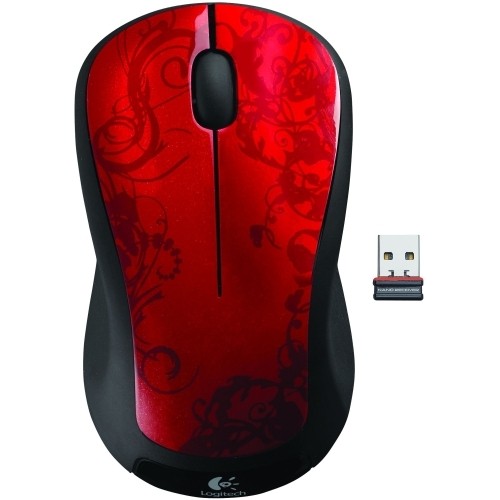
- Model:
- M310
- SKU:
- 3925911
Rating by feature
- Value
Rating 4.8 out of 5 stars
- Quality
Rating 4.7 out of 5 stars
- Ease of Use
Rating 4.8 out of 5 stars
Customers are saying
Customers recognize the product for its excellent overall performance, ease of use, and convenient size, often highlighting its great battery life, wireless functionality, and value for money. Many also appreciate its good ergonomics and the variety of available colors. However, some users have reported concerns regarding the scroll wheel becoming stiff, occasional lag, and a lack of super sensitivity, with its very light weight also being noted.
This summary was generated by AI based on customer reviews.
wireless mouse
||Posted . Owned for 1 month when reviewed.This reviewer received promo considerations or sweepstakes entry for writing a review.Easy to install. Easy to use. item as described. A+
I would recommend this to a friendGreat Mouse
||Posted .This reviewer received promo considerations or sweepstakes entry for writing a review.Awesome mouse and very good battery life easy to use and portable I liked it a lot.
I would recommend this to a friendWorks great
||Posted .This reviewer received promo considerations or sweepstakes entry for writing a review.Nice compact wireless mouse. Very easy use. Would reccomend.
I would recommend this to a friendgood wireless mouse
||Posted .This reviewer received promo considerations or sweepstakes entry for writing a review.the logitech m310 wireless mouse so easy to use no wires to slow you down.
I would recommend this to a friendHigh Quality Mouse
||Posted .This reviewer received promo considerations or sweepstakes entry for writing a review.Bought this mouse for my new desktop, tracks great, high quality, good price.
I would recommend this to a friendMouse is very nice
||Posted .This reviewer received promo considerations or sweepstakes entry for writing a review.The mouse is easy to use and fits in hand nicely! Love the look
I would recommend this to a friendMy niece also fell in love with this mouse
||Posted .This reviewer received promo considerations or sweepstakes entry for writing a review.My niece also wanted a wireless mouse so when I saw the price I said well just will go along with the other stuff that I bought so I got it and it's great
I would recommend this to a friendGreat Mouse for the price
||Posted . Owned for 3 weeks when reviewed.This reviewer received promo considerations or sweepstakes entry for writing a review.Great Price. Great Product!!! Recommend to all who like to have a kinesthetic approach to controlling the mouse feature on a computer! I do not like the built- in mouse controls on laptops and tablets. This mouse allows for more direct control of screen functions that require the movement of a mouse.
I would recommend this to a friendGreat Value
||Posted .This reviewer received promo considerations or sweepstakes entry for writing a review.Logitech makes a good product so you can't go wrong with this mouse for the price point. No bells and whistles but it's wireless and easy to get up and running.
I would recommend this to a friendGreat mouse
||Posted .This reviewer received promo considerations or sweepstakes entry for writing a review.Bought this for my mom along with a laptop. Very easy to set up and great performance
I would recommend this to a friendBest Bluetooth Wireless Mouse
||Posted .This reviewer received promo considerations or sweepstakes entry for writing a review.Great price. Easy to use. Half the price of Apple Wireless Mouse.
I would recommend this to a friendthe right price
||Posted .This reviewer received promo considerations or sweepstakes entry for writing a review.Great mouse, no wires, good price, how can you go wrong?
I would recommend this to a friendLogitech Wireless Optical Mouse
||Posted . Owned for 1 month when reviewed.This reviewer received promo considerations or sweepstakes entry for writing a review.My previous fancy mouse discontinued working. I'll miss the rainbow changing color shifts and at the same time realized that simple is better. The Logitech fits the bill perfectly. Simple controls, completed the set up by itself. No problems since purchase.
I would recommend this to a friendGreat wireless mouse
||Posted .This reviewer received promo considerations or sweepstakes entry for writing a review.Easy to connect and better than cord mouses. Love the wireless feature.
I would recommend this to a friendComfortable
||Posted .This reviewer received promo considerations or sweepstakes entry for writing a review.Fits my large hand. Doesn't take up a lot of room. Responsive buttons. Scroll wheel does not turn smoothly like my past mice due to its design. Got used to it, though
I would recommend this to a friendWorks as advertised
||Posted .This reviewer received promo considerations or sweepstakes entry for writing a review.I needed a wireless mouse for an old Windows XP based Toshiba laptop and a 2014 MacPro. The touch pads are OK, but sometimes I prefer a mouse. The Apple Magic Mouse at $70+ is a bit much and would only work on the Mac . The Logitech M310 for $15 works with both laptops just by moving the "nano receiver" to a USB port on the laptop. Yes, the Apple Mouse does perform a few more functions.
I would recommend this to a friendLove it
||Posted .This reviewer received promo considerations or sweepstakes entry for writing a review.The mouse is of great quality and easy to set up and use.
I would recommend this to a friendReview
||Posted . Owned for 1 month when reviewed.This reviewer received promo considerations or sweepstakes entry for writing a review.Lovely and sleek. I love the response too. So far enjoying it
I would recommend this to a friendBrand response from Logitech
Posted .Thank you for your feedback on the Logitech M310 Wireless Optical Ambidextrous Mouse! We're delighted you find it lovely and sleek and are enjoying its responsiveness. We appreciate you taking the time to share your positive experience.

Basic, simple mouse done right,
||Posted . Owned for 2 weeks when reviewed.This reviewer received promo considerations or sweepstakes entry for writing a review.Exactly what you want it to be - low cost, works seamlessly (just plug in the USB receiver that you can store in the mouse itself for travel) and it works. The wheel motion is satisfyingly "clicky" and the mouse looks like it costs a lot more. Works pefectly with Mac and PC.
I would recommend this to a friendEasy to use mouse for macbook
||Posted . Owned for 4 months when reviewed.This reviewer received promo considerations or sweepstakes entry for writing a review.For price and next day delivery it was a great purchase. I use a MacBook and it was able to connect easily with the attachment. No issues with the batteries, I have use that mainly for very specific programs, that I cannot use the trackpad on. I recommend, the scroll button it’s easy to use
I would recommend this to a friend