Customer Ratings & Reviews
- Model:
- 920-006523
- |
- SKU:
- 9483261
Customer reviews
Rating 4 out of 5 stars with 93 reviews
(93 customer reviews)to a friend
Customers are saying
Customers consistently note the excellent keyboard quality and ease of use of the Ultrathin Keyboard Cover for Apple® iPad® Air 2, praising its lightweight design and long battery life. However, some users express concerns about the hinge design and occasional connectivity issues. The level of protection offered is also a point of discussion among customers.
This summary was generated by AI based on customer reviews.
Rated 5 out of 5 stars
Great keyboard for your iPad air 2
||Posted .This reviewer received promo considerations or sweepstakes entry for writing a review.Love it. Was a treat to myself for use with my new iPad Works great no complaints at all
I would recommend this to a friendRated 5 out of 5 stars
Works great. Got it for my wife's new iPad Air 2
||Posted .This reviewer received promo considerations or sweepstakes entry for writing a review.Works great. Objects quickly with Bluetooth and typing is nice and touch is good.
I would recommend this to a friendRated 5 out of 5 stars
Perfct
||Posted .This reviewer received promo considerations or sweepstakes entry for writing a review.Exactly what was needed. Easy for my daughter to use.
I would recommend this to a friendRated 5 out of 5 stars
Great Product
||Posted .This reviewer received promo considerations or sweepstakes entry for writing a review.It is a very useful and awesome accessory 4 IPADSs
I would recommend this to a friendRated 2 out of 5 stars
the dock peels of the screen protector
||Posted .This reviewer received promo considerations or sweepstakes entry for writing a review.the dock peels of the screen protector so its better to use without a screen guard. But I wasted money on screen guard and geek bench to install it.
I would recommend this to a friend- Pros mentioned:Keyboard qualityCons mentioned:Hinge
Rated 2 out of 5 stars
Awful revision of a formerly awesome keyboard
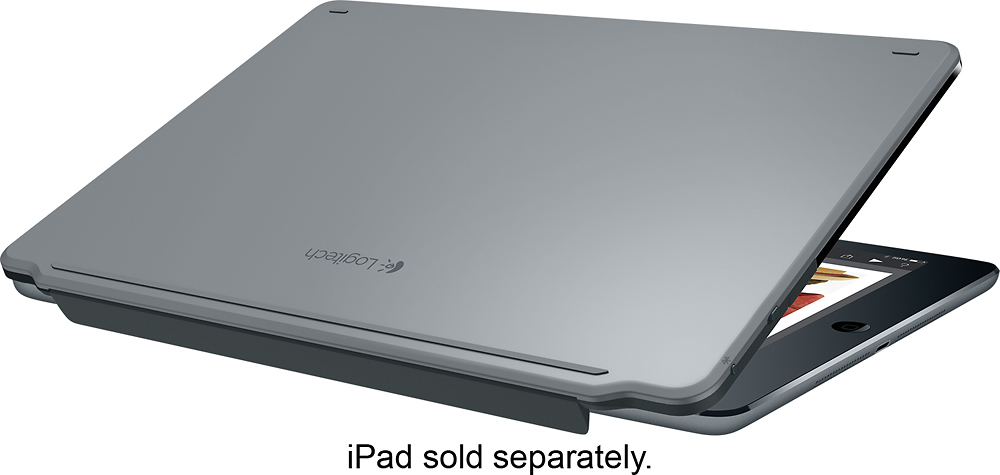
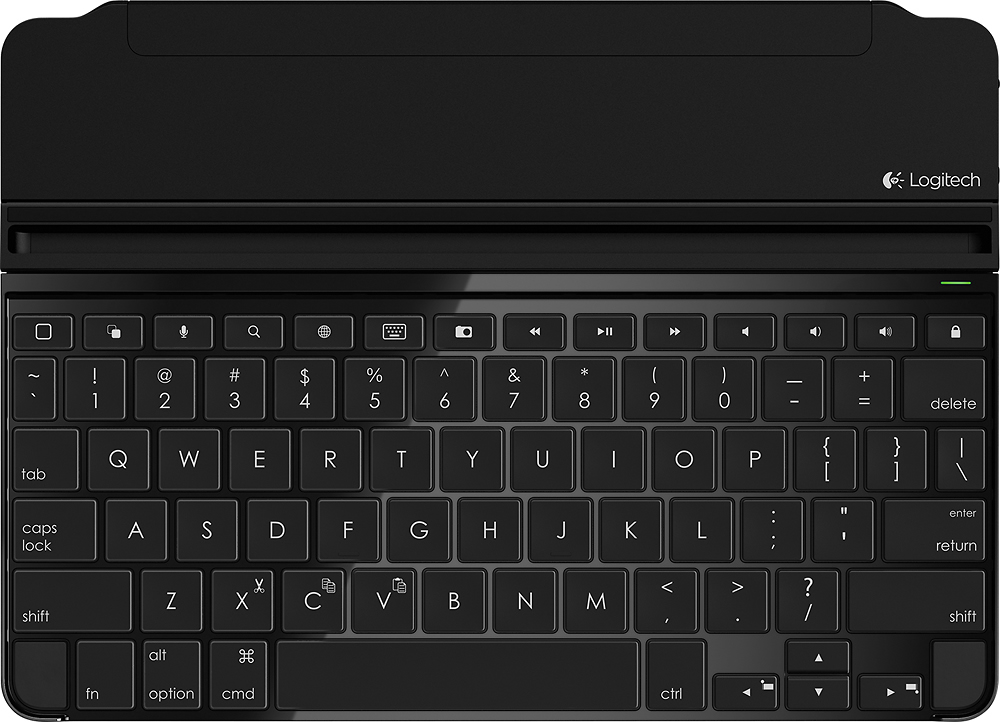
Posted .This reviewer received promo considerations or sweepstakes entry for writing a review.After trying several keyboards with my original iPad Retina, the Logitech ultrathin keyboard was far and a way my favorite. As a professional writer, I appreciated the great key action/responsiveness and layout and as an iPad fan, I loved how seamlessly it merged with my iPad. Having just made the move to an iPad Air 2, I pre-ordered my new Logitech Ultrathin Keyboard and couldn't wait for it to arrive. Sadly, while the keyboard action itself remains outstanding, it is a disappointment on many other levels. The Hinge: On the original keyboard, the magnetic hinge that secured the iPad's edge to the keyboard when closed was a smooth, rounded piece that blended into the iPad, left no edges that could be caught, and was comfortable in your hand as you were carrying it. The new cover has a hinge that folds into the keyboard rather than hanging off the back, which is a nice touch. It then pops up as you slide the iPad back toward it (also a nice touch). What isn't so nice is that the edge of the hinge is very sharp and extends way beyond the edge of the iPad itself. This is something Logitech has (deliberately, I expect) not highlighted in their product photography because it is awful. It makes it extremely uncomfortable to hold the closed iPad/keyboard along that edge as the hinge digs into your hand. I worry every time I put it into my bag that the edge is going to catch on something and pop off or break. The back of the keyboard has small rubber non-slip pads, which is a nice touch, especially because the hinge makes it impossible to put the iPad/keyboard down with the iPad facing down. The hinge simply won't let it lie flat. Finally, I don't trust the ruggedness of the design. It feels flimsy and light and I worry that if I move the iPad back too far, the hinge might snap off. The iPad stand On the original Ultrathin Keyboard, the iPad sat in a groove built directly into the keyboard. While it didn't allow you to adjust the angle, it felt solid and safe while not interfering with the iPad when it was closed. On the new keyboard, the groove is now a thick plastic on a hinge, which permits you to adjust the viewing angle. This is a nice feature. However, it makes it imperative that you remember to remove the iPad, then push down the hinged groove BEFORE you try to close the keyboard and iPad. Otherwise, the sharp edge of the groove sticks up above the keyboard, preventing you from closing the iPad and keyboard flat AND digs the edge into the full length of the iPad screen. I'd gladly sacrifice the angle adjustment for a return to the single angle but fully integrated groove. The Function Keys The Ultrathin Keyboard offers a number of nice features with the function keys though some seem a bit useless given how you would be using the iPad and keyboard together. Do you really need to be able to launch the camera app and take a photo via the keyboard? The most annoying key, however, is the Lock Screen key. I guess there's some value to being able to lock your iPad screen without having to touch the power key on the iPad itself. However, the Lock Screen key is directly above the Delete key. As a result, if your finger comes down just a bit too far up, you find yourself staring at a black iPad screen rather than the text you were trying to delete. It's more of an annoyance than anything else but it's an unnecessary and avoidable one. That being said, I expect that I'll be returning this keyboard in search of another one that offers the same quality keyboard action and thin design without the awful "improvements" Logitech made to this new edition of a fantastic product.
No, I would not recommend this to a friend - Pros mentioned:Keyboard quality
Rated 5 out of 5 stars
Good Protection, Great Keyboard
Posted .This reviewer received promo considerations or sweepstakes entry for writing a review.This is the second Logitech keyboard I've owned. The 1st one for iPad 2 was excellent, still working great after several years. This new one for the iPad Air2 has a couple of improvements I really like. There are now small rubber bumpers at the lower left and right corners of the keyboard that are barely noticeable but VERY important...they keep the iPad screen glass elevated just slightly away from the keyboard when closed. This keeps the keyboard from rubbing on and marring the iPad glass when in the closed position. Also, the attachment point where the iPad mounts to the keyboard in the open position has a rotation feature to adjust viewing angle. This is great for comfort and glare reduction. I've looked at other keyboard options, this one has always worked best for me and I like the new improvements for sure.
I would recommend this to a friend Rated 1 out of 5 stars
Needs to be returned
||Posted .This reviewer received promo considerations or sweepstakes entry for writing a review.After explaining what I wanted to buy to a BB associates, no one could give me the right advice. Brought the keyboard/cover that now has to be returned.
No, I would not recommend this to a friend- Cons mentioned:Hinge
Rated 2 out of 5 stars
Hinge not well thought out
Posted .This reviewer received promo considerations or sweepstakes entry for writing a review.When the keyboard is closed as a front cover for the iPad, the hinge hangs below the back of the iPad and is a fairly sharp plastic edge all along its length, making it very uncomfortable to carry from that edge. This should have been much better thought out. It is going back to BB.
No, I would not recommend this to a friend - Cons mentioned:Connectivity
Rated 1 out of 5 stars
Works Poorly
Posted .This reviewer received promo considerations or sweepstakes entry for writing a review.You will find the keyboard does not stay connected, is slow to reconnect to the iPad, and when it does sometimes drops characters and letters. I have another keyboard by Zagg that works excellently. I would advise not buying this model.
No, I would not recommend this to a friend Rated 1 out of 5 stars
Step Backwards from Prior Model
Posted .This reviewer received promo considerations or sweepstakes entry for writing a review.Just exchanged (in warranty) the prior model of the Logitech Ultrathin keyboard for an iPad Air (battery died after 10 months). Other than the battery issue, the prior model was PERFECT. The prior model had a much more robust magnet setup that wrapped around the edge of the iPad, which provided a smooth fit/finish when closed. The replacement model has a VERY cheap/thin magnetic that is supposed to pop up (but rarely does) when the iPad is slipped close to it. When the magnet catches, there is a now a sharp edge when carrying the iPad. In addition, the magnet strip is now VERY thin, cheap plastic -- will break very easily. Very disappointed in this product and may return to find the prior model. They've added a row of keys which may be of use to some users -- not any additional function for me. Would much rather have the older, more robust product.
No, I would not recommend this to a friendRated 1 out of 5 stars
Best Buy Sent a me used keyboard
Posted .This reviewer received promo considerations or sweepstakes entry for writing a review.the key board was blinking when i opened the package today and some of the original foam packing and the battery protector was removed already and it appears it may even be slightly bent. I selected this keyboard because it is also the one sold by the OEM. Disappointed in Best Buy online shopping for the first time.
No, I would not recommend this to a friendRated 1 out of 5 stars
Dont Work
Posted .This reviewer received promo considerations or sweepstakes entry for writing a review.I tried to connect to my iPad air 2, but do not work. That's why I returned.
No, I would not recommend this to a friend