Customer Ratings & Reviews
- Model:
- 920-006026
- |
- SKU:
- 1817149
Customer reviews
Rating 4.2 out of 5 stars with 839 reviews
(839 customer reviews)to a friend
Customers are saying
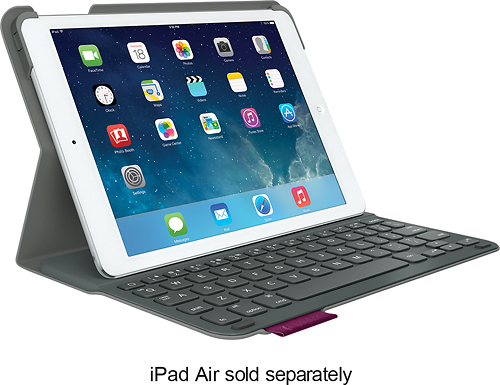
Customers express satisfaction with the keyboard quality, ease of use, and long battery life of the Ultrathin Portfolio Keyboard Case. Many appreciate its lightweight design and the protection it offers for their iPad Air. While some mention the case adds a bit of bulk, the overall feedback highlights the positive aspects of its functionality and design. The sturdy stand and available color options are also frequently praised.
This summary was generated by AI based on customer reviews.
- Pros mentioned:Ease of use, Weight
Rated 3 out of 5 stars
Overall great product
||Posted .This reviewer received promo considerations or sweepstakes entry for writing a review.Easy to use and lightweight to carry and Store Nothing we dint like about it Price is right!
I would recommend this to a friend - Pros mentioned:Keyboard quality, Weight
Rated 4 out of 5 stars
Nice light weight keyboard
||Posted .This reviewer received promo considerations or sweepstakes entry for writing a review.This is a nice lightweight attached keyboard. The prior one we had was not attached so it allowed horizontal And vertical viewing. This has two settings with firm magnetic attachment. It's very light weight, feels very secure when closed. Nice feeling keyboard. Would like if they could have include a vertical position swivel, other than that, very nice.
This review is from Logitech - Ultrathin Portfolio Keyboard Case for Apple® iPad® Air - Carbon Black
I would recommend this to a friend Rated 4 out of 5 stars
Good if you like the keyboard keys spaced apart
||Posted .This reviewer received promo considerations or sweepstakes entry for writing a review.This keyboard it okay. I liked the size of the keys, but don't like the spacing between each key; makes it harder to type.
I would recommend this to a friendRated 5 out of 5 stars
Great for School
||Posted .This reviewer received promo considerations or sweepstakes entry for writing a review.I use this keyboard with my iPad to take notes in class. It makes life a lot easier to be able to use it like a computer, while it's still so portable. The "shift" key messes with me, because it feels like it's in the wrong place, but I still love it!!
This review is from Logitech - Ultrathin Portfolio Keyboard Case for Apple® iPad® Air - Midnight Navy
I would recommend this to a friend- Pros mentioned:Keyboard quality, Protection
Rated 4 out of 5 stars
Provides protection and functionality
||Posted .This reviewer received promo considerations or sweepstakes entry for writing a review.The keyboard allows me to use the tablet like a laptop, while providing me the flexibility of having a keyboard and the protection of the tablet when I am not using it. I am very happy with my purchase. Several of my friends thought it was a surface because of the keyboard. I prefer the iPad to the surface. That is my preference.
This review is from Logitech - Ultrathin Portfolio Keyboard Case for Apple® iPad® Air - Carbon Black
I would recommend this to a friend - Pros mentioned:Battery life, Keyboard quality
Rated 1 out of 5 stars
Design Flaw - Don't buy
||Posted .This reviewer received promo considerations or sweepstakes entry for writing a review.This keyboard would be perfect if not for one fatal flaw. It has a very good keyboard, reasonable battery life ( I'm told ), and a good tactile feel to the keyboard. The only problem is with the case - the ipad is held in place with two plastic clips and a single small sheet of rubberized material. One of the retainer clips sits directly over the wake/sleep button. In order to accomodate it, Logitech designed into the retainer clip a channel/slot to allow a small piece of the plastic to flex and depress the iPad button. Within two weeks of purchase, this slot was where the clip failed - breaking the retainer and allowing the iPad to sit loosely. Given the extreme fragility of the new iPad Air, this is a real problem. Give this item a pass and hope that Logitech redesigns an otherwise good keyboard. Note that there are quite a few complaints online about this issue.
This review is from Logitech - Ultrathin Portfolio Keyboard Case for Apple® iPad® Air - Carbon Black
No, I would not recommend this to a friend - Pros mentioned:Keyboard quality
Rated 4 out of 5 stars
Great keyboard attachment for ipad
||Posted .This reviewer received promo considerations or sweepstakes entry for writing a review.This is actually the second keyboard I've bought. I use my ipad to do a lot of patient documentation & I really like that I can use the keyboard or fold it back & use the tablet only. It was reasonably priced and comes in a variety of colors. There are only a couple of little things that could be done differently: 1. I use the tab button A LOT so it's a little frustrating that I have to hold the Fn key down every time I tab. A stand alone tab key would be nice. 2. The delete key is actually a backspace & gets a little confusing if you're use to a regular keyboard. I still find myself deleting sentences I just wrote because of this. 3. If I forget to turn off the keyboard & close the case I frequently hear the ipad click as it keeps turning off/on, doesn't do it when the keyboard is off. These are just little things that I would change, but overall it is a great keyboard and I highly recommend it.
This review is from Logitech - Ultrathin Portfolio Keyboard Case for Apple® iPad® Air - Mars Red Orange
I would recommend this to a friend - Pros mentioned:Keyboard quality
Rated 4 out of 5 stars
Great protection for iPad air
||Posted .This reviewer received promo considerations or sweepstakes entry for writing a review.Stylish, sturdy and easy to use. Like the keypad for typing memos and emails for family, friends and part-time job.
This review is from Logitech - Ultrathin Portfolio Keyboard Case for Apple® iPad® Air - Midnight Navy
I would recommend this to a friend Rated 4 out of 5 stars
Would like to love it but......
||Posted .This reviewer received promo considerations or sweepstakes entry for writing a review.Overall, I would say I'm generally pleased with the case. Problems are small but noticeable. To get the product smaller, the keyboard is smaller in certain areas.....like the backspace key. More imporantly, the tab key requires you to hit "Fn" and "Q" at the same time, which means you have to remove you left hand to see it. The function key is the bottom left key, while the q key is top left. Not possible with one hand.....which makes navigating through certain web forms quite problematic without a functional tab key. Also of note, the construction of the case is generally good with one exception. The plastic is thin around the place where the power key for the ipad inserts into the case. I'm not sure if I broke it when I first inserted my ipad or if it broke subsequently. I noticed it within a week or so. Somewhat distressing, but I'm not interested in trying to return something that could be deemed my fault over poor design. Otherwise, the case, keyboard, and bluetooth work fairly well. The keys have good feel and response. Exterior feels like a rubber skin. Some will like it. Others will not. I'm indifferent to that aspect of it.
This review is from Logitech - Ultrathin Portfolio Keyboard Case for Apple® iPad® Air - Carbon Black
I would recommend this to a friend- Pros mentioned:Keyboard quality
Rated 4 out of 5 stars
great keyboard all around
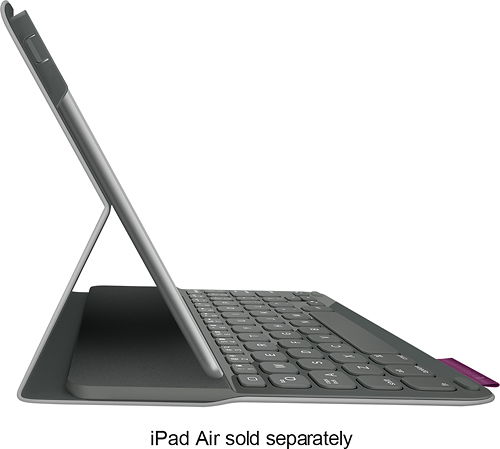
||Posted .This reviewer received promo considerations or sweepstakes entry for writing a review.Logitech - Ultrathin Portfolio Keyboard Case for Apple iPad Air - Midnight Navy This Logitech 920-005985 case for iPad Air doubles as a dual-view stand, allowing an upright angle that exposes the Bluetooth keyboard and enables comfortable typing and a flat-laying option that makes it easy to view media or browse the Web.
This review is from Logitech - Ultrathin Portfolio Keyboard Case for Apple® iPad® Air - Midnight Navy
I would recommend this to a friend - Pros mentioned:Battery life, Keyboard quality
Rated 5 out of 5 stars
Durable, great keys, easy to use
||Posted .This reviewer received promo considerations or sweepstakes entry for writing a review.I love the feel of the keys on the keyboard and I love how durable it is for my iPad Air. I will be able to use this for my class work anywhere, when I have a break from work or when I need to work from the cool spot in the house. A charge will last 30 days, that's pretty cool. It's lost a bit of luster on the outside from being inserted and extracted from my backpack and general use. Maybe a little research will educate me on what is safe to use for cleaning.
I would recommend this to a friend Rated 5 out of 5 stars
Good companion to iPad Air
||Posted .This reviewer received promo considerations or sweepstakes entry for writing a review.Nice keyboard companion to iPad Air. The keys, however, are slightly rounded, which makes typing a little more awkward than the slightly depressed surface on the iPad Air 2 keyboard. The iPad fits securely and integrates well with the keyboard.
I would recommend this to a friend- Pros mentioned:Battery life
Rated 4 out of 5 stars
nice keyboard case
||Posted .This reviewer received promo considerations or sweepstakes entry for writing a review.Great keyboard case. battery life is great. BT connection worked perfect. Zero issues so far with this product.
I would recommend this to a friend - Pros mentioned:Keyboard quality
Rated 4 out of 5 stars
Great cover
||Posted .This reviewer received promo considerations or sweepstakes entry for writing a review.The Logitech Ultrathin keyboard case for the I pad air is great. It does what I want it to do and is practical.
This review is from Logitech - Ultrathin Portfolio Keyboard Case for Apple® iPad® Air - Carbon Black
I would recommend this to a friend Rated 4 out of 5 stars
Nice keyboard/case combo used with an iPad Air 2
||Posted .This reviewer received promo considerations or sweepstakes entry for writing a review.While not specifically designed for the iPad Air 2, this case does fit and works perfectly. The only complaints I would have would be that it does require your Bluetooth radio to be turned on all the time for use with the keyboard which can drain the battery faster. The other complaint being that it can occasionally slip out of the tabs that hold the iPad in place at the top of the screen, but only slightly. Overall I would buy it again.
This review is from Logitech - Ultrathin Portfolio Keyboard Case for Apple® iPad® Air - Midnight Navy
I would recommend this to a friend- Pros mentioned:Ease of use
Rated 4 out of 5 stars
nice product. easy to use.
||Posted .This reviewer received promo considerations or sweepstakes entry for writing a review.I bought this product for my relative. I have had one myself for a year or so. Nice product. Easy to use.
This review is from Logitech - Ultrathin Portfolio Keyboard Case for Apple® iPad® Air - Mars Red Orange
I would recommend this to a friend - Pros mentioned:Keyboard quality
Rated 5 out of 5 stars
Ipad Keyboard
||Posted .This reviewer received promo considerations or sweepstakes entry for writing a review.Love the keyboard. I had a clip on the corner break & Logitech immediately replaced with a 2 day air shipment. The keyboard makes the ipad more like a laptop & the customer service from the company if there is an issue is superb.
This review is from Logitech - Ultrathin Portfolio Keyboard Case for Apple® iPad® Air - Mars Red Orange
I would recommend this to a friend - Pros mentioned:Keyboard quality
Rated 5 out of 5 stars
This IPad folio works beautifully!
||Posted .This reviewer received promo considerations or sweepstakes entry for writing a review.The Logitech folio seems to be well built and the keyboard works reliably, as does the auto-off feature. My only surprise was the complete lack of instructions, although that is normal these days. Instructions are available online.
This review is from Logitech - Ultrathin Portfolio Keyboard Case for Apple® iPad® Air - Mars Red Orange
I would recommend this to a friend - Pros mentioned:Battery life, Ease of use, Keyboard quality
Rated 5 out of 5 stars
Logitech -ipad Ultrathin Portfolio Keyboard Case
||Posted .This reviewer received promo considerations or sweepstakes entry for writing a review.Keyboard letters are large enought as if you are on your pc. Easy to use; keeps tablet safe and closes successfully and saves batteries.
This review is from Logitech - Ultrathin Portfolio Keyboard Case for Apple® iPad® Air - Midnight Navy
I would recommend this to a friend - Pros mentioned:Keyboard quality
Rated 4 out of 5 stars
Stable, functional product.
||Posted .This reviewer received promo considerations or sweepstakes entry for writing a review.I am happy to own this quality product. I shopped for an alternative to the standard cover/stand that would stay in position once placed. This one has a very strong magnet that holds the iPad in position. The keyboard is very comfortable to use, and I like the fact that you can fold it up with the keyboard hidden if you need a lower profile or perfer to use the on-screen keyboard. I would have given it five stars but for the fact that there was no information given to explain that the bluetooth battery needed to be charged separate from the iPad itself. In fact the only directions enclosed were pictures that were not intuitive for me; I had to have help from another person sync the keyboard to the iPad. A techy would have known to do this, and from now on, so will I.
This review is from Logitech - Ultrathin Portfolio Keyboard Case for Apple® iPad® Air - Carbon Black
I would recommend this to a friend