Customer Ratings & Reviews


- Model:
- B2M-00012
- |
- SKU:
- 7332059
Customer reviews
Rating 4.6 out of 5 stars with 3189 reviews
(3,189 customer reviews)Rating by feature
- Value4.7
Rating 4.7 out of 5 stars
- Quality4.6
Rating 4.6 out of 5 stars
- Ease of Use4.5
Rating 4.5 out of 5 stars
Customers are saying
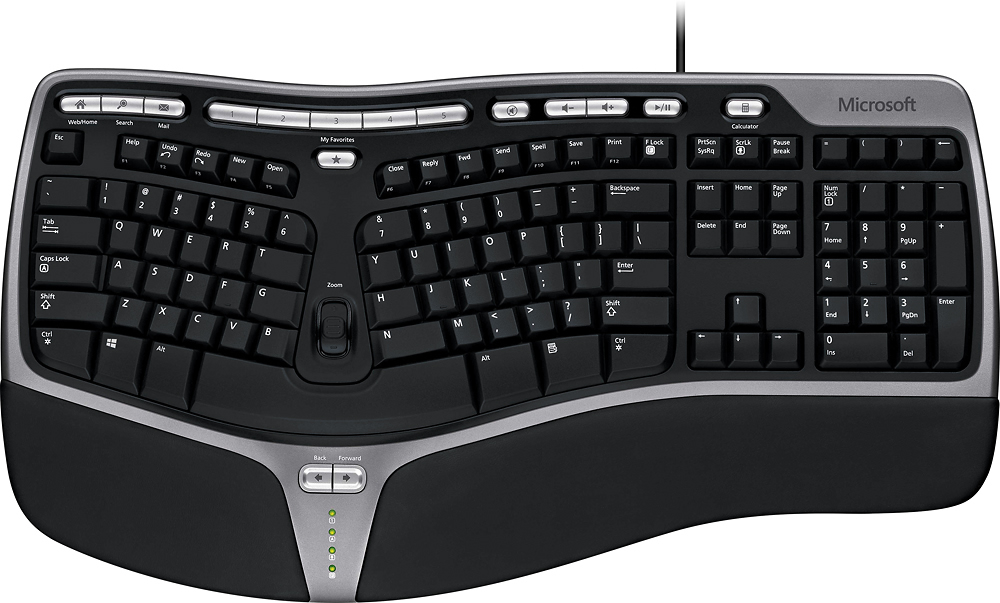
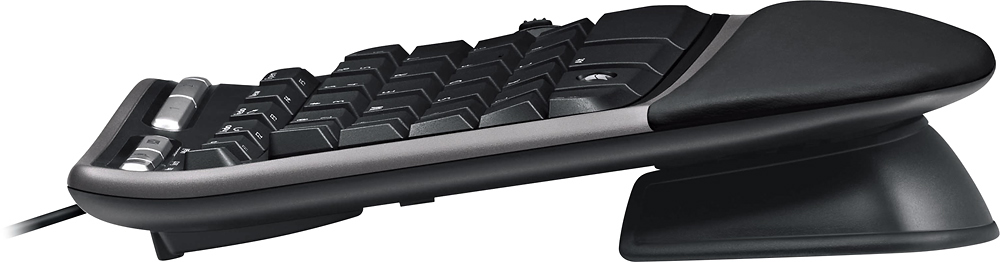
Customers find value in the Natural Ergonomic Keyboard 4000's ergonomic design, ease of use, and comfortable wrist support, with many praising the key feel and affordable price. However, some users experienced issues with the space bar, and others found the keyboard to be larger than expected. A common wish among customers was for a wireless version. The positive feedback on comfort and price is frequently highlighted in customer reviews.
This summary was generated by AI based on customer reviews.
Rated 4 out of 5 stars
great keyboard for support and comfort
||Posted .This reviewer received promo considerations or sweepstakes entry for writing a review.keyboard has helped a lot, relieve some pain from my wrists. though keys are a bit tough hoping they'll soften w use.
I would recommend this to a friendRated 5 out of 5 stars
Great keyboard for typing papers
||Posted .This reviewer received promo considerations or sweepstakes entry for writing a review.I like this keyboard because it helps me to position my hands while typing a homework paper or any other typing for fast production.
I would recommend this to a friend- Pros mentioned:Ease of use, Keyboard quality
Rated 5 out of 5 stars
Nice feel
||Posted . Owned for 1 month when reviewed.This reviewer received promo considerations or sweepstakes entry for writing a review.Love the key board helped my hands from hurting and easy to get used to
I would recommend this to a friend - Pros mentioned:Ease of use
Rated 5 out of 5 stars
Love this keyboard!
||Posted .This reviewer received promo considerations or sweepstakes entry for writing a review.I am a programmer and I absolutely LOVE this keyboard. It is comfortable and easy to use. It has all the programmable button controls that I use often which makes it even better. In addition to the features is the shape of the keyboard which is very comfortable for someone who is at a computer constantly and types often. I highly recommend this keyboard!
I would recommend this to a friend - Pros mentioned:Keyboard quality
Rated 5 out of 5 stars
Prevents Carpal Tunnel Syndrome
||Posted .This reviewer received promo considerations or sweepstakes entry for writing a review.When purchasing a new, desktop computer, buyers get a small keyboard that can cause carpal tunnel syndrome. By replacing your supplied keyboard with the Microsoft Ergonomic Keyboard, users can more easily avoid carpal tunnel keyboard. This keyboard is the least expensive one on the market. (This is my second one, after several years of use, the letters on my first one faded.)
I would recommend this to a friend Rated 5 out of 5 stars
Saves My Wrists
||Posted .This reviewer received promo considerations or sweepstakes entry for writing a review.I use this keyboard at work and, compared to other types and brands, results in fewer repetitive motion symptoms, especially wrist pain. I got this for home use.
I would recommend this to a friendRated 5 out of 5 stars
Keyboard is perfect
||Posted .This reviewer received promo considerations or sweepstakes entry for writing a review.This USB keyboard is designed to make typing comfortable due it's design, very well layed out keys for a better typing experience
I would recommend this to a friendRated 4 out of 5 stars
Great keybords, not my first one, This is a replac
||Posted .This reviewer received promo considerations or sweepstakes entry for writing a review.Not the first one of this keyboard I have owned, when it was time for a new one this was the replacement for the old one that was the same as this one.
I would recommend this to a friend- Pros mentioned:Ease of use, Keyboard quality
Rated 5 out of 5 stars
Comfortable keyboard
||Posted .This reviewer received promo considerations or sweepstakes entry for writing a review.Have problems with wrists. Macthing keyboard used at office. Easy to use, great design
I would recommend this to a friend Rated 4 out of 5 stars
If you are not looking for a wireless keyboard
||Posted .This reviewer received promo considerations or sweepstakes entry for writing a review.This is the second key board I purchased. I find this to work well and help keep my hands comfortable. Also like all the extra controls that it offers.
I would recommend this to a friend- Pros mentioned:Ease of use, Keyboard quality
Rated 5 out of 5 stars
Great ergo keyboard!
||Posted . Owned for 3 weeks when reviewed.This reviewer received promo considerations or sweepstakes entry for writing a review.Great price for a quality ergo keyboard. Love the feel and easy use.
I would recommend this to a friend Rated 4 out of 5 stars
A good Ergo keyboard
||Posted .This reviewer received promo considerations or sweepstakes entry for writing a review.This was purchased for a coworker of mine. It seems to be working great and is of good quality (especially for the price). Several people I know have used this model and I have not received any complaints.
I would recommend this to a friend- Pros mentioned:Ease of use, Wrist support
Rated 5 out of 5 stars
Great keyboard
||Posted .This reviewer received promo considerations or sweepstakes entry for writing a review.This is the best keyboard for typing. It really helps to stop my wrist pain
I would recommend this to a friend - Pros mentioned:Keyboard quality
Rated 5 out of 5 stars
Outstanding Keyboard
||Posted .This reviewer received promo considerations or sweepstakes entry for writing a review.This is the most comfortable keyboard I have ever owned. It is easy on wrists and the curved shape creates ergonomics that allows me to keep working for long hours. It never needs batteries since it is wired. I wish Microsoft made a specific version of this for Mac. The other desirable feature would be a USB port, back-lighting, and a wired mouse that goes with this keyboard.
I would recommend this to a friend Rated 4 out of 5 stars
Truly ergonomic, a bit large, it IS wired
||Posted .This reviewer received promo considerations or sweepstakes entry for writing a review.I bought this wired keyboard for a desktop PC connected to a TV monitor. The USB wire is approx 8 ft long. Unlike others, this keyboard is truly ergonomic because there is a pronounced "wave" shape, which allows you to keep your wrists at more comfortable angles (thumbs higher than your pinkies). Other "ergonomic" keyboards have the keyboard split and shifted at an angle, but the keyboard itself is flat. The only wireless keyboards that were as wavy as this are over $100; out of my price range. Note: I do not sit at a desk with this keyboard, I sit in an armchair with this keyboard on my lap or one of the armrests. ALL of my work involves typing, so I need to be comfortable. The keys and the amount of pressure needed feel good. The space bar clicks a bit loudly, though, so it might be annoying for your office mates (!) Pros: 1) great value for the price 2) truly ergonomic; the most comfortable keyboard I have used. 3) simple, professional layout. It does NOT look like a gamer's keyboard. Cons: 1) it IS wired. I do not require any mobility, and do not plan on using this keyboard with more than one computer, so this is NOT an issue, but a fact to consider. 2) the keys are spaced a bit too far apart for me, but I have small hands.
I would recommend this to a friend- Pros mentioned:Keyboard quality
Rated 4 out of 5 stars
It's a KEYBOARD...
||Posted .This reviewer received promo considerations or sweepstakes entry for writing a review.I like the ergonomic split keypad, and this is the only one BB carries. It would be perfect if it were: A. Lighted or backlit! B. Cordless! C. Came with some kind (either printed or online) of instructions that tells what the oddball keys are for and/or how to set them up. and D. If the space bar didn't make a noise each time you hit it. The rest of the keys are silent. Also wish the 'F' and 'J' bumps were bigger. Outside of that, it works!
I would recommend this to a friend - Pros mentioned:Keyboard quality
Rated 5 out of 5 stars
Great Keyborad
||Posted .This reviewer received promo considerations or sweepstakes entry for writing a review.I've been using this keyboard now for many years at both work and home. My work one had to be replaced only becuse a while back we had a pretty good earthquake and a cup of coffee got spilt on the keys and it stopped working after that. My home one I just recently replaced becuase my old one was so worn out the hubby and kids complained that they could no longer read the letters on the keys; but other than that it still functioned perfectily.
I would recommend this to a friend - Pros mentioned:Ease of use
Rated 4 out of 5 stars
My favorite keyboard
||Posted .This reviewer received promo considerations or sweepstakes entry for writing a review.The keys on this keyboard, for me, leads to fewer typing errors. It is Confortable to use. I have not yet downloaded the software for it, but my only complaint is that it does not rely on the bios to determine its startup conditions, eg: My bios is set to start it with the numlock key on. I have to press the numlock key each boot up to engage the number pad. That is my only complaint. I have not yet determined if this is correctable with the software downloadable from Microsoft.
I would recommend this to a friend - Pros mentioned:Keyboard quality
Rated 5 out of 5 stars
Love it!
||Posted . Owned for 5 months when reviewed.This reviewer received promo considerations or sweepstakes entry for writing a review.Best ergonomic keyboard out there. Unfortunately it isn’t always available. It has relieved the stress from my wrist. I use to have to take breaks when typing for a long time but don’t with this keyboard. It does take sometime to get use to . It’s not for everyone. But you should definitely try it if you are suffering from wrist pain.
I would recommend this to a friend - Pros mentioned:Keyboard quality
Rated 4 out of 5 stars
Great Keyboard
||Posted .This reviewer received promo considerations or sweepstakes entry for writing a review.Great Keyboard for those looking for an ergonomic layout and for good quality. Keyboard works great for my wife, it was a perfect replacement for her at-work ergonomic keyboard, but shel liked it better. The only complaint I had was a slightly loud spacebar. I popped that off and added a piece of rubber band to the contact points and it was silent. Great keyboard!
I would recommend this to a friend