Customer Ratings & Reviews

- Model:
- NBIQ2KUS
- SKU:
- 6543922
Rating by feature
- Value
Rating 2.9 out of 5 stars
- Quality
Rating 3.9 out of 5 stars
- Ease of Use
Rating 3.9 out of 5 stars
Customers are saying
Customers highly value the iQ 2K Smart Dash Cam for its outstanding video quality, ease of use, GPS accuracy, voice control, and live view capabilities. The sleek design and included storage are also appreciated. However, some customers have expressed concerns regarding the app functionality, battery life, and price. Overall, the positive features seem to outweigh the drawbacks for many users.
This summary was generated by AI based on customer reviews.
Scam!
||Posted . Owned for 1 year when reviewed.This reviewer received promo considerations or sweepstakes entry for writing a review.I would not recommend this camera. After a year and a half, it broke, and now I have to pay $19.99 a month for an extended warranty. The customer service for this product has been frustrating; they make you jump through hoops and waste your time. They keep sending constant downloads for troubleshooting, but nothing seems to work. Customer service insists on going through troubleshooting steps with you, even though you're paying for an extended warranty. They claim it's a simple update, but it's not. I have two cameras: the 1K version and the 2K version. I repeat: don’t get the 2K version! It will break, and Nextbase will not cover it at all, even if you are paying the $19.99 monthly subscription.
No, I would not recommend this to a friendBrand response from Nextbase
Posted .Hello,
We're truly sorry to hear about your experience and understand how frustrating this must be. We’d like to help make things right. Please reach out to our support team again, tell them that the reviews team has directed you back with then and we’ll ensure your case receives the attention it deserves to get your camera back working. Thank you for your feedback.
-The Nextbase reviews team
- Pros mentioned:Video qualityCons mentioned:App functionality

Very Expensive, Requires Subscription, Good Video
|Posted .This reviewer received promo considerations or sweepstakes entry for writing a review.Let me save you a lot of time. At the time of testing this extremely pricey dash cam. You will need a subscription to use most of the features that this dash camera provides. There is a $10 and $20 plan. There is also a free trial period for I believe 3 months for both plans. And 2 functions: Gaurdian Mode and Roadwatch A.I. are not operable yet. The rear window cam is another $200. So, if the initial price is in your budget, and monthly payments to remotely see your car anytime similar to a door bell security cam, and T-Mobile works well in your area. Read on. Let me start off with Nextbase is one of the better if not best brands in the dash cam market. I have a couple of their non-iQ cams and after a year plus, they still work and video quality is among the best. The new iQ series is very much in the running for whatever dash cam of the year awards there might be. However, despite including a OBD port and fuse tap in the box for easy hardwire installs. This new cam is not perfect...yet. Install: It may vary greatly with the phone you choose to install the cam with. I used a pixel 8 pro. Download the iQ Nextbase app. Once you plug into the OBD port the camera comes to life. Follow the prompts in the app and scan the QR code shown on the cams tiny screen. My first problem. For some reason the app chose to use my 5x zoom for this. Tried many ways to switch cam and zoom, but eventually got into the rear seat of my crew cab truck just to be able to scan the QR code on the cam. OK, got past that hurdle of pairing cam and app. Then to use live view to connect cam to window. Which BTW, if you have a large plastic shroud around your rearview mirror, most newer vehicles do. This camera being so large will sit much to the left or right of the mirror or be in line of sight under the mirror just to be able to get a clear view down your hood. Next issue. I am not in the best T-Mobile network area (full bars 5G Verizon signal). There was 30+ seconds of delay between what I saw on phone and what the cam was showing. Impossible to line up camera view...called tech support...which seems to be in the UK (5 hour time difference). Tried a few of their suggestions, not much improvement. Eventually had to pull up close to house and between wifi and 2 bar 4G got enough signal to mount dash cam in a proper orientation. Once finished, tucked all the wires for clean install. Its up and running lets go for a drive. Video Quality: I have the 2k video cam and there is a 1k and 4k variant. This is where Nextbase shines. They have excellent video quality, day or night. The cam sees everything pretty well ahead and sort of to the sides. Very similar to what many doorbell cams see, but on the road and moving 70mph. The in cab view is also very decent and easily usable day or night. My hiccup here would be that for the price, plus monthly subscription, why is the back camera another $200 add on? The rear window cam may not be completely needed for some vehicles. Yet the most driven vehicles in the USA are 4 door SUV's and trucks. BIG vehicles where a extra camera mounted as far to the rear is best and should be included at this price tag. Come on Nextbase, $240 a year in subscriptions and we can't have all the cameras for this purchase price? Using the app and notifications: The app is pretty straight forward and looks good. But new wrinkle. Without the paid subscription. The app is useless because ALL the features are behind the pay wall. You can not look at any footage. Notifications sent to phone bring you to the app where you can not see what the alert was for or video it may have taken. The default view for me is a foggy/opaque overlay with google maps below (pic) or the subscribe menu to pay for a sub. So if you are like me and don't mind not having all the bells and whistles on your security cam to just have footage stored on SD card. The iQ won't even give you that through the app. To see footage you will need to pull the SD card and view on a PC. BUT, if you pay monthly. You do get access to Live View and other footage in 1 minute clips, Many Many Many 1 minute clips. I'm sure this is to cut down on data traffic, and my spotty T-Mobile 4g is very slow where I am testing causing 20 second or more wait times in app. Even paying for a sub does not help me much from home. And 2 of the features are still locked out, Gaurdian Mode and Roadwatch A.I. Not sure if this device will get them or how soon. TBD Overall: I have to say that once through the technical install hurdles, which many may not experience. And if you can afford to spend this much for vehicle security. The potential that this camera offers for video security on your vehicle is pretty good, but not perfect. Nextbase has a good product to tweak. Not sure why they didn't use a 360 camera for this application. Driver door and passenger door are potential blind spots. And because there is not tilt or turn to the camera mount (which is fairly large BTW and may attract unwanted attention). You might not see interactions with the police/roadrager if you have a traffic stop. You can at least hear it if you turn audio on. Even though it may seem to be a somewhat negative review. I am happy to be able to test this product out. It is likely too expensive for the majority of the population who would happily buy other excellent Nextbase cams for accident coverage. And I strongly believe everyone needs at least a basic dashcam because everyone lies in an accident. I think the subscription model, a very high price and missing features are mostly why I can't recommend this to a friend. But like many things. Sales and promos, remove a few restrictions on the app and future updates and this will be what many of us will buy if not already preinstalled like Tesla has done.
No, I would not recommend this to a friendBrand response from Nextbase
Posted .Thank you for your review! The Nextbase iQ is our flagship device and requires Iot (with an active SIM) to make these features possible. However, we understand that not everyone wants to pay for a subscription and especially not be locked into a contract! This is why we've created 3 options, a solo plan, protect and protect plus! You can switch plans at any time, so you're not tied into any contract, which means that you only pay for a subscription when you want to. Please let us know if you have any questions along the way at [email protected]
- Pros mentioned:Live view, Video qualityCons mentioned:App functionality
Like having a Nest cam in your car, when it works.
|Posted .This reviewer received promo considerations or sweepstakes entry for writing a review.The Nextbase iQ 2K smart dash cam is the start of a new era. Dash cams are immensely useful in providing video evidence for insurance claims or to just play back interesting moments from your drive. Some will even keep recording after the car has shut off which essentially turns it into a security camera while you’re parked. Which brings us to the Nextbase iQ series of smart dash cams. It’s full of innovative features like live video streaming, live GPS monitoring, proximity monitoring, cloud stored footage, “Witness Mode”, “Guardian Mode”, and a few others that bring them a big step forward into the automobile security and surveillance category. The cloud save feature alone covers a huge weak spot in terms of dash cam security. My old dash cam system records for 12 hours after I park, which makes it a handy surveillance camera if something happens around my car. However, if someone were to break into my car and steal the dash cam itself, well then I’m up the creek without a paddle. The iQ solves that problem by automatically backing up footage in the cloud, so not only can you see the event of when your car was stolen, but presumably the footage after if it hasn’t been shut off. You can also live stream the footage from all of the cameras which is really neat, though there’s a solid 5 seconds of delay to contend with. The lag might not matter much in the practical day to day operations of the camera, but I can see it being annoying if I had to try to converse with someone in the car over the app. Which encapsulates a lot of what the experience with the iQ 2K is like right now. There’s a lot of genuinely neat and useful smart features promised, but they either lack polish or are not available yet. For example, there’s a proximity mode that supposedly analyzes activity around your car and sends you notifications if something suspicious might be happening. However, I’ve tried to set it off personally and have never gotten a notification. Maybe I needed to shake the car, but it certainly didn’t respond to any kind of visual threats. If that’s what it’s looking for. I honestly don’t know how it’s supposed to work, but the concept is cool. I’ve also found that a bunch of times I could not get the camera to wake up from the app. You need to wake it up to get the current location and review recent footage, but it doesn’t always work when the car is parked and off. The “Witness mode” feature is one of the most compelling in that you give it a voice activated command and it’ll automatically dial up 2 designated emergency contacts and play a live feed of what’s happening for them to witness. I absolutely love this concept and it’s one of the most compelling features the iQ has. I also have not been able to get it to activate yet, but that might be a setup issue. I’d like to report on the Guardian mode and Roadwatch A.I. but they’re currently unavailable for now. There’s also supposed to be a way to do 2 way communications through the app to the dash cam speaker, but that feature is also unavailable for now. Keep in mind, this is the first gen of smart dash cams, so there’s going to be some bumps along the way and firmware updates can fix a lot of issues. The critical part is how quickly Nextbase gets everything working and ready. There’s a price to be paid for being an early adopter, both figuratively and financially. This is not a cheap unit. I get that it’s new, it has a great camera, is well built, and comes with a nicely appointed installation kit, but it’s a hefty price tag for something that needs a monthly subscription for the smart features to work. Without either of the available 4G LTE subscription plans, the iQ is essentially just a basic dash cam and there’s much cheaper options if you’re going to do that. No, if you’re getting the iQ you’re subscribing and hopefully by then all of the bugs and planned features will be working smoothly. I can see a future where they subsidize these cameras with an annual plan (a la cellphones). And despite all of the early adopter flaws, I’m absolutely excited by this thing. Not just by what it is, but the example of how it’s reimagining what dash cams can do. Who needs a car alarm when you have actual high def footage with sound, GPS location, and time stamps? If you don’t mind the price tag and the frustrations of being an early tech adopter, I think you’ll love what this camera will eventually do. The live feed, cloud storage, and GPS tracking are reasons enough to get it now, but you’ll have to be patient for the other features to start working. PROS - Relatively easy installation - Install kit is nicely equipped (every add a fuse!) - Excellent picture quality - IR in-cabin camera for good night vision - Excellent microphone pick up - Well built - Wide field of view - Promising smart features - Not just a dash cam, but a security system - Like having a Nest cam for your car - Footage saved on mini SD and backed up in the cloud - App has battery saver feature - App controlled alarm CONS - 5 seconds of delay on live stream - Sometimes dash cam will not wake up remotely and am unable to check on it - Cannot change recording segment length - App needs more development - Some smart features are not ready at all or not working properly - Expensive hardware - Subscription needed for smart features - Relatively large camera system to mount - No rear camera included - Can only angle camera up and down, cannot rotate angle of camera sideways - Time stamp on stored footage title is off by hours, but correct on live feed
I would recommend this to a friend - Pros mentioned:Video quality
Has Great Potential
|Posted .This reviewer received promo considerations or sweepstakes entry for writing a review.Let me begin by giving a some information on the hardware. I love the look of the device. It’s very modern, sleek, not too big, not too heavy. It attaches to your windshield via 3M tape. I would rather have a suction cup but so far so good. I love the way the blue light shines. It gives futuristic vibes. I’m sure those who don’t normally ride in the car with you will ask what is this thing? So I’m sure attention will be drawn to it. I have it connected to the obd power supply which is conveniently located in my vehicle. Cables are also supplied to have this hardwired to the car. Installation wasn’t an issue for me but find a way to run the cables so they are hidden was a challenge in my vehicle. Maybe others won’t experience this. The video is great. Not full 4k but to me 2k is good enough for this. Very clear and crisp video. Unlike traditional dash cams, there is no screen on the unit so everything is seen through your phone. It takes getting used to as I’m am used to seeing everything right there on the dash cam. Wide viewing angles. Much wider than the other dash cam I own. Because of this placement shouldn’t be a problem. It comes with a 32 sd card but you can upgrade that with any micro sd card to have more storage. You can also purchase a rear camera for even more viewing options. Also, to see the stream from the dash cam you will need to download Nextbase’s iQ app and set up an account. Yes to view the video you need their app. In the app you’re able to access all kinds of neat features. Features like event notifications, cloud storage, remote connect live view (for when you’re not in your car and you want to view the stream), etc. The big downfall to all of this is that you must sign up for a subscription to access these features. There is a free subscription but it is very limited. You’re able to view the camera and receive alerts on the free plan. The other plans allow more features at a fee of $9.99 a month or $19.99 per month. When viewing the live stream there is a delay. Too long for my liking. It may be about 6 seconds the last time I timed it. With the way technology is nowadays no one likes to wait even if it’s a few seconds. Especially if you’re paying for it via subscription. But the purpose is not just for live stream but to have video of the vehicle and its surroundings so I can live with the delay. I feel like this can be a great device but honestly the subscription is a turn off for me. And you need to the subscription to justify the price of the device because otherwise you’re not using it to its fullest extent. You are allowed a 3 month free trial before deciding to take the dive with the monthly subscription. I’m sure Nextbase will listen to their customers and change a few things that we don’t like. But it has great potential and I look forward to what’s in store with updates. If you don’t mind paying the subscription after the 3 month free trial then I believe this won’t be a bad purchase. Nextbase is known for its dashcams and it will get better with time and updates.
I would recommend this to a friendBrand response from Nextbase
Posted .Hello, Thank you for leaving your review, we really appreciate the feedback. As you mention, we are always willing to listen to what our customers have to say and no doubt the iQ will only get better in the future.If we can be of any further assistance, please contact us on [email protected] Regards Thanks to your valuable feedback, we've made some exciting updates to our app and device!
To enjoy the new improvements:
Update the app from your app store.
For the latest firmware, open your iQ app, tap the menu in the bottom right, go to iQSettings > Firmware Update > Click Latest Update.
You're all set to enjoy the enhancements!
The Nextbase Review Team
- Pros mentioned:Video qualityCons mentioned:App functionality, Battery life
Really Nice Dash Cam for a Price
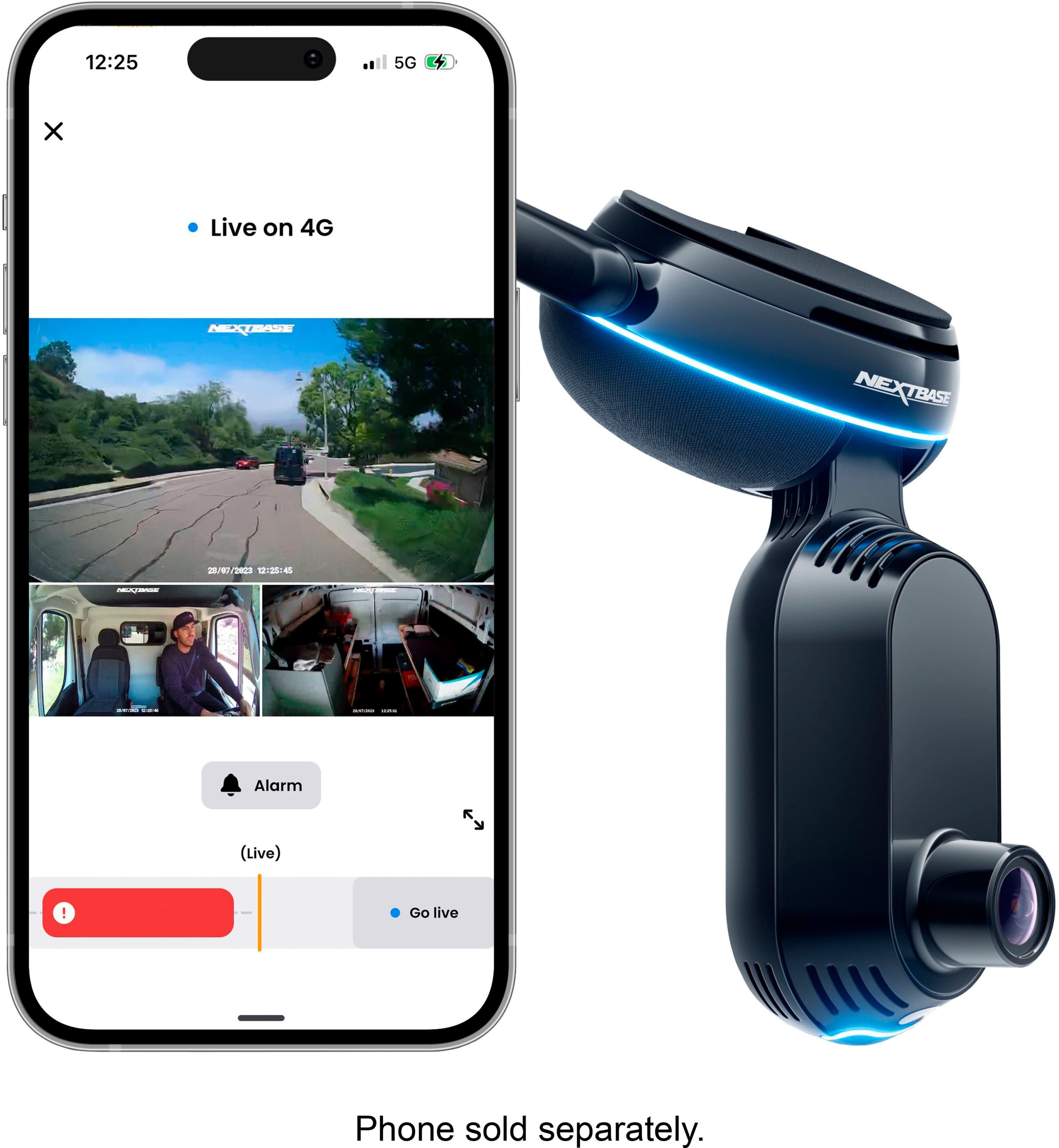
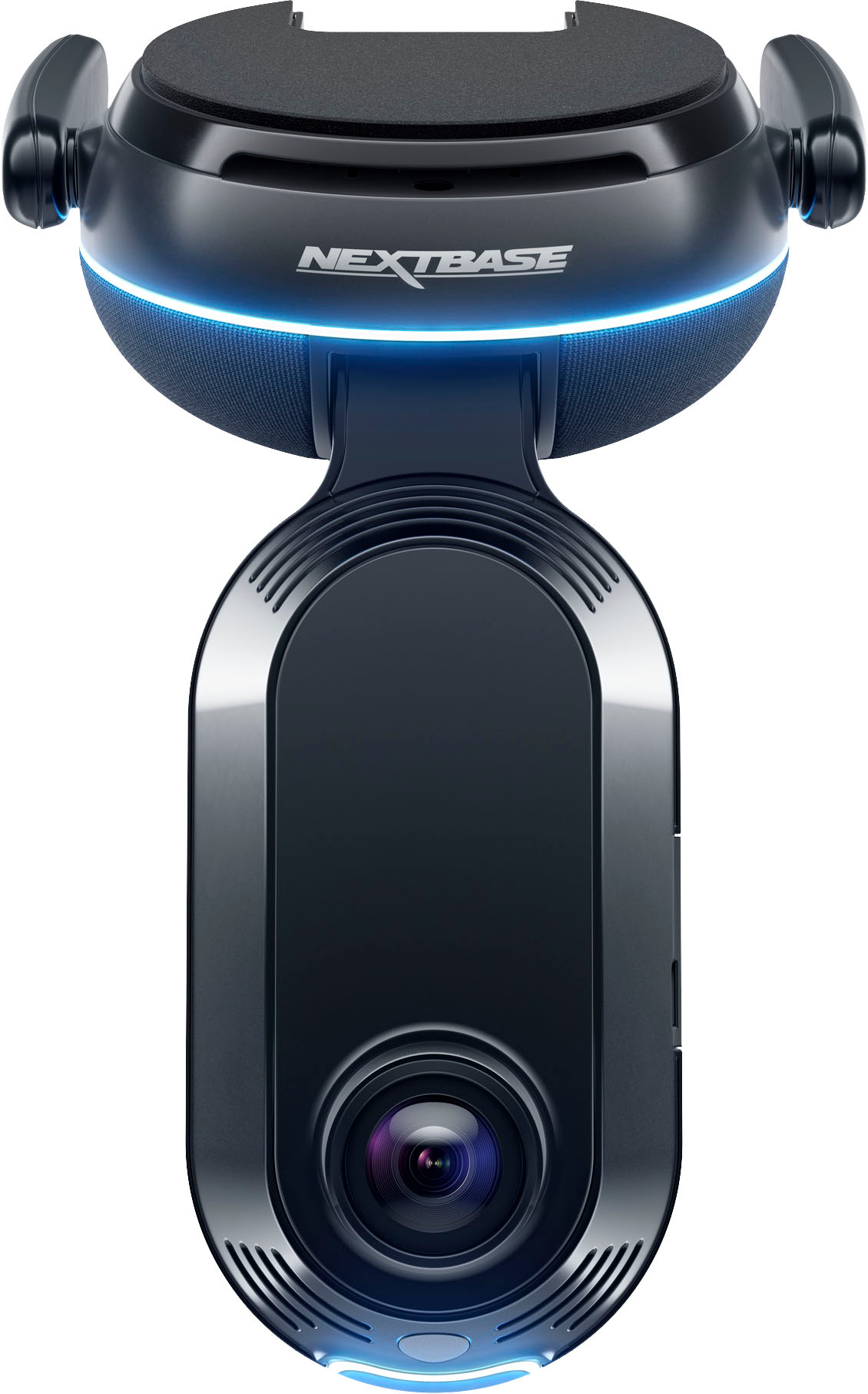
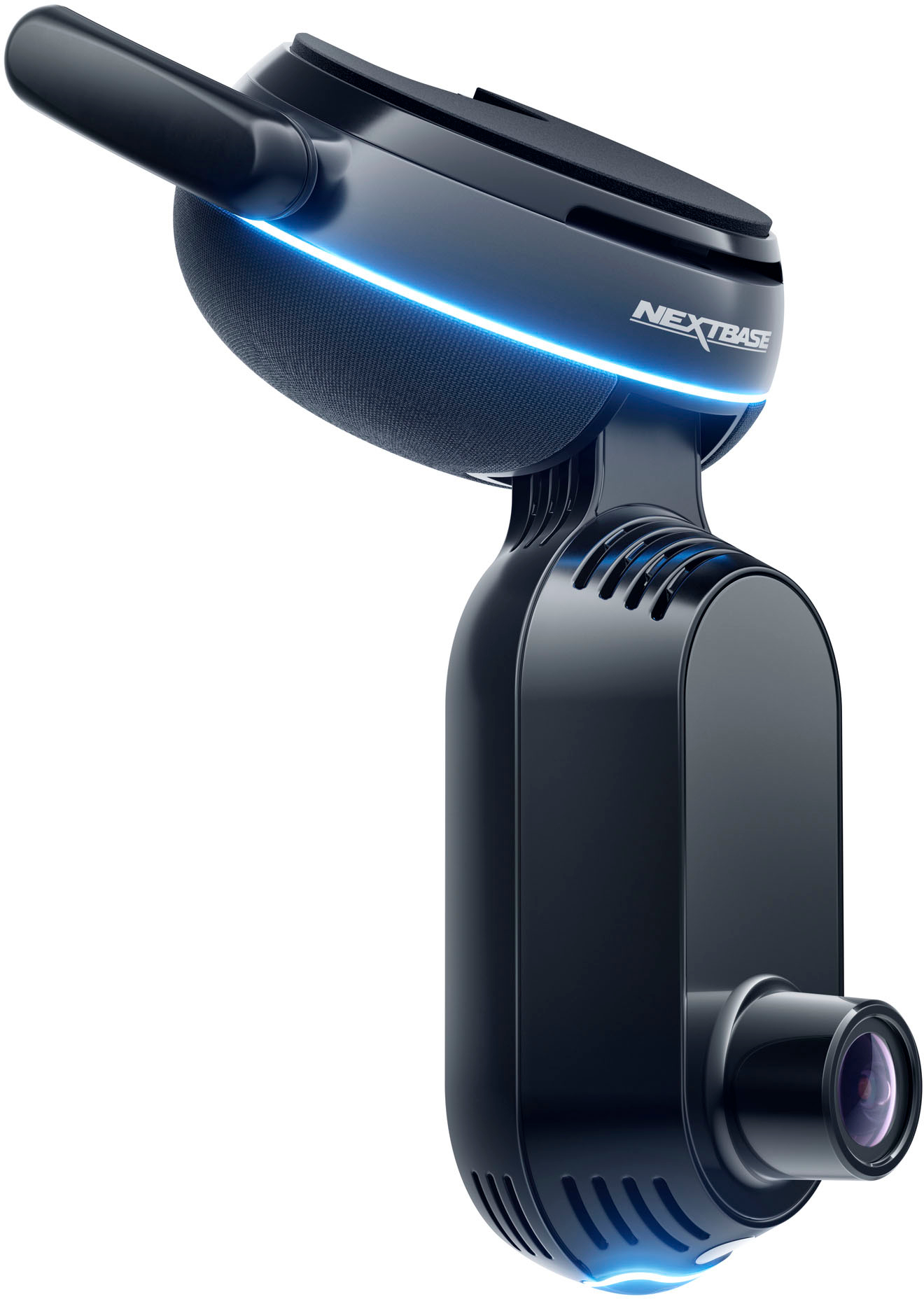
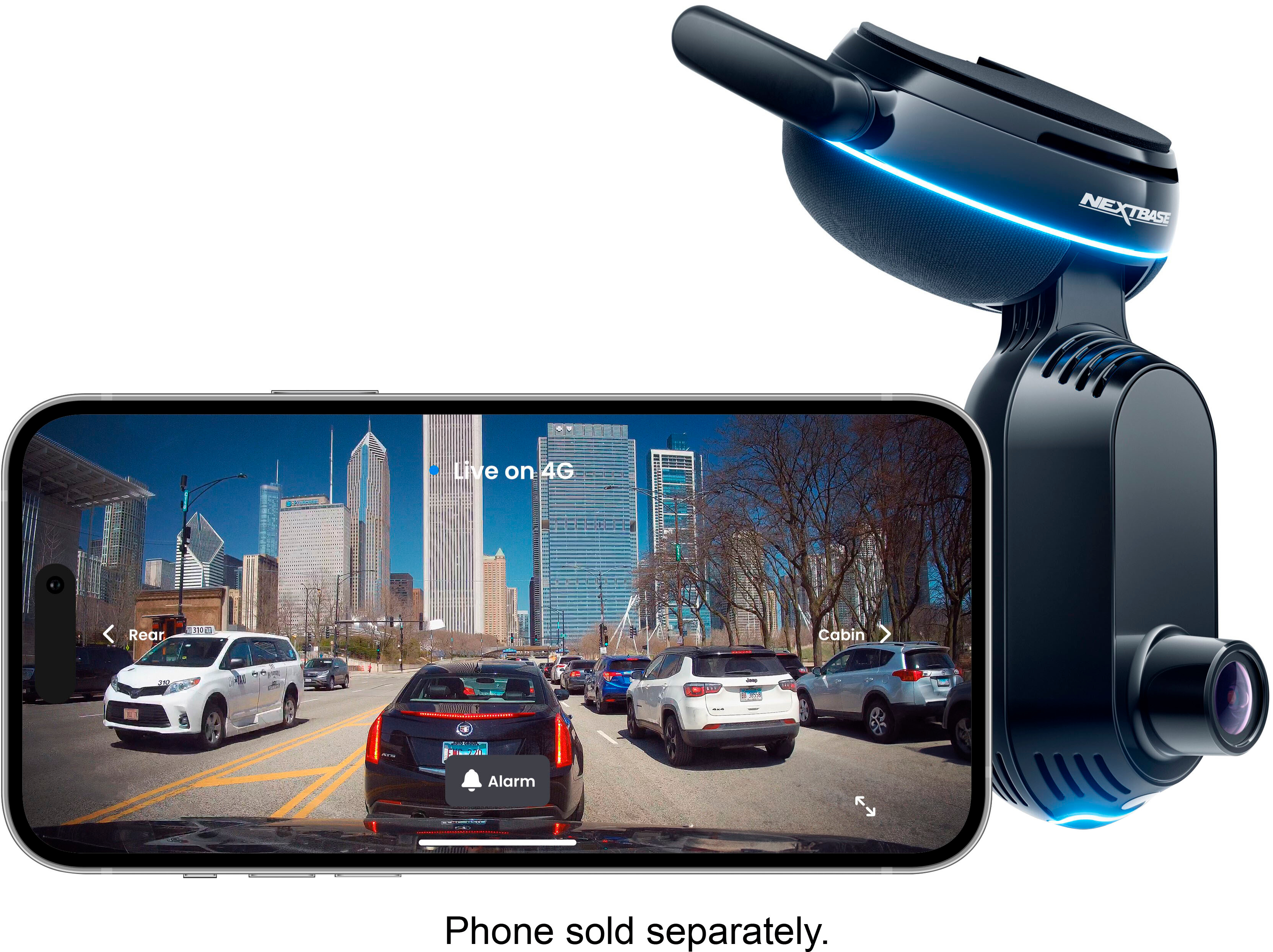
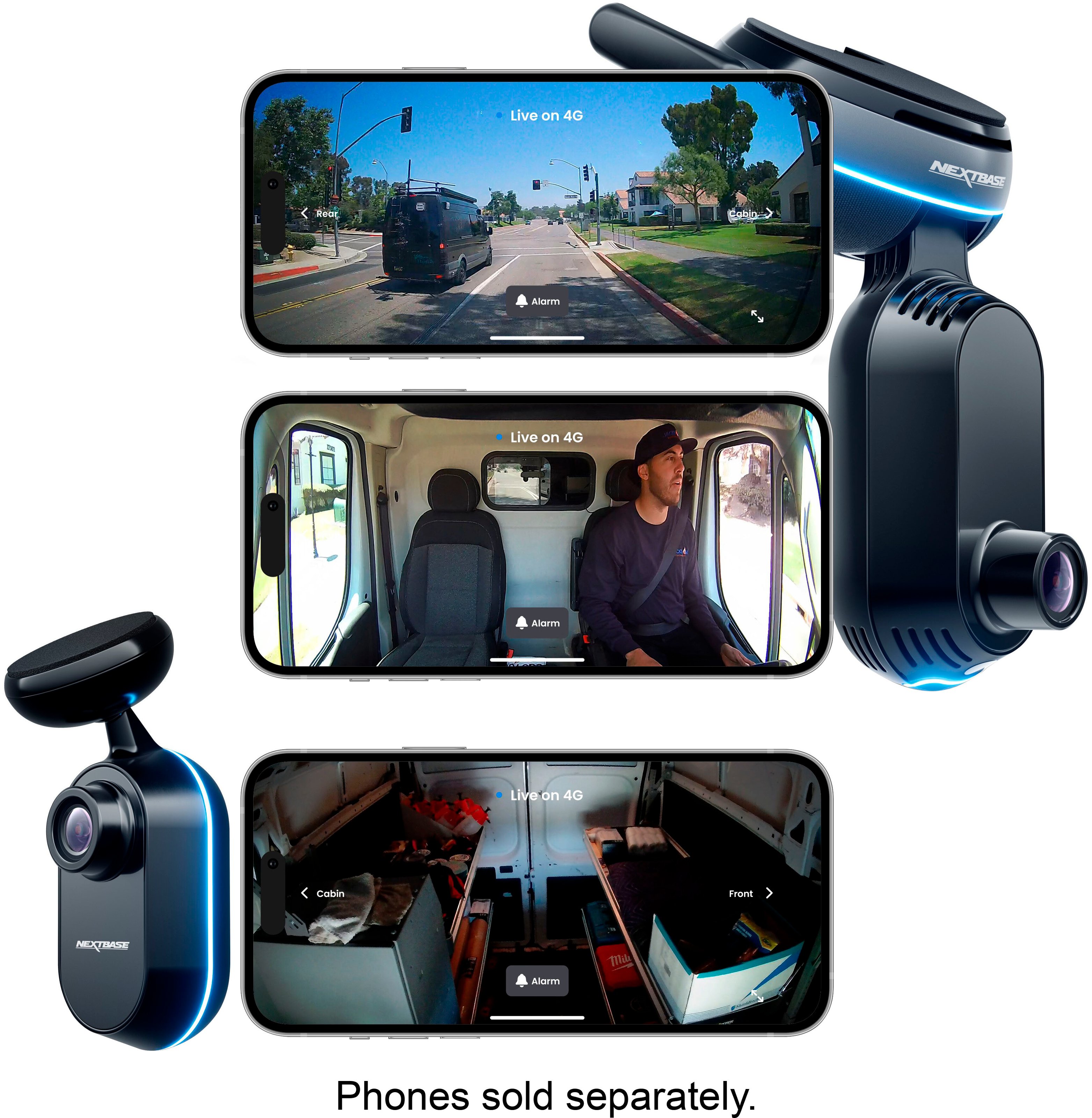
|Posted .This reviewer received promo considerations or sweepstakes entry for writing a review.This is a really nice dash camera/vehicle security system. But it better be for the price and the cost of the subscription. In the box you get the camera, a connection cable with OBD2 adaptor pre-connected, several different fuse connection adapters, a tool to help stuff the cable into trim, some decals saying “Protected by NextBase” and a card with a QR code/website URL to take you to the installation instructional video. Setup was fairly easy once I got to the instructions. First, you need to download the app and open it up. Then, connect the cable to the OBD2 port, turn the car on and connect the camera to the cable. Then follow the instructions on the app to finish the setup, including installing updates and starting your subscription. The camera uses 4g to connect to the internet. Your subscription basically pays for that connection functionality. NextBase does give you a 3-month trial to start. The actual camera unit is quite large compared to other dashcams I’ve used. It has a front facing camera and a cabin facing camera. You can add an additional rear facing camera if you want one for an additional $199 (at the time of this review). The camera unit consists of 2 parts connected by a hinge. The base connects to the window and houses the connection electronics and ring status LED. There are two antennas connected to it. Then there is the camera section with a lens on each side and a small status LCD. Unfortunately, there is no user manual in the box. It’s all online. Figuring out all the functions would be a lot easier with a nice, compact instruction manual you can keep in the glovebox. I did find one on the site after some searching. There is no link on the product page that I could find. I had to go to the support section of the site. There are quite a few light flashing status patterns on this dashcam. There are also a ton of icons that can be displayed on the little LCD screen. Figuring out what each means will take me a while. When you open the app, it brings you to the live view page. As you might expect, this is where you can activate the cameras to see live views. You can also see where your car is on a map. The History tab lets you access all the video files. Each video file is 30 seconds long. It keeps separate lists of your events (parking or impact), your library and your downloaded videos. Impact events can include an accident, opening the car door, hitting a pothole or bump in the street. The camera also detects and records motion around the vehicle. When it detects motion, lights flash very noticeably as not only status information but also to serve as a warning that something is noticing people walking by. There are only a few negatives. As mentioned earlier, the camera is quite large and noticeable in the windshield. Another concern is the use of 4G. Eventually this technology will be discontinued (like 3G last year). I’ve read this could be as soon as 2030. I couldn’t tell if there is a battery in this dashcam or not. If there is, will the battery die before the end of 4G and make this useless? I could not find any information about replacing a battery. The app can be a little slow sometimes as it waits for the camera. And finally, the lack of a physical manual is a little disappointing. Conclusion: This thing makes my other dashcams feel like toys. It feels very sturdy, has features I’ve never seen on other dashcam systems and so far, it has worked really well. However, this thing is not inexpensive. Especially considering the subscription. If you have an older car and just want something to record while you are driving, this is not for you. If you are looking for something that is more of a 24-hour security or evidence recording system for an expensive vehicle and cost is no object, this might be for you.
I would recommend this to a friendBrand response from Nextbase
Posted .Thank you for sharing your detailed review of the dash camera/vehicle security system! It's great to hear that you found the setup process easy and you have been impressed with the features compared to other dashcams. The inclusion of a 3-month trial for the subscription is designed to allow customers to try the functionality before making a decision.
Your insights into the camera's size, connectivity, and functionality provide a helpful overview for potential buyers. The camera has been designed to look great as well as be fully loaded with way more features than just a dashcam.
We have developed and released a new app which allows users instant access to their footage. We have already released some updates to improve speed. We have an online manual which we are going to make available in the app shortly.
Thanks again for sharing your experience!
- Pros mentioned:Video qualityCons mentioned:App functionality
Rushed software all but requires subscription
|Posted .This reviewer received promo considerations or sweepstakes entry for writing a review.Pros Includes high durability SD card Most of the NNunit mounts out of the way OBD2 power cleaner and easier to wire Good Quality Microphone LTE connection allows for remote access Footage can be stored in the cloud Can alert someone of location and stream footage in emergency Radar feature can detect and record motion near vehicle Optional rear camera that further extends radar Adjustable voltage when It turns off to save battery Records vehicle telemetry in footage to prove how you were driving Records speed and direction of vehicles around you for proof (Coming soon) Guardian mode can alert when car is going too fast or is out of area (Coming soon) Cons License plate capture is poor when moving Advertised features aren’t available on launch Less functionality in app than lower end Nextbase dashcams without subscription Video preview during setup is delayed from where you are Video preview no longer available after setup without subscription Footage is broken into two minute clips instead of automatically stitched based on event Only single adjustment once mounted Tiny QR pairing code on screen hard to scan Alerts do no work consistently Video clips aren’t automatically uploaded to cloud App is inconsistent and unpolished Advertised features are still listed as coming soon App alerted for impact but shows no clip in history App alerted for impact while driving with no change in g-force and showed parked clip Misses beginning of event while waking up Exposure not adjustable while viewing video Automatic time stamp shows correct time but video clips do not Description of functions in manual don’t explain and only restates name Viewing events brings up live view and not the associated event clip Over video clips in Library show no thumbnail to see what they are Before going further, it must be said if you are against subscriptions of any sort then the standard model Nextbase dashcams would be better suited. They offer similar quality video but work locally. If the subscription is less of a concern and you want advanced features, then read on. The Nextbase IQ is a completed redesigned dashcam from their older designs. Older Nextbase cameras simply recorded footage to an SD card. They did record the speed and g-forces of the car to prove how you were driving but the most advanced feature they had was Alexa support in some that worked through your phone. The Nextbase IQ adds smart features to make it more competitive. In the fresh the design has ditched the large built-in screen for a small one that displays icons instead of video. It is longer and skinny so you can place the camera lower to get a better angle without obstructing the drivers view. Unlike their older dashcam, the IQ is powered via the vehicles ODB2 port instead of a power port or wiring to the battery. This has the advantage of hiding power wiring away as well as allowing the dashcam to know exactly when the vehicle is running or not. The largest change is the addition of remote access via LTE which also adds more robust security features. While not new to dashcams, they are new to Nextbase dashcams. Installation In a strange departure for Nextbase, installation was less than smooth. The easy part is the OBD2 power cord. Since the ODB2 port is typically under the dash all you need to do is route the cord around the window and under the dash. Where things become more challenging is mounting and setup. First, the camera only allows adjustment in one direction. Once mounted all other adjustments are locked in without removing adhesive. To start, in order to see the orientation, you need your phone to view the footage. To set it up, you must scan a tiny QR code with an extremely reflective screen which was a challenge for most devices tried. If the angle was right, then distance was wrong and vice versa. Pairing also kept failing and nothing explained why. After experimentation it was discovered that it connects via Bluetooth but also needs Wi-Fi at some point. The app didn’t ask for Wi-Fi access nor did explain it was required. It wasn’t until Wi-Fi was turned on during troubleshooting the app could access the camera. Once paired it makes it seem like you can skip the video preview and view the live feed later for adjustment. Well, if you skip this step then live view won’t be available unless you buy a subscription. If you stay on the installation preview video, you will find the Wi-Fi doesn’t even seem to be used. As you try to watch the video feed it has to wait for LTE and then sends you a short video clip which is delayed. This means if you even slightly moved while waiting for the clip you must back out and try again. It does not show you a video stream. Furthermore, you must try to find a way to hold the base of the camera without blocking the front or rear view of the cameras but not touching the windshield because then the adhesive will stick. While you are doing this you need to have some way to hold your phone and press the back button and then forward again to prompt for another video clip. Just like it sounds this is near impossible to do alone. Even when enlisting the help of another person we found the process was frustratingly finicky. If the camera feed was a live feed this would make things manageable. Setup Once the camera is mounted everything else is via the app. This is again where you find some caveats. The first thing the app does is to prompt to choose a subscription. With built-in LTE this is to be expected. They can’t pay for an LTE connection for the life of your dashcam with a single purchase, but this goes further. After choosing the “free” plan you discover that to use almost any feature, including local ones, requires a subscription. For a dashcam marketed as a premium dashcam you would expect it to carry and enhance the features of the lower ones in the lineup. On lower end Nextbase cameras you can view the live feed and access video clips via the app using a Wi-Fi connection to the camera. With the IQ, about the only thing you can do without a subscription is change camera and account settings. It can alert you to certain events, but you can’t view that footage, only a live feed that goes away after closing. The one thing that has remained is that you can remove the SD card and access footage this way, but at the very least it should offer the same features as their base models. Another surprise, at least at the time of review, is that two of the main features marketed aren’t available yet and are listed as “Coming Soon”. While more businesses are doing this and selling products with features coming soon, it isn’t good from a consumer perspective. Often promised features do not come or aren’t what was advertised. Usage and Performance If the subscription requirement isn’t a concern, then the main question would be if the iQ 2K features are worth the investment. First, Guardian Mode and Roadwatch AI are not currently available to review. Also, the primary phones used are iPhones. The first thing to note is that notifications are not consistent. All notifications are turned on with both phones but often we do not receive alerts. Another odd behavior is my wife and I both received an alert for an Impact on our Apple Watches. When tapping the notification, it just brought up the live feed and not the actual event. After checking further, the issue event wasn’t showing in the list of events but just in the library. The clip also didn’t say impact in the library but did in preview. After checking the clip, it was sitting still in the parking lot, but the map showed it moving. Furthermore, the map shows a g-force graph with no changes in g-force. Checking even further it was discovered that all driving clips had the word impact on them at the top. Overall this behavior was strange because there was no change in g-force, the phone was in the vehicle, and the vehicle power was on which should mean it is in motion. This brings up another issue. Video clips are broken into 2-minute clips. If an even occurs the dashcam breaks the clip into pieces requiring you to download multiple clips to get the entire even and only the first is tagged as the event. Also, while embedded time on the clip is localized, finding a specific clip is odd because timestamps on the library are off by 5 hours. With a subscription you have local and remote access to the dashcam via the cloud. Clips are not automatically uploaded to your cloud account for easy viewing. It doesn’t say anywhere, but clips are only uploaded to the cloud when you request them. If an event happens after which your dashcam becomes available, you will not have access to the clips. This could cause a problem if the vehicle is stolen, and the thief unplugs the dashcam. The moment it is unplugged the dashcam goes offline meaning no evidence of the theft unless you can retrieve the dashcam. To reduce battery, drain the Nextbase iQ goes into sleep mode when parked. You can configure a radar mode which works for the front and sides of the vehicle and wakes the camera up when motion occurs nearby. You can extend coverage to the rear by adding on a back camera. Distance is configurable and can document activity near your vehicle. It works well with the caveat that the first couple of seconds as the dashcam wakes. Final Thoughts There is much more that can be said about the Nextbase iQ dashcam. It is nice to see Nextbase making more modern dashcams to compete. The iQ seems rushed with the software quirks and bugs. The requirement for a subscription for even the most basic function could turn off even loyal Nextbase fans. Nextbase can improve this via software updates and policy changes as the hardware design good. Nextbase makes great dashcams. This could be added to the list with updates. However, at the time of the review I cannot recommend it unless you are a diehard Nextbase fan, the subscription requirement does not bother you, and you trust them to continue development.
No, I would not recommend this to a friendBrand response from Nextbase
Posted .Thank you for taking the time to provide such detailed feedback on your experience with the Nextbase iQ dashcam. We appreciate your thorough examination of both the positive and negative aspects of the product. Your insights are valuable, and we would like to address some of the points you have raised.
I have reviewed and noted a few points below to provide some confidence on how we are continuing
Subscription Concerns: We recognize that the subscription model might not be suitable for everyone, this is why we offer a free plan and two levels of paid subscriptions. We also offer a free 30 days and the ability to cancel at any time.
Installation and Setup: We apologize for the difficulties you encountered during installation and setup. Your feedback on the need for clearer instructions, better QR code accessibility, and an improved user interface is useful, so much so we have released several firmware’s since the product launch to improve many aspects you have listed. We won’t stop there, the much like other smart devices will continue to evolve and have improved ways of working through future releases.
Usage and Performance: The issues you mentioned regarding inconsistent notifications, the impact alert discrepancy, video clip organization, and cloud upload functionality have again been improved through firmware releases.
The iQ is designed as an “evergreen product” it will evolve through continual feedback much like the points you have provided.
Thanks again,
The Nextbase Team
- Pros mentioned:Live viewCons mentioned:Price
New generation of dash cams
|Posted .This reviewer received promo considerations or sweepstakes entry for writing a review.When I received the information for the Nextbase iQ smart dash cam I was very excited about it. The idea of knowing what’s happening inside and outside my car from anywhere was very interesting. The other features such as the smart sense parking, driving event detection, witness mode and emergency S.O.S only made me want this more. Easy setup: I found my OBD port and worked my 16 feet OBD car power cable behind my paneling. Doing so made my installation very clean with no clutter. I did my install with daylight so everything went smoothly even scanning the small QR code on the iQ screen. 20 minutes or less was the time I believe I spent on the install. App POV: I tried the app before I signed up for the subscription and I really don’t think I would use it without the subscription. I felt like every feature I liked was not included without paying subscription. After I activated the subscription I see the app is better and not useless. Live view is a must and should be included with or without a subscription. The live view is clear and vivid because of the 2K camera. Stream quality: I find that the picture quality is HD. My problem is the live stream delay. It is about 5 seconds or more delay. I think this should get fixed asap because a $19.99 a month subscriber should have a better experience. My pros have to be the future capability of the Nextbase iQ. The Roadwatch A.I is what I’m waiting for. I’m not sure how long until it gets release but it is something I’m looking forward to. The witness mode I hope to not have to ever feel the need to use but knowing I have it to prove myself in certain circumstances is probably the game changer. I can activate it by a simple command. My cons are the stream delay and the subscription cost. For a camera that costs $500 plus, I think basic camera features should be included free. If my car is parked outside my house and the app is on my WiFi, I should have live streaming. If I’m paying a monthly charge I should have a better stream with little to no delay. I don’t think it’s a product that I would recommend until the bugs are fixed. I see the potential and maybe the features that are not yet added will truly enhance my experience.
No, I would not recommend this to a friendBrand response from Nextbase
Posted .Thank you for taking the time to share your detailed thoughts on the Nextbase iQ smart dash cam. We appreciate the time you have taken leaving feedback on various aspects of its performance.
We're thrilled to hear that the installation process was smooth for you, and you were able to set up the device with ease.
Your feedback on the app is valuable, and we understand your perspective on the subscription model. We're continually working to improve our services and make adjustments based on user input through remote updates.
Regarding the live stream delay, our team is actively working on optimizing this aspect of the user experience, we have already released 2 firmware released.
It's great to hear that you recognize the potential of the Nextbase iQ, especially with features like Roadwatch A.I. We share your excitement about the upcoming developments, and we assure you that we are committed to delivering cutting-edge capabilities to enhance your overall experience.
We take your feedback about the subscription cost, its useful to point share, the subscription cost covers all data usage, allowing customers to connect to their dashcam anywhere, anytime.
Thank you for your review, and we hope that future updates and enhancements will address some of the points you have, making the Nextbase iQ a product you can confidently recommend.
Thanks again,
The Nextbase Team
- Pros mentioned:Video qualityCons mentioned:App functionality
A smart evolution in dash cam
|Posted .This reviewer received promo considerations or sweepstakes entry for writing a review.I've been wanting to upgrade my dash cam for years now. There seems to have been a slow innovation in the dash cam market. I believe Nextbase has finally pushed the industry forward. They combined the features that I was looking for in an upgrade and added many that I had not considered. The dash cam features that I was most looking for before upgrading were to be powered by the OBDII, so the camera could monitor parking and be always on, and to have cellular connectivity, so I could check in and monitor the camera at any time, as well as get updates from the camera sent to my phone. The Nextbase iQ has both of these features and more. I'll start with installation, since that may be a concern to some. I'd like to say that I'm very particular about things that I put in my car too. Not only do I want them to look nice, but I don't want them to cause any cluttered appearances. Thankfully, neither was an issue here. I believe the camera to not take up much space, and routing and hiding the cable to the OBDII was easy and is not visible. The cable was tucked into the trim pieces of my car, around the headliner, down the trim along the side of my windshield and finally under my dash. The cable is not visible. The unit itself also looks nice. It has subtle lights that are not only functional, but also elegant. It warns when events are detected with the lights and with an audible sound. Along with the installation, setup was also very easy. The app walks you through installation and first-time setup. It's as simple as scanning a QR code within the app the begin the setup process. It was a simple and seamless process. Sticking the camera to the windshield with the adhesive was also very easy, and the camera feels firmly in place. Video quality has been overall pretty great. It handles the fast movement required for recording while driving at speed. Both inside and out, the views are high quality and would be great for protection or evidence if necessary. There are also many other useful features, like being able to give others the ability to view the camera as well. Like a significant other. The parking monitoring is one of the features that I wanted most. My previous camera had this functionality, and I wanted to make sure my replacement had it as well. The notifications for any parking events come through pretty quickly, so you can assess any possible problems. There are also driving event detections, like possible impacts that may occur, with the iQ making a clip for these and noting why it marked the event. The app itself is excellent as well. You can see a feed of events, with thumbnails for all available views (inside, out, and rear if you have the added rear cam). Tapping on the event will, of course, let you view the clip, but you can also see additional information, like the GPS coordinates of where it happened, speeds and time. There are also some pretty neat things, like the SOS mode. Which, in the event of a detected impact will notify emergency services that you need assistance. Or what Nextbase refers to as "Witness Mode", which will record and send the clip to someone that you have designated. There's also the promise of future updates that will further increase the already impressive feature set. The one issue I did have was related to the app. It can sometimes take a long time to start the app, or to move between sections. There's also a bit of time that it may take to connect to the iQ, since it may have powered off to save your car's battery. Hopefully there will be some performance upgrades to the app itself. It's not bad by any means, but if it was possible to speed it up a little, that would make it all the better. Another issue is that recorded audio seems very loud at times. An option to adjust the mic sensitivity may help as well. This is an excellent dash cam and easy to recommend if you're in the market for an upgrade or your first camera. Pros: Well-designed, great quality, plenty of nice features, ability to improve with over-the-air updates Cons: The app can sometimes feel a bit sluggish, audio recording seems overly loud at the moment, and blown out at times. An option to modify the mic gain or sensitivity would be a welcome update in the future.
I would recommend this to a friendBrand response from Nextbase
Posted .Thank you for the review! Sounds like all in all you are enjoying the iQ! If you have any questions, please let us know at [email protected]
- Pros mentioned:Video quality
Amazing Dash Cam!
|Posted .This reviewer received promo considerations or sweepstakes entry for writing a review.The Nextbase IQ cellular connected dash cam sets the standard for what every dash cam should aspire to be. I’ve owned several dash cams over the years and there is always something annoying about each of them; cheap components, confusing operation, less than desirable process to transfer footage from the camera, and so-on. Not to mention you are up the creek if it malfunctions since warranty claims are glacially slow, if honored at all. I’ve considered them necessary equipment in our litigious society, since the only way to fully prove what happened in an accident is one person’s word against another. A quality dash cam takes all the uncertainty out of the equation, but unfortunately it’s hard to find one that checks all the boxes, including its usefulness when something goes wrong. Nextbase is one of the few brands that actually puts out quality devices that are good enough to be sold in stores (i.e. Best Buy). This is my first Nextbase camera and so far, I love it. The 4g cellular connectivity is a total game-changer. While the IQ isn’t the first cellular dash cam, so far, it’s the only one I’ve found that is easy to use, affordable, and actually works well. This unit is compact and installs in literally 10 minutes. Just run the OBD cable along your driver side pillar and mount the camera. Done. The setup is straightforward HOWEVER I found the QR code to be very difficult to scan. I tried an iPhone and Android phone and neither was able to scan it on its own (displayed QR is very hard to focus on). I ended up having to take a pic using my Pixel 8 Pro, then enlarged that photo only to scan the photographed QR code with my other phone. It finally entered the setup mode. The setup process is straightforward as the Nextbase IQ app is designed well. I was up and running in under 20 minutes (from install to finish). I have the 2k model (the “middle” one)” and can attest the video quality is outstanding. The 4g setup is optional, but I’d imagine if you are spending the cash on this model, you are going to utilize the 4g connection. It’s reasonably priced and has 3 tiers: free (limited alerts and functionality), Basic ($9.99/month at the time of this review) and the top-tier is $19.99/month. To me, this is an incredible bargain since its functionality is similar to a home security camera. Always recording and you can live-stream the footage (of it parked or when someone else is driving). Pretty neat to stream your car’s dash cam live from anywhere in the world which feels futuristic, honestly. It features voice commands “Hey Dashcam, privacy mode” for example, turns off the cabin camera for privacy. You can also activate witness mode, which will record and live-stream what’s happening to someone you choose (family, etc). It comes with a micro-SD that’s fast enough to keep up with full resolution video recording. The parking mode is like a security camera that’s always watching. If someone bumps your car, or of course breaks in, you have the footage of it live or recorded. That alone makes it worth buying, IMO. There are a few additional features that aren’t yet activated, including one that uses AI to measure and document OTHER vehicles speed. Crazy, huh? You can update the firmware right from your phone and I’d imagine Nextbase will only improve the features with future updates. Night video is clear, especially the cabin (rear-facing) camera, since it has IR emitters that light up the dark without distracting you. I can’t speak to the rear-camera as I will need to purchase one, but I can only imagine it will be as useful as the main IQ unit. The weather right now is cool during the day and cold at night, so it will be interesting to see how it operates in below zero and triple-digit temps (we get both in Utah). In summary, this dash cam is truly innovative and absolutely deserves consideration from anyone serious about owning a dash cam they can trust to perform when the time comes. Nobody wants to be in an accident, witness another accident, or be broken into, but if and when that happens, you will be very thankful you purchased the Nextbase IQ! It’s not the cheapest camera on the market, but for what it offers, and the importance of the footage when something happens, I find it well worth the cost. Thank you Nextbase for bringing a truly innovative product to the US market! I give it a full 5-star rating without hesitation.
I would recommend this to a friendBrand response from Nextbase
Posted .Thanks for the awesome and thorough review! Happy to hear you are enjoying the iQ and are found it easy to set up. If you think it's innovative now, just wait until Roadwatch AI and Guardian Mode are available! If you have any questions or cool footage to share in the meantime, please do not hesitate to contact our support team at [email protected].
- Pros mentioned:Voice control
New standard in vehicle surveillance
|Posted .This reviewer received promo considerations or sweepstakes entry for writing a review.The Nextbase iQ 2K smart dash cam, which is replacing our previous 622 model, is truly a remarkable technological advancement. From its high-resolution 2K recording to its innovative AI-powered features, this dash cam sets a new standard for vehicle surveillance. First and foremost, the 2K recording capability provides impeccable clarity both day and night. The ability to capture license plates and road signs ensures no crucial details on the road are missed. The Live View feature, paired with an always-on 4G connection, empowers us to monitor the vehicle from anywhere. Custom alerts allow us to stay in control, providing peace of mind whether at work, at home, or on the other side of the world. We decided to install this system in our teenage daughter's car, which she uses for her daily commute to college. The live view and emergency SOS features have been invaluable to us as parents, especially since she was recently involved in a no-fault accident. Given that she is a new driver, this camera has provided us with peace of mind, allowing us to keep an eye on her location and leverage the latest technological advancements to enhance her safety. SmartSense parking is a game-changer for vehicle security, and Witness Mode allows us to initiate live streaming and share footage with trusted contacts in the event of road rage incidents or other emergencies. In case of life-threatening situations, the Emergency SOS response feature automatically shares our location and critical medical information with 911 personnel. The Roadwatch AI adds essential context to our recordings by displaying the speed and movements of surrounding vehicles and identifying pedestrians, cyclists, and more. The Smart Voice Control ensures a hands-free experience, and the inclusion of 4G connectivity, in addition to GPS, Bluetooth, and Wi-Fi, is a standout feature. It enables live streaming and automatic cloud uploads in the event of a collision. Importantly, these features continue to operate even when your car is turned off, thanks to power supplied through the OBD II port. However, we've noticed a slight delay in live view activation, and the date and time synchronize automatically once the 4G connection is established. We're currently facing challenges in configuring the local Bluetooth connection and are actively working with tech support to resolve this issue. The Nextbase iQ offers a range of subscription tiers, including Protect and Protect Plus, which provide additional functionality and convenience. With planned over-the-air updates, including Guardian Mode for location tracking and Push-to-talk for direct communication, the Nextbase iQ is poised to stay at the forefront of dash cam technology. The setup process is a breeze, and the sleek design seamlessly complements our vehicle. Inside the package box, you'll find the dashcam, a power cable equipped with an OBD connection port, a hardwire connection kit, additional double-sided tape for mounting, and a card containing a QR code. Scanning the QR code grants access to an installation video guiding you through the setup process. To get started, download the Nextbase iQ app from the App Store, create an account, and let the app assist you in the installation process. Simply connect the dashcam to your vehicle's OBD port, and once it's powered, scan the displayed QR code to proceed to the next steps. The app offers a 3-month trial subscription option, requiring credit card or Apple Pay information for payment processing once the trial period ends. This subscription is primarily for live viewing and additional security features. While the subscription may seem costly, there is a discount available for annual payments. If you prefer to use the basic dashcam features without the subscription extras, this might not be the right choice for you. Nextbase offers other products more tailored to your needs, as this model involves both a higher initial cost and ongoing expenses associated with the subscription, which could be a significant drawback. Pros: User-friendly installation & Design, Always-on 4G connection, Three resolution options, Interior and Rear-facing camera, Remote monitoring, OBD II port always-on power, Security features like SmartSense Parking, Witness Mode, live footage, emergency SOS, different tiers of subscription options, over-the-air updates like Roadwatch AI, Push-to-talk, and Guardian Mode. Cons: Subscription costs, premium price for high-resolution cams, additional accessory cost like rear-facing optional camera. While it comes at a premium price, the wealth of features, AI capabilities, and always-on connectivity make it a worthwhile investment for those who prioritize safety and advanced surveillance. It's an exciting glimpse into the future of dash cams, and we're eager to see how it performs in real-world scenarios.
I would recommend this to a friendBrand response from Nextbase
Posted .Thank you for such a thorough and detailed review! We appreciate the time taken to detail your experience! SO happy to hear this is bringing you peace of mind as your daughter drives to and from school. The iQ really does take the security of your car, and daughter, to the next level! Let us know if you have any questions at [email protected]
- Cons mentioned:Battery life
Awesome concept but not without its challenges.
|Posted .This reviewer received promo considerations or sweepstakes entry for writing a review.The Nextbase iQ 2K Smart Dash Camera is a really smart idea! I have been a Nextbase fan for years now, with several iterations of the GW series of cameras in our vehicles. The iQ takes what we know and love from the 'ring' style cameras on our front door and puts it into a dash cam. What that means is you can check on your vehicle at any time, from the comfort of your office, your party, your vacation miles away, literally from anywhere. That is the plan anyways. Setting up the dash cam is fairly easy. Once you open the packaging, you plug the camera into your OBDII port on your vehicle. You download the Nextbase iQ app and it will walk you through set up with a tutorial. I did find that there were some steps that I had to repeat a couple of times, and trying to scan the QR code on the small screen on the iQ dash cam was challenging. It wouldn't read it, and even pressing on the screen to enable the flashlight on the phone to turn on, caused some reflections. I had to move it around a lot for it to trigger. Once triggered, the dash cam will download a firmware update and install it on the camera. Then you are able to set up the camera and adjust it to your liking. One challenge I had here was that the camera wasn't 'live' when setting it up, there was an absolute delay when using the live view to set the position. Also, the camera doesn't take into account the curvature of the windshield when mounting. If you can't mount the camera as centrally as possible, you don't have any control left or right on the camera, only up or down. So if you don't hit it centrally right out of the gate, you may not have the view you want. There doesn't appear to be any adjustment of the camera pan or tilt in the app in a digital way either. The camera is supposed to be able to connect via bluetooth as well as wi-fi, I had a prompt show up asking to enable bluetooth, it covered up something that I was already working on in the app, dismissed it, and now I cannot find a way to get the camera to connect via bluetooth again, which is frustrating. I also cannot rename the camera, so it is named as a Nextbase serial number, and I find that several of the options are either 'coming soon' or not available, even when testing out the 3 month trial of the service. After that there are two subscription plans to choose from, one for $9.99 and one for $19.99 with various feature unlocks. Customer service have been incredibly helpful when I had to reach out to them, which is a great thing in this day and age. However, if you were able to set it up in a suitable position, then the image quality is fantastic, and gives a nice clean view both out the front of the vehicle and in the cabin as well. When driving with the camera on and recording, there is nothing really distracting you, a red circle shows on the screen, and that's about it. However, I did find that it was incredibly temperamental when going over expansion joints, uneven roads or bumps. It would chime and record an impact. Now I do drive a convertible sports car, so it's a very rigid vehicle and will have an amount flexibility over a hard top vehicle, but I was surprised at how twitchy the camera was in recording impact states. When the vehicle is parked, I've had hit or miss luck with connecting to the camera. If I drive the vehicle somewhere, and park up, I see that the camera is in 'security mode' and I am able to wake it using the app and see what is going on, both inside and outside (the front) of my vehicle. I was also able to do that this weekend, 400 miles away from my house. I was able to check the status of my vehicle and see that it was all safe and sound. However, when I returned home and went to show the same functionality to my neighbor about how cool this camera was, it would not wake the camera. I got an error and was told that it was offline. I started my vehicle and the camera came to life. It's almost as if after a certain about of time, the camera turns completely off and won't turn on again until the vehicle is started up. My vehicle is a 2023 Camaro SS Convertible, so the battery is new, as is the OBDII port etc, so not sure why it's doing this. The camera is actually quite large, it's almost like sticking a smart hub to your windshield with a camera dangling down off of it, so in the confines of a smaller sports car, it does take up a lot of real estate. When it is working in security mode, there is a red ring that lights up when motion is detected in the local vicinity of the vehicle and records the event. That is a nice and reassuring event that happens, when it works. Overall, this is a great concept, and with my experience with Nextbase in the past, I think it WILL be a great product, with future updates, firmware and software enhancements. But at the moment, there are too many slightly glitchy elements to it that cause me to wonder whether it will work when I really need it to. If I need it to record something happening to my vehicle when it's parked but it has turned itself off, then what is the point. I'm still talking with customer service to see if there are any reasons why it would be working fine for a day or so, even from 400 miles away and then the following day, right next to it, it is powered down.
I would recommend this to a friendBrand response from Nextbase
Posted .Hey. Thanks to your valuable feedback, we've made some exciting updates to our app and device!
To enjoy the new improvements:
Update the app from your app store.
For the latest firmware, open your iQ app, tap the menu in the bottom right, go to iQSettings > Firmware Update > Click Latest Update.
You're all set to enjoy the enhancements!
The Nextbase Review Team
- Pros mentioned:Video quality
Could be great, but a lot of considerations
|Posted .This reviewer received promo considerations or sweepstakes entry for writing a review.I purchased a new vehicle recently and decided it was a great idea to pick up a dash camera to protect my investment. Nextbase was a brand I recognized from online advertising and the advanced features on the IQ 2K sounded like a perfect fit for my needs. There were a few things, though, that I did not realize prior to trying this unit. I am going to make sure you know all of them so you can avoid any of the frustrations I had. First thing’s first - the installation process is not simply plug in play. In fact, I’d highly recommend taking this to a professional installer unless you feel secure in routing cables from near your rearview mirror all the way down to your car’s OBD II port or fuse box. Though a handy trim tool is included in the box, most people aren’t going to know the route this cable should take to avoid being visible or potential damage from things like closing your door. Next, there’s the actual placement of the device. It’s pictured right behind a rear view mirror barely in your line of sight. The reality is that if you have any modern safety technology in your car it too lives behind the mirror and usually has a big plastic cover over it. Said cover blocks your ability to position the camera in a way that is unobtrusive, and i finally had to settle for doing something that would disturb the view from the passenger seat but still be useful. Finally, there’s all the advanced technology that sells the product over others at this price point. Features like Guardian Mode and Roadwatch AI. All sound great until you realize the manufacturer hasn’t even activated them yet, and there’s a “coming soon” icon beside them. I haven’t seen any indication when they will actually be available. Finally, one last point of contention. If you want to actually use all these features, be prepared to have a $20 a month subscription (or 9.99 for a light version) or else you have a very expensive device that doesn’t do what you thought it would. On a positive note, the software is easy to use and the camera really does a great job of capturing everything inside and outside of the car. The g sensor is still too strong even after turning the sensitivity down and treats my exhaust sound as a collision event, but I’ve learned to just laugh when it happens. I want to recommend the Nextbase but i think all the concerns above make it hard to broadly recommend to everyone. If you can work through all the considerations above, it could be great for you. I’m just not sure it is the one for me.
No, I would not recommend this to a friend - Cons mentioned:App functionality
You can't have everything
|Posted .This reviewer received promo considerations or sweepstakes entry for writing a review.No, really - you can't: "Sadly, we don't support your region at this moment..." ***QUALITY:*** The Nextbase iQ 2K feels and looks _premium_ (it better for $600...). Unboxing it is a treat. So many dashcams remind you of their low price tag by being thin plastic with a low weight and a basic LED indicator. The iQ is hefty, sturdy, includes fabric in its build, and has a very noticeable wrap-around LED ring. Included cables are soft and flexible, and attachment points are rubbery. ***STYLE:*** This camera is one which articulates to adapt to various windshield angles, though it isn't _at all_ discreet. The style is very vertical, which will certainly get noticed. If discreet is your bag, this will not do - especially because of that big LED ring. Can you switch it off? ***SETUP:***Before talking about settings, we need to talk about set-up. 1.) Decide how you're going to power the device. Nextbase provides connectors for fuse-panel wiring, but no tester to determine which orientation to place them. OBD-II it is. 2.) Find a place in your headliner which opens enough to be a good starting point after roughing your cable length. My car didn't want me stuffing the cable in place close to the unit; there was only room to get started by the A pillar. 3.) The iQ displays a QR code as soon as it's powered on. Having used several devices which include a QR code for setup, I expected to be able to go straight to a setup page, electronic manual, or app specifically for the unit. None of these occurred. Scanning the QR code takes you to the Nextbase home page (nextbase.co.uk). From there you can find a relevant product page, but that doesn't contain what you need. I next thought: "I'll search the Play Store for Nextbase." The app I could find was wrong. Finally, I thought "what is this called?" Searching "Nextbase iQ" did the trick, and got me going. The QR then served a purpose, being a part of figuring out the model (couldn't the app just tell using NFC or Bluetooth? Why confuse users?). 4.) All the typical nonsense of modern electronics was next: create an account, sign up for the trial, agree to sell a child to the company (are YOU reading the fine print to see if that's NOT actually in there?). 5.) You need a place for the dash cam. As my car has its own front camera for driving assistance, this meant left of rear-view or right. As an American driver, I chose right. The app warned me not to, but I'm not sticking it in the middle and blocking my vision. After wiping the windshield with an (included) alcohol wipe, I guessed at placement. I have a good eye for it, but the lack of pan adjustment means you need get it right. Nextbase includes a preview mode for placement, but it's way too late in the game. This should be first and foremost. ***SETTINGS:*** The settings, as found in the app, are lacking. I don't want the giant spinning LED ring on - but I can't turn it off. Want to know what all the options do? Once you select them, you can't see any description anymore. The description is a one-time view. For things like Voice Commands, it's a no-time view. I had to look up commands on their website, and most of the commands don't work, even reciting them clearly and verbatim. Literally the only voice command that worked was "Start Witness Mode". That's it. And you know what else didn't work? Guardian Mode says "Coming Soon". "Roadwatch A.I.? same thing. Really, though, the huge blow was when I got a notification; after turning on "Emergency SOS" and setting it up, 10 minutes later I got a notification: "ESOS Activation Error - Sadly, we don't support your region at this moment..." Speaking of Notifications, I had to manually go turn on Event alerts. None were on. Not a single one. "Promotions" were on, though. Go figure. ***FUNCTIONALITY:*** This is where it ends. I can say something about its G-Force detection thinking slipping in winter is a collision, but it doesn't matter, because of the following: A device which is touted as "2K" must have a camera capable of approximately 1440p recording. A little give and take is okay, but that's not what's happening with the Nextbase iQ "2K". In reviewing footage with the app, I couldn't help but notice low quality recording. Hoping there was a higher quality version accessible, I went to "download from the cloud". The file was 480p. VERY concerned now, I snagged the SD card from the dashcam. Same file, same quality. "848x480". Looking back through the settings, there is NO option to change video quality. Under Video" settings" you get "Audio", "Exposure" and "Video stamps". Nextbase, this is - AT MINIMUM - poor choice making. If there is, in fact the ability to record in 2K, it needs to be ON BY DEFAULT and OBVIOUS WHERE TO CHANGE IT. If you are attempting to save Cloud storage space by lowering quality, that's false advertising. If the setting exists, I couldn't find it, and I'm an IT tech. ***CONCLUSION:*** Until Nextbase PUBLICLY addresses the quality issue and UPDATES THEIR SOFTWARE - This is ONE HUNDRED PERCENT A "DO NOT GET". Fix it, Nextbase, and I'll ask TIN for a re-write.
No, I would not recommend this to a friendBrand response from Nextbase
Posted .Thank you for taking the time to share your detailed feedback on the iQ 2K. We genuinely appreciate your thorough review, as it provides valuable insights that contribute to our commitment to continuous improvement.
We'd like to address a couple of the points you've raised, the great thing about the iQ is it’s a smart product, meaning its continuously being improved.
Quality and Style: We're delighted to hear that you find the Nextbase iQ 2K to have a premium feel and appearance. Your appreciation for the sturdy build and thoughtful design, including the wrap-around LED ring, is encouraging. We understand that discretion is essential for some users, and while the LED ring cannot be turned off currently, this is an option we are reviewing.
Setup: We appreciate your detailed breakdown of the setup process, and we apologize for any confusion you experienced with the QR code and the app. The great news is we have released a short update to make this a lot easier for customers. We are proud of how easy it is for us to tweak the sign up process and have seen some excellent feedback from users across Europe and North America.
Settings and Functionality: We understand the importance of providing comprehensive and accessible information about each setting, and we're always enhancing and refining the user interface to make things easier for customers. Additionally, your observation about video quality is totally valid, something we have tweaked now.
Conclusion: We genuinely appreciate your candid feedback, and we want to assure you we are taking all your points on board. Our team is always looking at ways to keep the iQ at the top level of its class.
We value your insights and hope that, with upcoming updates, we can regain your trust in the Nextbase iQ 2K.
Thanks to your valuable feedback, we've made some exciting updates to our app and device!
To enjoy the new improvements:
Update the app from your app store.
For the latest firmware, open your iQ app, tap the menu in the bottom right, go to iQSettings > Firmware Update > Click Latest Update.
You're all set to enjoy the enhancements!
The Nextbase Review Team
Requires a subscription to access most features
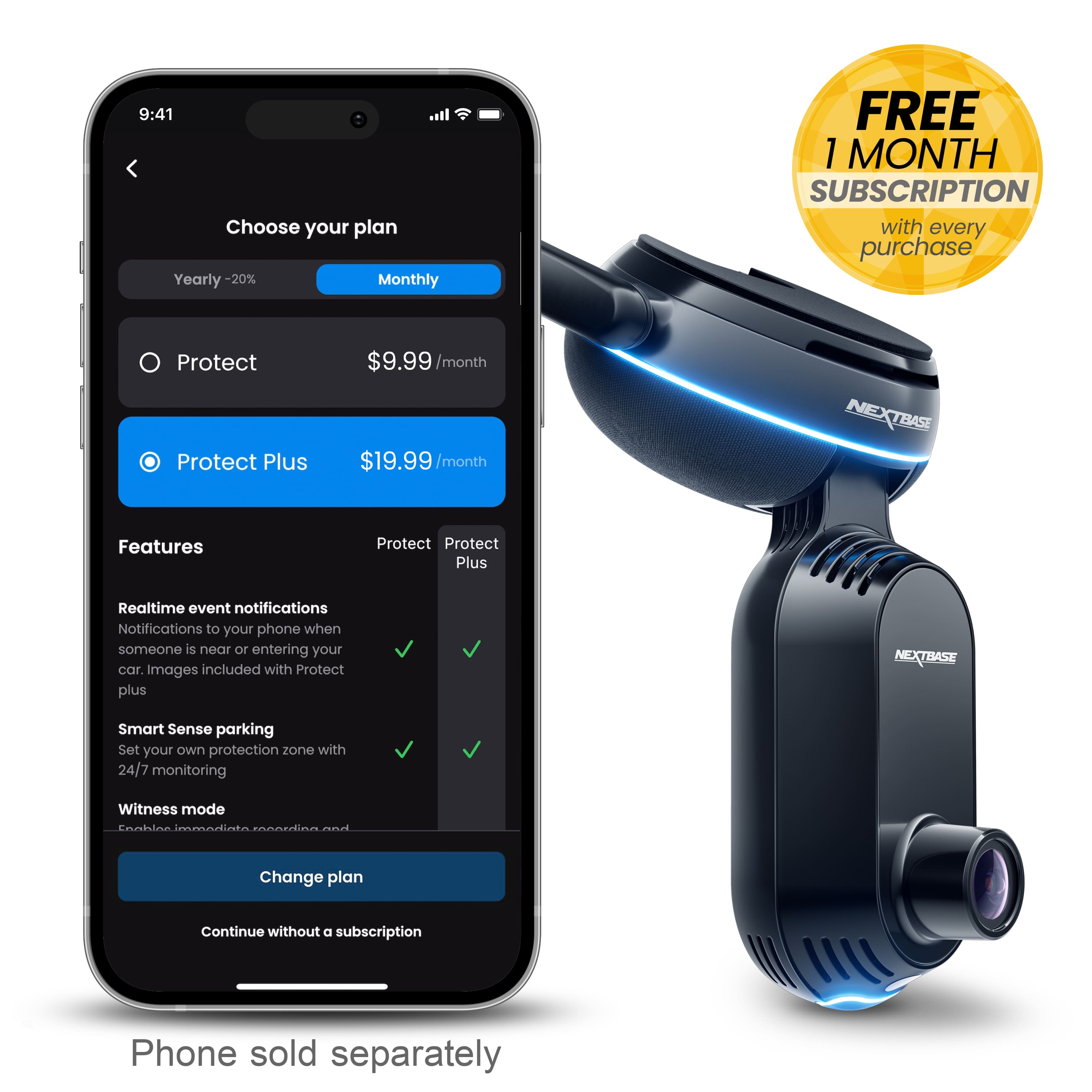
|Posted .This reviewer received promo considerations or sweepstakes entry for writing a review.The Nextbase iQ 2K Smart Dash Cam is much more than a simple dashcam when combined with the features of the Nextbase iQ app. However, many of the features are only available with a subscription. This model supports an optional rear camera also, but it is not included. What’s in the Box: • 2K Smart Dash Cam • Cable for connecting to OBD (on board diagnostics) port • Adapter cables for connecting to fuse panel • Extra adhesive pad • Tool for hiding / securing cables • Cleaner pad • Warning stickers I decided to install the dashcam in the car my 19-year-old drives. (He thinks it’s cool.) Since that car has an insurance dongle/tracking device on the OBD port, we investigated the alternate installation using the fuse panel. The Nextbase online instructions only cover the OBD installation, though and refer to the app for fuse panel installation instructions. After some back and forth we decided to get an OBD port splitter. (Yep, I read the warnings.) Fortunately, the splitter worked, and we had a relatively easy installation experience. We downloaded the app and followed the instructions for setting up the dashcam. After the initial setup, the app wants you to set up an account. Kudos to Nextbase for making it clear that you can skip the subscription. But our research had shown that we would not have access to many of the features without the app. At the time we installed, there was a free trial period that we opted into. We did, however, have to provide a credit card number. The app clearly showed when our first billing would be due, and that date correlates with the end of the free trial. We took the car and dashcam for a spin and were impressed with the resolution of the video. This model has a forward-facing camera as well as one that records inside the car cabin. It also records audio. But all of that is configurable. The next morning while the 19-year-old was on his way to campus, I got an impact alert on the iQ app. My heart stopped. But I checked the video and he just hit a speed bump a little too hard. So, we are changing the sensor sensitivity. (The dashcam uses a built-in 4G connection for communication.) We also set up the SOS feature and the parking feature. Fortunately, we haven’t needed the SOS feature. So, I can’t speak to how effective that is. The parking feature still has me puzzled though. It seems to be a car security function. It records when someone is within the area we defined (about 4 or so from the car) and labels those recordings “Parking event”. I need to do a lot more research to get the full benefit of this feature. Other features include an SD card, which appears to be the only way to access recorded video without a subscription, voice commands, witness mode, which can be voice activated and alerts designated contacts “in the event of dangerous or stressful situations.” Two additional features, Guardian Mode and Roadwatch AI are both labelled “Coming Soon”. At the time of this review there are two subscription options, the $9.99 option has live view and cloud storage, but lacks the emergency SOS feature. The $19.99 option has the emergency SOS feature and longer access to video stored in the cloud. I’m really on the fence about continuing the subscription after the trial. Another $20 per month subscription just seems excessive, considering the initial cost of the dashcam and the fact that it still has text message alerts without the subscription. But no live feed, etc. In summary, this is a really really nice dashcam, if you bundle it with the Protect Plus subscription. Without the subscription, it’s still a nice camera. But it lacks many of the features that make it stand out. It also seems that Nextbase doesn’t make it clear up front that to get all the cool features requires a subscription. It feels just a tiny bit like a bait and switch.
Brand response from Nextbase
Posted .Hi,
Thank you for taking the time to share your detailed and insightful review of the Nextbase iQ 2K Smart Dash Cam. We appreciate your thorough examination of its features and your experience with the installation and usage.
We're delighted to hear that you find the dashcam impressive, especially with its high video resolution and the various configurable options, such as the forward-facing and cabin cameras. We understand your concern about the subscription-based features, unlike a lot of other similar products, we offer the option for customers to switch from a subscription option to a free option.
Your feedback about the installation instructions and the need for a clearer guide for fuse panel installation is valuable. We advise to get the camera professionally fitted if its going to be hard wired, however the OBD connection is a single plug into the port and its ready to go.
It's great to hear that the impact alert feature worked effectively and provided reassurance during an unexpected moment. We also appreciate your detailed exploration of the app's features, including the SOS and parking functionalities. We understand that some aspects, like the parking feature, may require additional research, and we'll strive to provide more comprehensive information in the sign up process.
Regarding the subscription options, we understand your hesitation, and we appreciate your transparency in sharing your thoughts. We continuously evaluate our pricing structures to ensure they align with our users' expectations. Your feedback on the perceived value of the subscription is important to us, its useful to note there are no charges for data outside of the subscription.
We're committed to providing a positive experience for our users, and your feedback helps us in achieving that goal.
If you have any further questions or concerns, please feel free to reach out. We appreciate your trust in Nextbase, and we hope the dashcam continues to meet your expectations.
Safe travels,
The Nextbase Team
- Cons mentioned:App functionality
Could be good, but not ready yet
|Posted .This reviewer received promo considerations or sweepstakes entry for writing a review.I want to like the dashcam, but feel like what you get compared to what is advertised just don’t match making me disappointed in the overall experience. First, starting with the install, besides the video not being very easy to follow and there being no instructions in the box, it asks you to install a rear camera. Everything on the box seems to indicate its there and the website did too, but after some further research you don’t actually get the rear camera. Second the advertisement talks about AI guardian mode as features that will help you, but they don’t actually work now (says coming soon as of today). So in the end, you get a dashcam only that allows you to connect to 4g to see it if you are away from the car but nothing else. On top of the lack of features that are advertised, the price is pretty high especially when you consider the monthly fee that really isn’t necessary if instead of 4g slow connection you could connect it to your wifi at home when you are parked. Since the 4g is slow, its not like you can view whats going on live and instead most of what I found tends to be delay. So it would be nice to know that something happened to your car in a parking lot, but you cannot actually see it happening even if the get the notice. So far the only notice I have actually gotten has been me getting in the car, and I get this every time, so I end up ignoring it. Moving on to the app, its not very good. As I said the setup instructions are poor and you cannot even rename the device. Since they really want you to use the rear camera that isn’t included, anytime you watch a video you are stuck with one of the slots saying “no rear camera”. And since I have so many notices, all I have is parking events that are me getting in. It also for some reason tells me there are parking events when I’m stopped at a light or in traffic, even though the car is in drive. Maybe with further software updates it will get better, but at this point I don’t feel you get anything useful and more just disappointment compared to what is advertised. The only good thing that I can see is that you can go through all the videos so if something happens you have it, and its also accessible anywhere though slow. A standard dashboard that records what happens is going to work just as good at the moment.
No, I would not recommend this to a friendBrand response from Nextbase
Posted .Hello,
Thank you for your review. We appreciate the feedback.
The IQ Rear Camera is not required for installation or operation. Any IQ model includes Front and Cabin Cameras, and the Rear Camera is optional.
The instructions are provided in the App, the set-up process is meant to guide you through this. I am sorry it wasn’t clear. Our support center is available to help if you need them to.
Guardian Mode and Roadwatch AI are yet to be released but most of the smart features are available for use now with a subscription. You get a free trial period to try them out. These include Smart sense Parking, Witness Mode, Cloud storage and more. We would be happy to get in touch to go over these and help you get the most out of them.
Live view does depend on having a signal for the 4G connection and a few seconds delay is to be expected. Regardless of this, the complete event is saved on the SD Card, it can be accessed and downloaded. Notifications can be disabled or customized to your preference in Settings.
Please do contact us so we can help: [email protected]
Thanks to your valuable feedback, we've made some exciting updates to our app and device!
To enjoy the new improvements:
Update the app from your app store.
For the latest firmware, open your iQ app, tap the menu in the bottom right, go to iQSettings > Firmware Update > Click Latest Update.
You're all set to enjoy the enhancements!
The Nextbase Review Team
- Pros mentioned:Voice control
Necessary travel companion
|Posted .This reviewer received promo considerations or sweepstakes entry for writing a review.The Nextbase 2k iQ Dash Cam is a fantastic leap in vehicular safety and monitoring technology. Installing it in my 2023 Jeep Grand Cherokee L was a breeze; utilizing the OBD port made the process straightforward, and I was pleasantly surprised it took a mere 15 minutes. While I plan to hardwire it eventually, the initial setup was straightforward and easy. "Anticipate. Prevent. Defend." is more than a tagline for the Nextbase 2k iQ; it's a reality. The dash cam's intelligent alert system, Roadwatch AI, and Witness Mode are not just innovative but transformative in providing proactive protection. Being able to anticipate threats with smart alerts elevates the sense of security for both the vehicle and its occupants. The ability to "See what your car sees" is an invaluable feature. Whether it's monitoring my Jeep from a distance or setting custom alerts, the iQ keeps me informed. Its quick notifications of any unusual activity around my car enable me to intervene promptly, providing peace of mind. The built-in proximity sensing Spatial Awareness and AI-driven threat detection (coming soon)offer an additional layer of security, making me feel like I have a personal guard for my vehicle. The option to set speed and location limitations is a great feature especially when the truck is being operated by valets or younger family members, ensuring that I stay in control even when I'm not behind the wheel. The emergency features of the Nextbase 2k iQ are particularly impressive. In an unfortunate event of an accident, the iQ’s ability to share location and medical details with emergency personnel could be life-saving. Additionally, Witness Mode and the voice-activated commands add a layer of personal security that is unparalleled in dash cams today. The suite of features, including the iQ app, Voice Control, Real-time image & text notifications, Live View, Smart Sense Parking, and more, make this device not just a dash cam but a comprehensive vehicle management system. Cloud Storage for 180 days and support for Multiple User Accounts are thoughtful additions for modern families and professional users alike. The promise of upcoming features like Roadwatch AI and Guardian Mode further excites me, hinting at an even smarter and more intuitive user experience. Overall, the Nextbase 2k iQ Dash Cam isn't just a gadget; it's an indispensable companion for any vehicle owner, melding security, convenience, and futuristic technology in a sleek package. This is one investment that car owners, much like myself, would find not just useful but essential for their daily peace of mind and safety.
I would recommend this to a friendBrand response from Nextbase
Posted .Thank you so much for your thorough review of our new 2k iQ dash cam! It really is loaded with amazing features that take it to the next level of dash cams, we are so glad you agree! Should you have any questions, please don't hesitate to contact our support team at [email protected]. Happy driving!
- Pros mentioned:Video quality
If you want "just a dash cam" this isn't for you.
|Posted .This reviewer received promo considerations or sweepstakes entry for writing a review.I own a different Nextbase Dash Cam (622GW) that I love, so I was excited to check out the new “intelligent” dash cam, the IQ series, in 2k! In working through my product review, I did have a discussion with someone on the Nextbase product team (and Support team members) for clarification on some items - the “not yet” comments come from my conversation with the company. TL;DR for my frequent readers; more below. Good: Window mount / plate quick disconnect Fuse Tap (2A) is pretty easy to use ODB connection if you don’t want to use the fuse tap Voice Command capable 4G monitoring - if you are OK with paying the subscription cost Bad: No disclosure on how Nextbase collects/uses ODB data Designed for always-on usage / no “cigarette lighter” / 12V plug App experience (sign up, etc) No way to disable internal cabin camera / audio recording permanently Audio is disabled when disabling interior camera Voice Recognition of wake word can take 5-10 tries Time on videos in “library” (subscription needed), shows incorrect times Subscription is the only way to get videos off the camera via the App without pulling the SD card (free with other dash cams) Can’t fast-forward in videos (from SD card on computer) if you have the “free” service Need good cell service to get video clips to your phone My use case for a dash cam: record great video while I drive. An “iQ” or “AI” Dash Cam makes me think: car darts out, save the video. Car slams on breaks, save the video / get the license plate, watch for pedestrians. To me this seems like a ‘car monitoring’ system and per Nextbase: “stick with the 622GW if you’re looking for ‘just a dashcam.’” This is meant to be a permanent, “Day 1” monitoring system as there is no 12V / cigarette lighter plug and it can’t be detached from the windshield. I live in a HOT climate and I’m used to the Nextbase 622GW that I could just detach from the windshield and put away in the heat. You can do this by sliding it off the plate, but it’s a rather large unit and it doesn’t come with a case, risking damage. The reason for the permanent power - is that it’s meant to always be running, always watching - especially when you’re away from the vehicle. On initial wiring I used the OBD port - and that made me quite nervous. Why? There is no easily located disclaimer on their website that says they aren’t mining data from my car from the port that knows everything about my car. Nextbase indicates that the port is ‘only used to get power’ which is fine, it’s just not documented. I ended up moving it to an ‘ignition powered’ fuse box location - but Nextbase (tech support) says that’s not the intended use and couldn’t recommend that I use it in this way; it needs an always-on power source. No. My initial App experience was bad and reported subsequently to Nextbase to hopefully make it better. It doesn’t work easily with Google accounts & 2FA to “sign up.” Without a subscription and using only the “free” features, you aren’t able to even get the videos off your camera and have to pull the SD card - this was free in the MyNextbase App. Only with the monthly cost, you can pull your videos down onto your phone or tablet. You also can’t set the recording duration of the video (I like 3 minutes), so I have a million 88MB / 30 second front camera videos that I CANNOT fast forward through to get what I’m looking for. The reason for this inability to fast forward: FREE accounts can’t fast forward but subscription accounts can. Also, because the videos are meant to be uploaded to the cloud, 30 sec videos are made for quickness of upload. I personally don’t like this at all. You can’t turn the interior camera OFF from within the App permanently. Disabling the cabin/interior camera can ONLY be done via the voice command: “hey dashcam, privacy mode.” In my experience, it must be said a few times, which means you MUST be recorded on starting up the camera and it’s listening all the time. As a techie, the first thing I did was try to update the firmware – and it failed. Twice. But it worked telling me it had failed but I did get the latest version. Because of the firmware upgrade failure, it seems setup failed and I had to delete my account & start over with a new email address. Quality video is what I expect from a “dash cam” and I see that I have no way to “fix” the way the date stamp is; it’s in European format “for now” per Nextbase. I also can’t pick and choose what is plastered on my video (like the 622GW can) “for now.” I found the video to be a bit grainy and the fact that there are 30 second clips makes it almost impossible to find what I was looking for. Also, you get 4 videos per 30 second interval: Front High/Low quality, Cabin High/Low. Even with the cabin OFF, you still get 2 files (high/low quality) of nothing for around 2MB (pic). Lastly, in an attempt to get stills of videos from night driving via the App with a subscription, I couldn’t. I have very poor mobile coverage and regardless of being paired to the camera with my phone, there’s still a need for a “camera upload.” Since I want a dashcam that records the road and I can get the files off at no extra cost and not have to rely on strong mobile service, this camera is a “no” for me & what I’m looking for and will be un-wired, re-boxed and put on a shelf.
No, I would not recommend this to a friendBrand response from Nextbase
Posted .Thank you for taking the time to share your thorough feedback on the Nextbase IQ series. We appreciate your detailed insights and are sorry to hear about the challenges you've encountered. Your input is vital in helping us improve our products and services.
We'd like to address some of the concerns you raised:
1. Permanent Power Supply: We understand the importance of flexibility in power options, especially in hot climates. Your feedback regarding the lack of a 12V plug and the challenges associated with the permanent setup is duly noted. We'll explore options for increased adaptability in future iterations.
2. ODB Data Collection: We do not collect any data from the OBD port at all
3. App Experience: We apologize for the difficulties you faced during the app setup. Your feedback on Google account integration and the limitations of free features is crucial. We'll work on enhancing the app's usability and ensuring a seamless experience for all users.
4. Fast-forwarding and Video Duration: We understand your frustration with the inability to fast-forward in free accounts and the fixed 30-second video duration. This is only a limitation in the free subscription option.
5. Interior Camera Control: We appreciate your feedback on the inability to permanently disable the interior camera from the app. This is being reviewed for a future development.
6. Firmware Upgrade Issues: We apologize for the challenges you faced during the firmware upgrade process. We'll investigate this matter further to ensure a smoother update experience for our users.
7. Video Quality and Format: Your comments on video quality, date stamp format, and file organization are noted. We aim to enhance the user's ability to customize these settings in future updates.
We genuinely value your feedback and would like to learn more about your experience to address specific concerns. If you're open to it, our support team would be happy to work with you directly to find solutions and gather additional information.
Thank you for being a Nextbase customer, and we hope to have the opportunity to improve your experience in the future.
- Cons mentioned:App functionality, Battery life
Disappointed
||Posted .This reviewer received promo considerations or sweepstakes entry for writing a review.I was very disappointed with this product. For the premium price you’d think it would work properly. The camera would often shut down while driving saying the battery level is low or while driving it would display motion sensed. I ended up returning the dash cam.
No, I would not recommend this to a friendBrand response from Nextbase
Posted .Hello Mark,
Thank you for getting back to us.
I'm truly sorry to hear that your camera wasn't working properly and you had to return it. We aim to provide the best support possible to our customers and regret that this has not been the case.
If you would ever like to get a Nextbase dash cam and experience any issue, don't hesitate to reach out to us at [email protected]
We'll do our best to resolve your issue. Again, my sincere apologies for the negative experience.
-The Nextbase Reviews Team
Satisfied customer
||Posted . Owned for 1 month when reviewed.This reviewer received promo considerations or sweepstakes entry for writing a review.Exactly notification and clarification. The range visibility is clear
I would recommend this to a friendBrand response from Nextbase
Posted .Hello Sebastian,
Thank you for your review,
I'm glad to hear you're liking the notification feature and that the range visibility is clear. If there is anything we can help you with, please let us know! Safe driving!
- The Nextbase Reviews Team
- Pros mentioned:Video quality
A Smart camera
||Posted . Owned for 3 weeks when reviewed.This reviewer received promo considerations or sweepstakes entry for writing a review.It’s a Excellent camera,It’s really super Nice,I will buy it again and again unique product
I would recommend this to a friendBrand response from Nextbase
Posted .Hello Helen,
Thank you so much for your wonderful review! We're thrilled to hear that you’re enjoying your iQ 2K Smart Dash Cam and that it’s been such a great experience for you. It’s fantastic to know the camera stands out as a unique product for you.
We truly appreciate your support, and we’re here anytime if you ever need assistance or have questions about your device.
Thanks again for choosing Nextbase!
-The Nextbase Reviews Team