Customer Ratings & Reviews
- Model:
- QN55Q6FAAFXZA
- |
- SKU:
- 10780626
Customer reviews
Rating 4.6 out of 5 stars with 133 reviews
(133 customer reviews)Rating by feature
- Picture Quality4.8
Rating 4.8 out of 5 stars
- Sound Quality4.5
Rating 4.5 out of 5 stars
- Brightness4.7
Rating 4.7 out of 5 stars
to a friend
Rated 4 out of 5 stars
Good product
||Posted .This reviewer received promo considerations or sweepstakes entry for writing a review.Delivery was on time and the tv has a good picture and beautiful
This review is from Samsung - 55” Class Q6F Series QLED 4K UHD SamsungVision AI Smart Tizen TV (2025)
I would recommend this to a friendRated 3 out of 5 stars
If you can’t hear, get something else
||Posted . Owned for 2 weeks when reviewed.This reviewer received promo considerations or sweepstakes entry for writing a review.This has a great picture, was easy to set up, but the sound is not good. Have to turn it all the way up just to be able to hear people talking. Not good. Now I guess we will need to invest in a sound bar or something :(.
This review is from Samsung - 55” Class Q6F Series QLED 4K UHD SamsungVision AI Smart Tizen TV (2025)
I would recommend this to a friendBrand response from Samsung
Posted .Maebelluab,
Thank you for purchasing Samsung’s Q6F TV and for sharing your feedback regarding low volume. To start, we recommend making sure your TV is running the latest firmware, as updates can include improvements to sound performance: Home > left directional key > Settings > Support > Software Update
If volume levels still seem too low, you can improve sound performance by adjusting a few key settings:
Sound Mode: Navigate to: Settings > All Settings > Sound > Sound Mode
• Standard: Balanced for everyday viewing
• Optimized: Enhances effects and creates a more spacious sound
• Amplify: Boosts mid and high tones, especially helpful if dialogue is difficult to hear
Auto Volume: This feature helps maintain consistent volume levels across content and input sources. Turn it on under: Settings > All Settings > Sound > Expert Settings > Auto Volume = On
You can also explore Expert Settings to fine-tune sound output with adjustments for Balance, Equalizer, and more.
If you’re considering enhancing your setup, Samsung’s Q- and S-Series Soundbars (like the HW-Q600F) feature Q-Symphony, which syncs your TV and soundbar speakers for a fuller, more immersive sound experience.
For personalized support with these settings or selecting a soundbar to complement your setup, contact Samsung Support at 1-800-SAMSUNG (8AM – 12AM EST, 7 days a week) or use LiveChat via the ‘Support’ link on our website.
~ Samsung Specialist
Rated 5 out of 5 stars
Great for the price
||Posted .This reviewer received promo considerations or sweepstakes entry for writing a review.Perfect for my bedroom. Runs smooth and looks great.
This review is from Samsung - 55” Class Q6F Series QLED 4K UHD SamsungVision AI Smart Tizen TV (2025)
I would recommend this to a friendRated 1 out of 5 stars
Samsung 55" TV disappoints on almost all areas.
||Posted . Owned for 1 month when reviewed.This reviewer received promo considerations or sweepstakes entry for writing a review.I bought this TV based on Samsung's reputation and the positive online reviews. Wow, what a disappointment it was. The sound was very thin; the picture was good but not great. The setup wasn't as easy as the TCL that I replaced it with. The remote was hard to use, terrible in fact! After a week of moderate use, it began having trouble with menus freezing. Then the HDMI connection to the Sonos soundbar started having problems. Next, we had trouble searching for content. We discovered that this TV doesn't have a microphone (you have to buy their soundbar to get a microphone), so we turned on the Voice Assist feature thinking it would allow voice control. Big mistake, what an obnoxious feature. it would actually interrupt programming every time we hit a button like changing the volume. This causes Voice Assist to blast in with "Volume has been raised (or lowered)"! No kidding, thanks for interrupting the movie, now I have to rewind just to hear what the program content was saying and so guess what happened next, the rewind function caused voice assist to interrupt the program material again! This happens every time you touch a button on the remote, what a useless and obnoxious feature this is! Then I had to go into the menu 5 separate times before it would it finally turned off the voice assist! Frankly, this was by far the worse TV experience I've ever had. A smart TV that is too dumb to process voice commands. Extremely disappointed so I ended up retuning it. Fortunately, BEST BUY was very helpful with taking care of this problem.
This review is from Samsung - 55” Class Q6F Series QLED 4K UHD SamsungVision AI Smart Tizen TV (2025)
No, I would not recommend this to a friendBrand response from Samsung
Posted .JohnC,
We're sorry to hear that your experience with the Q6F TV led to a return. Your feedback matters to us and will be shared with our product team.
If you decide to explore Samsung TVs again in the future, we’re always here to support you - whether it’s setup, features, or troubleshooting. Reach us anytime at 1-800-SAMSUNG (8AM – 12AM EST, 7 days a week), or visit the ‘Support’ section of our website for LiveChat, manuals, and more.
~ Samsung Specialist
Rated 2 out of 5 stars
Disappointed In Color Quality
||Posted . Owned for 3 weeks when reviewed.This reviewer received promo considerations or sweepstakes entry for writing a review.I personally did not care for the quality of the color saturation. Even upon taking the Samsung remote control to use every aspect of improving the picture it made very little difference. We found only watching what was recorded or filmed in 2024 to present was brighter-clearer. I ended up exchanging for another Name brand and I’m Extremely pleased and Happy I did…
This review is from Samsung - 55” Class Q6F Series QLED 4K UHD SamsungVision AI Smart Tizen TV (2025)
No, I would not recommend this to a friendBrand response from Samsung
Posted .DonnaH,
We're sorry to hear that your experience with the Q6F TV led to a return. Your feedback matters to us and will be shared with our product team.
If you decide to explore Samsung TVs again in the future, we’re always here to support you - whether it’s setup, features, or troubleshooting. Reach us anytime at 1-800-SAMSUNG (8AM – 12AM EST, 7 days a week), or visit the ‘Support’ section of our website for LiveChat, manuals, and more.
~ Samsung Specialist
Rated 3 out of 5 stars
Not enough output slots
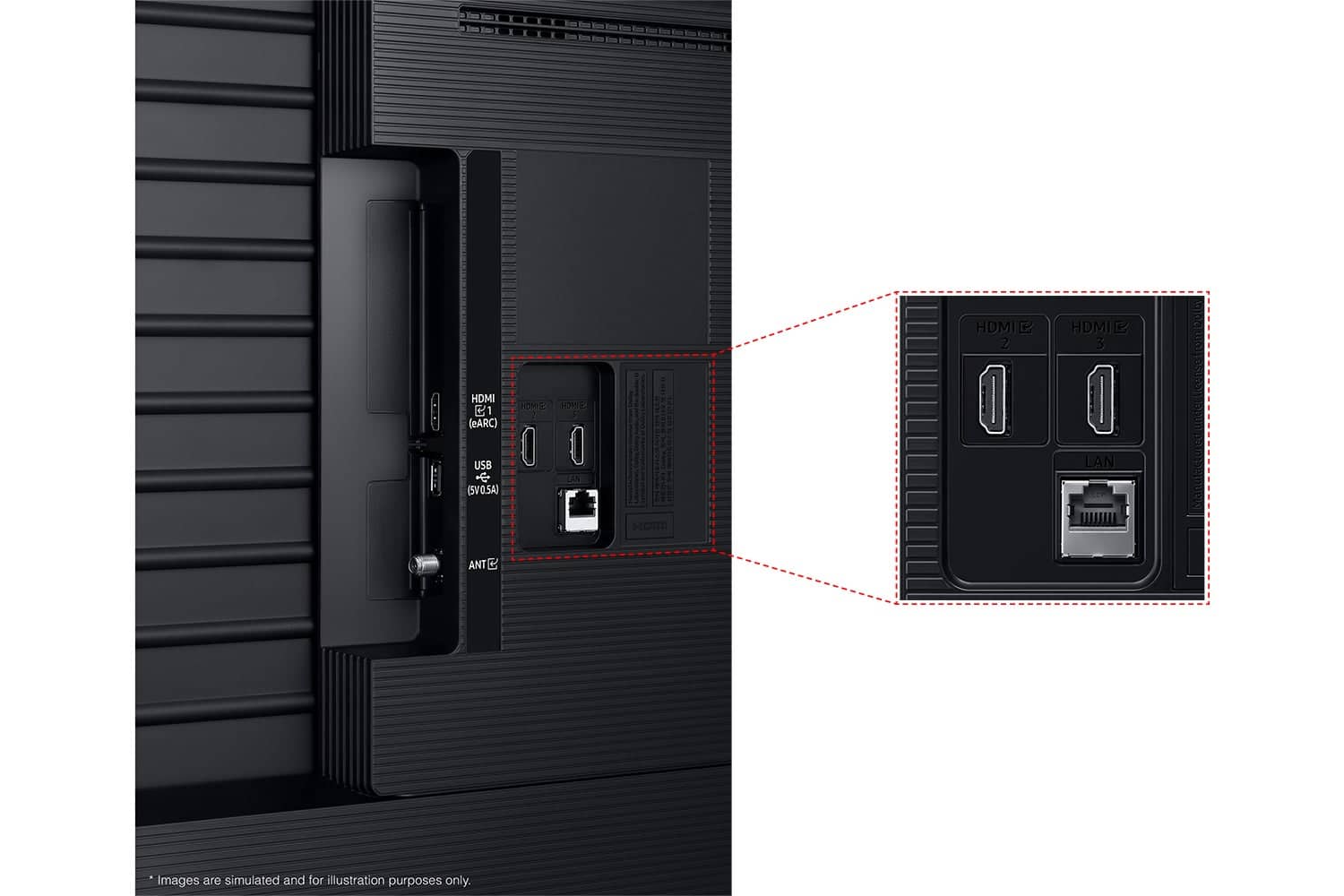
||Posted . Owned for 2 weeks when reviewed.This reviewer received promo considerations or sweepstakes entry for writing a review.Didn’t have enough output slots for our stuff, which I didn’t realize until I got it home. Never opened the box and returned it, so I can’t speak to the quality. But the price was good.
This review is from Samsung - 55” Class Q6F Series QLED 4K UHD SamsungVision AI Smart Tizen TV (2025)
No, I would not recommend this to a friendBrand response from Samsung
Posted .Azrael,
Thank you for sharing your thoughts on the available inputs for the Q6F. If an Optical port is a crucial part of your setup needs, you’ll find that connection starting with our Q8F Series and above.
For future purchases, we recommend double-checking the product specs on Best Buy’s site to ensure the model you choose has the ports you need. You’ll find the full list under the “Specifications” tab (just beneath the Highlights section): https://www.bestbuy.com/site/samsung-43-class-q7f-series-qled-4k-uhd-samsungvision-ai-smart-tizen-tv-2025/6619443.p?skuId=6619443
Should you ever decide to give Samsung TVs another try and have questions or need help with settings, setup, or features, please know we’re here to help. Call us at 1-800-SAMSUNG, 8AM - 12AM EST, 7 days a week.
LiveChat with an agent as well as manuals, software, and warranty info can be found at the ‘Support’ link on our Samsung website.
We hope to regain you as a customer in the future.
~ Samsung Specialist
Rated 2 out of 5 stars
Still loving Best Buy
||Posted . Owned for 3 weeks when reviewed.This reviewer received promo considerations or sweepstakes entry for writing a review.There seems to be a problem with the TV it will get stuck on a segment or something or when changing programs it has and sticks on to static? Not sure what the problem is? I am exchanging it for the 7.
This review is from Samsung - 55” Class Q6F Series QLED 4K UHD SamsungVision AI Smart Tizen TV (2025)
No, I would not recommend this to a friendBrand response from Samsung
Posted .NormaM,
We appreciate you taking the time to let us know about your experience with your TV. So that we can better troubleshoot this issue and provide steps towards a solution, please contact Samsung Support at 1-800-SAMSUNG, available daily from 8AM - 12AM EST. You can also chat with a LiveChat agent by clicking the ‘Support’ link on our website for:
• Live Chat
• Manuals, Software, & Warranty Info
• Creating a Service ticket
~ Samsung Specialist
Rated 1 out of 5 stars
Garbage
||Posted . Owned for 2 months when reviewed.This reviewer received promo considerations or sweepstakes entry for writing a review.complete garbage. less than two months after purchase a circuit board when out providing me with no picture. this is after several times having to unplug the set to reset it for the same issue only this time it was permanent. of course Best Buy was absolutely no help even with protection plan. Referred me to manufacture.
This review is from Samsung - 55” Class Q6F Series QLED 4K UHD SamsungVision AI Smart Tizen TV (2025)
No, I would not recommend this to a friendBrand response from Samsung
Posted .PaulK,
It’s unfortunate to hear about your experience with Samsung’s Q6F TV. We’re committed to delivering quality, value, and the best possible product experience. This TV is backed by a 1-year limited manufacturer’s warranty, which includes authorized repair for eligible defects when purchased brand-new from an authorized retailer. To review full warranty terms, you can enter your model number here: https://www.samsung.com/us/support/warranty/
We’d appreciate the opportunity to assist further. Please contact Samsung Customer Support at 1-800-SAMSUNG (8AM – 12AM EST, 7 days a week), or connect with a LiveChat agent by clicking the ‘Support’ link on our website.
~ Samsung Specialist
Rated 2 out of 5 stars
Sound!
||Posted . Owned for 3 weeks when reviewed.This reviewer received promo considerations or sweepstakes entry for writing a review.Volume does not work very well! Sometimes have to do max for sound!
This review is from Samsung - 55” Class Q6F Series QLED 4K UHD SamsungVision AI Smart Tizen TV (2025)
No, I would not recommend this to a friendBrand response from Samsung
Posted .DuaneH,
Thank you for purchasing Samsung’s Q6F TV and for sharing your feedback regarding low volume. To start, we recommend making sure your TV is running the latest firmware, as updates can include improvements to sound performance: Home > left directional key > Settings > Support > Software Update
If volume levels still seem too low, you can improve sound performance by adjusting a few key settings:
Sound Mode: Navigate to: Settings > All Settings > Sound > Sound Mode
• Standard: Balanced for everyday viewing
• Optimized: Enhances effects and creates a more spacious sound
• Amplify: Boosts mid and high tones, especially helpful if dialogue is difficult to hear
Auto Volume: This feature helps maintain consistent volume levels across content and input sources. Turn it on under: Settings > All Settings > Sound > Expert Settings > Auto Volume = On
You can also explore Expert Settings to fine-tune sound output with adjustments for Balance, Equalizer, and more.
If you’re considering enhancing your setup, Samsung’s Q- and S-Series Soundbars (like the HW-xxx) feature Q-Symphony, which syncs your TV and soundbar speakers for a fuller, more immersive sound experience.
For personalized support with these settings or selecting a soundbar to complement your setup, contact Samsung Support at 1-800-SAMSUNG (8AM – 12AM EST, 7 days a week) or use LiveChat via the ‘Support’ link on our website.
~ Samsung Specialist
Rated 5 out of 5 stars
I LOVE my New TV!
Posted .This reviewer received promo considerations or sweepstakes entry for writing a review.This is a great TV, and I LOVE it! I enjoy watching the Samsung TV thing that instantly starts streaming the moment you turn the TV on. I watch it all the time for background noise and when I don't know what I'd like to watch next on what platform. I really wish I could give 4 1/2 stars as i have one big issue with the TV, well not the TV, but the Remote, my old Samsung TV Remote had a sleep button on it so i could easily put sleep mode on, However, this Remote I have to press setting and then select sleep mode. Also, before setting up my streaming apps on the TV's main menu i used my Fire Stick and the sound quality was not good, but now that I'm streaming direct on the TV sound is perfect! Totally worth upgrading from a 40" to a 55"!
This review is from Samsung - 55” Class Q6F Series QLED 4K UHD SamsungVision AI Smart Tizen TV (2025)
I would recommend this to a friendRated 5 out of 5 stars
Samsung Q6
Posted .This reviewer received promo considerations or sweepstakes entry for writing a review.Amazing quality television. Picture shows great high definition resolution even in film that isn’t 4k. However 4k films show the best high definition resolution you can view to this day.
This review is from Samsung - 55” Class Q6F Series QLED 4K UHD SamsungVision AI Smart Tizen TV (2025)
I would recommend this to a friendRated 5 out of 5 stars
Great purchase!
Posted .This reviewer received promo considerations or sweepstakes entry for writing a review.Everything about it is perfect. I am extremely happy about this purchase.
This review is from Samsung - 55” Class Q6F Series QLED 4K UHD SamsungVision AI Smart Tizen TV (2025)
I would recommend this to a friendRated 4 out of 5 stars
Downgrade :(
Posted .This reviewer received promo considerations or sweepstakes entry for writing a review.No optical port and no smart remote :(. This was a downgrade from 2024. No antenna jack either. Never turned it on.
This review is from Samsung - 55” Class Q6F Series QLED 4K UHD SamsungVision AI Smart Tizen TV (2025)
I would recommend this to a friendBrand response from Samsung
Posted .AlexisU,
Thank you for sharing your review. If an Optical port is a crucial part of your setup needs, you’ll find that connection starting with our Q8F Series and above.
Additionally, the Q6F does indeed feature an RF/Antenna input - you can find this directly below the USB port, labeled "ANT".
For future purchases, we recommend double-checking the product specs on Best Buy’s site to ensure the model you choose has the ports you need. You’ll find the full list under the “Specifications” tab (just beneath the Highlights section): https://www.bestbuy.com/product/samsung-55-class-q6f-series-qled-4k-uhd-samsungvision-ai-smart-tizen-tv-2025/6639213
Should you ever need assistance with your TV, Samsung is here for you. Reach out by calling 1-800-SAMSUNG between 8AM - 12AM EST, any day of the week. You can also chat with us online by visiting the ‘Support’ section of our website.
~ Samsung Specialist