Customer Ratings & Reviews
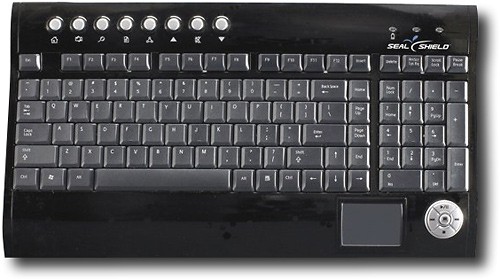
- Model:
- S103WP
- |
- SKU:
- 9798371
Customer reviews
Rating 4.3 out of 5 stars with 10 reviews
(10 customer reviews)to a friend
Rated 5 out of 5 stars
Connectivity was not a problem at all
Posted .This reviewer received promo considerations or sweepstakes entry for writing a review.Connectivity was not a problem at all. Just like the manual said, it was a painless two-click process. Since I’m trying this out on an Ubuntu Linux workstation, I thought I’d have a problem with drivers, but connectivity went without a hitch. My workstation is surrounded by a large screen TV, a cable box, AppleTV, two gaming systems, a high-power A/V receiver, and a subwoofer and surround speakers. Despite all the interference, I plugged the USB adapter for the keyboard in the rear USB port of the workstation. This puts the receiver VERY close to a nest of wires and cables connecting all the devices above. The keyboard worked flawlessly from two feet to 10 feet from the workstation. I sat comfortably on my living room couch while navigating my Ubuntu desktop. One connectivity issue I thought I would have was when I needed to reboot the workstation. I was happy to see that I didn’t have to reach behind the workstation to press the connect button on the USB receiver to regain keyboard connectivity. Honestly, this was much easier to connect than a Bluetooth mouse to my Bluetooth-enabled, Windows-powered Lenovo Thinkpad.
I would recommend this to a friendRated 5 out of 5 stars
Fantastic feature
Posted .This reviewer received promo considerations or sweepstakes entry for writing a review.I go through about four keyboards a year. It's sort of rare that I spill something on one, rare enough where I have to invent new curse words for the occassion. It's ashes that kill most of my keyboards. I'll be typing away like Hemmingway with a smoke dangling out of my mouth, typing crazy, mad swinging dickesque hemmingway stuff and the ashes will just fall on the board. This keyboard is not ash proof, but, you really can stick it in the dishwasher (I assume, I don't have a dishwasher, but I took a shower with it) and clean all the gunk out. Amazing. I love this keyboard.
I would recommend this to a friendRated 5 out of 5 stars
Best PS3 Keyboard ever! Put it in the dishwasher!
Posted .This reviewer received promo considerations or sweepstakes entry for writing a review.My wife bought me this wireless keyboard with touchpad to give me a full size keyboard to use with my laptop. She picked the Seal Shield keyboard, becuase I am a little bity of a Germaphobe. The Seal Shield keyboard is washable and antimicrobial. I was thrilled when I found out that the keybaord with touchpad was compatible with my Playstation 3! Wow! What a difference! Now I can surf the internet on my PS3 and control my Blue Ray movies with this keyboard! I realized this after about two weeks. Now, all I use this keyboard for is my Playstation and Blu Ray. A couple of nights ago we watched Monsters and Aliens with the kids. My son got his buttery fingers all over the keyboard. We just threw the keyboard in the dishwasher, and it came out sparkling clean. We never even had to take the batteries out! I can't believe someone didn't think of this sooner. One of the best products I have ever owned. We love it!
I would recommend this to a friendRated 4 out of 5 stars
The perfect keyboard for the shop
Posted .This reviewer received promo considerations or sweepstakes entry for writing a review.Put the batteries in the keyboard, put the USB dongle in the computer, turn on the computer, and hit the sync buttons on both the dongle and the keyboard. Your done. Now forget about where your pc is in the room and what you have sitting by the keyboard. I've used it 25 feet away from the pc with no problems. As others have posted, you really can run it through the dish washer (no heated dry). This is perfect for messy locations like the shop or artist studio.
I would recommend this to a friendRated 4 out of 5 stars
Good funcitonality with trackpad
Posted .This reviewer received promo considerations or sweepstakes entry for writing a review.This is a great keyboard; I was looking for a combination device that I could use in my media room. I connected my laptop to the screen via VGA/audio cable, and I am able to use this keyboard/trackpad combo. I haven't used it enough yet to determine battery life, but the features are great. It would be 'nice' to have it as a Bluetooth feature and be able to modify some of the functions to be more Mac compatible. However, it was great value for price. Hopefully I will not have to see if it is truly dishwasher safe!
I would recommend this to a friendRated 3 out of 5 stars
almost there
Posted .This reviewer received promo considerations or sweepstakes entry for writing a review.I bought a couple wireless keyboards from Best Buy with the plan to return the inferior models. I work off laptops all the time and prefer to use the touch pad that is centrally located below the space bar versus using a mouse. This seal shield was the first to arrive in the mail. I am typing from the keyboard that I just recieved today. Installation was a piece o cake - very easy. The wireless functionality works very well. The issues I have are with the touchpad. Its small and the location is not intuitive. I must move both hands use. the palm of my right hand rests over the left click button. I increased the speed of the mouse arrow to try and alleviate the size of the touchpad and I am still getting used to that. Nevertheless, the location is bad. The tactility of the keyboard keys are fine. If I can't find a good wireless keyboard with touchpad then I will probably have to settle for a mouse.
No, I would not recommend this to a friendRated 5 out of 5 stars
Extra Sexy All in One - no way waterproof?
Posted .This reviewer received promo considerations or sweepstakes entry for writing a review.I'm extremely happy w/my Seal Shield. I'm a huge gamer and have been looking for the right wireless keyboard w/integrated mouse and i'm glad i found this one on bestbuy.com. I still can't over the fact that you can just throw it into your dishwasher and wash all the nasty stuff that gets in & on your keyboard away. All that, and it's protecting you w/Silver? I want to try their remotes next.
I would recommend this to a friendRated 5 out of 5 stars
Great keyboard for a gamer!
Posted .This reviewer received promo considerations or sweepstakes entry for writing a review.I love this keyboard. When I had first purchased it, I wasn't sure what I was getting myself into. Once I started using it, especially for my Playstation 3, I couldn't help but to reccomend it to my other friends. This wireless multimedia keyboard is the best thing around and I can't wait to see what is next.
I would recommend this to a friendRated 5 out of 5 stars
Cool
Posted .This reviewer received promo considerations or sweepstakes entry for writing a review.I bought this thinking it was a gimmick, but it is pretty cool. I've cleaned it in my dishwasher at least 10 times, and its still working. Typing is just like my old keyboard.
I would recommend this to a friendRated 2 out of 5 stars
good idea, needs some work
Posted .This reviewer received promo considerations or sweepstakes entry for writing a review.if you're going to keep this keyboard in a mechanics shop or similar setting and only use to type out short fields, perhaps it would be ok. however, for actual typing and extensive use, no way. first of all the keys are hard and unresponsive, making it only good only for "hunt&peck" typists. on the same note, if you hold your hands correctly and actually type, the touch pad is in a terrible spot (under right wrist), so you accidentally touch and activate it constantly. i returned this after trying to type have a page and bought a Logitech wireless touch keyboard k400 - much much more practical and easy to use.
No, I would not recommend this to a friend