Customer Ratings & Reviews

- Model:
- 4169096
- SKU:
- 6521544
Rating by feature
- Value
Rating 4.6 out of 5 stars
- Quality
Rating 4.5 out of 5 stars
- Ease of Use
Rating 4.5 out of 5 stars
Customers are saying
Customers are positive about the product's force feedback, overall performance, and ease of use, noting its simple setup and adjustable clamp. Customers are negative about the pedal quality, the slightly smaller wheel size, and limited game compatibility.
This summary was generated by AI based on customer reviews.
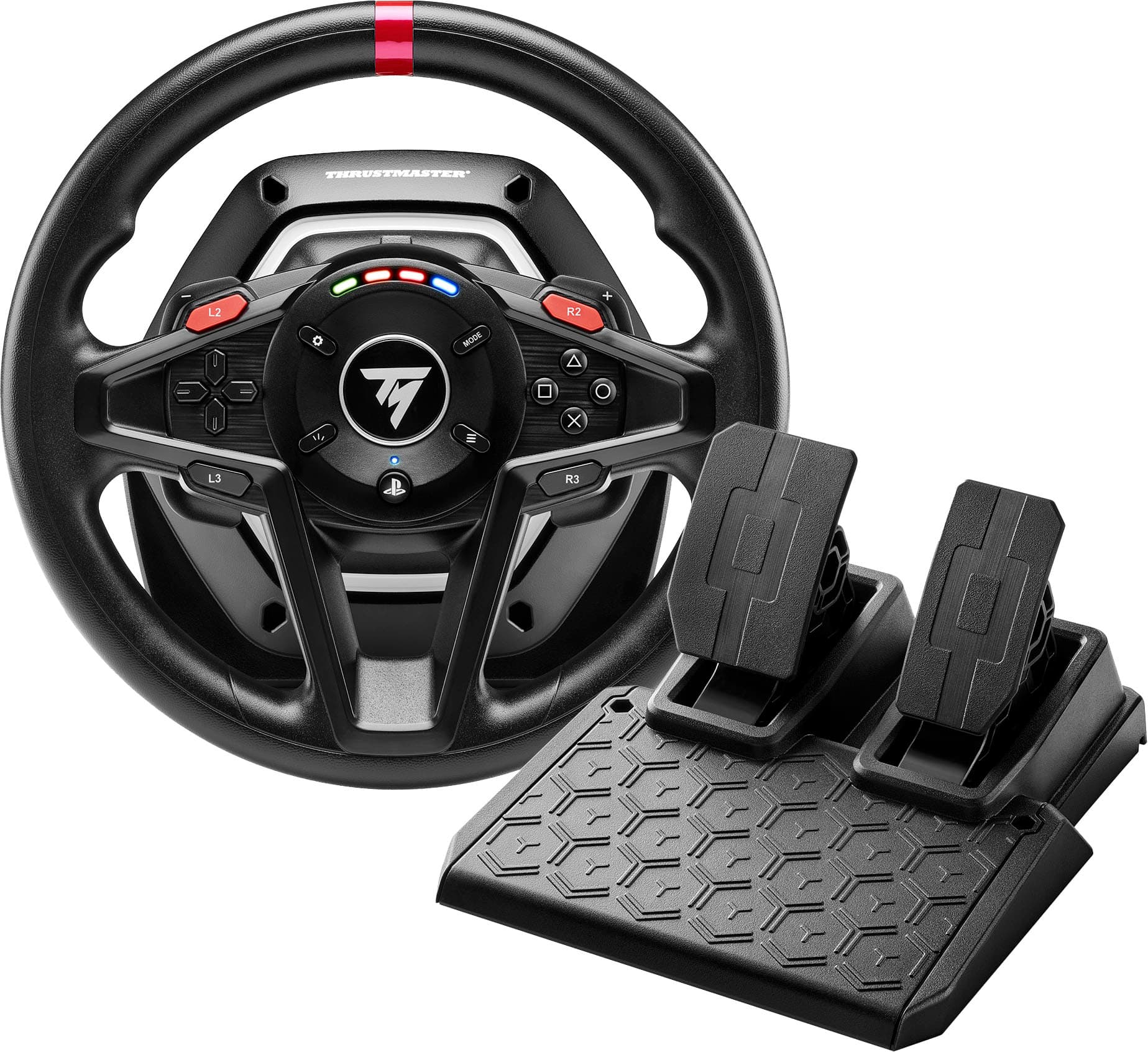
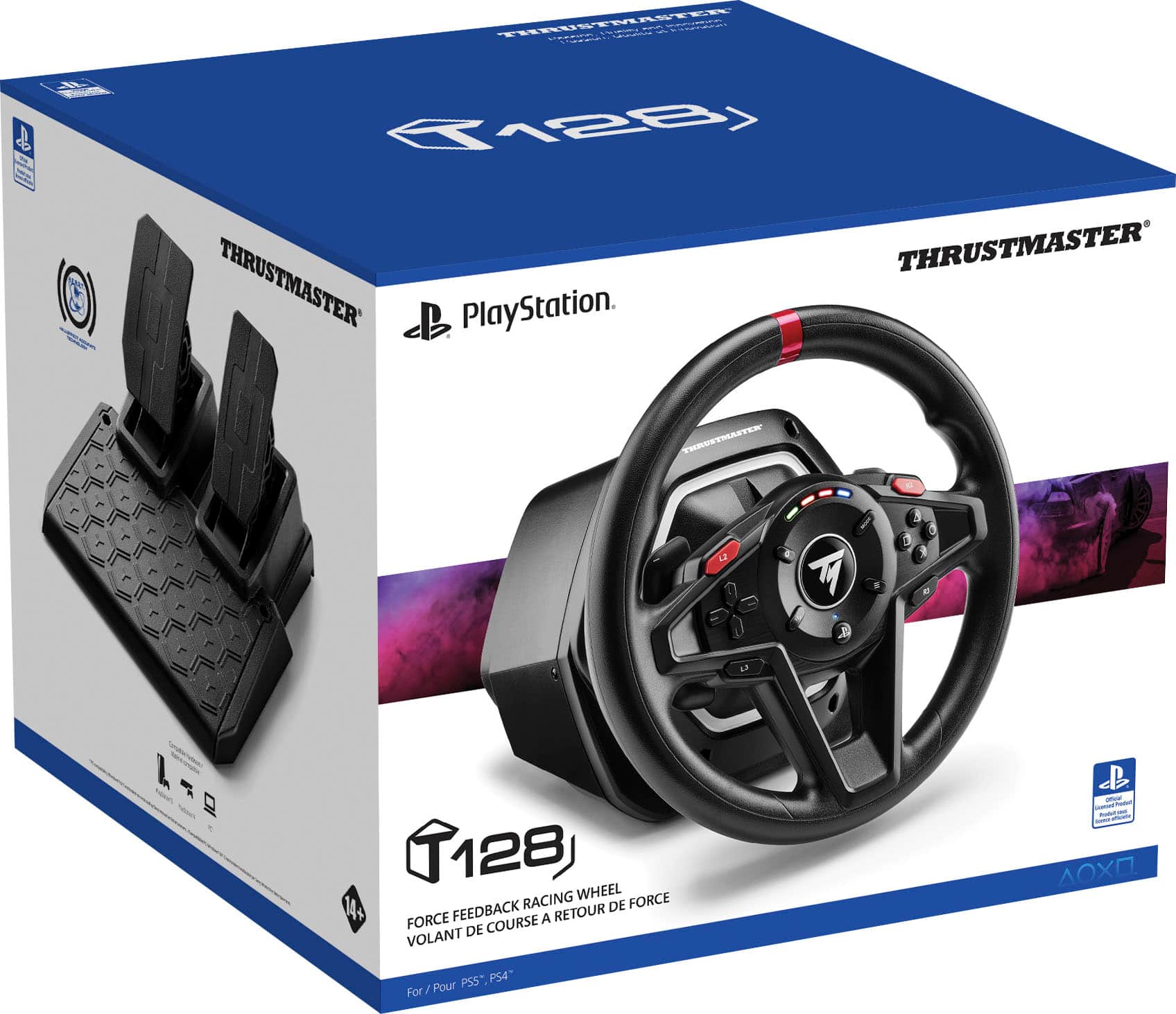
Thrustmaster T128
||Posted .This reviewer received promo considerations or sweepstakes entry for writing a review.This is the best Sim Racing experience I’ve ever had! The Thrustmaster handles so well, with excellent braking and acceleration too! Feels like I’m literally driving! I would recommend this for anyone; expert or novice. My grandson and I love it!
I would recommend this to a friend- Pros mentioned:Force feedback
Great quality
||Posted . Owned for 1 month when reviewed.This reviewer received promo considerations or sweepstakes entry for writing a review.Great cheap steering wheel and works great doesn’t feel weak and fidgety has force feed back
I would recommend this to a friendBrand response from Thrustmaster Expert
Posted .Hello, thank you for your feedback, and for your interest in our brand! Sébastien from the Thrustmaster team.

It do excellent job
||Posted . Owned for 3 weeks when reviewed.This reviewer received promo considerations or sweepstakes entry for writing a review.It worked most of my games and it never fails me while playing 8 hours on it
I would recommend this to a friend- Pros mentioned:Clamp, Force feedbackCons mentioned:Pedal quality, Wheel size

Decent entry-level racing kit.
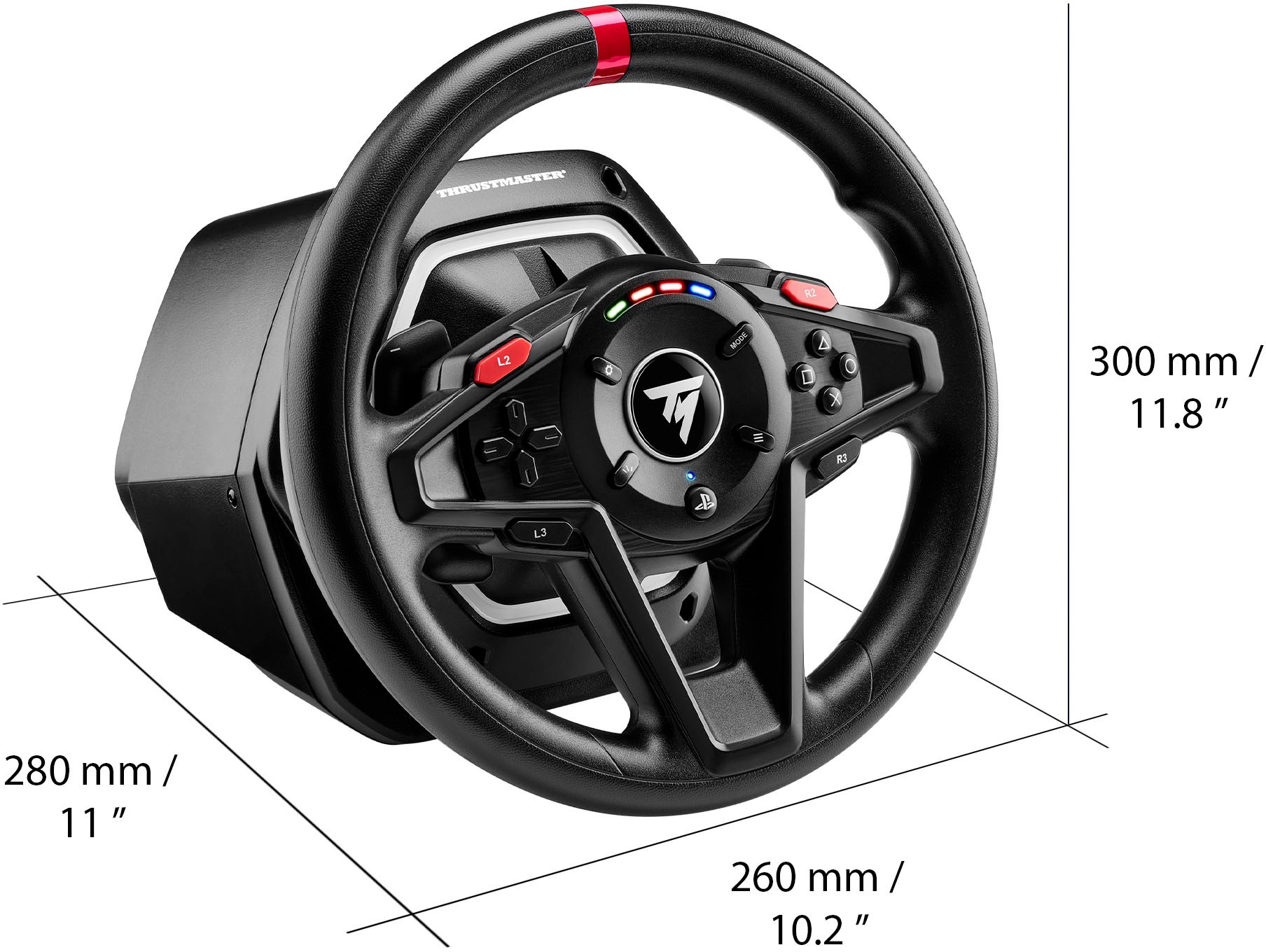
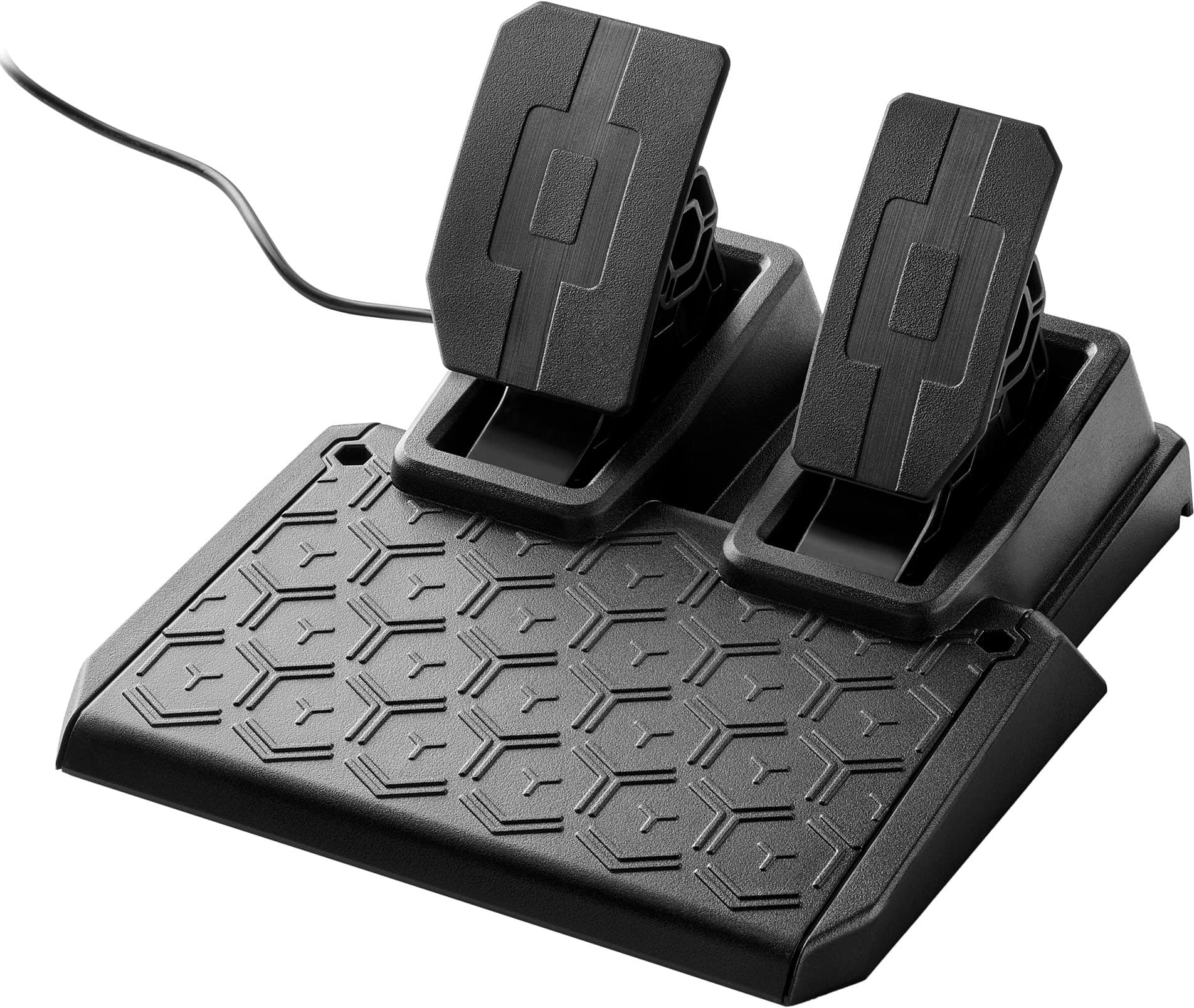
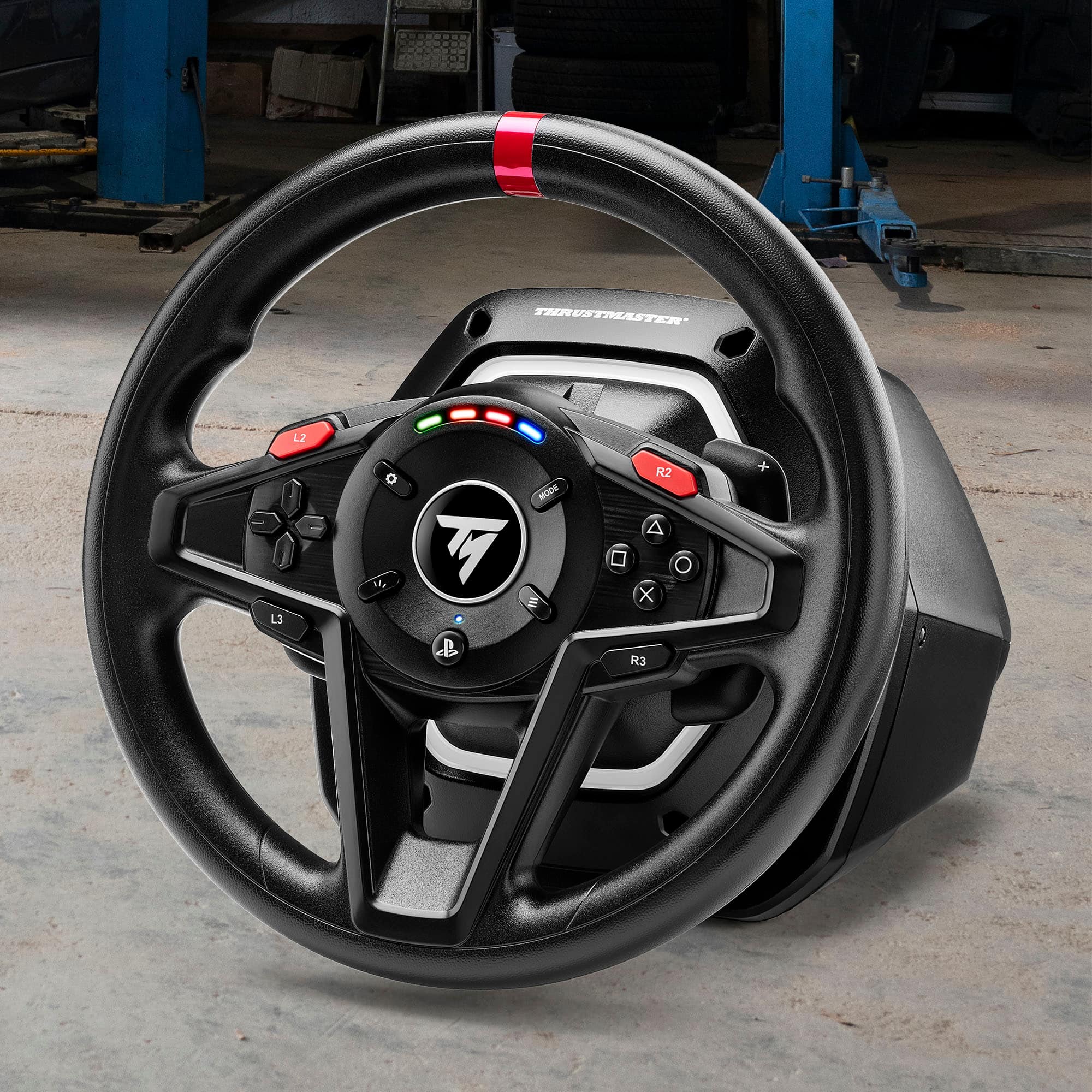
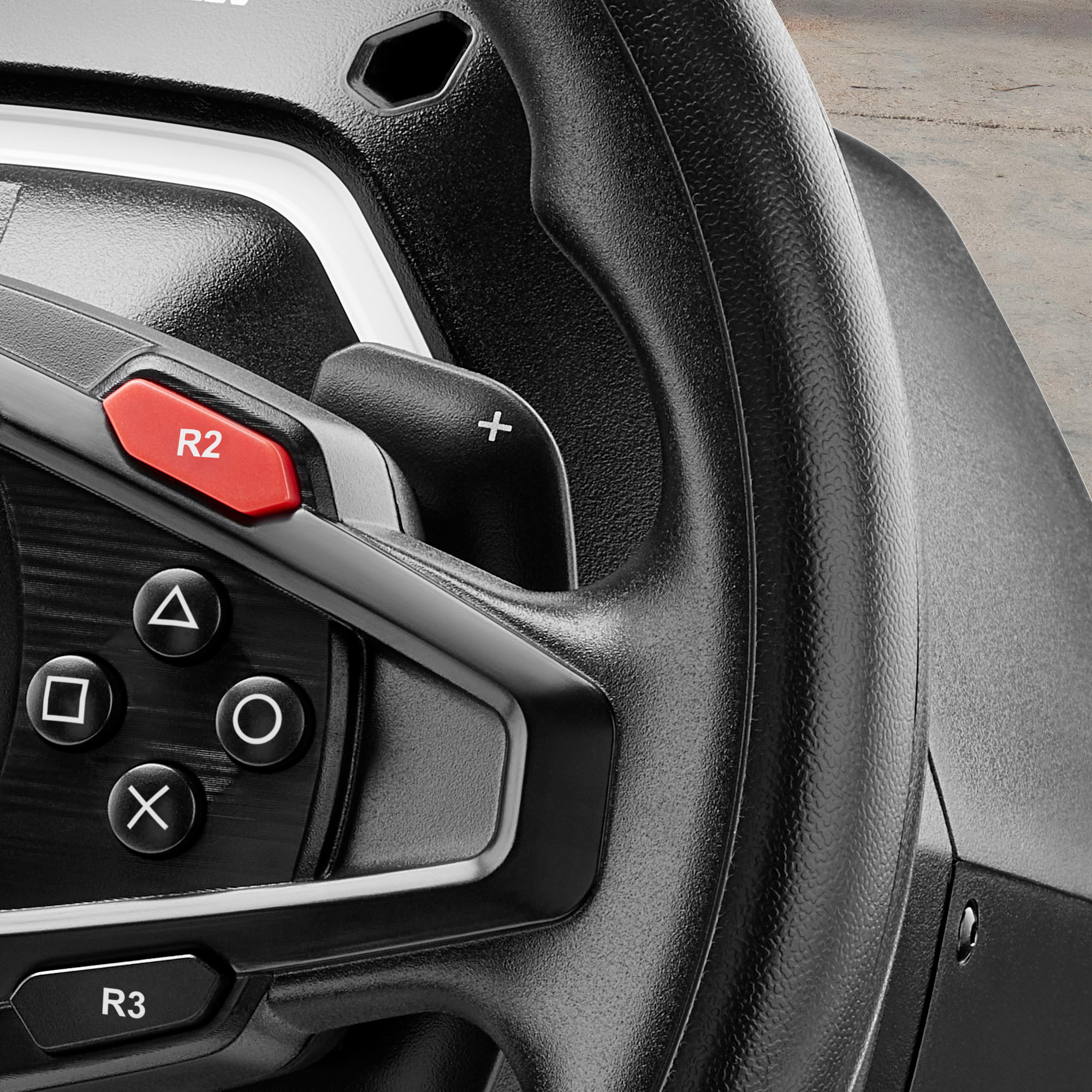
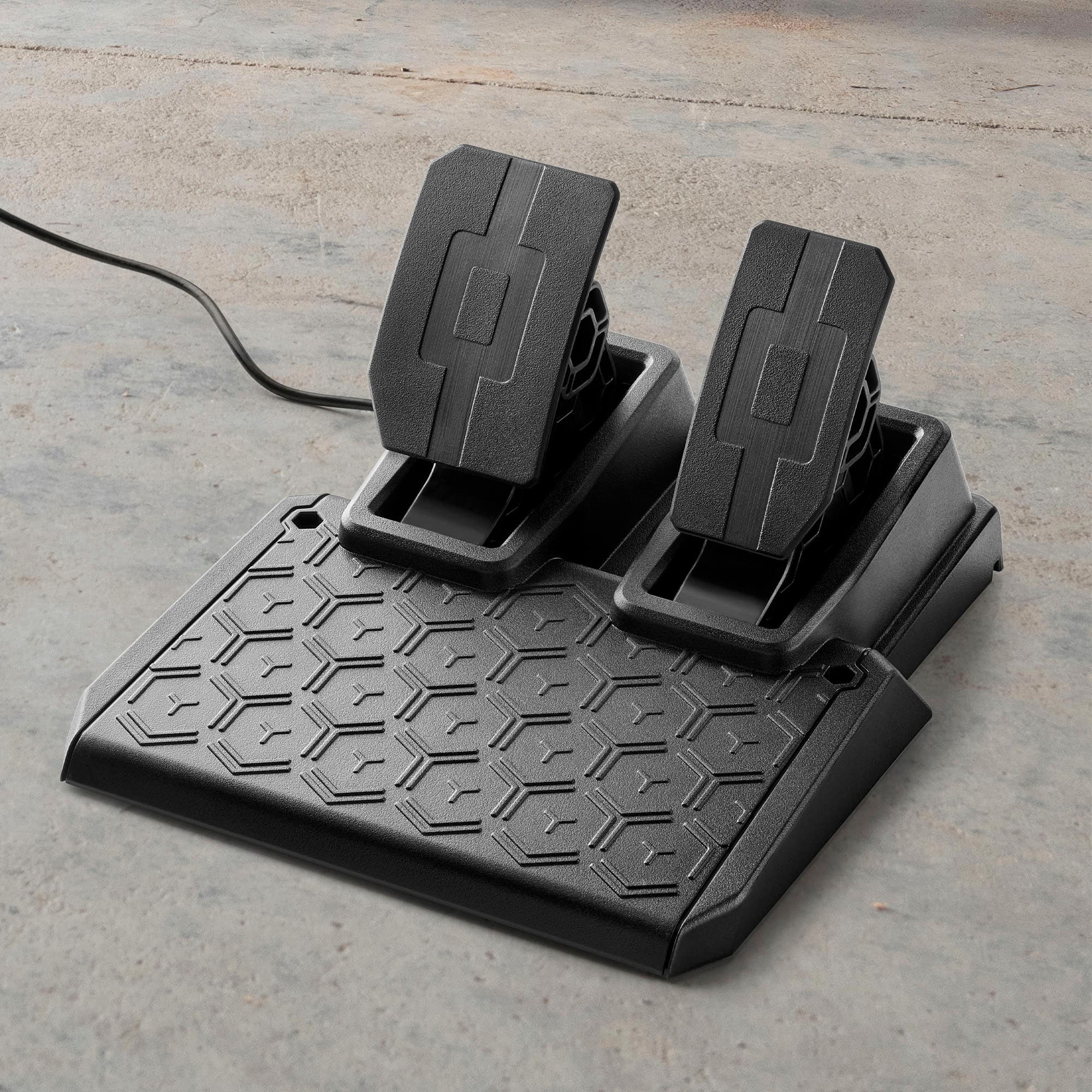
|Posted .This reviewer received promo considerations or sweepstakes entry for writing a review.Initially, I thought the T128 wheel was more like a toy. It is not a full-size wheel, light, and made mostly of hard plastic. The buttons feel kind of cheap, especially the shoulder buttons (LB2, RB2, LB3, and LB3) and d-pad. Although quite loud and clicky, the paddle shifters actually do feel authentic and are of decent size. The dual-pedal board is exceptionally small, which adds to the toy look. Setting it up is quite easy. The clamp has good clearance and is highly adjustable. There is no need to use any tools whatsoever. Because the wheel is so light, it feels very secure on the table (I tried two different setups). The wheel is fixed, with no room for up-down adjustments. The cables are long enough for a PC setup, but I did have to bring my PS5 closer to the rig in the living room. On the PC desktop, the wheel was immediately recognized in all my racing sims, including Fortza 5, NFS: Unbound and Grid Legends. Weirdly, I could not get it to work with F1 2022, which is a bummer. I did run into a small issue when hooking it up on the PS5. Turns out you must select the platform by using a combination of buttons which are not in the manual and found online (a QR code is provided on the simple manual). After figuring this out, it was all smooth sailing from there. I played GT7, Assetto Corsa Competizione, Dirt 5, and thankfully for me, F1 2022. Most importantly, the actual driving experience is what I found somewhat surprising. Despite the toyish look, the wheel was responsive and precise. On PC, I noticed that the force feedback is soft, but still noticeable and helpful. The turning was a bit loose, but messing with PC games settings easily took care of that. Now the PS5 is where the T128 truly shines. The force feedback was strong, contextual, and the 900° turn added to the realism. There was a real difference felt while driving in asphalt, grass, and gravel. The turning was tighter. The paddle shifters were on point and combined with the engine speed lights, changing gears were a joy. I will say that the hard plastic did make my hands cramp up a bit during intense driving, which makes me wish a little padding would’ve been nice. Wear gloves if you have them! Unfortunately, the pedal design is the T128’s true weakness. Depending on the driving style and the surface on which it is placed, the experience will vary. Because of the size of the pedals and how close they are to each other, wearing shoes is a no-go. Luckily, I have wrestling shoes (which feel a lot like driving shoes) and that made it easier to avoid accidentally pressing both at the same time. Another thing is that there is no weight on the base, and the rubber footings have no grip at all, which meant that I had to keep one foot on the base to hold it in place. This can be very distracting and cumbersome, especially if you use a dual-foot or toe-hill action. Nevertheless, I still found it functional enough once I sort-of got used to it. The good thing is that the pedal response is as tight as the shifters. Again, I have to stress that this is an entry-level, casual racing kit and as such it is considerably less expensive than other more advanced kits. The T128 has some truly strong points in its favor, and if you don’t mind not using shoes and find a way to keep the base in place, it is great for beginners at a very decent price. If you’re a PS5 driver, it's a no-brainer.
I would recommend this to a friend - Pros mentioned:Force feedbackCons mentioned:Pedal quality, Wheel size
Great value. The pedals are the weakest point.
|Posted .This reviewer received promo considerations or sweepstakes entry for writing a review.The Thrustmaster T128 is a good entry-level steering wheel that offers realistic force feedback that will increase the fun factor and immersion level of racing games without breaking the bank. The installation and setup is simple and easy, the software is easy to configure and use, and the wheel was compatible with my games out of the box with no tinkering or extra software workarounds required. The build quality of the wheel is decent at this price point but the all-plastic pedal set is a disappointment because it slips around too easily on carpet. _____ *Pros: -The table clamp with its rubber feet work well on slippery desks. -The Thrustmaster Control Panel app is easy to figure out and use. -The hall-effect foot pedals are responsive and work well. -The gear shift paddles are quiet and feel satisfying to use. -The wheel comes with 13 buttons, plenty for most games. _____ *Neutral: -The all-plastic construction of the pedals feels a bit cheap and toy-like. -The steering wheel is slippery and doesn't offer much grip. _____ *Cons: -The pedal assembly is too light and slip easily on carpet. **** Setup **** Physically setting up the Thrustmaster T128 on my Windows 11 gaming PC was a breeze. I first headed to the Thrustmaster website to download the software/firmware file, installed it, then followed the prompts and made all the wire connections. Upon reboot, the T128 was detected right away by Windows 11, and the steering wheel rotated left and right by itself executing its autocalibration routine. The clamp is easy to set up and use, and it stayed put securely on my desk which has a somewhat slippery surface without any issues. The racing games I enjoy playing correctly detected the T128 in the settings, and it worked without any compatibility issues. I played Dirt Rally 2.0 and Forza Horizon 5, and the games felt way more immersive and exciting playing than with a gamepad. The T128 is great for beginners and less tech-savvy users because it's so quick and simple to set up, and it's compatible with many racing games out there out of the box. The Thrustmaster technical support website has a list of compatible games, and there's a good chance that your racing game is already supported. **** Build Quality **** I'm quite content and happy with the steering wheel but not so much with the pedal set. The steering wheel has a nice heft to it without being too heavy or cumbersome. The wheel supports 270 to 900 degrees of rotation, and it rotates smoothly and realistically in games. The wheel surface has no grippy texture which can be a bit bothersome during long sweaty sessions but I found that one can apply some bicycle handlebar tape to improve the experience. There are 13 available buttons and they felt responsive and good to use. Although the pedals work well enough, I didn't like their super-light and all-plastic construction and their close spacing. The plastic base feels very hollow and cheap as well. Because they're so light, the pedal base kept slipping forward on the carpet during gameplay and it was very annoying. To alleviate the issue, I had to place some rubber non-slip mat underneath the base which helped a lot. It would've been nice if Thrustmaster included some sort of folding wheel stand but that would've surely raised up the price quite a bit. The brake and accelerator pedals are spaced together too closely, which I did not like. You will get used to it but it feels unrealistic and too toy-like. **** Performance **** Having never before played racing games with a steering wheel, the T128 was a revelation for me. The force feedback feature definitely makes racing games feel more visceral, immersive, and fun, and the T128 offered realistic steering wheel resistance and feedback that no gamepad can. Just like in real-life driving, you can feel the bumps and changes in road surface textures through the wheel. The paddle shifters are clickity and precise, and again, add to the immersion. The pedals worked very well as well, offering good responsiveness in the games, and not offering too stiff of a resistance. Compared to real cars, though, the pedals are a bit soft for my liking. My 8-yo daughter, though, was totally cool with the pedals because she doesn't have too much foot and ankle strength. **** Is it a good buy? **** Despite the aforementioned annoyances with the T128, I still think it's a good buy at this price point. It's not super-fantastic but it's not terrible either. I think it's great for both racing game beginners and non-hardcore enthusiasts who don't want to spend a lot of coin to experience the niceties that a force-feedback steering wheel can offer to elevate the immersion and fun factor. 4 stars.
I would recommend this to a friend - Pros mentioned:Force feedbackCons mentioned:Compatibility, Wheel size
Great "budget" option for better immersion
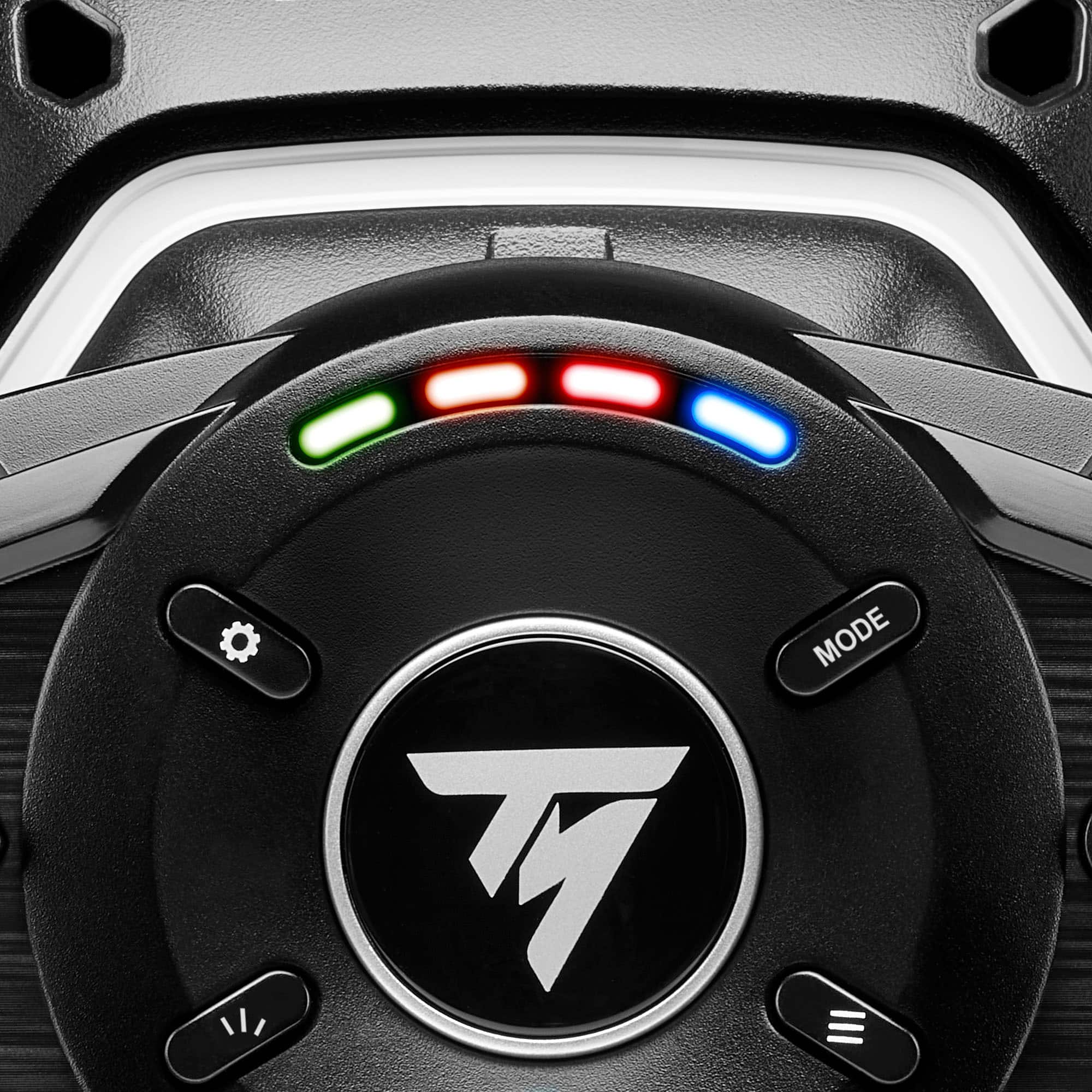
|Posted .This reviewer received promo considerations or sweepstakes entry for writing a review.I’ve played racing games for decades, but oddly enough, never owned a steering wheel. Part of it was cost, the other reason was space. I’ve played a ton of racing games, with Gran Turismo being my favorite. I’m no professional, but I can certainly hold my own. What changed now? PSVR2. I bought PSVR2 and was blown away by the immersion. After that I decided I wanted a steering wheel to add to the level of immersion. The Thrustmaster T128 is a great value for those (like me) that want to dabble in racing with a wheel without breaking the bank. Big drawbacks are lack of a shifter and mounting it. Arguably, mounting issues apply to most steering wheels, but for the casual racer who’s purchasing a wheel for the first time, it’s something to think about. My only other gripe is the short cables. Of course you can use an extension cord and longer USB cable, but longer cables should have been included in the box IN THE BOX Inside you get the steering wheel, AC power cable, a USB-A to USB-C cable, and pedals. There’s nothing to put together or otherwise assemble. You simply plug the USB cable, power, and pedals cable to the base of the steering wheel. You’ll obviously need to mount the steering wheel to something, and somehow secure the pedals so they don’t slide. I don’t have experience with other brand steering wheels and what mounting options they employ, but the T128 has a clamp that can attach to a table or a desk. As a larger adult, I wish the steering wheel was a bit bigger, but it certainly doesn’t feel cartoonishly small. But it feels really nice and not too plastickly. In other words, it feels well made and durable. SETUP I ran into a little hiccup on getting my PS5 to recognize the T128. And there was no instruction manual (there is, but it’s lacking in information). A little Google research essentially fixed the problem. After everything is plugged in, a greenLED light was on on the steering wheel. It needs to me blue. Green (I think) means that it’s ready for PC. If it’s blue, then it’s ready for a PS4 or PS5. To change the settings, I had to hold the MODE button down for 8 seconds and then when it started blinking, hit the PS button (I’m going off memory here, but the point is, there is a process and it’s not in the included instructions manual). After I hit this button combination, the light changed blue and it was immediately recognized as an accessory to my PS5. Another comment about setup, and this is geared towards first time steering wheel purchasers. When looking into this steering wheel (or any other) you really have to give consideration to how you’ll mount it. As I previously stated, it can be mounted to a desk or table. But if you’re playing in a living room, you might not have anything you can mount it to, and you’ll have to bring something into the room to mount it. If you’re playing on PC it’s likely less of a problem because your monitor is on a desk. Even when you mount the steering wheel, there’s still the issue of the pedals. They WILL slide away if not attached to something. There’s no clamp for the pedals (they’re on the floor so I didn’t expect one) and there’s a small selection of holes. You’re best bet, out of the box with no steering wheel stand, is to put something behind it to prevent it from sliding away from your feet. I highly recommend investing in a steering wheel mount. There are a bevy of options with the cheapest I found being about 50 bucks. It allows you to mount the steering wheel up high and mount the pedals to the base of it, at an angle. You’ll see the one I purchased in my photos. PLAYING Once your setup, however that looks, it was quite the treat. There’s a D pad and buttons on the steering wheel, allowing you to navigate the PS menus from the steering wheel. I’ll skip forward to my experience and thoughts of actually racing. I was playing Gran Turismo 7 in PSVR2. As you can tell from the product description, there’s force feedback in the steering wheel. If you hit a wall, you’ll feel the resistance in the steering wheel. Turning the wheel feels similar to a real car in certain ways. In other words, it doesn’t just spin freely. Now I couldn’t tell much if any difference between the type of car I was driving in the game. So the base level Honda Fit didn’t seem to drive any different than a high performance sports car in terms of the feedback on the steering wheel. I can’t say if it’s supposed to or not, and maybe someone else can tell the difference but I can’t. But this resistance/feedback on the wheel is great for holding your driving lines. You can even feel the tires slipping when losing grip on the road. Going over bumps you feel it too. The turning radius goes from 270 degrees to 900 degrees depending on the vehicle. But it’s just like driving a real car (versus being limited to rotating once to the left and/or right). I’m not very good with the paddle shifters, but they have a great responsive feel to them. Satisfying click if you will. The steering wheel has engine RPM lights on it to help notify you when to shift gears - although it wasn’t much help to me because I was wearing a PSVR2 headset and can’t see it when playing. But it's a nice touch. The pedals are described as being magnetic and are supposed to last a long time. All I can say is that they are really smooth and responsive. You can tap on the breaks, slam the breaks, or even push down on the accelerator halfway. It’s very similar to driving a real car. LIMITED COMPATIBILITY One thing that bummed me out was the limited number of games it’s compatible with on PS5. I don’t own a lot of racing games, but I wanted to play Hot Wheels Unleashed with the wheel but it’s not supported. This isn’t necessarily an issue with the steering wheel, but just a word of warning when looking into buying a wheel. Gran Turismo is obviously the big game it works with, but others, including Need for Speed, aren’t supported. You’ll need to check their website for a full list of compatible games. CONCLUSION If you have PSVR2 and Gran Turismo 7, this is a no brainer purchase for someone wanting to experience complete immersion in a racing game. Even if you don’t own PSVR2 it’s worth looking into without breaking the bank. It’s about as close as you can get to feel like you’re racing without actually racing expensive sports cars. I had a lot of fun and it makes me want to play Gran Turismo even more. Only real drawbacks are the lack of clutch and gear shifter (I prefer that over paddles) and the mounting issue. It’s designed to quickly mount and unmount the steering wheel which you might be able to find something in your house to work but it doesn’t solve the issue of the pedals. Again, I highly recommend buying or even building some sort of stand. While it adds to the cost, I almost think it’s a necessity to get the setup just right.
I would recommend this to a friend - Pros mentioned:Force feedbackCons mentioned:Pedal quality, Wheel size
Great step up from a controller
|Posted .This reviewer received promo considerations or sweepstakes entry for writing a review.The Thrustmaster T128 wheel is perfect for those looking to move from the controller into immersive, interactive play. While there are a few areas for improvement, the benefit the T128 provides is the interactive feel, vibration, resistance, and overall realism of having wheel feedback as you navigate your vehicle around a course. Setup is relatively easy, the steering wheel has a basic "Y" shaped clamping mechanism that holds the wheel in place. You may have to get creative if your desk has a metal frame or lip, but with a few tweaks I was able to make it work with my desk. Once clamped in, the wheel stays in place for hours of play, without denting or damaging the table surface. The wheel then has a wire connecting into the pedals and one going into a PlayStation or PC. For this review, I've solely used it with my PC setup due to needing a table to clamp onto. For PC, after plugging everything in, you'll have to go to the site to download the drivers. After the drivers are installed, you're off to the races! For build, I give it 3.5 stars. The negatives are that the steering wheel is not full size, and the grip is smaller diameter than I like, but I didn't feel much discomfort after playing for a few hours. The pedals are my least favorite part, as they are small and my foot either hangs off the top or rests on the edge of the plastic base. I wish they extended about 2 inches higher for a bit more realistic feel. The good news is the pedals stay in place and have enough cable length for my 6' husband to raise the desk and still have a few inches left on the cables. On the positive side, I like the button placement and the paddle shifters have a near perfect weight to them with a realistic feel versus being a light weight afterthought. The force feedback (the friction you feel when trying to turn the wheel) is nice. Is it highly realistic, no, but for someone using a controller prior, this is a great step up. The feedback includes friction in turning and vibration based on the game terrain and driving environment. I tested with both Forza Horizon 5 and Need for Speed Heat, the steering wheel automatically worked with both. I liked that the wheel gave a different feel when I was driving off the track versus on, and lower resistance on the straightaways and higher on the curves. I found myself hitting the gas and brake as I would in a vehicle, which is way too much pressure. It took a few attempts to get used to gently using the pedals. My overall impression is that I think its a great basic setup. For my first wheel, I wish the size was slightly larger, but I really like the feedback and the ease of setup. Overall I think this is a good wheel and I'd recommend it to the casual race gamer.
I would recommend this to a friend - Pros mentioned:Force feedback, SetupCons mentioned:Wheel size
Great entry level race wheel and pedal
|Posted .This reviewer received promo considerations or sweepstakes entry for writing a review.The Thrustmaster offers you the opportunity to feel what its like to get behind a race car and feel that immersion from behind the screen. And while this may not fill the needs of all, it is sure to be a great set up for those on the fence about buying their first set up. Out of the box you get everything you need to get you going. Set up is very straight forward and really requires very little effort. There are a few things to be aware of though. As far as Playstation 4 and 5 go its simply plug and play no other effort needed. On PC keep in mind the set up will not work unless you download the latest plugin, which will require to do some research of your own. Once the plug in is installed everything works flawlessly. Also be aware that unlike some other pedal set ups the base of these pedals does not offer any type of friction pad to prevent it from sliding across the floor. You will slide badly across hardwood and carpet will offer more friction. This base is very clearly meant to be installed on a race chassis and left on a floor. Keep this in mind incase you are planning to lay the pedals down on hardwood instead of mounting it. The wheel mounts very easily via a provided bolt and clamp set up and should easily mount up to a 3 inch platform. Now lets get in to the real reason why you wanna buy it and that's the immersion. The steering wheel has a built in motor which based on what game you are playing will offer multiple resistance or road feedback. Maxing out the settings seems the give the most realism. While playing Need for Speed Heat i remember i was pushing about 150 mph on a highway and as i came across a bridge where the bridge connects to solid ground there was a small dip in the ground. As a came across that junction point the wheel jerked a bit and the car felt a bit unstable for a quick second almost as you would expect it to feel in real life. The fact that the steering wheel had adequate pressure meant that i was able to apex my turns appropriately without over steering. The pedals have great resistance and personally feel better than the pedals in my personal vehicle. The transition from closed throttle to wide open throttle was very smooth and made holding a certain speed effortless. Never once did i experience any glitch or dropout of the pedal sensors. Drifting with these pedals was so much easier now that both the brake and accelerator could be easily feathered. There is no feedback in the pedals as in the steering wheel so keep in mind you wont really feel the road force in the pedals. Here's my take away from this set up. If your looking to get in to racing games but not really sure your gonna like it, then this is the perfect set up to start with. Out of all the wheels Thrustmaster makes, this is the best priced one that wont break the bank and should leave you with very little buyers remorse. But not just that it is actually a very good set up that offers great feedback and handling. The steering wheel is a little too small for my taste but thats to be expected with this set up. Now with that being said if your a avid racer looking to buy in to a new set up i'd personally recommend something of a higher tier as this may disappoint a bit. But all in all this is a awesome buy just keep in mind the pedals will require some kind of mounting or proper placement
I would recommend this to a friend - Pros mentioned:Force feedbackCons mentioned:Pedal quality, Wheel size
Good to GO!
|Posted .This reviewer received promo considerations or sweepstakes entry for writing a review.The Thrustmaster T128 racing wheel is a good entry-level setup for the casual racer. Included in the box is the wheel itself, wheel clamp, pedal set, power cord, USB-C to USB-A cable, and instructions. Setup is simple with steering wheel acting as a hub for pedals to plug into. For PC, instructions state to install drivers prior to connecting the wheel. Link to drivers included in the instructions did not work, however the drivers are easy to find on the Thrustmaster website. Driver installation was simple and includes a “Control Panel” for your Thrustmaster product. Control panel allows for testing of each button and axis, precise control of the force feedback, and software/firmware updates. Wheel itself is completely constructed of plastic. Despite this, it is a solid unit and is quite hefty. Completely round steering wheel clocks in at a diameter of 10 inches. A little on the small side but is adequate for the low-powered force feedback. Wheel clamp is sturdy yet somewhat cumbersome to mount. Force feedback is responsive. Oversteer is noticeable and the transition from pavement to grass/gravel can be felt. However, force feedback is not very strong which is expected at this price point. 900 degree rotation is on par with most other wheels and sufficient for just about any driving game. Wheel features all buttons commonly found on a gamepad. Paddle shifters have a very positive response and are fun to use. Pedal set is lightweight due to its all-plastic construction. When laying on the brake the whole unit tends to lift from the ground due to how light the base is compared to the spring weight in the pedal. This is mitigated by either keeping my heel pinned on the base while braking or having my left food rest on the edge of the pedal base. Pedals themselves feel smooth and well-balanced. PC support isn’t all there yet, but I hope that is changing soon as this is a brand-new product. Controls had to be mapped manually for each game I tested, and the engine speed indicator did not work for any of my PC games. Games tested include Beamng Drive, Dirt Rally 2.0, and Project Cars 2. Using the iRacing Force Feedback Test, I measured the response curve of the wheel’s force feedback. Results were almost completely linear with a ~6% deadzone on the low end and a slight deviation off the reference curve. Overall, the Thrustmaster T128 racing wheel is a great deal for those dipping their toes into the world of sim-racing.
I would recommend this to a friend - Cons mentioned:Pedal quality, Wheel size
Get the Feel of Racing
|Posted .This reviewer received promo considerations or sweepstakes entry for writing a review.The Thrustmaster T128 provides a novice level sim racing experience that is way better than using a controller but the pedals and plastic wheel keep this from being a really nice racing platform. Most of my PC racing games recognized the T128 as a racing wheel but only the newer game versions listed it as a Thrustmaster Advanced Mode Racing wheel. Overall the T128 and its forced feedback provides a simulated race experience that will thrill most novice or casual racers. Pros: - Hybrid Drive forced feedback was quiet and relatively consistent across games - 13 configurable buttons - Thrustmaster drivers and control software recognized by most games - Magnetic paddle shifters and pedals Cons: - The wheel is small at 10 inches and it is all plastic - The pedal base is too easy to move and tilt over during use - The pedals are too small and very close together - No mounting options for the wheel assembly besides the table clamp Game Play: Prior to playing any games I downloaded the T128 drivers and control panel software from the Thrustmaster support website. With the software installed I then tested all the wheel and pedal functions and buttons. All the games recognized the wheel as either a generic wheel or a version of a Thrustmaster wheel. With the wheel recognized I then went into each game’s controller/wheel configuration page and made changes to recommendations I have found on the web or Youtube. Note that these settings have a profound effect on how the wheel responds and reacts so to get the most out of this wheel you need to change the configuration to meet your needs. Below is quick rundown of what each game recognized the wheel as and if the wheel’s LED display worked in the game. Assetto Corsa – wheel is recognized as a Thrustmaster but the LED wheel display does not work. Assetto Corsa Competizione – wheel fully recognized as a Thrustmaster Advanced Mode and LED works. Dirt Rally – wheel is recognized as a Thrustmaster but LED display does not work. Dirt Rally 2 – wheel is recognized as a Thrustmaster but LED display does not work. F1 2018 – wheel is recognized as a Thrustmaster but LED display does not work. F1 2022 – wheel fully recognized as a Thrustmaster Advanced Mode and LED works. Forza 4 – wheel recognized as a generic wheel so you need to configure the wheel and pedal functions with the Custom wheel settings, LED does not work. Forza 5 – wheel recognized as a Thrustmaster T248 and LED works. Asphalt 9:Legends – wheel is recognized as a generic wheel but LED display does not work. Thrustmaster has a list on its support website that list the games that support the wheel’s LED display. Bottom line is that the games were somewhat consistent in recognizing the Thrustmaster drivers and minimal setup was required to get the wheel fully operational. Once the games were configured I was able to really enjoy the forced feedback and the driving experience that this wheel provides. In the F1 and Assetto Corsa games you can feel the wheel respond in tight corners at high speed and you can feel the vibration of the road surface as you go faster. In the Dirt Rally racing you can feel the difference when going from a dirt track to gravel in the wheel vibration and also how it responds to drifting. In Forza Horizon 5 the Hot Wheels track takes on a whole new feeling when you are trying to steer through high banks and loop to loops. For the casual player or someone who wants to get into racing games at an affordable price point this platform is definitely one to consider. Issues with Mounting the Wheel and Pedals The race wheel comes with a typical table top clamp but sadly Thrustmaster has shortened the legs of the clamp with this version versus some of its older models. Because of this the mounting clamp has to be able to grip the table top close to the edge of the table. If there is any type of support or molding offset from the edge you may have issues mounting the wheel. Also Thrustmaster did not include any mounting hardware built into the wheel’s base for securing it to racing stand. I use a racing stand and it has predrilled holes for Thrustmaster wheels but without mounts in the base of wheel I had to create my own mounting. The pedal platform is very problematic due to the short pedals and its size. It is impossible to keep it from sliding or tipping over if you use it on carpet. On a hardwood floor or any solid floor the pedal platform is grippier but definitely not perfect. The pedals are too small and way too close together. Anyone who has big feet or has wide shoes will have problems with these pedals especially if you like to use both feet on the pedals. Thrustmaster did include two mounting holes in the pedal platform if you have a racing stand and some hardware for mounting it.
I would recommend this to a friend - Cons mentioned:Pedal quality, Wheel size
Solid investment w/pedals. Limited compatibility.
|Posted .This reviewer received promo considerations or sweepstakes entry for writing a review.I've always liked the idea of buying a racing wheel for the various racing games that I have tried out over the years but, anyone that's ever looked into driving peripherals knows that it's an expensive hobby to get into. It’s possible spend a small fortune on the various wheels and gears and handbrakes and pedals and that's before you even get on to the really good stuff. The Trustmaster T128 is an excellent compromise as it comes with a racing wheel with an easily adjustable clamp for desks and tables to go along with that we've also got a set of pedals for braking and acceleration. The wheel itself has 15 buttons, a direction pad and the typical PlayStation controller with the triangle, square, circle and x. I’m sure this combination would work fabulously with a Playstation, however, I used it with my PC. Out of the box, the wheel itself is rather small in build and plastic, with no rubber or grips. It also comes with a clamp to secure it to a desk. The base pedal set includes only brake and accelerator. When I first received the wheel I attempted to used it on my desk (mount as supplied will only work with desk that are 2in thick max. We ended up having to design an extension for the clamp to make it useable for the desk (using a M10 x 1.5 Pitch Stainless Threaded Rod (150mm long) and Stainless Hex Coupling (45mm long). Another thing to consider is if the the front of your desk has a center drawer the move may move with drawer or the handle may be an issue. During the initial setup, I noticed the cord connecting the wheel to the base was too short to drape over the back of the desk, therefore it had to hang off to the side. It wasn’t a bother while I was driving, just an issue to consider while setting up. Downloading the drivers is necessary, but just a simple search for the model will lead you to the website. Once the wheel was setup and driver installed, I connected the USB to my pc. Be warned that the wheel does a calibration, rotating fully in each direction, on connection. I enjoyed the feeling the weight of it and the force of turning the wheel. This wheel action in no way feels like a lesser product. The turning angles meaning that you can whip this thing around for those really tight corners but the big feature the reason that you should be buying this racing wheel is the haptic feedback. I raced a few racing with it in the default settings, then adjust the feedback of the wheel, rotation, and a few buttons to customize my racing experience. On the various tracks of Forza 5, there was a ton of feedback and haptics, I could feel the type of road surface that was underneath my tires whether that be road, trail or river. The haptics here are really impressive and really immersive, it really pulls you into the game. Also, the feedback from the other cars, scenery, and terrain affects the handing of the vehicle, which is a fun and added to the difficulty of the game. I could really feel the physics of the game intentionally through the wheel. Now the pedals were another issue I had to overcome. My desk setup is in a carpeted room. I noticed the bottom of the pedals have a rubber grip, that my pair better with laminate or ceramic floors. Unfortunately, on the carpet the pedal slip away, and often I had to readjust them mid game, pulling them back with my feet. When I received my second desk, it had a support bar at the bottom. I used that support bar and a yoga block to stabilize the pedal setup. I didn’t have any problems after that solution. The pedals do provide nice feedback with the brake spring being a little harder to push than the accelerator. I have mostly used the wheel with Forza 5, because of the RPM LED support and mostly plug&play support. I have also used it with BeamNG and Dirt 2.0, but both required manually setting up the wheel. Unfortunately, I was really disappointed that Forza 4 is not yet supported (I have a ton of cars in that one). Please check the Thrustmaster website for the list of compatible games or check out some forums before buying if you are set on a specific game. Overall, the Thrustmaster T128 is an affordable set up that provides strong haptic feedback, RPM LEDS, a set of pedals and acceptable compatibility with newer games.
I would recommend this to a friend - Pros mentioned:Force feedbackCons mentioned:Pedal quality
More fun than controller for driving games.
|Posted .This reviewer received promo considerations or sweepstakes entry for writing a review.To start for those who had my issue. My wheel arrived in PC mode (green light) and I have my driving games on PS5 (blue light.) So to switch platform. Hold mode button for 5 seconds, once light flashes, while still holding mode button, press right directional button till light switches color. After that the fun can begin. Had a PC driving wheel over a decade ago and now that I wanted to get into the latest Gran Turismo 7 game. It was a great time to to get driving sim kit to play to see if it could make the experience even more fun. And yes, the T128 wheel is FUN. While no software is required for PS5 play. There are only 3 cables that are very easily connected to the wheel for play. The wheel clamps to the edge of most desks up to a few inches thick. While likely not intended by manufacturer, if you turn the clamp backwards, it can clamp decently on to a wood TV tray. The peddles will need a piece of plywood or other larger non slip material to mount for any long term play. The peddles resistance while very responsive, never lets them stay put as you constantly press the gas or brakes. There are 2 pre-drilled holes to allow you to mount the small peddle base to something larger to keep it from sliding and moving. At first it took some time (days) to get used to the wheels force. Its not power steering for video games. It is more of a resistive steering with feedback. As an older gamer, younger players may have never had the chance to drive a car without power steering where you feel more of the road and have to muscle the vehicle a bit more. The T128 wheel will bring that into your gaming experience. So, understeer and oversteer are felt in games like Gran Turismo 7 and while not making the game easier, it lets you feel the weight of the vehicle a bit better to help learn how to drive each vehicle more effectively. Just turn on the driving aids till you get used to it. For me, it also took a bit of tweaking in the settings to dial in the force I prefer. The one thing in GT7 it didn't do was make it easier to win by having that perfect driving line and throttle control that it seems only a professional driver posses. The real winning aspect of this wheel and peddle combo is how much more fun you will have in games like Need For Speed Heat. Running around in an open world while really driving and shifting changes the realism of the game. So, turn up the volume and put the peddle to the medal (plastic) and have fun. Just google the games that have built in settings for this wheel before purchase. Not all driving games work perfectly with the wheel.
I would recommend this to a friend - Pros mentioned:Force feedbackCons mentioned:Wheel size
A good device with a little quirk
|Posted .This reviewer received promo considerations or sweepstakes entry for writing a review.The Thrustmaster T128P is an entry level steering wheel for racing games both for the Playstation and the PC hence the P designation. Compared to other streering wheels in the market, this model is quite small. Most notably with this model is that the brake and accelerator pad could hardly accommodate my size 11 feet but would be suitable for someone perhaps with a size 8. Nonetheless it is still workable. On the steering wheel itself you can find two customizable paddles which I use for acceleration and braking. On the right side, you can see buttons specific for the PlayStation and on the left is a set of up and down arrow keys which are also customizable. There are also four customizable keys which you can use for other functions depending on the game being played such as zoom, instant replay, etc. I have tried this steering wheels on games I use on Steam normally using a keyboard such as Copa Petrobas, RaceRoom, and Victory: The Age of Racing. So far I find the force feedback on the steering wheel is quite acceptable. Not that this model is not modular meaning you can’t change the streering wheel only like what’s found in other models but this is fairly good to me. Acceleration is quite satisfactory fpr me, but braking is quite tricky since so far I cannot make the brakes work in spite of customizing the brake pedals and confirming that it should work. But then again that is downside of PC ganes sometimes not being fully compatible with accessories. Furhermore, most games I have tried from the Microsoft Store are often incompatible with this steering wheel. Perhaps AAA games for the PlayStation may be more compatible with this. But unfortunately I don’t have a PlayStation at my disposal. Overall, I find this steering wheel quite satisfactory in spite of the quirks of the brakes. Nonetheless, I would still recommend this streering wheel for those who would want one but not necessarily break the bank.
I would recommend this to a friend - Pros mentioned:Force feedbackCons mentioned:Pedal quality
Makes playing racing games fun again!
|Posted .This reviewer received promo considerations or sweepstakes entry for writing a review.I am 34 and occasionally play games on my PC, but I haven’t touched a racing game in a while, but I got the opportunity to try this racing wheel and honestly it’s been really fun that I have actually stopped playing my to-go games. I have been playing Project CARS 2 with this racing wheel and I had to play around with the settings to make it responsive and find a setting that I enjoyed. Although the wheel is super fun and of great quality, the pedals were a little harder to get used to because I do not have an appropriate sim with a seat. For this reason, I decided to set up the shifting pedals as the gas and brake, and it’s been working great for me! I know this might not be for everybody, but if you are having a hard time with the pedals, give it a try because this has helped me enjoy this wheel that much more! I love it! Quality 5/5 (except the foot pedals, I would give that 3.5/5) The wheel feels sturdy and having the shifting pedals be made of steel really give this a quality feel which gives confidence when playing a sim racer. Connectivity 5/5 Super easy to connect! I was using the wheel within 5 minutes without any issues. My PC and game read it right away. As I mentioned, I had to play with the settings to get the wheel to setting I really liked to make my gaming experience great. Design 4/5 The wheel itself is great but again the pedals were hard to get used to without a proper sim set up, so I am not using the foot pedals when I am using the racing wheel. Features 5/5 Force feedback feels good, and the wheel has so many buttons that can be configured to different settings. Because I am using the shifting pedals as my gas and brake, I had to use my R2 and L2 as my shifting gears and it’s working good for me. The attachment to my office desk is super easy and sturdy, but just be careful on not scratching your desk! All in all, I would highly recommend this for anyone wanting to have for fun playing those racing games you probably haven’t played in a while!
I would recommend this to a friend - Pros mentioned:Clamp, Force feedback
Great quality and economy price
|Posted .This reviewer received promo considerations or sweepstakes entry for writing a review.This racing controller outfit far exceeded my expectations. It is heavier than I thought and very well made. The foot pedals are rather light, but work fine if you set them against something from sliding. The clamp on the wheel is to mount to a desk and tightens down securely. I added some additional weight to the desk I mounted in on to keep it stable. You will need to follow the instructions on how to pair to a Playstation 5, but once you know what buttons to press and the color to look for, it is easy to pair. The wheel surprised me when it started spinning to calibrate on initial connection and pairing. I had no issues with it controlling my navigation in place of my regular controller. I was able to launch Grand Turismo 7 and start using it for racing without any additional setup on configuration. Feedback is great and have just right amount of tension when steering and the feedback when you collide with something is very realistic. The lights can be used to calculate when it is time to shift gears if you using it in manual transmission mode. It has allowed to finish it more top finishes than with the standard console controller. It is brought a renewed joy to my racing games and I am excited to race on a more frequent basis. It has most of the same basic features as devices that cost twice as much and you still have the same great control.
I would recommend this to a friend - Cons mentioned:Pedal quality
Neat Racing Wheel! Pedals Fall Short…
|Posted .This reviewer received promo considerations or sweepstakes entry for writing a review.The Thrustmaster T128 is a good racing wheel for all your racing games. It is a great alternative to using a controller. I have had the pleasure of using the racing wheel these past couple of weeks. Although using the wheel was exciting, there are a couple of items that are keeping it from being a perfect racing wheel. In this review, I will cover the pros and cons of the Thrustmaster T128. *TLDR at the bottom ============================================== IN THE BOX/SET-UP: Firstly, in the box, you get the T128 racing wheel, pedals, all the cables required, and a quick start guide. Setup did not take long. The majority of the time you will be finding a comfortable position to place the T128 in. I clamped mine on my desk. If you plan to use the T128 on a PC, you will need to download the drivers required for the racing wheel. Simply head to the website listed in the quick start guide and download the required drivers. Install them and the wheel should be ready to go! ============================================== COMFORT/BUILD: The racing wheel is smaller compared to an actual steering wheel. Comfort-wise, the racing wheel is comfortable but I would’ve preferred a leather cover grip at the cost of price but there are racing wheels out there that do have leather covers if you are looking for one. Buttons felt cheap but I didn’t find them to be a problem. On the other hand, the paddle shifters do feel great when shifting gears. The pedals felt cheap as well, but I did find them comfortable to use. Although, I did dislike how easily the pedals can be tipped over when using them. It’s all due to the lack of weight at the base. I worked around this issue by using my other foot to hold down the base. In terms of build, the entire product is mostly plastic. The racing wheel, buttons, pedals, etc. are all plastic. I don’t mind plastic, but I do hope it’s durable enough to last for years to come. ============================================== TESTING: I tested the wheel in mostly two games. The first game is Need for Speed: Heat and the second is Forza Horizon 5. I do recommend tweaking the settings and advanced controls for the racing wheel before playing for the optimal experience. Forza did have clunky controls and feel at first with the default settings. I decided to use some preset settings recommended by users online to have better control and feel of the game. NFS: Heat didn’t need much tweaking in settings. The default settings felt great, and I decided to go with those. I seriously enjoyed the forced(haptic) feedback on the T128. Whether you’re driving on rough terrain, asphalt or you hit a wall, you will feel it with the racing wheel. I mentioned buttons felt cheap but while playing, they were responsive which was nice. The paddle shifters were enjoyable to use and responsive when shifting gears. Also, the engine speed LED lights on the racing wheel will only work for some games. The weakest area for this product is the pedals. While the pedals are responsive, the base lacks that extra weight to hold it down, and the grip on the bottom isn’t the best either. ============================================== VERDICT/TLDR: The Thrustmaster T128 is a neat racing wheel for all racing game fans. It certainly is a great replacement for a controller. The controls and forced(haptic) feedback are the best features of this product. Where it falls short is the pedals. The pedals felt cheap and the lack of weight on the base makes it easy to tip over. If you can clamp down the base, your experience will go a lot smoother. Overall, due to the feel of the controls and the thrill I had of using this wheel over the past couple of weeks, I did enjoy using the T128 and do recommend you give this racing wheel a shot.
I would recommend this to a friend - Cons mentioned:Pedal quality
Like a fun new car but with quirks.
|Posted .This reviewer received promo considerations or sweepstakes entry for writing a review.So maybe I'm no Lewis Hamilton, Dale Earnhardt, or heck even a Ricky Bobby. But I may or may not have driven to Vegas going ...umm... let's say just a tad over the speed limit and also did that whole 20 laps in a NASCAR car experience, so I know how a steering wheel should feel going at speed. And while this wheel is fun, I personally found that I was a bit better on the PS5 controller than this. I used this wheel exclusively on GT7 for the PS5 and here are some pros and cons. Firstly, I found I had to immediately go into the settings and turn down the force feedback and torque settings down to the minimum. Ever have a car die on you mid drive, or drive an older car that was low on power steering fluid? Well, that's exactly how this wheel felt on anything but minimal settings. Also, there was this slight auto correct/steer during my worst driving techniques that I couldn't really get rid of. The wheel always felt like it was trying to correct for my bad driving ever so slightly. I know it's trying to emulate the feel of a real vehicle at speed, but I couldn't help but think of my old 69 Chevy Nova when it was low on power steering fluid or when many a car had died on me, and you have to steer it the side of the road with zero electrical assists on. Maybe there's a way to shut the auto steer feature off and I missed it. Some might like this though. I will admit it adds the illusion of heft to the car and if you are tired of how loose "arcadey" those driving cabinet wheels are at arcades, then this will feel much better. The shifting paddles are responsive and satisfying to press, but they are noticeably loud and clicky. As far as the pedals go, they are a bit steep to me, but I never really had any fatigue or discomfort during long play sessions. They have a nice amount of give to them where I felt I could manage acceleration nicely. They did occasionally slip from under me a few times, even when placed on carpet. I really like how snug it clamped to the table. There was no wobble or drift even during the sharpest of turns. Oh, and you will need a nice heavy table to secure it on believe me. Otherwise things might wobble or worse during the more intense of driving scenarios. I like how you can manage sensitivity for the different settings. I had a recurring problem on Nuremburg where I tended to oversteer the Porche and spin out. A quick toggle with the steering sensitivity and I had it driving like an old Buick. All in all, in the sparse moments when I wasn't fighting the wheel for control, or the pedals weren't slipping on me, I had the surround sound on loud, the POV set to behind the wheel view, and felt like it was finally my time to shake and bake just like Cal Naughton Jr.
I would recommend this to a friend - Pros mentioned:Force feedback
Great racing wheel for beginners!
|Posted .This reviewer received promo considerations or sweepstakes entry for writing a review.It's been a while since i last used a steering wheel setup for my games and i have to admit this opportunity i had with the Thrustmaster T128 made my games so much more interesting. I have to give the 5* stars for the great price to value you get with this wheel not necessarily with all the futures. You have to understand if you are just getting into racing games or looking for something that won't break the bank this setup is more then enough it's awesome! It connects by default to Pc Mode (green light indicator) but you can change that to Ps by holding the "mode" button for 5 seconds and then simultaneously navigate with the right arrow button till the light changes to your desire mode (blue and red both being for PlayStation) It clamps to your desk or table or rig setup with ease. Make sure u connect your pedals and run your usb-c to your desired gaming platform (pc or ps4 on my case) plug it in, and make sure to keep your hands away as it recalibrates each time you make a connection! It's entirely made out of plastic it's light weight and rather small but with great pedal/shifters. Even so the force feedback it's strong and even when i was getting hit by other cars it will push you away like in a real life situation. The brake/acceleration pedals they are great you can just set them under your desk However i have a problem when the race intensify they will slide and go all over the place so i have to find a solution since they have 2 slots for screws to find a secure position for them since just setting them on a flat surface it's not enough. All in all it's a great toy with a lot of value! Thanks
I would recommend this to a friend - Cons mentioned:Wheel size
Very Solid Racing Wheel option
|Posted .This reviewer received promo considerations or sweepstakes entry for writing a review.I had a great time testing out the Thrustmaster T128 over the past week and found it to be a very nice set-up for anyone looking to get an affordable racing wheel and pedal set. It works with both PC and PlayStation (4 and 5). It was instantly recognized in Forza Horizon 5 and was easy enough to set up in games such as Euro Truck Simulator 2 and Project Cars 2. I was hoping to try it out in Rocket League just for fun, but it wasn't picking it up and I did not want to rebind all my controls to see if that would work. Overall, the T128 looks pretty good. I liked the clamp style mounting system included, which should work on a large variety of desks/tables/sim set-ups. The wheel itself is not too large, so it did not feel like it was taking up that much space. The wheel itself is made of pretty much all hard plastic but it's not too big of a deal. The paddle shifters feel pretty nice and everything responded pretty much immediately. I feel that the Thrustmaster T128 Racing wheel is a very good option for the price. It is cheaper than the Logitech G920 and G923, but lacks a clutch pedal and is lesser build quality. For someone looking for a simple to use set-up and wants just a casual experience, this T128 is the way to go. If you are looking to add a manual shifter other than the paddles, then I would maybe lean towards the logitech options or other options from Thrustmaster.
I would recommend this to a friend Racing games at a different level
|Posted .This reviewer received promo considerations or sweepstakes entry for writing a review.The Thrustmaster T128 racing wheel will take your racing game to the next level. This wheel is very well constructed. Despite being mostly made of plastic, the wheel does feel good on the hands and is not as slippery as you may think. This wheel does come with a set of pedals (brake and accelerator). Putting it together was very simple, plug and play for the most part. This wheel works with PC/PS4 and PS5. It connects via USB-A cable. If you connect this to the PC I recommend you head over to the manufacturer website and download the drivers and software for better performance and compatibility. Every time you turn on the device that the wheel is connected to, it will conduct and self alignment by spinning several times. On the front of the wheel you have access to all the PS buttons and the engine light. I played several games on my PC and it definitely was a different experience. It felt like the arcades just needed a seat that moves with the game. Steering felt kind of natural and I say that because the wheel is not the size of an actual steering wheel. However, it was much better playing with this than the remote or keyboard. The paddle shifters are very responsive and they are easy to reach. Now I found myself using the paddle shifter more often in my vehicle after getting used to this wheel. A is mentioned before this wheel works with the PlayStation 4 and 5. I connected it to my PS5 and it worked fine. However, I went through some hurdles to make it work. I believe the reason was that I was using it on the PC at first and that setting became the default. If you are trying to connect it to the PS5 or 4, the light above the PS button should turn blue. In my case no matter how many times I disconnected and re-tried the light stayed green, meaning it was recognizing it as a PC. If you have that issue follow these steps: when the wheel is connected to your PlayStation press and hold the mode button for 5 seconds until the light above the PS button starts flashing. Keep holding the mode button and then press right on the directional pad until you see the light turn blue, then release the button. That should get you setup for your PlayStation. Playing Gran Turismo with this wheel and the PSVR is totally a different ball game. You are in the driver seat. Great experience. As with the PC the wheel is very responsive with the PS5. Despite most of my experience being positive there were a few things this wheel could have done better on the PS . For instance, more driving feedback. A little vibration when the vehicle is in motion could lead to a better and more realistic driving experience. If you drive straight you will not receive any road feedback unless you turn the wheel. During PS gaming I noticed when impacting another vehicle on the side you will not result in steering feedback, neither going off road. I tried adjusting the sensitivity but got the same results. I noticed the same on PC but that was easily corrected on the wheel settings. Also, be aware where you place the pedal set if you place it on a carpet it will slip. Besides that, this wheel is phenomenal. Overall, this wheel will change the way you play racing games at home. It easily attaches to pretty much any table. It is very well built, easy to use and set up. In the box you get the Wheel, pedal set, power cable, USB cable and quick setup guide.
I would recommend this to a friend