Customer Ratings & Reviews


- Model:
- S55B5155
- SKU:
- 3953834
to a friend
- Pros mentioned:Beautiful, FastCons mentioned:No system recovery media
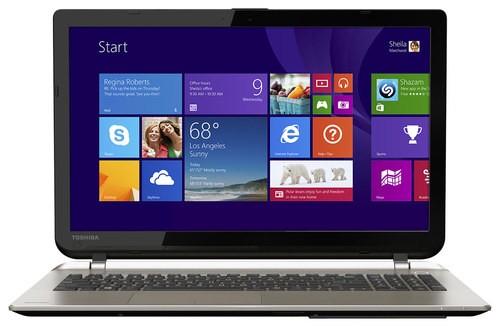
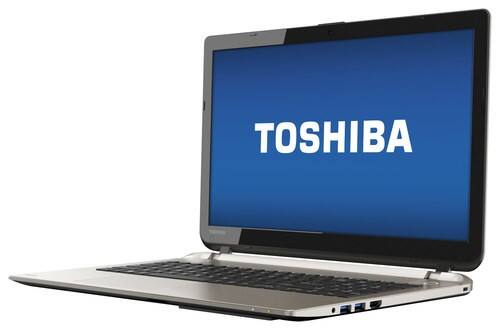
Nice looking very light weight fast for now.
||Posted .This reviewer received promo considerations or sweepstakes entry for writing a review.I purchased this laptop for my youngest daughter and she seems to enjoy it, says it's fast and beautiful! She wanted an apple computer but the cost vs. This laptops rated performance and it's over all cost was a no brainier. Only thing I don't like is computers now days don't come with software for system re-install, This computer needs a system backup on a USB stick 64Gig's Minimum and if you don't have it the computer will by pass backup allowing it to be used. When young adults are involved it's a job to get it done if you don't know the requirements. Manufactures should block the use of the computer until a clean back up of the system is done, or they should stop being so cheap and provide a USB back up with system image for the customer or maybe business such as Best Buy should inform or do it for the customer for free with Geeksquad.
I would recommend this to a friend - Pros mentioned:Amd graphicsCons mentioned:Hinges
Good value for money
||Posted .This reviewer received promo considerations or sweepstakes entry for writing a review.This was the only laptop with a dedicated graphics card that I could find after extensive search in this price range. There were a few reviews mentioning unsatisfactory travel in the keyboard, but I am well satisfied with it. But the hinges do not look sturdy and I am sure that they will fail after about a year. So I am really careful and slow when opening and closing the lid.
I would recommend this to a friend - Pros mentioned:Fast
Just as expected
||Posted .This reviewer received promo considerations or sweepstakes entry for writing a review.the Toshiba Satellite was just what I expected about. Fast, easy, works perfectly in all matters it promissed. It's a pretty recent purchase and can't assure it's longevity or long term quality but to start with is just as I imagine, no great surprises on it. Not very light, kind of too big but strong and work well
I would recommend this to a friend - Cons mentioned:Fragile screen
Great little machine
||Posted .This reviewer received promo considerations or sweepstakes entry for writing a review.Upgraded to 16M ram and it's fast. Do buy the accidental damage warranty from Toshiba, though...the screen will crack if you sneeze at it.
No, I would not recommend this to a friend - Pros mentioned:Amd graphics, Gaming
Very good laptop
||Posted .This reviewer received promo considerations or sweepstakes entry for writing a review.Elegant laptop. Very beautiful and powerful. It has intel graphics and AMD graphics. No trouble if you want to play game.
I would recommend this to a friend - Pros mentioned:Price
Great for office, but average for gaming
Posted .This reviewer received promo considerations or sweepstakes entry for writing a review.This is the newest generation of Intel Cpu, which gives an outstanding speed to the computer for most of the software. The Gpu, Radeon R7 270M is unfortunately few steps behind compare to its competitors, especially Nvidia GeForce cards. It does do the trick for most of the new games, but only in medium settings, and if you are a frame per second freak like me, you may even go lower than that. It does open the games on highest settings if you do not mind your fps being low. Audio is pretty loud, keyboard has no backlit, but has a num pad. The material is not any better than a mac book or a dell but I would expect Toshiba to step up, guess not. Aluminum material keeps the laptop cool, and looking good but any recent games ( past 3 years and so ) will make the fan keep working, it gets loud. Considering it is thinner than an inch, i guess it is normal. To summarize, it works good with win 8.1, fast processor, average GPU, thin laptop for under $800, its a good deal. Pros: Fast processor, Thin, way cheaper than its competitors. Cons: Average Graphics Card, No Backlit on keyboard,
I would recommend this to a friend - Cons mentioned:Battery life
Misrepresented
Posted .This reviewer received promo considerations or sweepstakes entry for writing a review.I think Bestbuy has the wrong specs and review score posted on the card in the store. The battery life is listed at 8 hours. I get 4 if I'm lucky. It showed a 4 star review and the website only shows 2 reviews so that is misleading. The system should work better than it does. It lags and freezes constantly. Not impressed.
No, I would not recommend this to a friendBrand response from ToshibaStaff
Posted .Thank you for the review, asldfjlasdkjfl, and sorry to hear that you're experiencing lagginess and freezing with your S55-B5155.
If this is a brand new system for you, it's possible that Windows Update has been busy downloading & preparing updates for installation. That's often the case on new systems, and if so it will tax initial performance for a period of time until Windows finishes its update process. You may want to run the Windows Update app to see what it's up to, if anything. If it has critical updates to install, I recommend having it complete that process ASAP and then reboot when it's finished (even if not required) to see if performance improves significantly once that process has completed.
I don't recommend letting Windows Update install any "optional" updates since those can overwrite drivers & utilities that are optimized for or by Toshiba. Optional updates can be installed via the Toshiba Service Station app or by visiting support.toshiba.com.
If Windows Update isn't busy, you may also want to try performing a Windows Reset to clarify whether or not the issues are being caused by configuration or software changes. Please be sure to backup any personal data before doing this process.
The Toshiba Forums community knowledge base article and embedded video at forums.toshiba.com/t5/System-Recovery-and-Recovery/How-To-Understanding-System-Restore-Refresh-Reset-and-Recovery/ta-p/342690 has detailed instructions for how to perform a Windows Reset.
If the problem persists after performing the reset, please contact Toshiba support at 800-457-7777 for further help.
Battery life ratings are for comparison purposes only, and aren't meant to predict the battery life that will be obtained by every use case and set of applications.
Thanks again for the feedback and for choosing Toshiba.
- Cons mentioned:Keys stopped working
Few keys on keyboard stopped working
Posted .This reviewer received promo considerations or sweepstakes entry for writing a review.I purchased this laptop 2 months back and suddenly arrow keys,numbers and Question mark key have stopped working. Even wifi stops working in it suddenly. Buying product from best buy is joke.
No, I would not recommend this to a friendBrand response from ToshibaStaff
Posted .Thank you for the review, Shruti, and sorry to hear about the keyboard problem on your Satellite S55-B5155.
The loss of specific keyboard key functionality while others continue to work fine is, unfortunately, very likely to be a hardware problem requiring repair. Please contact Toshiba support at 800-457-7777 for further diagnosis and, if needed, to make warranty repair arrangements.
Thanks for the feedback and sorry for the trouble.