Customer Ratings & Reviews
- Model:
- HDWC130XK3J1
- SKU:
- 6914041
Rating by feature
- Ease of Use
Rating 4.5 out of 5 stars
Customers are saying
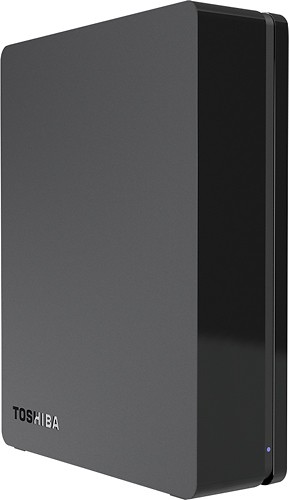
Customers praise the Canvio 3TB External USB 3.0 Hard Drive for its large storage capacity, ease of use, and affordable price. Many appreciate its compact size and quiet operation, along with the fast transfer speeds offered by the USB 3.0 connection. Positive feedback also highlights the straightforward setup process. A small number of users expressed some dissatisfaction with the included backup software.
This summary was generated by AI based on customer reviews.
Slow to boot
Posted .This reviewer received promo considerations or sweepstakes entry for writing a review.I like the storage but takes way to long to boot after hibernation. It would of gotten a better review if there was a way to shut off hibernation
No, I would not recommend this to a friendGood, except Windows 7 64-bit System Image Backup
Posted .This reviewer received promo considerations or sweepstakes entry for writing a review.Toshiba Canvio Desk 3 TB P/N HDWC130XK3J1 external hard drive fails running Windows 7 Home Premium 64-bit Service Pack 1 Windows System Image backup with error 0x8078002a then 0x8007045d. Windows 7 System Image errors 0x8078002a and 0x007045d occurs with many hard drives over 2 TB; do web searches. Keeping drive to save Windows 7 Media Center video recorder files. Has pads for horizontal or verticals use.
I would recommend this to a friend- Cons mentioned:Software
a questionable purchase
Posted .This reviewer received promo considerations or sweepstakes entry for writing a review.i question why i bothered to buy this external hard drive,and this particular brand, since buying ive had 1 problem after another, the software that was supposed to be there to backup wasnt installed, that should have been my first clue, also after attempting to format this hard drive several times, i finally ran a surface scan and lo and behold the number of bad sectors was more than i wanted to deal with, suffice it to say the MBR/MFT was corrupted and could not be brought back, so now im stuck with a brick, having lost the receipt im not even sure i could return this brick and get a replacement, this has not endeared me to best buy or them to me, having spent 109.00 and some change for a product that ive had less than 1 month at this point, im not only angry at myself but at toshiba as well, not certain if it would be better to just use this for door stop or a boat anchor...beginning to wonder if this was a discontinued item as well.... but its still on the site so will wait and see if i get any kind of response from best buy, b4 i decide to buy from them again or not..... one other fact that makes me wonder whether this is a discontinued item from toshiba is that the serial number and model number were not even recognized as a valid input, that really makes me wonder for sure....
No, I would not recommend this to a friend - Pros mentioned:Storage
Good price for 3TB
Posted .This reviewer received promo considerations or sweepstakes entry for writing a review.Works great for everything I needed to backup, lots of space
I would recommend this to a friend - Pros mentioned:Storage
grat for everyone
Posted .This reviewer received promo considerations or sweepstakes entry for writing a review.great price and maybe i can never be able to fill it completely , the packing its kind of cheap but the hard drive feels premium
I would recommend this to a friend Works like it should
Posted .This reviewer received promo considerations or sweepstakes entry for writing a review.I decided to rip my 400 cds and put them on a disk. This was a convenient size so I bought it for the music storage. It came with automatic backup software so I have that done once a week also. So far (2 months) everything works as it should and I'm happy.
I would recommend this to a friendWatch Out
Posted .This reviewer received promo considerations or sweepstakes entry for writing a review.I have a 1 TB Toshiba portable drive that I bought last year and have had zero problems with it. This 3 TB drive is another story. It isn't recognized by my LG blu-ray player. It isn't recognized by my digital TV converter. There are even times it's not recognized by my PC until I unplug the USB wire and plug it back in. I also have Seagate and Western Digital drives on top of the previously mentioned Toshiba 1 TB drive and ALL those work fine on all devices. If you have any plans of using this drive on anything other than a PC, you may want to think twice before buying it.
No, I would not recommend this to a friendUse it for duplicate storage. Keep the receipt.
Posted .This reviewer received promo considerations or sweepstakes entry for writing a review.I purchased this to back up a computer hard drive I had that appeared to be failing. For a few months, all was well. Contrary to what others have experienced here, I did not find the drive to be particularly responsive, but it worked well enough for data storage and backup purposes. One day, after only a few months of usage sitting atop a computer tower in an out-of-the-way location, the hard drive completely failed. It began clicking and would not read files. It eventually began beeping. Tapping the drive and freezing it produced no benefits. Toshiba's will require proof of purchase to fulfill a warranty claim, which according to the "customer service" representatives at the company, consists of either the original receipt or other documentation from the retailer that you'd purchased it new. If you lose the receipt and cannot get the retailer to provide you with documentation, you are out of luck. I would recommend against purchasing this product due to my example's unusually quick failure and Toshiba's rather poor customer service. If you intend to buy this hard drive #the price to data storage ratio looks attractive, doesn't it?# regardless of this recommendation, then use it to duplicate files you already have on another machine and IMMEDIATELY backup the data to other storage media. Do not rely upon it as the sole gatekeeper of anything important for any longer than necessary. In my case, I had unwisely reinstalled the operating system of the computer that appeared to be failing, so I did not have my original files. It was a very inconvenient and costly lesson in contingency planning. Remember that when it comes to data storage, two is one and one is none.
No, I would not recommend this to a friendRun away fast
Posted .This reviewer received promo considerations or sweepstakes entry for writing a review.Don't know where all the good reviews are coming from, but this thing is junk. It lasted about 6 months with infrequent usage, then went belly up. You can see it in the Device Manager, but can't initialize or talk to it anymore. Check the Toshiba site - it received a 1.3/5 rating, and only 5% would recommend it to a friend.
No, I would not recommend this to a friendBrand response from ToshibaStaff
Posted .Thank you for the review, Duck, and sorry to hear that you've experienced some sort of problem using your Canvio drive.
Since Windows' Device Manager does see the drive, you may be able to force a drive letter assignment to make the drive usable from the Control Panel > Computer Management > Disk Management tool.
Please let us know if that solves the problem. If not, you can initiate Toshiba's warranty replacement process at http://acclaim.toshiba.com anytime during its 3-year warranty.
Thanks again for the feedback and sorry for the trouble.
Great hard drive
Posted .This reviewer received promo considerations or sweepstakes entry for writing a review.So far so great. It has USB 3.0. Fast connection speed.
I would recommend this to a friend- Pros mentioned:Speed
Drive failed right out the box.
Posted .This reviewer received promo considerations or sweepstakes entry for writing a review.Bought this drive as the transfer drive for data that I was having professionally recovered from a failed external drive. I received a call from the technician at the recovery service and he informs me he has good news: They were able to recover 99.99% of the sectors from my failed drive, but there is some bad news; the drive that I brought in for the transfer has failed right out of the box. According to the tech about 4% of drives actually are dead on arrival in the box and this one was one of them. Returning for a LaCie, or Seagate alternative.
No, I would not recommend this to a friend Excellent Back Up Drive
Posted .This reviewer received promo considerations or sweepstakes entry for writing a review.Easy to set up and use. Lots of space for back ups and file storage!
I would recommend this to a friendPass on this
Posted .This reviewer received promo considerations or sweepstakes entry for writing a review.I had a Toshiba laptop and thought this HD would be most compatible. After 3 months, it began to malfunction and eventually crashed. My computer wasn't able to read the drive, Geek Squad got the same results. I backed up 6,000 photos, which I can't recover unless I spend $100-$200. I'll never buy another Toshiba hard drive.
No, I would not recommend this to a friendBrand response from ToshibaStaff
Posted .Thank you for the review, PBIphotography. and sorry to hear that your Canvio hard drive developed some sort of problem.
I understand the frustration of storage failures when data loss is involved, but you'll find that no standard warranties across the industry cover data recovery from failed drives. Since, unfortunately, no storage medium is immune to potential (or eventual) failure, we recommend always maintaining multiple copies of all important files on separate storage devices -- ideally stored in at least two different locations -- to safeguard your most valuable data.
You can initiate the warranty replacement process at acclaim.toshiba.com anytime during your Canvio drive's 3-year warranty term.
Thanks again for the feedback and sorry for the trouble.
One thing I hate
Posted .This reviewer received promo considerations or sweepstakes entry for writing a review.I reviewed this drive last year when I purchased two of these 3 TB external drives. I've had no problems but one issue fundamental to them DRIVES ME CRAZY. They go to sleep much too soon when they are in use. Thus, you are wanting to view to modify a file located on one of them, often something (such as a Photoshop file) that you just saved a few minutes ago. When you open or save the file again, low and behold the drive has gone into powersave mode and you have to wait ten seconds for it to power up again. PLEASE Toshiba, concern yourself more with the usefulness of your drives than with how many milliseconds of power saving you achieve by sending the drive into sleep mode constantly. I cannot wait to replace these drives with SSD's, or at least hybrid drives.
No, I would not recommend this to a friendTerrible
Posted .This reviewer received promo considerations or sweepstakes entry for writing a review.had this for about 6 months. a month or two ago it started to crash when usuing it. now the led just stays lit and doesnt register the connection
No, I would not recommend this to a friendBrand response from ToshibaStaff
Posted .Thank you for the review, bbob, and sorry to hear about the connection issues with your Canvio drive.
As a process of elimination to narrow down possible causes, I recommend connecting the drive to a different computer and, if it also doesn't work with that computer, try using a different USB cable.
If the drive proves to be defective you can initiate the warranty replacement process at acclaim.toshiba.com anytime during its warranty.
Thanks again for the feedback and sorry for the trouble.
Started "click of Death" after 1.5 yrs
Posted .This reviewer received promo considerations or sweepstakes entry for writing a review.I was told at a shop that tried to recovery my drive that Toshiba packaged Hitachi drives are terrible. I need to look for Western Digital Purple or Black drives if I were going to use this enclosure to put a drive back in, I was told. I may get a WD My Cloud drive in replacement. Advice to anyone with a drive though.. this drive may have been good, but I never dropped it, moved it carefully. Have data in different places. This was my backup drive till I thought I could just use it, which may happen to people who get such a large drive 9 times larger than my computer's drive. Not sure if any drive is dependable. This drive started clicking after I edited 400 pictures and they were lost. If you do get this, still use a backup.
No, I would not recommend this to a friendBackup hard drive failed after only 3 months
Posted .This reviewer received promo considerations or sweepstakes entry for writing a review.I had purchased this hard drive in February of 2013. I finally got around to setting it up and it worked great for transferring some files from an XP computer to a Win7. After about 2 months I starting having issues with the drive not being recognized by the new 7 machine. It now has gone into total failure and I will be losing data from it. Best buy wants to charge $99 for data recovery on a device that is still under warranty from Toshiba. Toshiba will not recover the data and will not be able to replace it and only offering a coupon for their website. I DO NOT recommend that you buy this drive. If you go to the Toshiba website, they have a list of reviews showing this drive has failed over and over again.
No, I would not recommend this to a friendGarbage
Posted .This reviewer received promo considerations or sweepstakes entry for writing a review.First off it goes to sleep too quick. Takes too long to wake up. MY 5 year old Seagate with the slow USB 2.0 wakes up quicker. That's not the problem though. That's just an annoyance. The problem is that after any shutdown or reboot of PC it says the hard drive needs to be formatted. It does not need formatted. It just needs the power unplugged and plugged back in. I have a Seagate Backup Plus 3 TB that I have to unplug and plug back in every time because PC does not realize it's there. I have grown use to that though and rarely shut off computer so it's not an issue because it never says I need to format it. It would just be too easy on the Toshiba for someone else to accidentally format it. On top of all that this drive mangled my drive letter paths after the first time I noticed the shutdown problem. I'm so glad this massive winter storm hit and made me decide to actually power down my PC for once. Taking this piece of junk back today! To get another Seagate. This drive has also caused my computer to completely lock up including while I wrote this review the first time! Junk!
No, I would not recommend this to a friendDied out after 2 days
Posted .This reviewer received promo considerations or sweepstakes entry for writing a review.Bought it on Oct 17, used for two days withouth any problem. On Oct 19, I've plugged it into my notebook and received the message that it needed to be formatted. Since it was working fine previously, I decided to restar the computer and see what happens... Well, it simply died, any power issue I guess, as not even its led was coming on... I was just nopw checking reviews at the Toshiba website, and it cannot get worse than that... http://www.toshiba.com/us/accessories/Storage/Desktop-and-Portable-Hard-Drives/3TB/customerReviewsAjax.jsp?poid=2000036409&order=desc&pop=true In other words: don't waste your money. I'm sorry that this product was not so great than the 1TB canvio portable. I'll never trust Toshiba products ever again!
No, I would not recommend this to a friendUnreliable
Posted .This reviewer received promo considerations or sweepstakes entry for writing a review.After about a week and as my Time Machine backup hard drive, all of a sudden, everything was gone. My partitions had lost their titles, their size settings, and all data. My Toshiba Canvio was basically the same as another person's 2T Canvio who posted a review here for that model. That person's did the exact same thing. Hmmm. It was a good deal, but it's a good thing I still had my old backup drive. This was a real shock! I'm within my 30 days, so I'll exchange it, but I'm pretty wary right now about getting another Toshiba Canvio.
No, I would not recommend this to a friend