Customer Ratings & Reviews

- Model:
- CDS610S
- |
- SKU:
- 5631801
Customer reviews
Rating 3.9 out of 5 stars with 29 reviews
(29 customer reviews)to a friend
Customers are saying
Customers love the Bamboo Slate Smartpad A5, Small for its ease of use. Many users find the product wonderful and easy to use. However, some customers have expressed dissatisfaction with the pen, describing it as not great.
This summary was generated by AI based on customer reviews.
- Cons mentioned:Pen quality
Rated 4 out of 5 stars
A great tool, easy to use
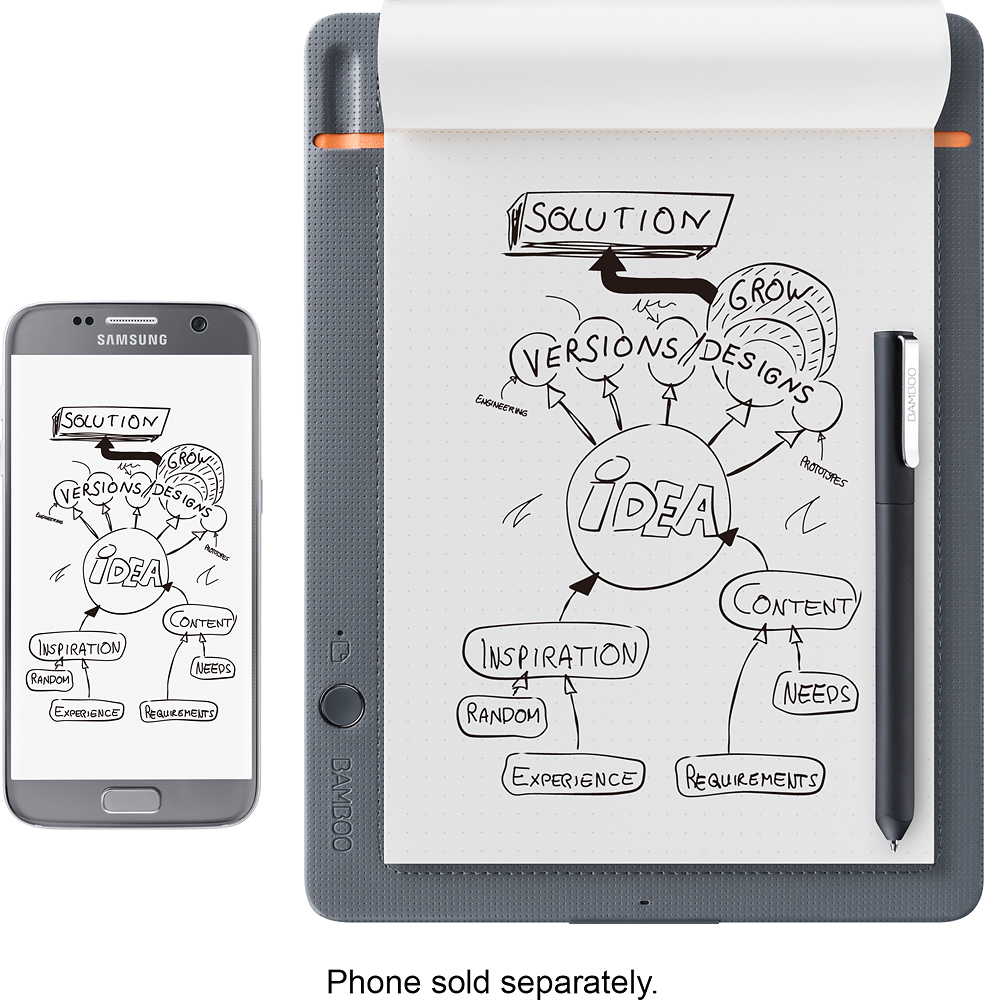
||Posted .This reviewer received promo considerations or sweepstakes entry for writing a review.I'll admit, this is a little bit of a niche product, since many people like to write on their tablets or phones or other interfaces now. But, there's still no comparing to writing on pen and paper, as far as feel, precision, and memory go. This product is great for people who sketch or take notes frequently and want to capture those things digitally. It is great for an initial design step, since you can capture the layers of an image as you draw them and then do the rest of the work on your computer. The images sync to InkSpace app, which is just ok right now but does the main things well. You can have it convert your handwriting to text and it does this very well for both print and cursive. It will also convert your work to many exportable formats, like pdf or graphics, and can then send directly to just about any app. I export pdfs to Evernote for business meetings, for example, or email images to people when needed. On the plus side, you can use any paper you want. Just no more than 80 sheets on the pad at a time. The major negative is that you must use the pen it came with, which is rollerball. You can buy refills from AutoPoint (the source of the Wacom refills), but they need to be D1 type and must have a copper or brass-colored tube. All in all, this is a nice tool as a casual sketch pad for a kid whose parents want to keep their art, or for a professional who uses handwritten notes and wants to store these. And yes, it is more precise than a Galaxy pen, active stylus, or Apple pencil - at least for now!
I would recommend this to a friend Rated 4 out of 5 stars
Works as Advertised
||Posted .This reviewer received promo considerations or sweepstakes entry for writing a review.Works great. Easy way to have notes/drawings stored digitally. The only bad part about this product is Inkspace. Digital pages can't be combined or merged, have to be exported individually. There's also no pressure sensitivity.... which is one of the reasons I purchased this to begin with. Works great with any paper otherwise - just wish there was an option for a pen that I actually liked. Aside from that, was definitely worth it for the 50$ I got it for.
I would recommend this to a friend- Cons mentioned:Pen quality
Rated 3 out of 5 stars
The Pen is okay
||Posted .This reviewer received promo considerations or sweepstakes entry for writing a review.This is actually a great item for note taking. I personally don’t like it as a drawing tool, the pen is not that great and a pen drawing tends to be very forgiving as an obvious sketch, once its downloaded to digital it just looks messy.
No, I would not recommend this to a friend - Cons mentioned:Pen quality
Rated 4 out of 5 stars
Nice for Freehand Drawing to Digital format
||Posted .This reviewer received promo considerations or sweepstakes entry for writing a review.My wife really enjoys using this device to sync drawings to a digital format. The size is great for sitting and drawing in any location and not having to be tied to a PC desk area. Overall I would say this is a nice device except she doesn't like the pen as much as the nice pens she usually uses for her drawing projects. It syncs to her iPhone easily and can transfer it out as a digital file for further uses.
I would recommend this to a friend Rated 4 out of 5 stars
Works Pretty Well
||Posted .This reviewer received promo considerations or sweepstakes entry for writing a review.I use the Slate to take notes in meetings. Combined with the Ink2Text feature of Inkspace, it does a pretty good job of translating my handwriting to text.
I would recommend this to a friendRated 5 out of 5 stars
Excellent tool for uploading my sketches
||Posted .This reviewer received promo considerations or sweepstakes entry for writing a review.There is something to be said for the tactile feel of drawing on paper. When you are then able to have your drawings/sketches/doodles simultaneously saved in a digital format, drawing becomes a lot more fun. This product enables you to take your doodles import them into programs like Photoshop or Illustrator and turn them into greater works of art with ease. The pen is sensitive to pressure. If there is any hang-up it's with the size of the drawing area, which is kind of small...but the size lends itself to being shoved easily into a backpack or even a big purse. So the tradeoff is logical.
I would recommend this to a friendRated 3 out of 5 stars
Is Good
||Posted .This reviewer received promo considerations or sweepstakes entry for writing a review.Great for the price. I would give it a 5, but the application for this device does not allow coloring. You have to use another application for that. And trying to connect it to the computer does not work either.
I would recommend this to a friend- Pros mentioned:Ease of use
Rated 5 out of 5 stars
Great gift for the Tween years
||Posted .This reviewer received promo considerations or sweepstakes entry for writing a review.We have a niece that is difficult to shop for. Not saying this in a negative way. Family leaves up north and we don't see them often. I remember that she liked to draw and she's 12-13. We heard back that she enjoyed it. I'm glad she did. That age is hard to shop for. Highly recommend for people who like to draw. It gives you the ability to transfer to the computer to edit.
I would recommend this to a friend - Pros mentioned:Ease of use
Rated 4 out of 5 stars
Tech meets Touch
||Posted .This reviewer received promo considerations or sweepstakes entry for writing a review.I have always taken notes with a pen but wished I could use a key board fast enough to do so. Now using a pen you can record and PDF your notes without scanning and filing.
I would recommend this to a friend - Pros mentioned:Ease of use
Rated 5 out of 5 stars
Bamboo
||Posted .This reviewer received promo considerations or sweepstakes entry for writing a review.Easy to use well worth the price. Light weight so you can take it everywhere.
I would recommend this to a friend Rated 4 out of 5 stars
Great hardware, so so software
||Posted .This reviewer received promo considerations or sweepstakes entry for writing a review.I purchased this for my son. He finds it useful for taking notes at college. He thinks the cloud integration is so-so.
I would recommend this to a friendRated 4 out of 5 stars
Looks good for beginner
||Posted .This reviewer received promo considerations or sweepstakes entry for writing a review.Although I haven't been able to use the tablet much, it seems ideal for the purpose that I purchased it for.
I would recommend this to a friend- Cons mentioned:Pen quality
Rated 3 out of 5 stars
drawing tablet
||Posted .This reviewer received promo considerations or sweepstakes entry for writing a review.my son picked this out, but we ended up returning it as he didn't realize that it was actual drawing paper. he was looking for something that he could use a stylus with & not a pencil. I'm sure if you're a pencil paper person this would be perfect, but my son is digital all the way
I would recommend this to a friend Rated 5 out of 5 stars
Cool product
||Posted .This reviewer received promo considerations or sweepstakes entry for writing a review.Love how it operates have had it awhile now and it still works great
I would recommend this to a friendRated 5 out of 5 stars
I bought this as a gift and my husband loves it.
||Posted .This reviewer received promo considerations or sweepstakes entry for writing a review.My husband loves this item, it does exactly what he wanted it for.
I would recommend this to a friendRated 4 out of 5 stars
Great solution
||Posted .This reviewer received promo considerations or sweepstakes entry for writing a review.Its very good have your notes everywhere or share with your partners with a mail or sending a text message. Only has a issue the pen is twist when you write it goes down, frequently you have to twist again in the notes.
I would recommend this to a friendRated 3 out of 5 stars
It's OK, but doesn't transfer great.
||Posted .This reviewer received promo considerations or sweepstakes entry for writing a review.This works OK for taking notes, but trying to sketch with this is not feasible. The transfer from the pen to the digitizer is not consistent.
No, I would not recommend this to a friendRated 5 out of 5 stars
Works like a champ!
||Posted .This reviewer received promo considerations or sweepstakes entry for writing a review.The device works well every time. Thus far, I have had no issues. Keep in mind that accessories (which are needed, such as ink and special paper) will be important down the road to keep using this item. I would recommend the device for education, journaling, business, and similar uses.
I would recommend this to a friendRated 3 out of 5 stars
Great concept but lacks functionality
||Posted .This reviewer received promo considerations or sweepstakes entry for writing a review.Great concept but needs to connect to One Note and Box. To much of a hassle to transfer to these apps/tools.
No, I would not recommend this to a friendRated 5 out of 5 stars
Great Smartpad
||Posted .This reviewer received promo considerations or sweepstakes entry for writing a review.Meets all expectations. I use it everyday with work. The battery lasts me all day. I am very pleased with this product.
I would recommend this to a friend