Customer Ratings & Reviews
- Model:
- CTH490PK
- |
- SKU:
- 4359300
Customer reviews
Rating 4.5 out of 5 stars with 130 reviews
(130 customer reviews)to a friend
Customers are saying
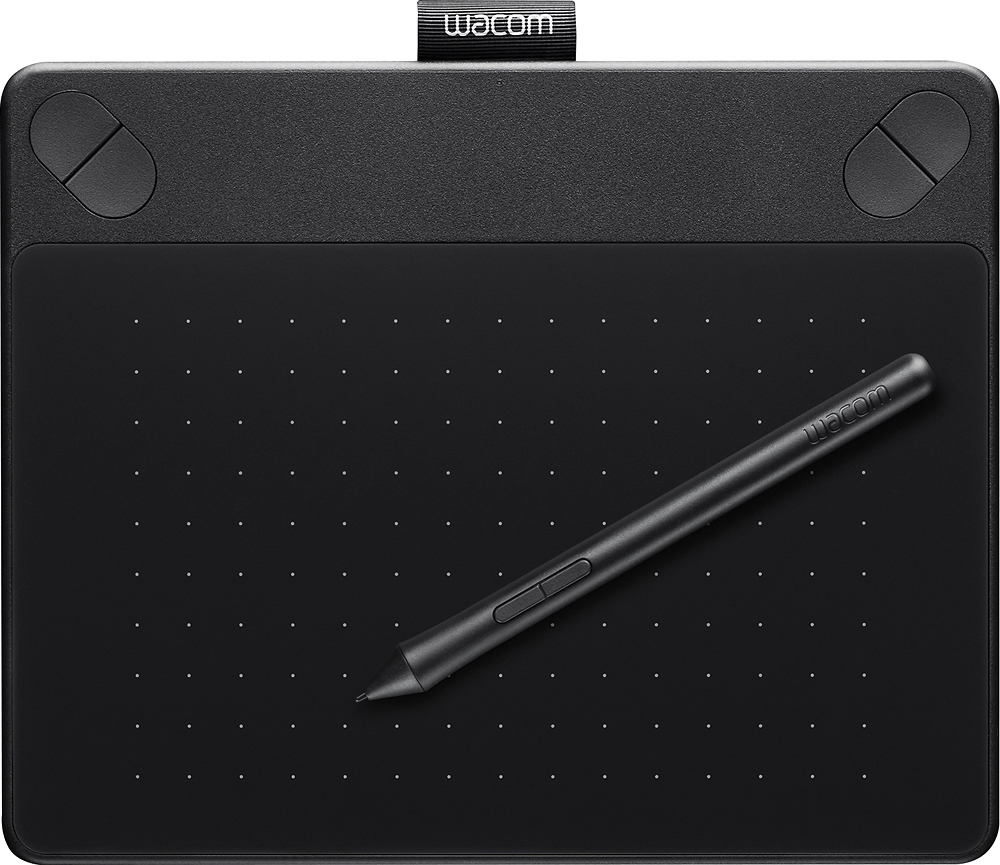
Customers consistently note the Intuos Photo Creative Small Pen and Touch Tablet's ease of use, affordability, and accuracy. Many customers find it particularly useful for photo editing, with some specifically mentioning the helpful selection tools in Photoshop. While some users mention there is a learning curve, most find it easy to use and connect.
This summary was generated by AI based on customer reviews.
Rated 4 out of 5 stars
Digital Pad for Artists
||Posted .This reviewer received promo considerations or sweepstakes entry for writing a review.Researched several brands and talked with BestBuy associates. I'm a photographer with 28 years of oil painting experience. I've designed logos for military and civilian organizations and know how to paint and draw the old fashion way. Combining the technology of computer science, the skills of an old school artist and the cost saving of not having to purchase supplies is the preferred method of working from my desk. The pad has already paid for itself with the signature logos I've created for photographers. Thanks Wacom and Best Buy.
I would recommend this to a friend- Pros mentioned:Price
Rated 4 out of 5 stars
great for its size and the price
||Posted .This reviewer received promo considerations or sweepstakes entry for writing a review.This graphics tablet is great for its size and the price. If you are interested in doing a lot of drawing and editing on screen, you will want to invest in one of the larger tablets. I use it to be able to do some basic writing and easily draw simple diagrams for math problems. It works very well for that. However, I could see someone who wants to do any kind of detail work becoming frustrated with the size. Work through the tutorials and play around in the software settings. It will be worth the little bit of time to soften the learning curve.
I would recommend this to a friend Rated 5 out of 5 stars
Works really well for the price category!
||Posted .This reviewer received promo considerations or sweepstakes entry for writing a review.I am really happy with this. The options to go fancier are basically either an iPad Pro with Apple Pen ($700+) or a larger tablet for more drawing surface area but those are essentially tablet computers with a big LCD screen and also run you the price of a good laptop computer ($700+) or a bigger version of this product for 5x the price! This item is basically $100 and you get 2048 levels of pressure sensitivity and a smaller drawing surface. Really can't compare the two but when you can get 80% of the functionality for 1/5 to 1/7 the price... how do you complain? tablets very responsive (if you remember to turn it on! it has an on/off switch which confounded me initially). .
I would recommend this to a friend- Pros mentioned:Ease of use
Rated 3 out of 5 stars
Good drawing tablet for a decent price
||Posted .This reviewer received promo considerations or sweepstakes entry for writing a review.We got this for my step son who wants to start drawing on computer instead of just paper and other media. Controls were quick and easy for him to learn and set up and he took to it right away! One thing to realize with this though, it does not come with the wireless option pre-installed. If you want wireless, look at the upgrades, or buy the kit (battery and wifi card) that is sold separately (though our local best buy did not have it in stock)
I would recommend this to a friend Rated 5 out of 5 stars
A necessity for any photographer
||Posted .This reviewer received promo considerations or sweepstakes entry for writing a review.Where can I start.. The Intuos photo tablet is probably the most helpful piece of editing hardware that I've ever used. It has multitouch control, allowing you to ditch the pen and have an external touchpad, but it also allows for easier zooming while using the pen as well. The pen is super responsive and the pressure-sensitive nib is a great addition for those looking to either edit soft or hard with the different apps that can use this technology. It also comes with a great alternative to lightroom, made by Corel that is definitely a great addition to the bundle, as well as a few other photo editing softwares such as Tonality Pro, and Snapheal Pro. And lastly, you can download vector software and use this tablet like a graphic design tablet, as it can use other software that allows you to draw and create works of art with only the cost of the various software to set you back a few extra dollars.
I would recommend this to a friendRated 5 out of 5 stars
Still learning but this is very helpful.
||Posted .This reviewer received promo considerations or sweepstakes entry for writing a review.The Wacom tablet is well worth learning. Use it both with LightRoom and photoshop. Gave me a big leap in my post processing learning curve.
I would recommend this to a friend- Pros mentioned:Compatibility
Rated 4 out of 5 stars
Good for what its designed for.
||Posted .This reviewer received promo considerations or sweepstakes entry for writing a review.The tablet works well with Lightroom and Photoshop, but as a first time tablet user, it has a steep learning curve. I will stick with it, though.
I would recommend this to a friend - Pros mentioned:Ease of use
Rated 5 out of 5 stars
wacom intuit pad
||Posted .This reviewer received promo considerations or sweepstakes entry for writing a review.the wacom pad is easy to install and to use, i wanted this pad for my photography work, so far i have been very please, it may not be expensive it just works that way....
I would recommend this to a friend - Pros mentioned:Ease of use
Rated 4 out of 5 stars
Nice tablet for young artists
||Posted .This reviewer received promo considerations or sweepstakes entry for writing a review.Love the tablet! We use it on the mac and pc. The only downside ....dont use the corel free download. Viruses are attached. We bought this with the assumption that we didnt need to purchase software to draw but it didn't.
I would recommend this to a friend - Pros mentioned:Price
Rated 5 out of 5 stars
Great Product and Value
||Posted .This reviewer received promo considerations or sweepstakes entry for writing a review.I am new to using Photoshop, and I researched allot of products before buy the Wacom Photo. It is packed with great features and at only $99.99 it is priced at a great value. A real plus is that it can be upgraded to wireless with additional hardware.
I would recommend this to a friend - Pros mentioned:Ease of use
Rated 5 out of 5 stars
A great tool for editing photos
||Posted .This reviewer received promo considerations or sweepstakes entry for writing a review.Being that this is my first tablet I expected there to be some learning curves but I also wanted my maiden voyage into editing my photos with a tablet to come from a reputable company and Wacom has been a leader in the market for years. The size of this tablet works great for me, will travel easily and I'm sure will eventually lead me to buying one of the more expensive, higher resolution models but if your looking for a table to graduate from a mouse and enhance your photo editing experience - this is it!
I would recommend this to a friend - Pros mentioned:Ease of use
Rated 5 out of 5 stars
Excellent tool
||Posted .This reviewer received promo considerations or sweepstakes entry for writing a review.I use the Wacom Intuos Tablet for editing my images in Photoshop CC 2015. It's ease of handling simple tasks like zooming in on the image eases my workflow considerably.
I would recommend this to a friend Rated 5 out of 5 stars
Very Nice!
||Posted .This reviewer received promo considerations or sweepstakes entry for writing a review.This writing tablet is great. I needed something last minute in order to present drawings for a video shoot. It has great response and is very comfortable to use.
I would recommend this to a friend- Pros mentioned:Ease of use
Rated 4 out of 5 stars
Love it!
||Posted .This reviewer received promo considerations or sweepstakes entry for writing a review.This tablet makes editing photos so much easier! I am still getting used to the techniques you have to use, but overall happy with the purchase!
I would recommend this to a friend - Pros mentioned:Ease of use
Rated 5 out of 5 stars
Easy to use
||Posted .This reviewer received promo considerations or sweepstakes entry for writing a review.Easy to set up. Easy to use. I am using it with a Mac and Lightroom. Seams to be making editing easier especially when coloring certain areas of of picture. It really did not take much time to get used to using
I would recommend this to a friend - Pros mentioned:Ease of use, Size
Rated 5 out of 5 stars
Great value
||Posted .This reviewer received promo considerations or sweepstakes entry for writing a review.I work at a company that uses the bigger more expensive version of this tablet to do retouching and I got one of these to just use at home for my own photos and I feel like this smaller one functions just as well as the next up and I love that it doesn't take up a lot of space on my desk. I would say it's good for beginners, students, professionals, hobbyists and whoever else wants a good tool to enhance their photo editing experience.
I would recommend this to a friend - Pros mentioned:Ease of use
Rated 5 out of 5 stars
the perfect working tool for a photographer
||Posted .This reviewer received promo considerations or sweepstakes entry for writing a review.the tablet worked out perfectly for me while on the road. Made it a lot easier to edit photos
I would recommend this to a friend - Pros mentioned:Ease of use
Rated 5 out of 5 stars
Great tool for Photo editing
||Posted .This reviewer received promo considerations or sweepstakes entry for writing a review.Great tool, wasn't sure if I needed to spring for IntuosPro but as it turns out this perfect. Light and easy to travel with.
I would recommend this to a friend - Pros mentioned:Ease of use
Rated 5 out of 5 stars
So far so good
||Posted .This reviewer received promo considerations or sweepstakes entry for writing a review.I am just getting started but it seems to be easy to use. It wasn’t hard for me to synchronize it to my laptop but I still need to figure out the software.
I would recommend this to a friend - Pros mentioned:Ease of use
Rated 5 out of 5 stars
Worth the price
||Posted .This reviewer received promo considerations or sweepstakes entry for writing a review.Just learning to use this device so it is good for me as a starter
I would recommend this to a friend