Customer Ratings & Reviews
- Model:
- PTH651
- |
- SKU:
- 1680758
Customer reviews
Rating 4.6 out of 5 stars with 307 reviews
(307 customer reviews)to a friend
Customers are saying
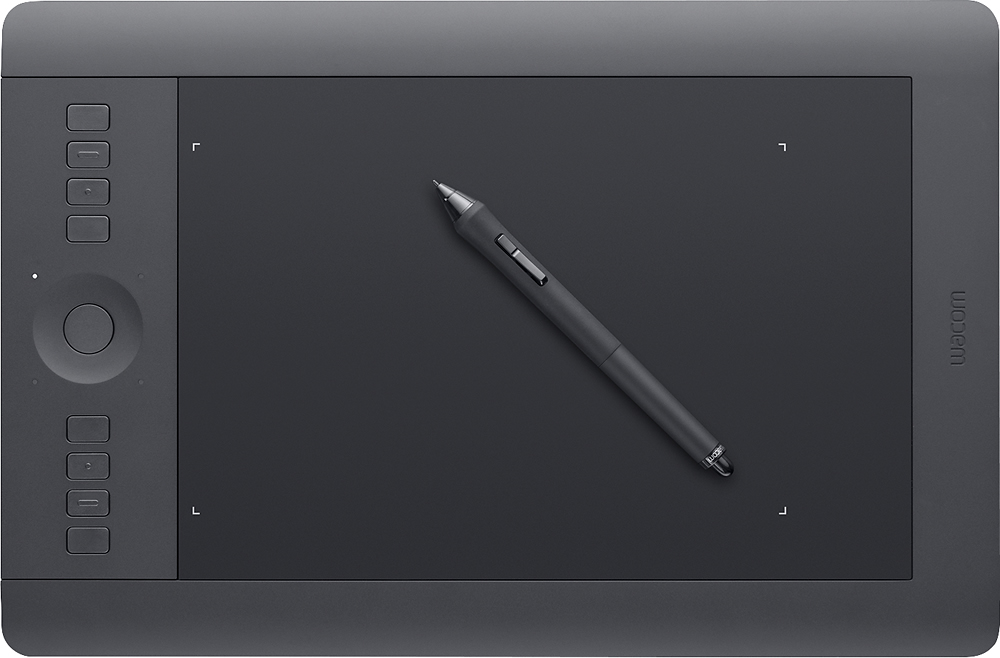
Customers are delighted by the Intuos Professional Pen and Medium Touch Tablet for its ease of use, wireless capability, and responsive performance. They find the tablet to be a great tool for photo editing, drawing, and upgrading from older Wacom models. While some users mention a learning curve, most agree that the tablet provides a natural feel and programmable buttons that enhance its functionality.
This summary was generated by AI based on customer reviews.
- Pros mentioned:Size
Rated 5 out of 5 stars
Yes
||Posted .This reviewer received promo considerations or sweepstakes entry for writing a review.I haven't gotten to use this tablet very much thus far, but my time with it has been excellent. It was much larger than I expected and I'm very pleased with it!
I would recommend this to a friend Rated 4 out of 5 stars
Overall very good
||Posted .This reviewer received promo considerations or sweepstakes entry for writing a review.Installation instructions were vague. Recommend only using online files.
I would recommend this to a friendRated 3 out of 5 stars
Difficulties in the setup process
||Posted .This reviewer received promo considerations or sweepstakes entry for writing a review.Difficult setup process even with Windows Vista. After following the setup instructions in the guide the url could not be reached for some reason. Have had the tablet since Christmas and still haven't been able to use it.
No, I would not recommend this to a friendRated 4 out of 5 stars
great pen tablet for designer
||Posted .This reviewer received promo considerations or sweepstakes entry for writing a review.excellent product, need to practice a lot to become an expert.
I would recommend this to a friendRated 4 out of 5 stars
Great product
||Posted .This reviewer received promo considerations or sweepstakes entry for writing a review.Works well. Had a little trouble at first with syncing to the Mac.
I would recommend this to a friendRated 5 out of 5 stars
Great tablet for digital art
||Posted .This reviewer received promo considerations or sweepstakes entry for writing a review.This tablet has everything my 15 year old son needs to make his art pieces look exactly as he imagines them. As a scholastic art and writing gold medalist he is able to use this tablet to add more details to all his pieces within Photoshop, Illustrator, Flash and In-design. My son actually has two of these in the event something were to go wrong with one. It's worth every penny if you are serious about digital art and will actually use it at least thrice a week.
I would recommend this to a friendRated 5 out of 5 stars
simple to use , even for beginner
||Posted .This reviewer received promo considerations or sweepstakes entry for writing a review.Excellent product support ,simple operation , good for beginner to professional , excellent software included .
I would recommend this to a friendRated 4 out of 5 stars
Tablete is the boom!
||Posted .This reviewer received promo considerations or sweepstakes entry for writing a review.Tablet is everything that was needed.Nice to have.
I would recommend this to a friend- Pros mentioned:Pressure sensitivity
Rated 5 out of 5 stars
Responsive, adjustable, a great tool!
||Posted .This reviewer received promo considerations or sweepstakes entry for writing a review.I love it! it is very responsive and can be adjusted to your liking of sensibility. I cannot imagine working without it!
I would recommend this to a friend - Pros mentioned:Ease of use
Rated 5 out of 5 stars
Best decision
||Posted .This reviewer received promo considerations or sweepstakes entry for writing a review.I am doing a lot of graphic design and having this wacom tablet is a life saver! It is very easy to use and charging it is a breeze.
I would recommend this to a friend - Pros mentioned:Wireless
Rated 5 out of 5 stars
Love this thing
||Posted .This reviewer received promo considerations or sweepstakes entry for writing a review.Use this tablet on my Mac to edit photo's in photoshop. Much better than using a mouse and the wireless option make this a dream to use
I would recommend this to a friend - Pros mentioned:Ease of use
Rated 5 out of 5 stars
Great tablet!
||Posted .This reviewer received promo considerations or sweepstakes entry for writing a review.Best tablet on the market for drawing in Adobe and even for use as a touchpad for your PC or laptop!
I would recommend this to a friend Rated 5 out of 5 stars
Great tool for graphic design classes
||Posted .This reviewer received promo considerations or sweepstakes entry for writing a review.I am a freshman college student enrolled in Web Design and Media Graphics. This is making my assignments so much easier to do rather than on my laptop with a mouse. I am still in the learning groove with the different points and touch but am sure I will greatly enjoy using it.
I would recommend this to a friend- Pros mentioned:Ease of use
Rated 5 out of 5 stars
Great for Photoshop!
||Posted .This reviewer received promo considerations or sweepstakes entry for writing a review.Makes photo retouching so much easier once one gets used to the absolute vs relative control aspects
I would recommend this to a friend - Pros mentioned:Ease of use
Rated 5 out of 5 stars
This product is awesome.
||Posted .This reviewer received promo considerations or sweepstakes entry for writing a review.I love this tablet. To be honest it works great and is super easy to setup and use.
I would recommend this to a friend Rated 5 out of 5 stars
Excellent! Something every artist should have
||Posted .This reviewer received promo considerations or sweepstakes entry for writing a review.I am excited to learn all that this tablet can offer and so far the WACOM Intuos Pro (Medium) Tablet has performed as I imagined it should. I find vast support communities and tutorials on the web and enjoy following along/reading/learning about this newest addition to my electronic toolkit. Best Buy, as always, provided prompt service and accurate shipping. I have yet to be disappointed by any purchase made through this Corporation. Their prices are always competitive (or lower than most) and their service is excellent.
I would recommend this to a friend- Pros mentioned:Ease of use
Rated 5 out of 5 stars
Great drawing pad
||Posted .This reviewer received promo considerations or sweepstakes entry for writing a review.I was looking for a drawing pad that would allow me to get back into drawing. This pad is exceptional and easy to use.
I would recommend this to a friend - Pros mentioned:Ease of use
Rated 5 out of 5 stars
Great for Art
||Posted .This reviewer received promo considerations or sweepstakes entry for writing a review.Easy to use for people with disabilities. We have great feedback from this item. I really recommend this item to anybody
I would recommend this to a friend - Pros mentioned:Ease of use
Rated 5 out of 5 stars
Great buy
||Posted .This reviewer received promo considerations or sweepstakes entry for writing a review.Didn’t have much experience with these types of products but was easy to use and works as expect
I would recommend this to a friend - Pros mentioned:Pressure sensitivity
Rated 4 out of 5 stars
its great to retouch photography
||Posted .This reviewer received promo considerations or sweepstakes entry for writing a review.The variety of points for the pen are great for different effects on the drawing tablet the amount of pressure points are so may that its precision is very accurate.
I would recommend this to a friend