3inus - Wired Mechanical Keyboard with 5-Port USB Hub (1xUSB-C/3xUSB-A/1xHDMI 4K@60Hz) for MacBook Pro/Air, Mac Mini, iMac - Brown Switch
3inus - Wired Mechanical Keyboard with 5-Port USB Hub (1xUSB-C/3xUSB-A/1xHDMI 4K@60Hz) for MacBook Pro/Air, Mac Mini, iMac - Brown Switch
Color
Brown SwitchRelated Item

Specifications
- Lighting TypeRGBForm FactorTenkeyless (TKL)Keyboard TechnologyMechanicalConnection TypeWired
- Key Specs
- Lighting Type: RGB
- Form Factor: Tenkeyless (TKL) (The size, arrangement, and physical configuration of the product.)
- Keyboard Technology: Mechanical (Type of technology that detects a key press.)
- Connection Type: Wired
- General
- Brand: 3inus
- Model Number: 944045
- Product Name: Wired Mechanical Keyboard with 5-Port USB Hub (1xUSB-C/3xUSB-A/1xHDMI 4K@60Hz) for MacBook Pro/Air, Mac Mini, iMac
- Color: Brown Switch
- Features
- Lighting Type: RGB
- Customizable Lighting: true
- Keyboard Features: All-in-one mechanical keyboard with built-in 5-port USB hub (4K HDMI), fast charging & data transfer. Features hot-swappable brown switches for smooth typing and full Mac/Windows compatibility.
- Functions
- Form Factor: Tenkeyless (TKL) (The size, arrangement, and physical configuration of the product.)
- Number Of Keys: 87
- Keyboard Technology: Mechanical (Type of technology that detects a key press.)
- Connectivity
- Connection Type: Wired
- Wired Connectivity: USB-C
- Number Of USB Port(s): 4 (The total number of USB ports including all generations and versions.)
- Number of Devices Connectable Simultaneously: 5
- Compatibility
- Operating System Compatibility: Windows, Mac
- Plug and Play Operation: true
- Dimensions
- Product Height: 13.92 inches (The out of box height of the item. Height is measured as the vertical distance from the bottom of the item to the top as it would be primarily used or placed.)
- Product Width: 4.88 inches (The out of box width of the item. Width is measured as the horizontal distance from one side of the item to the other as it would be primarily used or placed.)
- Product Depth: 1.73 inches (The out of box depth of the item. Depth is measured as the distance from the front of the item to the back as it would be primarily used or placed.)
- Product Weight: 32.45 ounces (The out of box weight of the item.)
- Warranty
- Warranty - Parts: 1 year
- Warranty - Labor: 1 year
- Other
- UPC: 765453986669
The KEBOHUB EE01 revolutionizes your desktop by integrating a full-featured mechanical keyboard with a powerful 5-port USB hub, eliminating cable clutter and streamlining your workflow. Its built-in hub includes a USB-C port, three USB-A ports, and an HDMI port supporting stunning 4K clarity, allowing you to connect storage drives, smartphones, and external displays while delivering up to 5V/5A fast charging and blazing-fast USB 3.0 data transfers. Designed for Mac and Windows, it features 100% hot-swappable quiet brown switches for a smooth and relaxing typing feel, with over 70 million clicks of durability. The set includes key pullers for easy customization. The package includes the keyboard, USB-C cable, key pullers, and user manual, providing a complete and productivity-boosting setup.
- All-in-One Design: Keyboard & 5-Port Hub Combined: This innovative mechanical keyboard integrates a full-featured 5-port USB hub to transform your workspace. Connect your phone, drives, and accessories directly through the keyboard while enjoying fast 5V/5A charging and blazing USB 3.0 data transfers—all without cable clutter.
- Unrivaled Connectivity with 4K HDMI Output: Equipped with USB-C, USB-A ports, and a dedicated HDMI port, the built-in hub supports stunning 4K video output. It’s a complete docking station that keeps your devices charged, connected, and ready for high-definition presentations or multitasking.
- Fully Hot-Swappable for Total Customization: Express your style with 100% hot-swappable switches. Two included key pullers let you easily swap keycaps and switches anytime, turning your keyboard into a personalized tool that refreshes your desktop and mood.
- Quiet Red Switches for Smooth Durability: Featuring 87 quiet linear red switches with low resistance and short travel, this keyboard offers a smooth, relaxing typing and gaming experience. Engineered for over 70 million clicks, it’s built to last far longer than conventional keyboards.
- Mac & Windows Compatible, Complete Package: Designed to work seamlessly with both macOS and Windows, this keyboard ensures broad compatibility. The set includes the keyboard, a USB-C cable, key pullers, and a user manual—everything you need to set up and boost productivity right away.
- All-in-One Design: Keyboard & 5-Port Hub Combined: This innovative mechanical keyboard integrates a full-featured 5-port USB hub to transform your workspace. Connect your phone, drives, and accessories directly through the keyboard while enjoying fast 5V/5A charging and blazing USB 3.0 data transfers—all without cable clutter.
- Unrivaled Connectivity with 4K HDMI Output: Equipped with USB-C, USB-A ports, and a dedicated HDMI port, the built-in hub supports stunning 4K video output. It’s a complete docking station that keeps your devices charged, connected, and ready for high-definition presentations or multitasking.
- Fully Hot-Swappable for Total Customization: Express your style with 100% hot-swappable switches. Two included key pullers let you easily swap keycaps and switches anytime, turning your keyboard into a personalized tool that refreshes your desktop and mood.
- Quiet Red Switches for Smooth Durability: Featuring 87 quiet linear red switches with low resistance and short travel, this keyboard offers a smooth, relaxing typing and gaming experience. Engineered for over 70 million clicks, it’s built to last far longer than conventional keyboards.
- Mac & Windows Compatible, Complete Package: Designed to work seamlessly with both macOS and Windows, this keyboard ensures broad compatibility. The set includes the keyboard, a USB-C cable, key pullers, and a user manual—everything you need to set up and boost productivity right away.
Whats Included
- 1 x KEBOHUB 87 Keys Compact TKL Wired Keyboard
- 4 x Extra Switch
- 51 x Bonus Keycap
- 1 x Switch Puller
- 1 x Keycap Puller
- 1 x User Manual
- 1 x KEBOHUB 87 Keys Compact TKL Wired Keyboard
- 4 x Extra Switch
- 51 x Bonus Keycap
- 1 x Switch Puller
- 1 x Keycap Puller
- 1 x User Manual
Q: Can the keyboard be used with Windows computers?
A: This keyboard is compatible with Windows operating systems.
Q: What is the weight of the keyboard?
A: The product weight is 32.45 ounces.
Q: How many keys does the keyboard have?
A: This keyboard has 87 keys.
Q: What type of switches are used in the keyboard?
A: This keyboard uses hot-swappable switches.
Q: What is the maximum number of devices that can be connected to the hub?
A: The KEBOHUB EE01 Wired Mechanical Keyboard has a 5-in-1 hub that allows you to connect up to five devices simultaneously.
Q: Does the keyboard have a built-in hub?
A: The keyboard does have a built-in hub.
Q: What are the dimensions of the keyboard?
A: The keyboard has a width of 4.88 inches, a height of 13.92 inches, and a depth of 1.73 inches.
Q: Is the keyboard compatible with Windows operating systems?
A: This keyboard is compatible with Windows operating systems.
Compare similar products
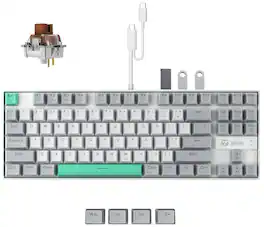
The KEBOHUB EE01 revolutionizes your desktop by integrating a full-featured mechanical keyboard with a powerful 5-port USB hub, eliminating cable clutter and streamlining your workflow. Its built-in hub includes a USB-C port, three USB-A ports, and an HDMI port supporting stunning 4K clarity, allowing you to connect storage drives, smartphones, and external displays while delivering up to 5V/5A fast charging and blazing-fast USB 3.0 data transfers. Designed for Mac and Windows, it features 100% hot-swappable quiet brown switches for a smooth and relaxing typing feel, with over 70 million clicks of durability. The set includes key pullers for easy customization. The package includes the keyboard, USB-C cable, key pullers, and user manual, providing a complete and productivity-boosting setup.
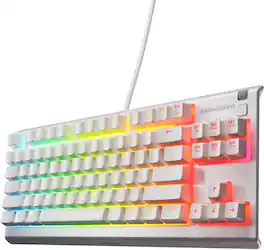
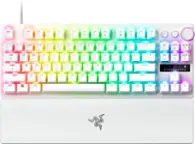
Built for the needs of gamers with premium features like a compact tenkeyless esports form factor, low friction whisper quiet gaming switches, gaming-grade keys, water and dust resistance for protection against spills and accidents, multimedia controls, and brilliant PrismSync lighting. Now available in White.
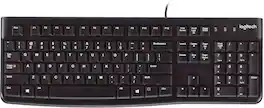
Logitech Keyboard K120. A better typing experience that's built to last. You’ll enjoy a comfortable and quiet typing experience thanks to the low-profile keys that barely make a sound and standard layout with full-size F-keys and number pad. With its thin profile, spill-resistant design, durable keys that can withstand up to 10 million keystrokes and sturdy, adjustable tilt legs, this sleek keyboard not only looks and feels good—it’s built to last. Setup is simple too. You just plug it into a USB port and start using it right out of the box. Bold, bright white characters make the keys easier to read. And it all comes with the high quality and reliability that’s made Logitech the global leader for keyboards and mice.
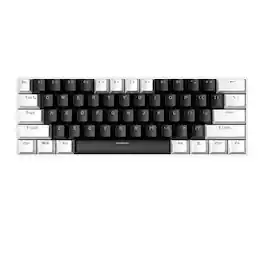
The Loheer keyboard utilizes a standard US 61-key layout compatible with Windows (XP through 11), Mac, Linux, and Android systems via a detachable Type-C interface. It features 21-key rollover to prevent signal conflicts during simultaneous keystrokes and offers a high 8K polling rate for rapid data transmission. Users can toggle between 17 distinct backlight modes using "FN+\" and adjust brightness or speed via "FN+[" / "FN+]" and "FN+;" / "FN+'" respectively. The device also includes multimedia shortcuts and specific function layers (F1-F12) accessible through the FN key combination for full-sized keyboard utility in a compact form factor.
Specs

- SteelSeries - Arctis Nova Pro Wireless Multi Gaming Headset for PC, PS5, PS4, Switch - White$299.99The price was $379.99


Reviews
This product doesn't have any reviews yet.