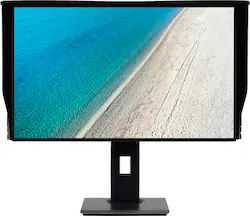
Acer - ProDesigner PE270K bmiipruzx 27" Ultra HD IPS Monitor (HDMI) - Black
- Key Specs
- Refresh Rate: 60Hz (The number of frames per second the device can produce natively without enhancement. Higher rates help produce smooth, seamless pictures.)
- Maximum Resolution: 3840 x 2160 (Maximum resolution refers to the highest number of pixels that a screen can process and display. Higher resolution signals produce more detailed images.)
- Response Time: 4 milliseconds (The speed at which pixels can change colors is called response time. It is measured in milliseconds (ms).)
- Panel Type: Not Applicable (Technology that affects response time and image quality.)
- Synchronization Technology: Not Applicable (Generally, these technologies allow syncing between a computer/console game's frame rate and the device's refresh rate for a smoother display without tearing.)
- Screen Size: 27 inches (Size of the screen, measured diagonally from corner to corner.)
- Display Connector(s): 2 x HDMI (The number and type of connectors used to connect to an external display.)
- General
- Brand: Acer
- Model Number: PE270K bmiipruzx
- Product Name: ProDesigner PE270K bmiipruzx 27" Ultra HD IPS Monitor (HDMI)
- Color: Black
- Operating System Compatibility: Not Applicable, Not Applicable, Not Applicable, Not Applicable, Not Applicable
- Display
- Refresh Rate: 60Hz (The number of frames per second the device can produce natively without enhancement. Higher rates help produce smooth, seamless pictures.)
- Maximum Resolution: 3840 x 2160 (Maximum resolution refers to the highest number of pixels that a screen can process and display. Higher resolution signals produce more detailed images.)
- Contrast Ratio: 100,000,000:1 (Measured difference between a displayed image's brightest whites and darkest blacks. The larger the first number, the more detail and color that can be displayed.)
- Response Time: 4 milliseconds (The speed at which pixels can change colors is called response time. It is measured in milliseconds (ms).)
- Display Type: LED
- Panel Type: Not Applicable (Technology that affects response time and image quality.)
- Synchronization Technology: Not Applicable (Generally, these technologies allow syncing between a computer/console game's frame rate and the device's refresh rate for a smoother display without tearing.)
- Aspect Ratio: 16:9 (The measurement of the width of a screen compared to the height of a screen, expressed as a ratio.)
- Curved Screen: false
- Brightness: 350 candela per square meter (A measure of the total light output.)
- Screen Size: 27 inches (Size of the screen, measured diagonally from corner to corner.)
- High Dynamic Range (HDR): true (An HDR-compatible 4K TV or other HDR-compatible product displays HDR video content when it's available from sources like 4K Ultra HD Blu-ray Discs and 4K streaming services.)
- Connectivity
- Number of HDMI Inputs (Total): 2
- Display Connector(s): 2 x HDMI (The number and type of connectors used to connect to an external display.)
- Compatibility
- Wall Mountable: true (The product is able to be secured to a wall. Some products are designed ready to mount, while others may require additional hardware/accessories for installation.)
- Features
- Adjustable Stand Height: true
- Built-In Webcam: false
- Integrated Speaker(s): true
- Dimensions
- Product Height With Stand: 20.55 inches
- Product Height Without Stand: 13.9 inches
- Product Width: 24.2 inches (The out of box width of the item. Width is measured as the horizontal distance from one side of the item to the other as it would be primarily used or placed.)
- Product Weight: 15.92 pounds (The out of box weight of the item.)
- Stand Included: true
- Certifications Listings & Approvals
- ENERGY STAR Certified: false (Devices carrying the ENERGY STAR service mark, such as computer products and peripherals, kitchen appliances, and other products, generally use 20% to 30% less energy than required by federal standards.)
- EPEAT Qualified: false (The Electronic Product Environmental Assessment Tool (EPEAT) was designed to provide an environmental assessment tool for purchasers. In order to qualify for EPEAT, a product must meet all 23 required criteria.)
- Other
- UPC: 193199474001
Acer ProDesigner PE270K bmiipruzx 27" Ultra HD (3840 x 2160) IPS Monitor (USB 3.1 Type-C, Display Port 1.2 & 2 - HDMI 2.0 Ports)
- Exceptional Detail with 4K2K Resolution: This giant 27" 4K display, with Ultra HD resolution (3840 x 2160) and in-plane switching (IPS) presents stunning, accurate colors from wide angles.
- Keep your Focus, Reduce Fatigue: The 3-sided hood with anti-glare material creates a shaded environment for your screen, preventing serious glare caused by ambient lighting and providing privacy.
- Realistic, Natural Images with HDR Xpert: Photographers, video editors and others working in creative industries will appreciate the monitor’s HDR Xpert technology, which enhances brightness for a vivid contrast between lights and darks, while covering a wider gamut for truly vibrant colors.
- New Depths of Color Accuracy: This monitor is ideal for color-critical projects producing accurate colors with a low Delta E < 1 and supporting 100% of the sRGB. An amazing monitor for graphic designers, photographers and film editors.
- Comfort and Protection: The monitor sports VisionCare technology which incorporates several technologies helps reduce eye strain and fatigue during long editing sessions.
Q: How does this monitor help with eye strain during long editing sessions?
A: This monitor features VisionCare technology, which helps reduce eye strain and fatigue during extended use.
Q: Does this monitor have built-in speakers?
A: Yes, the Acer ProDesigner PE270K monitor has integrated speakers.
Q: What is the screen size of this monitor?
A: The Acer ProDesigner PE270K has a screen size of 27 inches.
Q: What is the response time of this Acer monitor?
A: This monitor has a response time of 4 milliseconds.
Q: What is the maximum resolution supported by this monitor?
A: The maximum resolution supported by this monitor is 3840 x 2160.
Q: Does this monitor come with a stand?
A: Yes, the monitor includes a stand.
A: Simple. they are not comparable. Televisions have image processing chips built in designed to make the image POP with image processing for perceived sharpness and satisfying color often with oversaturation. image processing in a TV can be reduced or even eliminated by using settings like PC mode, however the panel is still designed to primarily operate in the TV environment. Comparatively, this is a Monitor designed to accurately represent the image as it is intended to be seen. It's sort of like the difference between Blasting a speaker system with really loud bass and tweaking your equalizer curve to emphasize what you *want* to hear, compared to a studio setup with reference speakers tuned to try to represent as closely as possible *exactly* what it sounded like when it was recorded. - neither method is wrong by the way, use the method that brings you the type of enjoyment you seek. and it is the same when it comes to displays. This is intended as a tool for color work. As an example: Often, when you print a picture, it doesn't look the same printed as it did on the screen because the colors not accurate and may seem to have shifted. or when you send your work to someone else, it doesn't look correct on Their display. (which could be the result of either one of the display's being out of calibration) Investing in a device like this, and other workspace devices to ensure your production tools are all calibrated within the same color space ensures people in a closed environment see your work as it is intended to be seen. It's actually really neat if it's the kind of device you are specifically after. but if you are just looking for a display to watch movies and play games on, you are correct that another TV or Monitor may be a much better value for you. I hope my reply was helpful - and which ever way you find yourself going in the future - I hope you enjoy your next display as much as I have been enjoying this one.
Q: Can this monitor be mounted vertically with it's existing in-the-box stand?
A: The stand must be removed before mounting. This model does not support pivoting to portrait mode.
People also viewed
 $1,049.99The price was $1,299.99
 $199.99The price was $279.99
 $1,599.99The price was $1,999.99
 $119.99The price was $139.99
 $754.99The price was $799.99
 $199.99The price was $346.99
 $299.99The price was $369.99



Today's top picks
- $299.99The price was $369.99
 $249.99The price was $329.99
 Clearance$156.99The price was $389.99