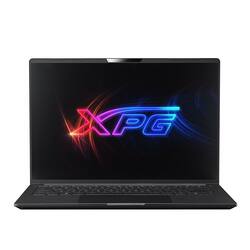
ADATA - XPG Xenia 14 14" Ultrabook Intel i7-1165G7 Intel Iris Xe 512TB SSD,16GB 3200MHz DDR4, 1080p Full HD IPS Gaming Laptop - Black
- Key Specs
- Screen Type: IPS
- Screen Size: 14 inches (Size of the screen, measured diagonally from corner to corner.)
- Screen Resolution: 1920 x 1200 (WUXGA) (Screens come in a range of resolutions (measured in pixels, horizontal x vertical). The higher the resolution, the greater the picture quality.)
- Touch Screen: false (Touch-screen devices make navigating more intuitive. Using a touch-screen display, you can do things such as tap to select, hold and drag to move items, swipe to scroll, and pinch to zoom.)
- Processor Model: Intel 11th Generation Core i7 (Your computer's processor is like its brain. Working in combination with system memory, the power of the processor determines the complexity of software you can run, how many programs you can have open at the same time, and how fast those programs will run. Most computers feature an AMD, Intel or Snapdragon processor.)
- Storage Type: SSD, SSD
- Total Storage Capacity: 16 gigabytes
- System Memory (RAM): 16 gigabytes (Random-access memory (RAM) is a computing device's short-term data storage, which allows active information to be accessed quickly. The size and type of RAM determines how efficiently the device can handle large amounts of information at one time. For example, gaming or video editing requires more RAM for optimal performance.)
- Graphics: Intel Iris Xe Graphics (Often referred to as a "graphics processing unit" (GPU), this device is responsible for displaying image content and decoding/encoding video content in programs and games.)
- Battery Life (up to): 10 hours (Battery life will vary depending on the product configuration, product model, applications loaded on the product, power management setting of the product and the product features used by the customer. As with all batteries, the maximum capacity of this battery will decrease with time and usage.)
- Backlit Keyboard: true (Integrated lights allow for visibility of the keys in low-light conditions.)
- General
- Brand: ADATA
- Model Number: XENIA14I7G11GXELX-BKCUS
- Product Name: XPG Xenia 14 14" Ultrabook Intel i7-1165G7 Intel Iris Xe 512TB SSD,16GB 3200MHz DDR4, 1080p Full HD IPS Gaming Laptop
- Color: Black
- Year of Release: 2021
- Display
- Display Type: LCD
- Screen Type: IPS
- Screen Size: 14 inches (Size of the screen, measured diagonally from corner to corner.)
- Screen Resolution: 1920 x 1200 (WUXGA) (Screens come in a range of resolutions (measured in pixels, horizontal x vertical). The higher the resolution, the greater the picture quality.)
- Touch Screen: false (Touch-screen devices make navigating more intuitive. Using a touch-screen display, you can do things such as tap to select, hold and drag to move items, swipe to scroll, and pinch to zoom.)
- Processor
- Processor Brand: Intel
- Processor Model: Intel 11th Generation Core i7 (Your computer's processor is like its brain. Working in combination with system memory, the power of the processor determines the complexity of software you can run, how many programs you can have open at the same time, and how fast those programs will run. Most computers feature an AMD, Intel or Snapdragon processor.)
- Processor Model Number: 11th Gen Intel® Core TM i7-1165G7
- Storage
- Storage Type: SSD, SSD
- Total Storage Capacity: 16 gigabytes
- Solid State Drive Capacity: 512 gigabytes (The amount of data that can be stored on the device's solid state drive (SSD). SSD is a flash-based storage with faster speeds than a hard disk drive (HDD).)
- Solid State Drive Interface: PCIe 4.0 (Connects the solid state drive to the host system. PCI and SATA interfaces are the most common; PCI interfaces are typically faster, but SATA interfaces are compatible with a wider range of systems.)
- Hard Drive RPM: 3900 revolutions per minute (A hard drive's data is stored on disks, or platters, that spin while transferring information to the host system. The higher the RPM, the faster the hard drive's performance.)
- Memory
- System Memory (RAM): 16 gigabytes (Random-access memory (RAM) is a computing device's short-term data storage, which allows active information to be accessed quickly. The size and type of RAM determines how efficiently the device can handle large amounts of information at one time. For example, gaming or video editing requires more RAM for optimal performance.)
- Type of Memory (RAM): DDR4 (Each type of RAM delivers a different level of speed, bandwidth, energy efficiency and performance.)
- System Memory RAM Speed: 3200 megahertz (How fast the information-storing hardware operates. The faster the RAM, the faster memory can be transferred to other system components. Ultimately, faster RAM improves operational efficiency.)
- Number of Memory Sticks Included: 2
- System Memory RAM Expandable To: 64 gigabytes (Adding more random-access memory (RAM) to a computer speeds up performance and improves efficiency. Upgrades to memory are limited by the number of expansion slots for additional RAM and existing RAM installed on the device.)
- Graphics
- Graphics Type: Integrated (Dedicated graphics uses a separate graphics card for processing video images. Because it does not use memory from the system's RAM, there is no extra burden on the CPU and graphics are processed more efficiently. Integrated graphics shares system RAM to process video images.)
- GPU Brand: Intel
- Graphics: Intel Iris Xe Graphics (Often referred to as a "graphics processing unit" (GPU), this device is responsible for displaying image content and decoding/encoding video content in programs and games.)
- Compatibility
- Operating System: Windows 10 Home (The operating system manages all software and hardware, including files, memory and connected devices. Most importantly, it lets you interact with your device and your programs in a visual way; otherwise, you'd be typing computer code to get anything done.)
- Power
- Battery Life (up to): 10 hours (Battery life will vary depending on the product configuration, product model, applications loaded on the product, power management setting of the product and the product features used by the customer. As with all batteries, the maximum capacity of this battery will decrease with time and usage.)
- Expansion
- Number of M.2 Slots: 2 (This interface is most commonly used for high-speed solid state drives (SSDs), and is often used in laptops due to its small size.)
- Number Of Internal 2.5" Bays: 0
- Camera
- Front-Facing Camera: true
- Front Facing Camera Video Resolution: 720p (Refers to the number of pixels, both horizontally and vertically, used by the camera facing the user to capture video. The higher the resolution the finer the video detail that can be seen.)
- Built-In Microphone: true
- Features
- Backlit Keyboard: true (Integrated lights allow for visibility of the keys in low-light conditions.)
- Casing Material: Magnesium alloy
- Dimensions
- Product Height: 12.15 inches (The out of box height of the item. Height is measured as the vertical distance from the bottom of the item to the top as it would be primarily used or placed.)
- Product Width: 0.6 inches (The out of box width of the item. Width is measured as the horizontal distance from one side of the item to the other as it would be primarily used or placed.)
- Product Depth: 8.5 inches (The out of box depth of the item. Depth is measured as the distance from the front of the item to the back as it would be primarily used or placed.)
- Product Weight: 2.3 pounds (The out of box weight of the item.)
- Certifications Listings & Approvals
- ENERGY STAR Certified: false (Devices carrying the ENERGY STAR service mark, such as computer products and peripherals, kitchen appliances, and other products, generally use 20% to 30% less energy than required by federal standards.)
- EPEAT Qualified: false (The Electronic Product Environmental Assessment Tool (EPEAT) was designed to provide an environmental assessment tool for purchasers. In order to qualify for EPEAT, a product must meet all 23 required criteria.)
- Included
- Included Software: True
- Other
- UPC: 842243025057
Experience a new level of performance with the new XPG Xenia 14 Lifestyle Ultrabook. Powered by an Intel 11th Gen Core i7 Processor with 4 cores and 8 threads, the Xenia 14 allows you to work on demanding projects that require desktop-strength performance all while also performing well enough for light gaming. XPG brings the latest PCIe Gen4 Solid State Drive into the Xenia 14 with the 512GB XPG GAMMIX S50 LITE. Multi-tasking is a breeze thanks to the 16GB of 3200MHz DDR4 Memory, expandable up to 64GB of SO-DIMM Memory with its 2-dimm slots that can hold a capacity of 32GB per slot. Measuring only 15mm thick, the Xenia 14 is built in a stylish and lightweight magnesium alloy chassis that comes in at only .99kg (2.2lbs).
- Display: IPS 14” 16:10 FHD-60Hz, 1920 x 1080, 92% Screen ratio, 400nits, sRGB 100%
- Processor: Intel 11 Gen CPU & Intel Iris Xe GPU
- Storage: PCIe Gen 4 XPG GAMMIX S50 LITE 512GB SSD, DRAM: DDR4-3200MHz 16GB*1 (expandable up to 64GB at 3200MHz speed)
- Versatile IO ports: Thunderbolt™ 4 (USB 4.0) *1 ,USB 3.0 Gen 2 Type-C (with DP1.4)*1, USB 3 Gen1 Type-A *2, HDMI 2.0b, Card Reader (UHS-I, SD/SDHC/SDXC), Audio 3.5mm Combo Jack, Power connector
- Case: Magnesium alloy chassis and 970g weight
- Display: IPS 14” 16:10 FHD-60Hz, 1920 x 1080, 92% Screen ratio, 400nits, sRGB 100%
- Processor: Intel 11 Gen CPU & Intel Iris Xe GPU
- Storage: PCIe Gen 4 XPG GAMMIX S50 LITE 512GB SSD, DRAM: DDR4-3200MHz 16GB*1 (expandable up to 64GB at 3200MHz speed)
- Versatile IO ports: Thunderbolt™ 4 (USB 4.0) *1 ,USB 3.0 Gen 2 Type-C (with DP1.4)*1, USB 3 Gen1 Type-A *2, HDMI 2.0b, Card Reader (UHS-I, SD/SDHC/SDXC), Audio 3.5mm Combo Jack, Power connector
- Case: Magnesium alloy chassis and 970g weight
Q: When running games, how badly does this computer overheat>
A: Hello, Thank you for your inquiry. This product does well when running games, it sports an i7 and it's graphics is rendered by the Intel Iris Xe graphics. The computer will operate at normal operating temperatures for a majority of your gaming experience , however, please note that operating temperatures can vary depending on the amount of background processes opened, the resources demanded by the game, or if the laptop is running on a surface that does not dissipate heat properly (Like a bed). For best operating procedures, please use a hard surface like a table to operate your computer, be in an area with proper ventilation, and manage the amount of available processes are opened through task manager. If you would like the newest advancements in a gaming laptop, I also recommend our XPG Xenia 15KC. Hopefully this helps provide you with additional insight into your purchases. Thank you! Sincerely, The ADATA/XPG Team
A: Hello, Thank you for your inquiry. We apologize for the issue you have had with our product. The best way to resolve the issue is to make sure you are currently up to date on the current version of Windows. You will not need an activation code as it is already installed on your laptop's SSD. This method will connect you to a Microsoft server and resolve the issue. To update: Please type in windows update on the search bar. Click on updates. Please ensure you are updated to the current version of windows. If the issue persists, please contact Microsoft Chat support as this might be an issue with their servers. They will be able to activate your windows for you. The process takes about 15 minutes. Please use the attached link for an easy step by step guide: https://www.groovypost.com/howto/activate-windows-10-license-microsoft-support/ Hopefully this helps answer your question. Thank you! Sincerely, The Adata/XPG team
Q: How do you boot into BIOS with this laptop?
A: Hello, Thank you for your inquiry. You can boot into bios when your start your computer, you will have a small window of time to press F10 key on your laptop for the bios boot menu. Depending on what you task you are currently trying to do you may also press F2 for BIOS setup. Thank you! Sincerely, The ADATA/XPG team
A: undefined
A: Hello Tom, Apologies for the mistake, we have requested this drives information to be rectified, it should say "512GB", and not "512TB". We apologize for any inconvenience this may have caused. Regards, ADATA Team
A: Hello Sir, This is not a BIOS issue, rather it is a system feature that is auto allocated by the Windows 10 and Windows 11 operating system to conserve power and functionality. You may always choose to adjust these settings. Please follow the directions below: Open the Settings app. Click System, then choose Power & sleep. On the far right, click Additional power settings. From the window that appears, click Choose when to turn off the display. Take a look at the advanced power settings as well. Click Change advanced power settings, then expand each section to verify if sleep is allowed on each (none of them should say "Never"). If you have any further questions or concerns, please feel free to reach out to us through the ADATA website. Thank you! Sincerely, The ADATA/XPG Team
Q: Is this compatible with Debian or any Linux distribution?
A: Hello, Thank you for your inquiry. All our laptops come with Windows preinstalled onto the SSD. You may choose to switch to a linux based distribution after you have wiped the drive of the Windows OS. You may install linux based distribution from a thumb drive. Hopefully this helps provide you with a little more insight. Thank you. Sincerely, The ADATA/XPG team


























