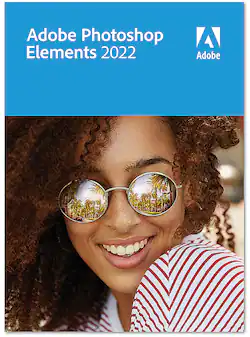
Adobe - Photoshop Elements 2022 - Windows [Digital]
- Key Specs
- Operating System Compatibility: Windows
- Software Format: Digital (Physical software requires a disc, cartridge, etc. be inserted into the gaming console or computer to download and/or operate the software. Digital software allows for downloading and/or playing the software on the gaming console or computer without a physical disc, cartridge, etc. Physical (Download Code Only) software is purchased in physical form with a code that allows for downloading and/or playing the software on the gaming console or computer without a physical disc, cartridge, etc.)
- General
- Brand: Adobe
- Model Number: ADO951800V533
- Product Name: Photoshop Elements 2022
- Publisher: Adobe
- Features
- Software Subject: Photo editing
- Compatibility
- Operating System Compatibility: Windows
- Bit Version: 64-bit
- Software Format: Digital (Physical software requires a disc, cartridge, etc. be inserted into the gaming console or computer to download and/or operate the software. Digital software allows for downloading and/or playing the software on the gaming console or computer without a physical disc, cartridge, etc. Physical (Download Code Only) software is purchased in physical form with a code that allows for downloading and/or playing the software on the gaming console or computer without a physical disc, cartridge, etc.)
- Requirements
- System Requirements: Microsoft Windows 10 version 2004 or later (version 21H1 recommended); Microsoft Windows 11 (version 21H2); 64-bit versions only; Windows 7, Windows 8.1 not supported (The software that a product must have for it to be able to integrate with another product.)
- Other
- UPC: 883919283203
Bring out your creativity to share your life stories. Adobe Sensei AI technology* and automated options do the heavy lifting so you can instantly turn photos into art, warp photos to fit any shape, and more. Add moving overlays or 3D camera motion to take your photos to a whole new level, and save them as MP4s for easy sharing on social. Grow your skills with 60 Guided Edits that step you through how to create perfect pet pics; extend, remove, or replace photo backgrounds; and more. Effortlessly organize your photos, and craft personalized creations like dynamic photo and video slideshows with all-new styles and inspirational quote graphics. Transform your favorite photos into gallery-quality wall art, beautiful prints, and unique keepsakes with the built-in prints and gifts service.
†And enjoy an updated look that makes the software even easier to use and navigate.
*Adobe Sensei is the technology that powers intelligent features across all Adobe products to dramatically improve the design and delivery of digital experiences, using artificial intelligence and machine learning in a common framework.†FUJIFILM Prints & Gifts service is available in the U.S. only.
- Automation makes editing easy: Your best photos are just a click away. Adobe Sensei AI technology and automated options do the heavy lifting so you can focus on bringing your vision to life.
- Instantly turn photos into art: In one click, transform your photos with effects inspired by famous works of art or popular art styles. Choose from amazing artistic effects that you can apply to all or part of your photo, and easily adjust the results for exactly the look you want.
- Create not-so-still photos: Add moving overlays like snowflakes and sparkles, and create fun animated frames. Then save your photos as MP4s to share on social and more.
- Warp photos to fit any shape: Place one photo inside another by wrapping it around an object like a coffee mug or fitting it inside shapes like the lenses of your subject’s sunglasses. There's no limit to what you can create!
- Add motion to your static images: With one click, transform your favorite shots into moving photos—fun animated MP4s and GIFs with 2D and 3D camera motion. It’s easy and perfect for sharing on social media.
- Fine-tune face tilt: Make sure everyone in your photo is looking in the right direction by automatically adjusting the position of a person’s face. It’s great for selfies!
- Adjust facial features: Get the perfect shot every time by automatically opening closed eyes, turning frowns upside down, and more.
- Smooth skin automatically: Make sure everyone looks their best. Easily soften skin texture without making it look unnatural.
- Easily grow your skills with Guided Edits: Flawless photos are just steps away. Simply follow along to make basic tweaks, artistic creations, and everything in between with 60 Guided Edits.
- Create perfect pet pics: Make your furry and feathered friends look their best. Frame them up just right, adjust color and lighting, select and refine detailed edges like fur, fix pet-eye, and remove collars, and leashes in a few simple steps.
- Extend photo backgrounds: Create a stunning landscape or reposition your subject for the perfect social postby easily extending your photo’s background. The magic of Content-Aware Fill technology makes it all possible.
- Perfect your landscapes: Easily replace skies, remove haze, and erase unwanted objects to create epic outdoor scenes. With this easy Guided Edit, you’re sure to create the perfect adventure photo every time.
Q: Gee - I don't want to pay monthly. So is it a lifetime license where you never have to pay again?
A: Mine was a lifetime license.
A: Adobe Photoshop Elements is a 'basic' version of the Photoshop image editor. This is an editing program, not a tutorial, although there are tutorials included. Full featured enough for me, to be sure. If you're looking for a image editor to handle most challenges, this will probably work for you. And you own the program, not a subscription as with the full Photoshop software. Can't tell you what it's missing from the full Photoshop version, but I've been using it for years and haven't been disappointed.
A: New in this version is a tool for selection of the subject of the photo, and by inverting this selection one can then modify the background in any way desired. This tool works very well, and is very simple to use.
A: Not sure… online version is SUPER easy… exchange it!!
A: Not sure, honestly, as Adobe makes it extremely difficult or they just don't answer.
Q: I have a laptop and desktop…Can I use this on more than one computer
A: I don't know a lot, but I'm pretty sure you can't. I don't log in or anything. It's just software on my laptop.
A: I have this version installed on my laptop and my desktop. I believe it could be put on more than 2 computers as long as you have the code provided by Best Buy when you purchase the digital program.
People also viewed
Today's top picks
 $479.99The price was $729.99
 $199.99The price was $249.99
 $789.99The price was $1,049.99
 $799.99The price was $1,199.99