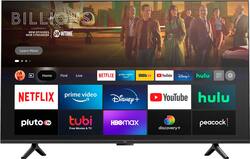
Amazon - 43" Class Omni Series 4K UHD Smart Fire TV hands-free with Alexa
- Key Specs
- Display Type: LED
- Resolution: 4K (2160p) (Refers to the number of pixels, both horizontally and vertically, used to capture video/images. The higher the resolution the finer the detail that can be seen.)
- Screen Size Class: 43 inches (The group size measurement of a screen. This differs from a screen size measured diagonally from corner to corner.)
- High Dynamic Range (HDR): true (An HDR-compatible 4K TV or other HDR-compatible product displays HDR video content when it's available from sources like 4K Ultra HD Blu-ray Discs and 4K streaming services.)
- LED Panel Type: Standard LED
- Backlight Type: Direct Lit (Edge-lit: lights are on the edges of the display with ~10 zones of vertical LEDs. Direct-lit: lights are on the edges and behind the screen for more light uniformity than Edge-lit. Full array: direct-lit with local dimming for greater contrast with up to 100 zones of LEDs.)
- Refresh Rate: 60Hz (The number of frames per second the device can produce natively without enhancement. Higher rates help produce smooth, seamless pictures.)
- Smart Platform: Fire TV (Just like a computer, a smart TV needs an operating system (also called a smart platform) in order to access the Internet, connect with entertainment apps, and play streaming content. Some common TV smart platforms are; Roku TV, Android TV, and Chromecast.)
- Featured Streaming Services: Prime Video, Disney+, Netflix, Hulu, YouTube, HBO Max (Streaming services and other programs are available on this device. Keep in mind, there may be more services supported than just those shown here.)
- Number of HDMI Inputs (Total): 4
- Voice Assistant Built-in: Amazon Alexa (A digital assistant built into the device that uses voice commands to answer questions and control smart devices.)
- General
- Brand: Amazon
- Model Number: 4K43M600A/B08T6DZ81T
- Product Name: 43" Class Omni Series 4K UHD Smart Fire TV hands-free with Alexa
- Color: Black
- Series: Omni Series (Part of a group of the same product type with similar features.)
- Model Year: 2021
- Dimensions
- Product Height With Stand: 24.2 inches
- Product Width: 38 inches (The out of box width of the item. Width is measured as the horizontal distance from one side of the item to the other as it would be primarily used or placed.)
- Product Depth With Stand: 8.7 inches
- Product Height Without Stand: 22.6 inches
- Product Depth Without Stand: 3.6 inches
- Product Weight Without Stand: 15.5 pounds
- Stand Width: 31 inches (The horizontal measurement of the stand/base, or the distance from the outside of one leg to the outside of the opposite leg, as it is attached to the product.)
- Adjustable Stand Width: false (Whether the stand can adjust to have more than one measurement either between the legs or the base itself.)
- Display
- Display Type: LED
- Resolution: 4K (2160p) (Refers to the number of pixels, both horizontally and vertically, used to capture video/images. The higher the resolution the finer the detail that can be seen.)
- Screen Size: 43 inches (Size of the screen, measured diagonally from corner to corner.)
- Screen Size Class: 43 inches (The group size measurement of a screen. This differs from a screen size measured diagonally from corner to corner.)
- High Dynamic Range (HDR): true (An HDR-compatible 4K TV or other HDR-compatible product displays HDR video content when it's available from sources like 4K Ultra HD Blu-ray Discs and 4K streaming services.)
- Picture Quality Enhancement Technology: Active HDR
- LED Panel Type: Standard LED
- Backlight Type: Direct Lit (Edge-lit: lights are on the edges of the display with ~10 zones of vertical LEDs. Direct-lit: lights are on the edges and behind the screen for more light uniformity than Edge-lit. Full array: direct-lit with local dimming for greater contrast with up to 100 zones of LEDs.)
- Curved Screen: false
- Refresh Rate: 60Hz (The number of frames per second the device can produce natively without enhancement. Higher rates help produce smooth, seamless pictures.)
- Features
- Remote Control Type: Voice control
- Smart Capable: true (Smart, or smart-capable devices are able to connect directly to your home network in order to stream content from the Internet, run Internet-based apps, or connect to other smart devices.)
- Smart Platform: Fire TV (Just like a computer, a smart TV needs an operating system (also called a smart platform) in order to access the Internet, connect with entertainment apps, and play streaming content. Some common TV smart platforms are; Roku TV, Android TV, and Chromecast.)
- Featured Streaming Services: Prime Video, Disney+, Netflix, Hulu, YouTube, HBO Max (Streaming services and other programs are available on this device. Keep in mind, there may be more services supported than just those shown here.)
- TV Tuner: Digital (The ATSC TV Tuner is a component built into conventional TV sets or other devices for receiving over-the-air broadcast TV without a cable/satellite box. Digital tuners may be purchased separately and connected to a device if it does not have one built in.)
- Connectivity
- Number of HDMI Inputs (Total): 4
- RF Antenna Input: true (This input is used to connect devices such as antennas or cable boxes to a TV via a coaxial cable.)
- Number Of USB Port(s) (Total): 1 (The total number of USB ports including all generations and versions.)
- Compatibility
- VESA Wall Mount Standard: 300mm x 300mm (VESA wall mount standards refer to the spacing of screw holes built into a TV in order to fit with standard TV wall mounts. These standards are implemented into most TVs and monitors.)
- Voice Assistant Built-in: Amazon Alexa (A digital assistant built into the device that uses voice commands to answer questions and control smart devices.)
- Power
- ENERGY STAR Certified: false (Devices carrying the ENERGY STAR service mark, such as computer products and peripherals, kitchen appliances, and other products, generally use 20% to 30% less energy than required by federal standards.)
- EPEAT Qualified: false (The Electronic Product Environmental Assessment Tool (EPEAT) was designed to provide an environmental assessment tool for purchasers. In order to qualify for EPEAT, a product must meet all 23 required criteria.)
- Estimated Annual Operating Cost: 14 United States dollars (Predicted cost of operating the product under average conditions for one year.)
- Estimated Annual Electricity Use: 116 kilowatt hours (Predicted amount of electricity needed to operate the product under average conditions for one year.)
- Included
- Stand Included: true
- Box Dimension
- Height: 25 inches
- Width: 42.3 inches
- Depth: 5.6 inches
- CubicDimension: 5922 inches
- Other
- UPC: 840080521312
Put down the remote and dive into entertainment with your voice. Fire TV Omni Series brings 4K Ultra HD entertainment, brilliant picture quality, Dolby Digital Plus, access to more than 1 million movies and TV episodes, and the magic of hands-free control with Alexa to your living room. B08T6DZ81T
- Brilliant 4K entertainment: Bring movies and shows to life with support for vivid 4K Ultra HD, HDR 10, HLG, and Dolby Digital Plus.
- Scenes that leap off the screen: 4K Ultra HD, HDR 10, and HLG deliver a clearer and more vibrant picture with brighter colors compared to 1080p Full HD.
- Hands-Free TV: With built-in microphones, just ask to turn on the TV, and find, launch, and control content, no remote needed.
- Watch what you want: Stream over 1 million movies and TV episodes. Watch favorites with subscriptions to Netflix, Prime Video, Disney+, and more.
- One stop entertainment: Watch live and free TV, play video games, and stream music.
- SmartTV: Fire TV adds new Alexa skills, features, smart home capabilities, and voice functionality all the time.
- Connect all your devices: Use the 3 HDMI inputs to connect to cable or satellite and video game consoles. The HDMI eARC lets you add audio equipment for enhanced sound.
- Privacy Protection: Built with privacy protections and controls, including a switch that electronically disconnects the microphones.
- Enjoy MGM+ on us: Receive a 6-month subscription to MGM+, including access to thousands of Hollywood movies and Original series with your Fire TV purchase. Terms apply.
A: Hi Shannon, Yes, you would give it commands such as " Alexa, turn on the TV" or "Alexa, change to HDMI 1". If you have an echo dot near the TV as well, I would recommend moving that to another room, or muting the device so that it does not hear you and get confused. Or you could change the wake word of the Echo Dot to Echo, Amazon, Computer or Ziggy and then it would not respond to Alexa. Hope this info helps. Have a great day!
A: Hi biosnake! Yes, you can choose to use the remote instead of voice controls if you'd like! To disable the microphone used for voice commands on your Omni TV you can flip the toggle switch on the bottom of the TV. Thanks for your question, have a great day!
A: Hi Greg! There are several web browser apps available for download and use on your Omni TV. You can open these web browsers using Alexa commands as well. Thanks for your question, have a great day!
A: I have an Insignia Fire TV that I bought about 2 months ago and I recently downloaded and installed the Xfinity App. All I had to do after that is sign in one time and it is working fine. It is not as easy to use as the cable box, but it is fairly easy to figure out.
Q: Can I pair my Apple Air Pods Pro with this TV?
A: Hello edweardo! Yes you are able to connect AirPods Pro by putting it into pairing mode and following the on screen Bluetooth set up in the settings of the TV. Thanks so much for your question and have an awesome holiday!
Q: Can you connect echo or echo studio to this TV for audio?
A: Hello! Yes you can do this and so much more all through the Alexa app You can have stereo sound and improved music playback in the left and right channels, pair two supported Echo devices. To set up an audio system, follow these steps: 1. Open the Alexa app. 2. Select Devices. 3. Select Plus. 4. Select Set Up Audio System. 5. Select Stereo Pair, and then follow the on-screen instructions. Have a great day!
Q: How many watts are the speakers?
A: Hi Kat541! The built in speakers on the 43" Omni Series TV are 8 Watts. Thanks for your question, have a great day!
A: Hi Nikki! To control your cable box you'll have to add it via the "Equipment Control" menu in your TV. To do this follow these directions from Amazon: Go to Settings on your Fire TV. Select Equipment Control. Select Manage Equipment. Note: Select Advanced Settings on this screen to activate or deactivate Automated Device Discovery. Select Add Equipment and choose the equipment you'd like to add. I don't have a cable box myself but I've managed to connect to and control all sorts of equipment using this feature! Hope this helps, have a great rest of your day!
People also viewed
 $399.99The price was $599.99
 $579.99The price was $1,299.99


Today's top picks
 $199.99The price was $249.99
 $149.99The price was $239.99
 $789.99The price was $1,049.99











