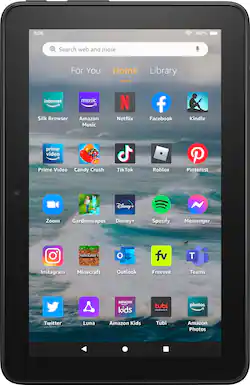
Amazon - Fire 7 (2022) 7” tablet with Wi-Fi 32 GB - Black
- Key Specs
- Screen Size: 7 inches (Size of the screen, measured diagonally from corner to corner.)
- Screen Resolution: 1024 x 600 (Screens come in a range of resolutions (measured in pixels, horizontal x vertical). The higher the resolution, the greater the picture quality.)
- Processor Model: Quad-Core 2.0 GHz (Your computer's processor is like its brain. Working in combination with system memory, the power of the processor determines the complexity of software you can run, how many programs you can have open at the same time, and how fast those programs will run. Most computers feature an AMD, Intel or Snapdragon processor.)
- Total Storage Capacity: 32 gigabytes
- Operating System: Fire OS 8 (The operating system manages all software and hardware, including files, memory and connected devices. Most importantly, it lets you interact with your device and your programs in a visual way; otherwise, you'd be typing computer code to get anything done.)
- Voice Assistant Built-in: Amazon Alexa (A digital assistant built into the device that uses voice commands to answer questions and control smart devices.)
- Works With: Amazon Alexa (Compatible with or able to be connected to other smart devices or applications.)
- Wireless Connectivity: Wi-Fi (The manner in which a device sends data to another device over a short distance without the use of wires or cables.)
- Battery Chemistry: Lithium-ion
- General
- Brand: Amazon
- Model Number: B096WJFX8M
- Product Name: Fire 7 (2022) 7” tablet with Wi-Fi 32 GB
- Color: Black
- Model Family: Amazon Fire
- Year of Release: 2022
- Display
- Display Type: LCD
- Screen Size: 7 inches (Size of the screen, measured diagonally from corner to corner.)
- Screen Resolution: 1024 x 600 (Screens come in a range of resolutions (measured in pixels, horizontal x vertical). The higher the resolution, the greater the picture quality.)
- High Dynamic Range (HDR): false (An HDR-compatible 4K TV or other HDR-compatible product displays HDR video content when it's available from sources like 4K Ultra HD Blu-ray Discs and 4K streaming services.)
- Processor
- Processor Model: Quad-Core 2.0 GHz (Your computer's processor is like its brain. Working in combination with system memory, the power of the processor determines the complexity of software you can run, how many programs you can have open at the same time, and how fast those programs will run. Most computers feature an AMD, Intel or Snapdragon processor.)
- Storage
- Total Storage Capacity: 32 gigabytes
- Memory
- System Memory (RAM): 2 gigabytes (Random-access memory (RAM) is a computing device's short-term data storage, which allows active information to be accessed quickly. The size and type of RAM determines how efficiently the device can handle large amounts of information at one time. For example, gaming or video editing requires more RAM for optimal performance.)
- Compatibility
- Operating System: Fire OS 8 (The operating system manages all software and hardware, including files, memory and connected devices. Most importantly, it lets you interact with your device and your programs in a visual way; otherwise, you'd be typing computer code to get anything done.)
- Operating System Compatibility: Android
- Voice Assistant Built-in: Amazon Alexa (A digital assistant built into the device that uses voice commands to answer questions and control smart devices.)
- Works With: Amazon Alexa (Compatible with or able to be connected to other smart devices or applications.)
- Connectivity
- Wireless Connectivity: Wi-Fi (The manner in which a device sends data to another device over a short distance without the use of wires or cables.)
- Headphone Jack: true (The device features an interface that allows for the connection of headphones.)
- GPS Enabled: false
- Power
- Charging Interface(s): USB-C (The connection for transmitting power to charge the device.)
- Battery Chemistry: Lithium-ion
- Camera
- Front-Facing Camera: true
- Front Facing Camera Video Resolution: 720p (Refers to the number of pixels, both horizontally and vertically, used by the camera facing the user to capture video. The higher the resolution the finer the video detail that can be seen.)
- Rear-Facing Camera: true
- Rear Facing Camera Video Resolution: 720p (Refers to the number of pixels, both horizontally and vertically, used by the camera facing away from the user to capture video. The higher the resolution the finer the video detail that can be seen.)
- Built-In Microphone: true
- Dimensions
- Product Height: 0.3839 inches (The out of box height of the item. Height is measured as the vertical distance from the bottom of the item to the top as it would be primarily used or placed.)
- Product Width: 4.628 inches (The out of box width of the item. Width is measured as the horizontal distance from one side of the item to the other as it would be primarily used or placed.)
- Product Depth: 7.112 inches (The out of box depth of the item. Depth is measured as the distance from the front of the item to the back as it would be primarily used or placed.)
- Product Weight: 0.6393 ounces (The out of box weight of the item.)
- Certifications Listings & Approvals
- ENERGY STAR Certified: false (Devices carrying the ENERGY STAR service mark, such as computer products and peripherals, kitchen appliances, and other products, generally use 20% to 30% less energy than required by federal standards.)
- Included
- Stylus Included: false
- Warranty
- Warranty - Parts: 90-day limited warranty and service included.
- Warranty - Labor: 90-day limited warranty and service included.
- Other
- UPC: 810014309088
Tiny price, big fun. Enhanced performance - now with up to 10 hours of battery life (40% more) and up to 30% faster quad-core processor compared to Fire 7 (9th generation) for more responsive video playback and game play (2021).
- Key Specs: 7” touchscreen; 16GB or 32GB of storage (add up to 1TB of expandable storage with microSD)
- Battery Life: Up to 10 hours of reading, browsing the web, watching videos, listening to music, and more.
- Enhanced performance: Up to 30% faster quad-core processor and 2GB of RAM (double compared to Fire 7—9th generation).
- Streaming Services: Unwind with your favorite content from Netflix, Facebook, Hulu, Instagram, TikTok, and more through Amazon’s Appstore. (Google Play not supported. Subscription for some apps required).
- Video Calls: Stay in touch with Zoom, or ask Alexa to make video calls to friends and family.
- Get more done with Alexa: Update shopping lists, set reminders or listen to your favorite podcast
- Parental Controls: Amazon Kids offers easy-to-use parental controls on Fire tablets. Subscribe to Amazon Kids+ for access to thousands of books, popular apps and games, videos, songs, Audible books, and more.
Whats Included
- Fire 7 Tablet
- USB-C
- Power Adapter
- Quick Start Guide
Q: can this be used to send and receive email
A: Good Morning Willy, Thanks for reaching out! You absolutely can send and receive email from the Amazon Fire 7 tablet as long as you are connected to Wi-Fi. If you are using a web based email such as Gmail or Yahoo you can log in from the website using your Silk Browser or download the App from the Amazon App store. You can also go to your apps and look for the Email icon. Click on the email icon (which looks like an envelope with a letter sticking out of it) to start the set up process from there. I hope this helps! Have a great day
A: Hello Glenda and thank you for your question. You can download the Microsoft Office app from the Appstore to make access the ability to make spreadsheets. Hope this helps! Have a great day!
Q: What size SD card for the external slot
A: Hi Soro, The Micro SD card slot is located on the bottom of the Fire 7 Tablet. For the 32 GB tablet, 25 GB are available to users of internal storage. You can add a microSD card for up to 1 TB of additional storage. Some apps may require that they are installed on internal storage. App or feature updates may impact available storage to you. Hope that helps!
A: Hello, Thank you for inquiring about the Fire 7 tablet, our most popular selling tablet! While the dimensions are similar, they are not the same which would prevent you from using any previous case you may currently have. The camera is also a different size and moved so, this would prevent a previous case from working too! I hope this information helps, have a great day!
Q: Can I use this as a reader for kindle?
A: Hi Lubelle, thanks for reaching out about the Fire 7 tablet. You will have instant access to the Kindle app on this tablet when you purchase. Hope this helps. Happy Holidays!
A: "Hello MomZ2! All tablets are compatible to WIFI setting.If you are having internet issues on your Kindle, here are some troubleshooting tips you can try to resolve the issues: -Confirm other devices connect to the same network. If they are, do they work properly? -Make sure that Airplane mode is off. -Confirm that your device has the latest software version available. -Restart your Kindle and any network devices like modems or routers. -Attempt to connect your Kindle to Wi-Fi again or add a network manually. I hope that helps. Have a great day! "
Q: Can I download the Netflix app?
A: Hello Diane. Thank you for your question. Yes! Big library, small tablet, more fun - Unwind with your favorite apps like Kindle, Netflix, Prime Video, Disney+, Spotify and more through Amazon’s Appstore (Google Play not supported. Subscription fees may apply). Have a great day!
Q: Can I connect this to Verizon?
A: Hi CaroleT! From Amazon's website the Fire 7 works on "public and private wifi networks or hotspots that use the dual-band 802.11a, 802.11b, 802.11g, or 802.11n standard with support for WEP, WPA, and WPA2 security using password authentication", regardless of provider. To put it simpler, it'll work with most WiFi setups! There is no option for cellular internet, though you could always use a separate wireless hotspot in order to connect to the internet on the go. The Fire 7 also features a Micro SD Card slot that allows you to expand the local storage by up to 1TB, great for downloading shows and movies before you leave the house to watch while travelling. I hope that helps, have a great rest of your day!
People also viewed
 $129.99The price was $213.00
 $139.99The price was $329.99

Today's top picks
 $249.99The price was $269.99
 $629.99The price was $739.99
 $499.00The price was $599.00