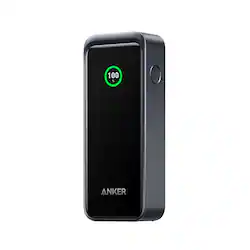
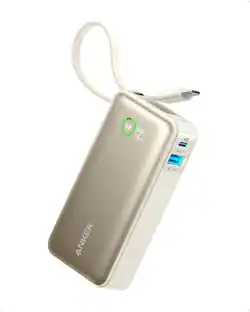
Anker - PowerCore Power Bank (12000mAh, 65W) - Black
- General
- Brand: Anker
- Model Number: A1335011
- Product Name: PowerCore Power Bank (12000mAh, 65W)
- Color: Black
- Features
- Capacity: 12000 milliampere hours
- Battery Chemistry: Lithium-polymer
- Number Of Devices Charged Simultaneously: 2
- Power Output
- Power Supply Output: 2 x USB-C (The connector type(s) used by the device to send electrical power to another device.)
- Power Input
- Power Supply Input: 1 x USB-C
- Maximum Input Voltage: 3.85 volts
- Dimensions
- Product Length: 5.30 inches (The out of box length of the item. Length is measured as the longest dimension of the item.)
- Product Height: 2.17 inches (The out of box height of the item. Height is measured as the vertical distance from the bottom of the item to the top as it would be primarily used or placed.)
- Product Width: 1.30 inches (The out of box width of the item. Width is measured as the horizontal distance from one side of the item to the other as it would be primarily used or placed.)
- Product Weight: 0.22 pounds (The out of box weight of the item.)
- Warranty
- Warranty - Parts: 18 months
- Warranty - Labor: 18 months
- Other
- UPC: 194644130916
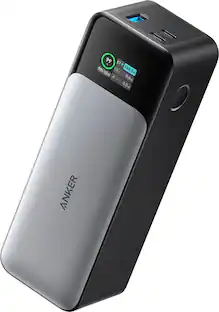
With its smart TFT color screen and vibrant user interface, the power bank meets both aesthetic and technological needs.
- 65W Fast Charging: With the included 65W USB-C cable and charger, quickly charge a 16" MacBook Pro to 50% in just 41 minutes. Double your charging speed and save time on charging.
- 65W Input for Recharge: The 65W rapid recharge enables the power bank to be fully charged in 45 minutes.
- Small and Portable: The 65W power bank is small enough to place inside a bag and is convenient for travel.
- Huge 12,000mAh Capacity: This 12,000mAh battery packs enough power to charge a phone 1.2 times or a laptop to at least 40-50%- ideal for a short getaway.
- Intelligent Display: With its smart TFT color screen and vibrant user interface, the power bank meets both aesthetic and technological needs.
Q: Can I use this power bank with my MagSafe phone case?
A: Yes, this power bank is MagSafe compatible and works seamlessly with all MagSafe phone cases.
Q: Does this power bank have a display?
A: Yes, it has a smart TFT color screen with a vibrant user interface.
Q: What is the maximum power output of this Anker power bank?
A: This Anker power bank has a maximum power output of 65W.
Q: What is the capacity of this power bank?
A: This power bank has a capacity of 12,000mAh.
Q: How long does it take to fully recharge this power bank?
A: With the 65W rapid recharge, the power bank can be fully charged in 45 minutes.
Q: How do you charge the device?
A: With a usb type-c cable. And you don't need a "sony" cable.
A: The Anker 723 Power Bank (PowerCore 65W) does not appear to have magnetic functionality based on the available knowledge. It is designed as a high-capacity power bank with 65W output, but it lacks the magnetic capabilities featured in products like the Anker 622, 621, or 633 Magnetic Batteries.
Q: Can this charger charge a Dell Inspiron laptop?
A: The Anker 723 Power Bank (PowerCore 65W) may not be able to effectively charge a Dell Inspiron laptop depending on the power requirements of the laptop's charging protocol and the battery mode of the power bank. When in portable battery mode, the maximum output of the 723 Power Bank is limited to 30W per USB-C port. If the Dell Inspiron laptop requires higher wattage (e.g., 45W or more), it cannot be charged effectively in this mode. However, when plugged in and functioning as a charger, the 723 Power Bank can output up to 65W through a USB-C port, which could be sufficient for some laptops, provided they are compatible with its output specifications. Additionally, many Dell laptops, including models like the Dell XPS series, have proprietary charging protocols that prevent them from charging effectively or at full speed with third-party chargers. Thus, it is recommended to verify the specific power requirements of your Dell Inspiron laptop to ensure compatibility.
People also viewed
 Clearance$9.49The price was $29.99
 $17.99The price was $22.99
 Clearance$35.99The price was $39.99
 $19.49The price was $29.99
 $125.99The price was $179.99
Today's top picks
- Clearance$9.49The price was $29.99
 $249.99The price was $269.00
- $19.49The price was $29.99