Apple - Magic Trackpad - Multi-Touch Surface (USB-C) - Wireless - Black Multi-Touch Surface
Customers are saying
Customers are impressed with the overall performance of this device, which many users find to be a significant improvement over a traditional mouse. The product is frequently praised for its ease of use and minimalist design, making it a seamless addition to any workspace. Additionally, users appreciate the customizable gesture controls, excellent battery life, and reliable connectivity that help to streamline their daily workflow.
Color
Black Multi-Touch SurfaceFeatures
Compatibility
Mac Models: MacBook Air (2020 and later), MacBook Pro 14-inch (2021 and later), MacBook Pro 16-inch (2019 and later), MacBook Pro 13-inch (2020 and later), iMac 24-inch (2021 and later), iMac 21.5-inch (Retina 4K, 2019), iMac 27-inch (5K Retina, 2019-2020), iMac Pro (2017), Mac Studio (2022 and later), Mac mini (2018 and later), Mac Pro (2019 and later)
iPad Models: iPad Pro 13-inch (M4), iPad Pro 11-inch (M4), iPad Pro 12.9-inch (3rd to 6th generation), iPad Pro 11-inch (1st to 4th generation), iPad Air 13-inch (M3), iPad Air 13-inch (M2), iPad Air 11-inch (M3), iPad Air 11-inch (M2), iPad Air (3rd to 5th generation), iPad (A16), iPad (7th to 10th generation), iPad mini (A17 Pro), iPad mini (5th and 6th generation)
Apple Vision Pro
Specifications
- Connection TypeWireless
Reviews
Rating 4.7 out of 5 stars with 105 reviews
- Overall Performance (30)
- Ease of Use (17)
- Design (6)
- Battery Life (4)
- Connectivity (4)
Customer Images
The vast majority of our reviews come from verified purchases. Reviews from customers may include My Best Buy members, employees, and Tech Insider Network members (as tagged). Select reviewers may receive discounted products, promotional considerations or entries into drawings for honest, helpful reviews.

- Razer - Huntsman V3 Pro 8KHz Full Size Wired Analog Optical Linear Switch Gaming Keyboard with Snap Tap - Black$189.99The price was $249.99




Compare similar products

Magic Trackpad is wireless and rechargeable, and it includes the full range of Multi-Touch gestures and Force Touch technology. Sensors underneath the trackpad surface detect subtle differences in the amount of pressure you apply, bringing more functionality to your fingertips and enabling a deeper connection to your content. It features a large edge-to-edge glass surface area, making scrolling and swiping through your favorite content more productive and comfortable than ever. Magic Trackpad pairs automatically with your Mac, so you can get to work right away. The rechargeable battery will power it for about a month or more between charges. It includes a woven USB‑C Charge Cable that lets you pair and charge by connecting to a USB‑C port on your Mac. Magic Trackpad works seamlessly with Apple Vision Pro for activities like arranging apps in 3D space or navigating complex spreadsheets.

Magic Mouse is wireless and rechargeable, with an optimized foot design that lets it glide smoothly across your desk. The Multi-Touch surface allows you to perform simple gestures such as swiping between web pages and scrolling through documents. The rechargeable battery will power your Magic Mouse for about a month or more between charges.* It’s ready to go right out of the box and pairs automatically with your Mac. It features a USB-C port and includes a woven USB-C Charge Cable that lets you pair and charge by connecting to a USB-C port on your Mac, so you can charge all of your favorite devices with just a single cable.

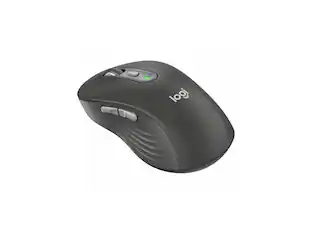
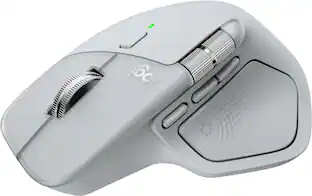
The Logitech MX Master 4 brings immersive control and precision you can feel with haptic feedback. Experience haptic feedback on specific actions, shortcuts, notifications like switching desktops, slider adjustments and more. Customize vibration intensity in Logi Options+. With Actions Ring shortcuts and MX Master 4, save up to 33% of your time by accessing tools and filters at your cursor, reducing repetitive movements by up to 63%. Experience uninterrupted performance with 2X more powerful connectivity, powered by an advanced radio chip, optimized antenna placement, and a new USB-C dongle.
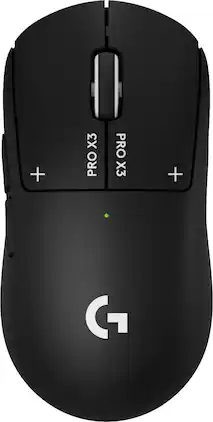
Logitech G partnered with top esports athletes to create The Fastest, Fully Customizable Click. Equipped with the Haptic Inductive Trigger System, the advanced HERO 2 sensor, and the robust LIGHTSPEED wireless. PRO X3 SUPERSTRIKE is a revolutionary PRO mouse delivering The Winning Click. Customize each main key’s actuation point, rapid trigger setting and click haptics. Your competition won’t know what hit them.
| Pros for Apple - Magic Trackpad - Multi-Touch Surface (USB-C) - Wireless - Black Multi-Touch Surface | |||
|---|---|---|---|
| Overall Performance, Ease of Use, Design, Battery Life, Connectivity | Overall Performance, Battery Life, Ease of Use, Design, Connectivity | Overall Performance, Battery Life, Ergonomics, Haptic Feedback, Button Functionality | There were no pros for this product— |
| Cons for Apple - Magic Trackpad - Multi-Touch Surface (USB-C) - Wireless - Black Multi-Touch Surface | |||
| There were no cons for this product— | Size, Charging Port Placement, Scrolling | Size, Weight | There were no cons for this product— |
Specs
Customers often buy these together
Computer Keyboards
![esc
F1
F2
F3
F4
F5
F6
F7
F8
F9
F10
F11
F12
F13
F14
F15
F16
F17
F18
F19
` 1
@ 2
# 3
$ 4
% 5
^ 6
& 7
* 8
( 9
) 0
- -
+ =
Q
W
E
R
T
Y
U
I
O
P
{ [
} ]
|
7
8
9
-
A
S
D
F
G
H
J
K
L
: ;
" "
Z
X
C
V
B
N
M
, <
. >
/ ?
fn
control
option
command
command
option
control
0](https://pisces.bbystatic.com/image2/BestBuy_US/images/products/61efe0f6-0bb8-4d06-a37e-e95c7bba95ca.jpg;maxHeight=232;maxWidth=233?format=webp)
![The text on the image is a list of keys on a keyboard. Here is the grouped and corrected text:
1. Function keys: F1, F2, F3, F4, F5, F6, F7, F8, F9, F10, F11, F12
2. Numeric keys: 1, 2, 3, 4, 5, 6, 7, 8, 9, 0, -, =, +, (, )
3. Modifier keys: shift, control, option, command, caps lock, and return
4. Navigation keys: arrow keys (up, down, left, and right), and home and end keys
5. Punctuation keys: [, ], |, /, and ;
6. Numeric keypad keys: 7, 8, 9, *, -, and =
7. Other keys: tab, Q, W, E, R, T, Y, U, I, O, P, J, K, L, and Z
This list includes all the keys on a standard keyboard, grouped by their functions and types.](https://pisces.bbystatic.com/image2/BestBuy_US/images/products/eba31cb9-2606-42ab-9643-ed4280533545.jpg;maxHeight=232;maxWidth=233?format=webp)
![g) FS F4 F3 esc F2 F1 A $ % # 6 ! 4 5 ~ 3 1 2 R T W E Q tab F G S D lock A caps V C X Z shift H command option control F6 & 7 Y H B logi 44 F9 FB F7 * ( ) 9 0 8 I O U K L J < N M 1.0% r FI3 FQ2 Fl F10 fn + delete - = - 3 I { / P [ ] A return : I ; shift ? > I control option command 2 10 300 3 F PS F1 page clear home up page 7 end down Q P F F8 = I 8 9 4 5 1 2 0 F9 * 1 + 6 3 enter](https://pisces.bbystatic.com/image2/BestBuy_US/images/products/6578/6578481_sd.jpg;maxHeight=232;maxWidth=233?format=webp)
![The text on the image reads:
888 DD DI DD 4 DSC i F2 F3 4 FS T6 ET 1. 1N IN F.. 11 1.. 114 1n F1 F12 118 in9 - a ee 1 8F 2 3 $ 4 % 5 A 6 & 7 . 8 I 9 I 0 ee I + = delete fn home page up clear - / + tab Q W E R T Y U I 0 P { [ ] ] | I delete end page down 7 8 9 ee caps lock A S D F G H J K L : I - return 4 5 6 + shift Z X C V N M < F > ? / shift a 1 2 3 control option 2 command 3 command option control Y - 0 enter
After grouping and correcting the text, it reads:
888 DD DI DD 4 DSC i F2 F3 4 FS T6 ET 1. 1N IN F.. 11 1.. 114 1n F1 F12 118 in9 - a ee 1 8F 2 3 $ 4 % 5 A 6 & 7 . 8 I 9 I 0 ee I + = delete fn home page up clear - / + tab Q W E R T Y U I 0 P { [ ] ] | I delete end page down 7 8 9 ee caps lock A S D F G H J K L : I - return 4 5 6 + shift Z X C V N M < F > ? / shift a 1 2 3 control option 2 command 3 command option control Y - 0 enter](https://pisces.bbystatic.com/image2/BestBuy_US/images/products/f4059d3a-0c2a-46ef-bcfd-4e11b9b26d5d.jpg;maxHeight=232;maxWidth=233?format=webp)
![logi esc 1 F1 2 F2 3 F3 F4 F5 F6 F7 F8 x F9 NI F10 x F11 F12 ins del ~ ! 1 2 # 3 $ 4 % 5 ^ 6 & 7 8 ( 9 ) 0 e - + = backspace tab Q W E R T Y U I O P { [ } ] I / caps lock A S D F G H J - K L : ; " enter shift Z X C V B N M < > ? / shift ctrl fn L start opt H alt cmd alt cmd ctrl opt](https://pisces.bbystatic.com/image2/BestBuy_US/images/products/6478/6478163_sd.jpg;maxHeight=232;maxWidth=233?format=webp)
![esc
F1
F2
F3
F4
F5
F6
F7
F8
F9
F10
F11
F12
~ /
! 1
@ 2
# 3
$ 4
% 5
^ 6
& 7
* 8
( 9
) 0
- -
+ =
Q
W
E
R
T
Y
U
I
O
P
{ [
} ]
A
S
D
F
G
H
J
K
L
: ;
" '
Z
X
C
V
B
N
M
< >
? /
control
option
command
command
option](https://pisces.bbystatic.com/image2/BestBuy_US/images/products/b0b8a609-507c-46fa-8954-8a8f3577c8ae.jpg;maxHeight=232;maxWidth=233?format=webp)
![esc ~ ! 1 tab caps lock shift ctrl F2 Fl # 2 3 Q W A S Z start opt L F3 $ 4 E D X alt cmd3 ) FS F4 A % 5 6 R T F G V C logi 44 HI & F9 FID FB F7 F6 * ) - - & 0 8 9 7 O P U I Y K L H J > < N M 1 B PM + = { [ : I ; ? I alt cmd D 2 4 300 3 1 F12 . * page I insert home up clear backspace 8 9 + 7 page A pg up end down home } I delete ] / 6 4 5 4 enter 2 3 enter 1 dn Pg end shift = 0 del ins etrl fn opt](https://pisces.bbystatic.com/image2/BestBuy_US/images/products/6539/6539505_sd.jpg;maxHeight=232;maxWidth=233?format=webp)
Mouse Pads





Customers ultimately bought
 $42.99The price was $69.99


Explore tech essentials Sponsored
 $80.99The price was $99.99
 Top Deal$74.99The price was $99.99

Discover related products




Keep exploring
 $79.95The price was $109.95