Apple - Thunderbolt 3 (USB-C) to Thunderbolt 2 Adapter - White - Open Box - fair
Apple - Thunderbolt 3 (USB-C) to Thunderbolt 2 Adapter - White - Open Box - fair
- Works like new.
- May have larger dents or scratches.
- May be missing parts, accessories, or packaging.
FREE shipping to
More Buying Options
Related Item

About This Item
About Open Box
Reviews
Customers are saying
Customers consistently note the Thunderbolt 3 (USB-C) to Thunderbolt 2 Adapter's compatibility, overall performance, and ability to convert Thunderbolt 2 to USB-C as major advantages. Many appreciate its ease of use, connectivity, and speed. However, some customers find the price to be a drawback, and a few have concerns about its size and cable length.
Customer Images
The vast majority of our reviews come from verified purchases. Reviews from customers may include My Best Buy members, employees, and Tech Insider Network members (as tagged). Select reviewers may receive discounted products, promotional considerations or entries into drawings for honest, helpful reviews.
Compare similar products

The Thunderbolt 3 (USB-C) to Thunderbolt 2 Adapter lets you connect Thunderbolt and Thunderbolt 2 devices - external hard drives and Thunderbolt displays, for example - to any of the Thunderbolt 3 (USB-C) ports on your MacBook Pro. As a bidirectional adapter, it can also connect new Thunderbolt 3 devices to a Mac with a Thunderbolt or Thunderbolt 2 port.*

The USB Type-C digital AV multiport adapter lets you connect your USB Type-C enabled Mac or iPad Pro to an HDMI display, while also connecting a standard USB device and a USB Type-C charging cable.

The Apple USB-C-to-USB Adapter lets you connect iOS devices and many of your USB accessories to a MacBook with a USB-C port. Plug the USB-C end of the adapter into the USB-C port on your MacBook, and then connect your flash drive, camera or other standard USB device.
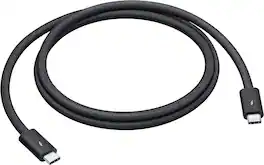
Featuring a black braided design that coils without tangling, this 1-meter cable supports Thunderbolt 5 data transfer up to 120Gb/s;¹ Thunderbolt 3, Thunderbolt 4, and USB 4 data transfer up to 40Gb/s; USB 3 data transfer up to 10Gb/s; DisplayPort 2.1 video output; and charging up to 240W. Use this cable to connect a Mac with Thunderbolt 3, 4, or 5 (USB-C) ports to Thunderbolt (USB-C) and USB displays and devices such as Studio Display, Pro Display XDR, docks, and external drives. You can also use this cable to connect iPhone and iPad models with USB-C to your Mac.
| Pros for Apple - Thunderbolt 3 (USB-C) to Thunderbolt 2 Adapter - White | |||
|---|---|---|---|
| Compatibility, Overall Performance, Ease of use, Thunderbolt 2, USB-C | Compatibility, Overall Performance, Ease of use, HDMI, Connectivity | Compatibility, Ease of use, USB, Quality, Size | Build Quality, Charging Speed, Performance, Data Transfer |
| Cons for Apple - Thunderbolt 3 (USB-C) to Thunderbolt 2 Adapter - White | |||
| Price, Size, Cable Length | Price, Size, Ports, Heat | Cord Length | There were no cons for this product— |