60th Anniversary SaleEnds Sunday. Exclusions, terms and conditions apply.Shop now

Skip to contentGo to Product Search
Main Content

ASUS - CX34 14" FHD Chromebook Plus Laptop with Google AI - Intel Core 5 120U (2024) - 8GB Memory - 128GB UFS Storage - Staid Black

Model: CX3402CVA-C58128
SKU: 6672664
Sold byBest Buy

About this product

ASUS Chromebook Plus CX34 is powerful, portable, and designed to make everyday life easier — offering double the speed, double the memory, and double the storage,** with AI-powered Google and Adobe features that help you get more done and have more fun. Its stylish, lightweight, and durable build makes it a great companion for daily use. Boost your creativity with 12 months of Google AI Pro — now including NotebookLM — on us when you purchase this Chromebook Plus. With convenient touches like a Full HD touchscreen, a 180 degrees lay-flat hinge, and fast, stable Wi‑Fi 6E, ASUS Chromebook Plus CX34 is built to elevate every experience.

See it in-store: Roseville has a demo model on display.

Highlights

Features
  • The best of Google, in a laptop

    The fast, secure operating system from Google comes with built-in Google apps like Gmail, Gemini, Docs, Photos, YouTube, and more, so you can go from deadlines to downtime straight out of the box.

  • The Power to do More

    Powered by an Intel Core 5 120U Processor, 8GB memory, and 128GB storage, you can edit files while watching your favorite shows in Full HD, with up to 10 hours of battery life* on the ASUS Chromebook Plus CX34.

  • Expansive, Immersive Touch Display

    Full HD (1920 × 1080) NanoEdge anti-glare 14-inch display minimizes reflections for a clearer, more focused viewing experience.

  • Lightweight Yet Durable

    Built to withstand daily wear and tear with military-grade durability (MIL-STD 810H), yet lightweight at just 3.15 lbs for effortless portability.

  • Comprehensive Connectivity

    Worry-free connectivity with 2 × USB 3.2 Gen 1 Type-C (supports display/power delivery), 2 × USB 3.2 Gen 1 Type-A, 1 × HDMI 1.4, and 1 × 3.5mm combo audio jack.

  • Versatility for Work and Play

    With features including an FHD camera with a privacy shutter, Wi‑Fi 6E, and a 180 degree lay-flat hinge.

  • Never had a Virus

    *** Chromebooks have never had a virus*** so you can breathe easy knowing your security and privacy are covered with built-in protection and the Titan C2 security chip.

  • Boost Your Productivity and Creativity

    With the Google One AI Premium plan, you get Gemini Advanced, 5TB of cloud storage, and Gemini in Gmail, Docs, and more — all on us when you purchase a Chromebook Plus**

See all features
Specifications
  • Screen Type
    IPS
    Screen Size
    14 inches
    Screen Resolution
    1920 x 1080 (Full HD)
    Touch Screen
    Yes
    Refresh Rate
    60Hz
Sponsored

Reviews

Rating 4.4 out of 5 stars with 20 reviews

95% would recommend to a friend

Customer Images

The vast majority of our reviews come from verified purchases. Reviews from customers may include My Best Buy members, employees, and Tech Insider Network members (as tagged). Select reviewers may receive discounted products, promotional considerations or entries into drawings for honest, helpful reviews.

  • Rated 4 out of 5 stars

    good choice for speed, all day battery

    When opening the Asus Chromebook, the overall appearance is excellent. Although the top and bottom look to be textured plastic, it still felt fairly rigid. There was a very little flex in the display, but almost none in the keyboard and palm rest area. The screen can lay fully flat. The screen is a 14 inch 1920 X 1080 FHD at 60Hz It is an led screen and although only rated at 250 nits, was bright enough even in a lit room. Also, it is a touch screen, and responds well to the touch input. Screen has reasonably good viewing angles, also a matte screen so it doesn't reflect. The screen coloration leans toward the red / green the “low blue light” that is common now. I tend to set backgrounds to bluish scenes which minimizes this effect. There is no provision to change color temperature, except night light setting – which removes blue light even more. I would like to see the addition of color settings in Chrome for better ability to work with photos, watch movies, etc. Trackpad was also responsive, and the “click” seemed to work across the entire bottom. Keyboard has a soft feel, and a short travel, but easy to type on. However, key back light is non-existent, so typing in a dark room may be next to impossible without a light on.... The processor is an Intel Core 5 Series 1. It is a 10 core, 12 thread processor, running at 1.4Ghz, with boost to 5Ghz. However, it does not have an NPU. Along with the 8Gb ram, this machine tears through tasks. Multiple tabs, and apps, don't seem to slow it down. The UFS storage is 128Gb, but there is no micro card slot for extra storage. You would have to use an external USB storage device. It does have 2 USB A ports, 2 USB C ports, HDMI port, and headphone jack. I charged fully, and the machine has been on for 3 hours, and still shows 100%. This is a good choice for an all day computer.... The computer is fast, lightweight, with exceptional battery life, and feels solid and well built. The major downfalls would be the lack of back lit keyboard, somewhat limited storage, and the inability to correct coloration. Still excellent for students, those needing to work all day on a single charge, etc.

    Posted by ebk02

  • Rated 4 out of 5 stars

    Solid, Versatile Chromebook Minor quirk

    Pros: • Great Ecosystem & Account Management: ChromeOS makes it incredibly easy to manage separate accounts. It’s perfect for switching between my kids' school/entertainment profiles and my own browsing needs. • Seamless Phone Sync: The integration with my phone works effortlessly—notifications, file sharing, and tab sync are super smooth. • Solid Build & Display: The chassis feels surprisingly sturdy and durable for daily family use. The matte touch screen is a huge plus—it handles glare well, but not as bright and the touch response is snappy. • Great Daily Performance: For browsing, watching videos, and basic daily tasks, it’s fast, simple, and reliable. • Comes with subscription for Google AI Pro plan for 12 months (says offer expires January 31,2027). Totally worth it. Cons: • Screen Brightness: The display isn't exceptionally bright. It’s totally fine indoors, but if you're in a very bright room or near a sunny window, you might wish it had a bit • Trackpad Gap: There is a noticeable physical gap around the edges of the trackpad. It doesn't affect functionality, but once you see you cant unsee it Bottom Line: If you need an easy-to-use, durable notebook for light family duty, streaming, and casual web browsing, this Chromebook Plus is a great choice. Despite a couple of minor design quirks, the software experience and solid build make it a great value.

    Posted by Techuser

  • Rated 4 out of 5 stars

    Solid Chomebook for students or business use

    The Asus Chromebook Plus CX34 is a solid, no-nonsense Chromebook Plus laptop that gets the fundamentals right. It is not flashy, and it comes with a few clear compromises, but it is a dependable machine for everyday users, especially if you can find it below MSRP. Design and Build The CX34 is a plastic laptop, and it does not try to hide that fact. What it lacks in style, it makes up for in durability. The chassis feels rigid, the lid has very little flex, and the hinge feels sturdy even if it is not especially remarkable. At about 3.15 pounds, it is not especially thin or light, but it is still easy enough to carry in a bag. Port selection is also a strong point, with two USB-C ports, two USB-A ports, HDMI, and a 3.5mm headphone jack. Display The 14-inch 1920 x 1080 Full HD IPS display is sharp and seems reasonably color-accurate to my untrained eyes. The main drawback is brightness: at about 250 nits, the screen is fine indoors but washes out quickly near bright windows or outdoors. The matte finish is a welcome touch, though, because it helps reduce glare and does not show fingerprints as easily as glossier screens. Performance The Intel Core 5 120U performs very well for everyday work. Dozens of tabs, Google Docs, YouTube, Android apps, and light photo editing all run smoothly, and the laptop feels fast and responsive in normal use. The main weak spot is storage. The 128GB UFS drive is acceptable for a Chromebook, but it is not as fast as NVMe storage, and larger file transfers make that difference noticeable. Most users will not mind, but anyone who works heavily with local files should be aware of it. Keyboard and Trackpad The keyboard has good key travel and a comfortable layout, making it suitable for long typing sessions. The major downside is the lack of backlighting, which can be frustrating in low-light environments, and the lack of a 10 key may steer some folks away from this. The trackpad is much better. It is large, accurate, and easy to click, and it feels comparable to trackpads found on some more expensive Windows laptops. Chromebook Plus Software The Chromebook Plus features are where this model earns its name. The 1080p webcam with AI noise suppression is genuinely useful for video calls and is a major upgrade over the 720p cameras found on many older laptops and the included privacy shield is a great feature as well. You also get a 12-month trial of Google Ai Pro (expires 1/2027) which is a great added feature. Battery Life Real-world battery life lands around eight to ten hours, depending on workload. That is not class-leading, but it is enough for a full day of classes, typical work, or a cross-country flight. The 45W USB-C charger also tops it up reasonably quickly. Verdict At MSRP, the CX34 asks you to pay for the Core 5 processor, solid build quality, and Chromebook Plus software features. The dim display and non-backlit keyboard are the main compromises, and they are harder to overlook at a higher price. Best for: Students, professionals, and casual users who want a fast, reliable Chrome OS laptop with good ports and a strong webcam. The CX34 is not flashy, but it is a solid, honest workhorse. Just know that you are paying a premium for the Core 5 model over cheaper Core i3 versions, while the display and keyboard remain lack advanced features.

    Posted by jago

  • Rated 4 out of 5 stars

    Good quality and battery. Ok keyboard laptop

    The Asus Chromebook Plus was easy to set up, once it was charged. The device opens with an option to automatically transfer all files, apps, and other information from an Android phone. I do not have an Android phone and was unable to test this option. There was an update that needed to be immediately installed. The update took about 12 minutes to complete. I was able to connect to my personal WiFi easily. The WiFi has stayed connected for days even while the FIOS company was adjusting and working on our home connection. The battery life is decent. The device provides plenty of warning when the battery is low. The device also turns off the screen when it is not being used to help save the battery life. When the battery bar was at 5%, I was able to use the computer for basic functions for about 44 additional minutes. The majority of icons on the bottom bar are Google options. This does allow for typing documents through Google Docs, without downloading word processor programs. All of the saved files and info stored in my Google settings was copied over. I was able to access my Google Calendar quickly just by clicking the icon on the bottom bar. I was never able to access the “Games and Apps” icon, as a message pops up to say there is no internet connection, even though I have an internet connection. There are also some icons that I am not familiar with such as NotebookLM. I have not used Gemini before, but found that this is similar to other AI chats for answering questions and providing information without being fact checked. I appreciate that there are ports for charging on both sides of the device. I also love that the cord comes with a velcro loop for wrapping up the cord when it is not being used. I did not use the other ports yet, but the HDMI port will prove to be helpful when I connect to a smart tv. There is also a spot to connect headphones. If you prefer to use bluetooth extras such as earbuds or a mouse they connect quickly and easily. I clicked on “Settings” and then went through the Bluetooth option and clicked on “Pair a New Device.” Once my mouse was turned on, it connected and worked seamlessly. The volume level is great and allows for quiet listening, as well as loud options when watching and listening from a different room. The keyboard is quite noisy while typing and reminds me of a student keyboard as it feels plainly constructed with hollow, plastic keys.

    Posted by hokie00

  • Rated 5 out of 5 stars

    Solid Chromebook Plus with MIL-STD 810 durability

    With many people still seeing Chromebooks as low-end, cost-effective cloud-based computers, Google stepped up and created a new class call the Chromebook Plus. These Chromebook Plus models must meet minimum requirements and offer better performance with advanced AI features. Asus has experience with Chromebooks and Chromebook Plus devices and their CX34 is a perennial best-of-breed one. Let's take a look and see what this version with an Intel Ultra 5 processor is like. Overview and Specs ========================================== Chromebooks are known for doing a bit more with less specs-wise. You don't need a "beast" from a hardware perspective to have a snappy and responsive Chromebook. The fact that the Chromebook Plus models have certain minimum specs, really helps ensure the performance will be just as snappy (or snappier) than you'd expect from an efficient operating system like ChromeOS. The Asus CX34 comes in a lot of configurations, but this specific model is an Intel Core 5 (120U) with 8 GB of RAM and 128 GB of UFS storage. If this was a Windows 11 PC, that would mean some pretty anemic performance and not much storage. One a Chromebook Plus with a lot of cloud-based storage, there's no problem. Additionally there's a 14" anti-glare LED display with a 1920x1080 resolution, making it a widescreen, 16x9 format. I'm testing the Staid Black version which is definitely staid and black... The chassis is a sturdy polycarbonate or plastic variety and it feels sturdy. It actually is sturdy, considering it's passed enough different durability tests to qualify as MIL-STD 810H. It should definitely handle your commute and getting tossed around in your backpack or trunk. In the box, you'll get your Chromebook Plus along with a 45w compact USB-C charging adapter. Design and Architecture ========================================== Opening the lid, we see the anti-glare, touchscreen display, FHD webcam with cover, and the keyboard that has an interesting texture on each key. Unlike other laptops that use smooth or finely textured keys, these are quite coarse but actually feel nice and exude a bit of ruggedness or durability. The keypresses themselves are a bit soft and squishy, but on the plus side, it makes for a quiet typing experience. It's also listed as an antimicrobial keyboard which is a plus for germophobes! The lid hinge also has Asus' Ergo Lift hinges which are small rubber feet on the "spine" area which lifts the laptop slightly for better typing experience and possibly heat dissipation (which would be more important for gaming). Wireless connectivity is via an 802.11x Wi-Fi 6E with Bluetooth 5.4. Port-wise, you're well taken care of: left edge - USB-C 3.2 Gen 1 right edge - USB-C 3.2 Gen 1, HDMI 1.4, 2x USB 3.2 Gen 1 Type A, combo audio jack Overall, I'd say this is perfectly safe-looking Chromebook Plus for a school or work environment where you don't need a flashy nor gaudy gaming laptop. Performance ========================================== If you haven't used Google's ChromeOS yet, you'll feel at home soon. With most of the apps being cloud-based and using Chrome as a portal, it probably isn't too different than many people who live in a browser on their PC or Mac. Many popular apps have ChromeOS-native versions and most everything else is covered by running in the browser or using the built-in Google Play store to run millions of Android apps. As if that wasn't enough, you can also run Linux apps which is nice if you wanted to run some alternate browsers or apps that aren't available elsewhere. With an Intel Core 5 (120U) CPU and 8 GB of RAM, there's no problem doing day-to-day tasks, opening tons of browser tabs, and knocking out your office or school productivity tasks. ChromeOS has come a long way and as an avid PC gamer, I always have room in my household for a good Chromebook (especially a Chromebook Plus!) for quick tasks and rock-solid stability and security. This specific process has an Intel NPU for local AI functions. In this case, we're talking about light tasks like helping blur the background of your video call or perhaps some better background noise cancellation, but this isn't a powerful GPU-style parallel processor to run powerful local AI models. Depending on what specific tasks I'm working on, I can easily switch to a Chromebook Plus and knock out research, creating articles and white papers, and more. If you think about how much time you spend in a browser, much if translates well to moving your work to a Chromebook. Android apps have come a long way in the past few years and having access to a vast library means you can have almost any app you need, including Minecraft, Stardew Valley, and more! The lack of gaming used to be a big downside to Chromebooks. Now with the Chromebook Plus and their minimum specs, Google's Google Play Games has a curated collection of popular games that run well. Not to mention you can always use streaming services like Nvidia's Geforce Now, Microsoft's Xbox Live, and others. Battery life has been great with light usage lasting more than a day away from a charger. The specs list up to 10 hours of battery life and I could see that being true. You won't have to worry about leaving your charger behind. Besides, it's uses USB-C charging, so chances are you can top off somewhere. Lastly, Chromebooks have perks! When you get a new Chromebook or Chromebook Plus, you'll get access to multiple promotions like a Geforce Now 12 month trial and Google AI Pro for 12 months that includes more access to popular AI tools and 5TB of storage. That's more than 200-300 dollars of value alone! Summary ========================================== Chromebooks have come a long way since they were first introduced as low-cost competitor to Windows-based laptops. These new Chromebook Plus models, like this Asus CX34 are solid, snappy performers that can definitely be a primary productivity device for student, business owners, and even content creators and gamers. If you're looking for a solid Chromebook Plus that is reliable and durable, look no further than the Asus CX34.

    Posted by Kaizoku

From the Manufacturer

Compare similar products

ASUS - CX34 14" FHD Chromebook Plus Laptop with Google AI - Intel Core 5 120U (2024) - 8GB Memory - 128GB UFS Storage - Staid Black
4.4(20)

ASUS Chromebook Plus CX34 is powerful, portable, and designed to make everyday life easier — offering double the speed, double the memory, and double the storage,** with AI-powered Google and Adobe features that help you get more done and have more fun. Its stylish, lightweight, and durable build makes it a great companion for daily use. Boost your creativity with 12 months of Google AI Pro — now including NotebookLM — on us when you purchase this Chromebook Plus. With convenient touches like a Full HD touchscreen, a 180 degrees lay-flat hinge, and fast, stable Wi‑Fi 6E, ASUS Chromebook Plus CX34 is built to elevate every experience.
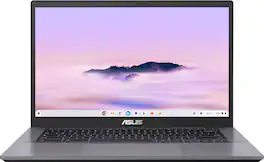
ASUS - CX34 14" FHD Chromebook Plus Laptop with Google AI - Intel Core i5 - 8GB Memory - 128GB Storage - Rock Grey

ASUS Chromebook Plus CX34 is powerful, portable, and built to boost productivity — with advanced speed, memory, and storage. Its lightweight, durable design makes it ideal for work or study on the go. The anti-glare touchscreen delivers clear, comfortable viewing in any light, while the 180° lay-flat hinge and fast, stable WiFi support seamless collaboration. Powered by ChromeOS with built-in Google AI, it helps you work smarter with enhanced writing, editing, and organization tools. With ASUS Chromebook Plus CX34, you’re ready to do more, wherever you are.
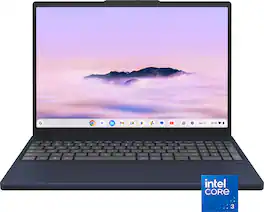
Lenovo - Chromebook Plus 15.3" 2K Touchscreen Laptop - Intel Core 3 Processor N355 2025 - 8GB Memory - 128GB Storage - Cosmic Blue
4.8(5)

Smarter work. Lighter load. More done. The Lenovo Chromebook Plus gives you big-screen advantage without bulk on a 15.3" 16:10 display. With Intel® Core™ performance and Gemini built in, you can multitask, create, stream, and game in the cloud seamlessly anywhere.

Acer - Chromebook Plus 516 Laptop – 16" WUXGA Display - Intel i3-1315U – 8GB LPDDR5 – 128GB Storage– Wi-Fi 6E - Google AI - Steel Gray

Power through your day with the Acer Chromebook Plus 516, a Chromebook Plus laptop, with Google AI built in. Featuring an Intel Core i3-1315U processor and 16” WUXGA 16:10 display, it’s built for smarter, faster productivity. Durable and always connected, it’s ready for anything. An impressive Full HD Facial Auto Exposure Camera, fast wireless connectivity and long-lasting battery life let you transition smoothly between work, home, and personal projects —all day long. And with up to double the speed, memory and storage – plus popular apps – you have the power to do more.

Pros for ASUS - CX34 14" FHD Chromebook Plus Laptop with Google AI - Intel Core 5 120U (2024) - 8GB Memory - 128GB UFS Storage - Staid Black
There were no pros for this productThere were no pros for this productThere were no pros for this productOverall Performance, Screen Size, Speed, Ease of Use, Battery Life
Cons for ASUS - CX34 14" FHD Chromebook Plus Laptop with Google AI - Intel Core 5 120U (2024) - 8GB Memory - 128GB UFS Storage - Staid Black
There were no cons for this productThere were no cons for this productThere were no cons for this productKeyboard Lighting

Specs

Be the first to ask a question.

We’ll try to get your question answered within 24 hours by a Best Buy customer or brand representative.

No content

Customers often buy these together

Sponsored

Finance Options

My Best Buy® Credit Card
Choose a benefit:Or
Buy Now, Pay Later
Lease to own

Special Offers

Top Offers
Included with Purchase

Finance Options

My Best Buy® Credit Card
Choose a benefit:Or
Buy Now, Pay Later
Lease to own

Special Offers

Top Offers
Included with Purchase