Holiday deals. Holideals?Either way, start saving.Shop now

Skip to contentGo to Product Search
Main Content

ASUS - Zenbook DUO Dual 14” 3K OLED Touch Laptop - Intel Core Ultra X7 358H (2026) - 16GB Memory - 512GB Storage - Copilot+ PC - Moher Gray

Model: UX8407AA-ZB/DUO_70
SKU: 6684927
Sold byBest Buy

About this product

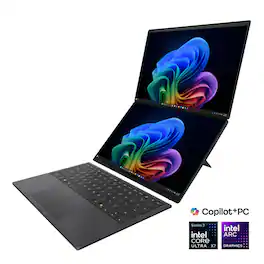
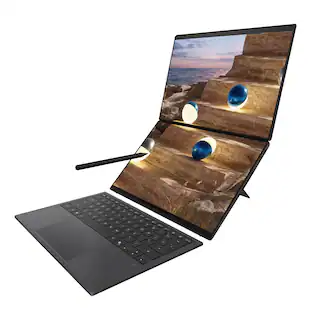
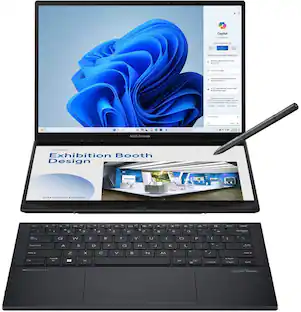
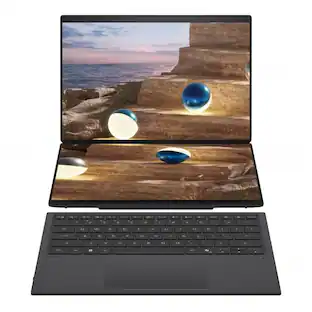
Get more done, wherever you are. The Zenbook DUO’s dual 3K OLED screens let you run multiple apps, documents, or references at the same time, so you don’t have to keep switching windows. Its Intel Core Ultra X7 processor delivers powerful, responsive performance for demanding workflows like 4K editing and heavy multitasking. Switch between dual-screen, laptop, or sharing modes in seconds, and carry it easily thanks to its sleek, durable design.

See it in-store: There are no demo models on display within 50 miles of Roseville

Highlights

Features

  • Copilot+ PC on Windows 11

    As a Copilot+ PC on Windows 11, Zenbook DUO delivers up to 50 TOPS of on-device AI, powering faster searches, instant file retrieval, quick summaries, real-time assistance, and AI features that work smoothly in the background without slowing you down.

  • Immerse Your Senses

    Dual 3K 144 Hz ASUS Lumina Pro OLED touchscreens with 100% DCI-P3 color deliver vivid clarity and up to 1000 nits HDR brightness, while the anti reflection coating and E Reading mode help reduce eye strain during extended use.

  • High-Performance DUO

    Take your productivity further in Windows 11 with the 16-core Intel Core Ultra X7 358H Processor, delivering responsive multitasking and enhanced graphics performance.

  • Advanced Intel Integrated Graphics

    Featuring advanced Intel integrated graphics that deliver smooth visuals for everyday creativity, light 3D work, and casual gaming. Enjoy fast rendering, sharper playback, and responsive performance for multitasking and content creation.

  • Fast Memory for Smooth Multitasking

    With 16 GB of high speed LPDDR5X RAM, apps stay smooth and responsive, letting you switch tasks, edit content, and work across multiple windows without slowdowns.

  • Spacious Storage for Everyday Files

    A spacious 512 GB PCIe 4.0 SSD ensures quick boot times, fast file access, and ample room for large projects, keeping heavy workloads feeling smooth and effortless.

  • Easy to Carry

    Everything travels as one sleek device thanks to its unified design, making it easy to slip into your bag and take between home, office, class, or café sessions.

  • Transforms in Seconds

    Switch modes fast with a magnetic keyboard and integrated kickstand. Move from laptop mode to dual-screen productivity or sharing mode in just a few seconds, keeping your workflow fluid wherever you are.

  • All-Day Power

    A 99Wh battery setup keeps you moving through busy days, and fast-charge technology brings you to 60% in just 49 minutes.

  • Built to Last

    From the full Ceraluminum chassis, hinge, and kickstand to the screens, every part is engineered to set a new gold standard for durability in portable computing.

  • Ports That Keep You Connected

    2× Thunderbolt 4, 1× USB 3.2 Gen 2, and 1× HDMI 2.1 FRL, plus Wi‑Fi 7 and Bluetooth 5.4 keep you connected and productive without extra adapters.

  • ASUS Pen 3.0 Included

    Featuring wireless charging and MPP 2.6 support, ASUS Pen 3.0 provides precise control for note-taking, sketching, and on-the-go productivity.

Specifications

  • Screen Size
    14 inches
    Screen Resolution
    2880 x 1800
    Touch Screen
    Yes
    Refresh Rate
    144Hz
    Brightness
    500 nits
Sponsored

Reviews

Rating 4.8 out of 5 stars with 24 reviews

92% would recommend to a friend

Customer Images

The vast majority of our reviews come from verified purchases. Reviews from customers may include My Best Buy members, employees, and Tech Insider Network members (as tagged). Select reviewers may receive discounted products, promotional considerations or entries into drawings for honest, helpful reviews.

  • Rated 5 out of 5 stars

    Powerful Multitasking & Productivity Machine

    The Asus Zenbook Duo is my first foray into dual-screen laptop computing, and using it has been a revelation. At first glance, it might come off as too niche and too gimmicky. Give it a fair go, then you’ll come to realize how useful that second screen can be, especially if your main tasks and activities involve video editing, art, research, and writing. The potential of the second screen is fully realized as well thanks to powerful components inside that don’t hold them back. With its pair of gorgeous displays, powerful components, comfortable keyboard, well-balanced audio system, and huge battery the Duo is a premium multitasking champ. _______ *Pros: -The dual touchscreens are bright, crisp, and smooth. -Powerful and peppy performance from high-performance components. -It can run AAA games thanks to the 12-core Arc B390 integrated GPU. -The keyboard attachment is super light and comfortable to type on. -Responsive and low-latency touchpad. -The pen is excellent and comes with a wireless charging case. -Has USB-A, USB-C, and HDMI ports. -99Whr battery with a 100W USB-C power adapter. _______ *Neutral: -It feels a bit chunky in your hands when folded up. -At this price level, I expected at least 1TB of storage. _______ *Cons: -None *** Design and Build Quality *** The Asus Zenbook Duo initially surprised me with its chunky feel and look when I first got my hands on it. Due to its dual displays and a keyboard attachment all sandwiched together, it looks thick from the side, especially for a 14” formfactor. But once the laptop is flipped open and the displays are stacked on top of each other and the keyboard is detached, then you realize how thin and sleek the entire system is. Touching and carrying the Duo is a pleasant tactile experience thanks to the Ceraluminum chassis. Asus says the material is meant to feel like stone, and I would agree with that. It does a better job than plastic at resisting smudges and it also has a higher resistance rating against scratches than standard anodized aluminum. Asus has done a really great job integrating two very bright, high-resolution touch displays with pen support in such a portable and compact formfactor – the wow factor is definitely there and it’s just really cool. The bezels are thin and attractive, and the gap between the upper and lower display is quite narrow (~8mm), really upping the immersion factor when both displays are being used at the same time. The new hideaway hinge design is responsible for shrinking the visual gap between the displays, and according to Asus, it’s been rated for 40K fold cycles and now allows both displays to sit completely flat against a table, which the previous generation Duos couldn’t do. The engineering that went into this is truly impressive. Despite its thinness, Asus managed to equip the Zenbook Duo with two USB-C Thunderbolt 4 ports, one USB-A (USB 3.2 Gen 2) port, a headphone jack, and a full-size HDMI port. Nice! As mentioned earlier, the 3K (2880 x 1800), 16:10 ratio, OLED touchscreen displays are very nice, and they even support MPP pen technology as well as variable refresh rate (VRR). Asus didn’t skimp on the displays, enabling up to 1000 nits of peak brightness as well as refresh rate up to 144Hz with 100% DCI-P3 color gamut with an effective anti-glare coating that keeps reflections minimal. What all this means to the user is that the displays are very bright, very crisp and detailed, and any scrolling you do on websites and documents will be flicker-free and buttery smooth. Movies and TV shows are vibrant and show true inky blacks thanks to the OLED tech, upping the immersion factor and providing excellent viewing angles. Audio is also very good, with Asus surprisingly fitting six speakers in the Duo, resulting in loud volume, a decently wide soundstage, and a pleasant overall aural experience. When I first saw the ultra-thin magnetic keyboard attachment, I thought I might hate typing on it. But the keys have good travel and uptake, have backlighting, and they’re responsive and clickity and not mushy at all. The touchpad is also smooth and premium-feeling, and they’re very responsive and easy to live with. The rest of the components are also modern and up-to-date, such as Wi-Fi 7, Bluetooth 5.4, 1080P webcam, and PCIe 4.0 NVME storage. All in all, Asus has put together one heck of a jack-of-all-trades performance machine. It looks cool, feels premium, it’s very performant, has great battery life, and thanks to the dual-screen formfactor, it truly unlocks new levels of productivity, time saving, and convenience. *** Performance *** As expected from a system with a 16-core Intel Core Ultra X7 358H, 16GB of RAM, and Intel Arc B390 GPU, the Zenbook Duo is super responsive, snappy, and performant in pretty much everything. My usual list of tasks and activities all received a huge productivity upgrade thanks to the dual screens, from online research and writing, charting data and tables in spreadsheets, video editing of footage from my phone, drones, and action cams, and learning how to draw while watching a tutorial video on one screen and drawing on the other. Although the Zenbook Duo is geared toward creativity and productivity, it’s no slouch when it comes to gaming. The 12-core Intel Arc B390 is pretty powerful for integrated graphics and when paired up with the 144Hz refresh rate, games run smooth and tear-free. If games support Intel’s XeSS upscaling technology and the XeSS-FG (frame gen) mode, then the games run even faster and smoother due to the higher FPS they unlock. Some recently released games that ran very well on the Zenbook Duo included Resident Evil Requiem, the Witcher 3 Remastered, and Castlevania Belmont’s Curse. The keyboard isn’t optimized for gaming, though, so I would recommend using a gamepad for a more comfortable and pleasant experience. Thanks to its 99Whr battery, the Zenbook Duo was an endurance champ, and while it was running, it ran nice, cool, and quiet. Unless I was doing video editing or gaming, I couldn’t even hear the fans, and even at the high setting, the fans didn’t get distractingly loud. All in all, I was not left wanting for more performance. All of my apps and games performed well, and Windows 11 and the Zenbook Duo were rock-solid and stable. *** Is it worth the coin? *** It depends on how much value you place on convenience. Although it’s true that you could buy a lower cost conventional single-screen laptop and purchase an additional portable display for the extra screen real estate as needed, that’s another thing you would have to pack and carry around with you. With the Zenbook Duo, you don’t have to do that – the two displays and the keyboard all fold together neatly into one compact package that is easy to fit inside almost any bag while only weighing 3.6lbs. Plus you get the big battery and integrated graphics that’s actually powerful enough to run intensive video editing software and triple A videogames at impressive performance levels. If you’re a person that does a lot of multitasking and lots alt-tabbing throughout the day, then the Zenbook Duo is definitely the device for you. It certainly is for me. 5 Stars.

    Posted by optimummind

  • Rated 5 out of 5 stars

    Maximum Versatility

    When you're considering investing in a laptop, ask yourself, do I want something with maximum versatility and multitasking capability? If yes, the ASUS Zenbook DUO might be the option for you. One that balances performance, portability, and productivity isn't always easy. Most laptops give you a single screen, which often means switching between tabs, minimizing windows, and constantly rearranging your workspace. The ASUS Zenbook DUO takes a different approach by putting two displays into one compact device. Featuring two 14-inch 3K OLED touchscreens, you get double the workspace and double the immersiveness. -Design- Upon unboxing, the first thing I noticed was how heavy it was. It's portable enough to bring on the go but in my experience it was better to use as a stationary setup. The Asus Ceraluminum tech is also a big feature that they're proud of. And it makes everyday wear and scratch resistance unmatched. Most impressively you can use the zenbook in multiple modes to fit every need you may have from vertical to dual horizontal functions and a traditional one screen and keyboard setup. The laptop's flexible design also makes it useful in different environments, from a home office to Starbucks or a classroom. Each 14-inch screen has a resolution of 2880 × 1800. Amazingly sharp and detailed this thing is gorgeous and feels ultra premium. Both screens support touch input, adding another layer of convenience when navigating applications or interacting directly with onscreen content. Another benefit is the physical keyboard that can be used separately if you wanted instead which connects seemlessly via bluetooth. Simply put, the displays aren't just there to look cool, they give you more room to work with. The built in kickstand is also a welcome and needed feature when setup in vertical mode. -Performance- A laptop can have all the features in the world, but it still needs enough processing power to keep everything running smoothly. This Zenbook DUO is equipped with an Intel Core Ultra X7 358H processor and 16GB of memory. Designed to support everyday productivity including office apps, web browsing, video, content-creation and running multiple applications at once. For example, you could keep a browser open with several research tabs, work on a presentation, respond to messages, and reference a spreadsheet without constantly closing applications to make room for the next task. The 16GB ram configuration should be sufficient for many users. However, professionals who regularly work with large data and complex creative projects, or other memory-intensive applications may want to consider the 32 gb option. The key advantage here is the extra screen space to run multiple apps at once or even share your screen with the screen share feature allowing two users to follow along together or even have their own separate spaces when folded all the way flat, thanks to the hideaway hinge. If your a gamer you can get away with some light gaming but don't expect to be blown away. This is more geared towards convience and workflow than as an exclusive gaming laptop. -Features- As mentioned above, the screen share feature boasts a ScreenXpert tool bar that quickly gives you the option to switch the occupied space of the dual screens and allows for individual settings like brightness levels. It's a neat and easily accessible widget at a tap of a finger, that can come in handy with another user. It can do a few other things too, as pictured. As a Copilot+ PC, has access to supported AI-assisted tools that can help with mundane tasks from finding info, to working with content, or summing up a blog post. For students, office workers, and people who primarily use cloud storage, 512GB may be more than adequate. However, storage could become a limitation over time. So making use of external and online cloud storage could be necessary. Its connectivity options make it suitable for a range of working environments, providing flexibility for most users. I found myself watching YouTube or streaming a show on one screen while browsing and researching on the other and it all worked flawlessly. The audio is very good too including an immersive 6 speaker design. Even on max volume there wasn't any popping or loss of clarity. -Battery- Battery life will depend on your workload, screen brightness, power settings, and whether you're using both displays. ASUS says you can get up to 18 hours with both screens or up to 32 hours unplugged with one screen active and the external keyboard can get 52+ hours without being backlit. But that will vary per person. You would think having a dual battery system would make temperatures get super hot but the laptop overall stayed nice and cool thanks to the larger fans and I barely noticed any noise. -Experience- The ASUS Zenbook DUO is an interesting alternative to a traditional laptop because it focuses on more workspace without adding more equipment. It's been a blast getting to have multiple windows and managing tasks without sacrificing area for either. One thing I wanted to try was how well it could be used as an e-reader. I was pleasantly surprised that this thing felt like holding an actual comic book! Utilizing both screens and the gorgeous OLED displays, the colors popped and having both screens show it's own page was a huge plus. It may not be ideal given the weight and the large bezel in the middle when opened but it was absolutely serviceable. And the the OLED panels feature 70 percent less blue light, perfect to reduce harm during long term use. Some days I used it as a traditional laptop when I wasn't trying to maximize my screen space and just need some light browsing. But then the option to freely let this baby sing and make use of the beautiful dual display it was like living in the future. I'm pleasantly surprised overall how it just works. -Summary- For professionals, students, content creators, and multitaskers the dual-screen setup could be the biggest reason to choose this laptop over a conventional model. It's important to consider your memory and storage needs and while extra screen space can make multitasking more convenient, the actual productivity gains will depend on how you use it. For the ASUS Zenbook DUO, rather than simply offering more powerful hardware, it rethinks how a laptop workspace can be configured. It's a compelling choice for anyone who wants a more flexibility in their computing experience and i would definitely recommend it if you want to level up your laptop game.

    Posted by TechGeek28

  • Rated 5 out of 5 stars

    Portability meets Productivity

    Just to start the off the review after testing the 2026 ZenBook DUO, I think Asus knock it out the park with the dual screen OLED design. This mobile laptop comes equipped with two 2880X1800 OLED 144Hz refresh rate touchscreen panels. The colors are super vibrant and the details pop out at you. One of the most interesting things about the ZenBook Duo is the sleek form-factor and the coating Asus opted with. I am still wrapping my head around the ZenBook Duo being much smaller and compact than my 2026 top of the line work laptop. Even with the ZenBook having a removable keyboard and dual OLED screens. You have to see in person to see how thin and lightweight this setup is. Asus uses a coating on the ZenBook DUO called ceraluminum that’s stronger than normal aluminum and more resistant to scratches and fingerprint smudges. I carry a microfiber cloth around daily to wipe smudges away for my other devices, so this is a win in my book. Some of the best Features of the ZenBook DUO are: Dual 14-inch 144Hz touchscreen OLED panels with thin bezels. Magnetic Keyboard with pogo pins also Bluetooth enabled when using dual screen mode. Intel Core Ultra X7 358H with an Intel Arc B930. 16GB DDR5X RAM with 512GB NVMe worth of storage 99Wh battery 2 Thunderbolt 4 USB-C ports, 1 HDMI 2.1 port, WI-FI 7 and Bluetooth support Asus Pen 3.0 3.7 pounds for a dual monitor laptop How is the real-world experience? The best way to describe the ZenBook DUO is like having a mobile dual monitor setup. You have the capability to have dual monitors anywhere in the world and on the go. The neat part is you also have the capability to have a normal laptop experience as well. I performed some tests by having Microsoft Teams opened on one screen and Excel and Chrome snapped on other screen. This worked like a charm with no issues and no hiccups performance wise. I took the ZenBook to my local coffee shop and I had so many people stop and ask what type of laptop did I have. They were really intrigued with the design and functionality of the laptop. The detachable keyboard is a plus in my book due to the feel of the keys. The keys do not feel overly clicky and the trackpad is responsive. The keyboard lays flat on the surface as opposed to being elevated or slanted when removed from the pogo pins. You also have to toggle on the Bluetooth switch when undocking the keyboard for continued use. When in dual monitor mode, the setup takes up less space than having two physical monitors. This allows you to have a portable and permanent setup. Some may find that the laptop may be on the heavier and thicker side versus some of the other laptops on the market, but I feel the ZenBook DUO is the sweet spot. Charging the device with the 100-watt charger is seamless. I keep it handy when I use dual display mode, as the battery will drain much faster than in single monitor mode. I am impressed with the battery quick charging capabilities as well. It takes about an hour to go from 20% to 80%. Overall thoughts If you travel constantly and need something for productivity, you should think really long and hard by getting a ZenBook DUO. If you have a profession similar to mine being a data analyst who needs to access multiple apps, spreadsheets, and documents, this may be the right laptop for you as well. For creatives and photo editors that can take advantage of the Pen 3.0, you will love this laptop as well. For all the high-end AAA gamers, this won’t be the laptop for you. You will be able to play most games with low to medium settings, and you won’t be blow away with the ZenBook’s gaming performance. Some things for the Asus to consider with their next iteration in regards to the price point: 32GB DDR5 RAM and 1TB NVMe Storage are the two options I would like to see updated and added. Overall, I really think Asus knocked it out the park with this year’s 2026 ZenBook DUO, and look forward to tapping into my creative side even more.

    Posted by kriserikka

  • Rated 5 out of 5 stars

    Dual Screen Excellence

    As a longtime ASUS user and fan, I was thrilled with the Zenbook Duo’s performance and its ease of use between the two screens. The build of the Zenbook Duo feels solid and the material is nice to the touch - it somewhat resembles the surface of smooth pebbles (ASUS calls it ‘full chassis Ceraluminum’). The hinge for both screens and the kickstand feel sturdy as well, both of which have been reportedly tested for 40,000+ cycles. Despite being a 14 inch laptop, its thickness and overall size feels much more substantial than that; however, the entire unit only weighs just a little over 3.6lb, which is quite light for a dual screen laptop with a keyboard in my opinion. The 14 inch OLED screens are clear and sharp at 2880x1800, 144hz each, and colors appear balanced in sRGB mode. There are a total of four different modes for single or dual screen situations, including a dual portrait one called ‘desktop mode’. This is helpful when working with windows containing long lines of text side by side, such as a PDF on one screen and Docs on the other. The landscape ‘dual screen mode’ is especially great for tasks like on-the-go editing: in Adobe Premiere Pro, one of the screens can function as a dedicated playback monitor, and FL Studio, where the second screen can be used for a fullscreen mixer or a space for plugin windows without covering the main playlist. Its overall performance is fast and snappy - even with 16GB memory it still handles multitasking well such as in situations where Spotify, multiple browser tabs, and windows are open simultaneously. With the Intel Arc B390 Integrated GPU, I was able to run Clair Obscur: Expedition 33 at a steady 40 FPS on medium settings while using a browser on the second screen. Surprisingly the Zenbook Duo could run Battlefield 6, although on the lowest settings and at 20 FPS. Not very good, yet still impressive in my opinion for an integrated GPU. Having had less than stellar experiences with ASUS’ software years ago (particularly Armoury Crate), I was relieved to find that the Zenbook Duo’s software, ScreenXpert and MyASUS, work well together. The only issue I had was that setting the screen color to sRGB via ScreenXpert only applied it to the top screen - I had to go through Windows Color Management to manually delete and add in the sRGB color profile for the bottom/second screen. The detachable keyboard is remarkably thin, yet surprisingly the key travel is not as short as I had expected. Each key has a nice soft touch to it without feeling slippery; in addition, the keyboard’s dedicated hotkeys for moving windows between screens or disabling the second screen is very convenient and effective. Its trackpad also has meaningful shortcut gestures built in, such as swiping up and down to change volume and brightness on its left and right edges. Swiping from the top right corner to the center of the trackpad opens ScreenXpert which provides access to additional settings and controls. The six speakers deliver good, immersive spatial sound for laptop speakers, especially with the Dolby effects enabled. Of the available presets, my favorite is the “Movie Balanced” one, which in my opinion sounds the clearest without compromising the bass frequencies as much as the other presets. The battery life was on par with my personal expectations - overnight in sleep mode, it lost just about 2% battery. In a session with very heavy usage (both screens on, 144hz mode), over 30 minutes the battery had dropped 20%. The included USB-C charging cable is a small-ish 100W square shaped charging block but is still a little hefty, in my opinion. Overall, the Zenbook Duo is a beautiful, premium-feeling device that delivers excellent performance - it is well suited for on the go multitasking and creative work (and maybe even some gaming on the side).

    Posted by AnSmolCoffeeBeane

  • Rated 5 out of 5 stars

    ASUS Zenbook DUO 'Incredible' Found

    I am the thrilled recipient of the new ASUStek Zenbook DUO. ASUS’s Tag Line is “In Search of Incredible” and with this laptop I have found it. ASUS truly shows off their design engineering prowess and high-quality manufacturing with this new, exceptional ASUS Zenbook DUO (2026) Dual Screen 14” 3K OLED Touch Screen Laptop Model: UX8407AA-ZB/DUO_70 boasting the latest high-end mobile “system-on-chip” (SoC) Intel Core Ultra X7 358H running at 1.9 GHz with Turbo Boost up to 4.8 GHz with 16 cores and 16 threads utilizing 16GB of LPDDR5X dual-channel RAM running at 9600 MT/s (megatransfers per second of actual data), a powerful on-chip 128 MB Intel Arc B390 Graphics Processing Unit (GPU) with 12 Xe3 integrated graphics cores, an on-chip AI Neural Processing Unit (NPU 5) at up to 50 TOPS supporting CoPilot + PC and 512GB of fast Read / Write storage with a Micron NVMe SSD. These hardware choices are cutting-edge, combining solid processing and on-board AI power with tremendous battery life and fantastic cooling performance. Add to that an excellent 6-speaker sound system and a premium, light-weight (3.64 lbs), rugged, but elegant quality build featuring ASUS’s recently patented and extensively durability-tested ceramic coating Ceraluminum™ technology and you have an exceedingly remarkable laptop. But to me, the real “Incredible” stars of the show are the beautiful and extremely color accurate Dual ASUS Lumina Pro OLED displays. These ASUS displays are factory calibrated and have an incredible 100% DCI-P3 color gamut which translates to 133% sRGB with a Delta E < 1 color accuracy with Pantone Validation. The resolution on these displays are over 240 pixels per inch (PPI), which is a very high pixel density for desktop monitors and provides excellent on-screen detail. These screens offer a 144Hz Variable Refresh Rate for smooth motion and gaming. With over 1600 nits HDR brightness, .0005 nits true black, and 1,000,000 to 1 Contrast Ratio and VESA Display HDR and Dolby Vision certification, these displays are top-of-the-line and are perfect for photo and video editing. As a Nature Photographer, I exceedingly appreciate these displays’ virtues and I think my work looks fantastic on these displays. All of these features make this ASUS Zenbook DUO my newest go-to for my photo ops and daily activities. Others will find this gorgeous versatile laptop one of their favorites for gaming, study, watching videos, or web browsing. It is an “Incredible” all-around superlative laptop.

    Posted by NatureLover2

Compare similar products

ASUS - Zenbook DUO Dual 14” 3K OLED Touch Laptop - Intel Core Ultra X7 358H (2026) - 16GB Memory - 512GB Storage - Copilot+ PC - Moher Gray
4.8(24)

Get more done, wherever you are. The Zenbook DUO’s dual 3K OLED screens let you run multiple apps, documents, or references at the same time, so you don’t have to keep switching windows. Its Intel Core Ultra X7 processor delivers powerful, responsive performance for demanding workflows like 4K editing and heavy multitasking. Switch between dual-screen, laptop, or sharing modes in seconds, and carry it easily thanks to its sleek, durable design.
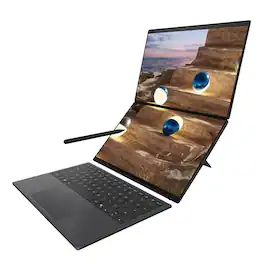
ASUS - Zenbook Duo Dual 14" 3K OLED Touch Laptop - Intel Core Ultra 9 386H - 32GB Memory - 1TB SSD - Moher Gray
4.6(18)

Get more done, wherever you are. The Zenbook DUO’s dual 3K OLED screens let you run multiple apps, documents, or references at the same time, so you don’t have to keep switching windows. Its Intel Core Ultra 9 processor delivers powerful, responsive performance for demanding workflows like 4K editing and heavy multitasking. Switch between dual-screen, laptop, or sharing modes in seconds, and carry it easily thanks to its sleek, durable design.
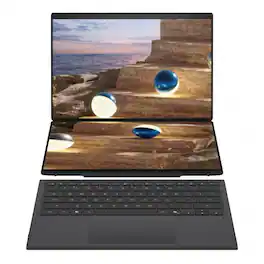
ASUS - Zenbook DUO Dual 14" OLED WQXGA+ 144Hz Touchscreen Detachable Copilot+ PC 2-in-1 Notebook Intel Core Ultra 7 355 - Moher Gray

ASUS ZenBook Duo 14-inch is a premium dual-screen laptop with OLED display, Intel Core Ultra 7, fast memory and storage, Windows Hello, Copilot+ AI, and multitasking for productivity.
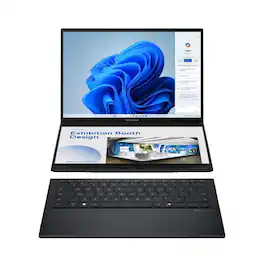
ASUS - Zenbook DUO Dual 14" OLED WUXGA Touchscreen Detachable 2-in-1 Notebook Intel Core Ultra 9 285H 32GB RAM 1TB SSD - Inkwell Gray

The ASUS Zenbook Duo is a high end dual screen 2 in 1 laptop designed for multitasking and creativity. It combines powerful Intel Core Ultra 9 performance, vivid OLED touch displays, and a flexible detachable design for work and entertainment anywhere.

Specs

Be the first to ask a question.

We’ll try to get your question answered within 24 hours by a Best Buy customer or brand representative.

No content

Customers often buy these together

Sponsored