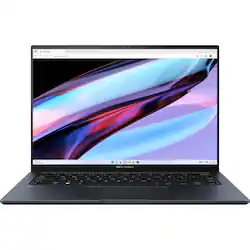
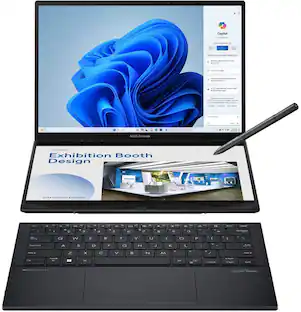
ASUS - Zenbook Pro 14 OLED UX6404 14.5" Touch-Screen Laptop - Intel Core i9 with 16GB Memory - 1 TB SSD - Tech Black
- Key Specs
- Screen Size: 14.5 inches (Size of the screen, measured diagonally from corner to corner.)
- Screen Resolution: 2880 x 1800 (Screens come in a range of resolutions (measured in pixels, horizontal x vertical). The higher the resolution, the greater the picture quality.)
- Touch Screen: true (Touch-screen devices make navigating more intuitive. Using a touch-screen display, you can do things such as tap to select, hold and drag to move items, swipe to scroll, and pinch to zoom.)
- Refresh Rate: 120Hz (The number of frames per second the device can produce natively without enhancement. Higher rates help produce smooth, seamless pictures.)
- Processor Model: Intel 13th Generation Core i9 (Your computer's processor is like its brain. Working in combination with system memory, the power of the processor determines the complexity of software you can run, how many programs you can have open at the same time, and how fast those programs will run. Most computers feature an AMD, Intel or Snapdragon processor.)
- CPU Base Clock Frequency: 2.6 gigahertz (Actual central processing unit (CPU) speed may vary by device configuration and design. The average rate at which the processor is able to execute tasks under normal operating conditions as asserted by the manufacturer.)
- Storage Type: SSD
- Total Storage Capacity: 1000 gigabytes
- System Memory (RAM): 16 gigabytes (Random-access memory (RAM) is a computing device's short-term data storage, which allows active information to be accessed quickly. The size and type of RAM determines how efficiently the device can handle large amounts of information at one time. For example, gaming or video editing requires more RAM for optimal performance.)
- Graphics: NVIDIA GeForce RTX 4060 (Often referred to as a "graphics processing unit" (GPU), this device is responsible for displaying image content and decoding/encoding video content in programs and games.)
- Display Connector(s): 1 x HDMI 2.1, 1 x Thunderbolt 4, Display connection via USB port (The number and type of connectors used to connect to an external display.)
- 2-in-1 Design: false (A laptop and a tablet combined in one lightweight, portable device. Sometimes referred to as "convertible" or "hybrid" laptops, these devices deliver the processing power and keyboard of a laptop. When you're ready to play, either detach the screen or fold your 2-in-1 into tablet mode to comfortably watch movies, play games, read an e-book and more.)
- Backlit Keyboard: true (Integrated lights allow for visibility of the keys in low-light conditions.)
- General
- Brand: ASUS
- Model Number: UX6404VV-DS94T
- Product Name: Zenbook Pro 14 OLED UX6404 14.5" Touch-Screen Laptop - Intel Core i9 with 16GB Memory - 1 TB SSD
- Color: Tech Black
- Year of Release: 2023
- Display
- Display Type: OLED
- Screen Size: 14.5 inches (Size of the screen, measured diagonally from corner to corner.)
- Screen Resolution: 2880 x 1800 (Screens come in a range of resolutions (measured in pixels, horizontal x vertical). The higher the resolution, the greater the picture quality.)
- Touch Screen: true (Touch-screen devices make navigating more intuitive. Using a touch-screen display, you can do things such as tap to select, hold and drag to move items, swipe to scroll, and pinch to zoom.)
- Refresh Rate: 120Hz (The number of frames per second the device can produce natively without enhancement. Higher rates help produce smooth, seamless pictures.)
- Processor
- Processor Brand: Intel
- Processor Model: Intel 13th Generation Core i9 (Your computer's processor is like its brain. Working in combination with system memory, the power of the processor determines the complexity of software you can run, how many programs you can have open at the same time, and how fast those programs will run. Most computers feature an AMD, Intel or Snapdragon processor.)
- Processor Model Number: 13900H
- CPU Base Clock Frequency: 2.6 gigahertz (Actual central processing unit (CPU) speed may vary by device configuration and design. The average rate at which the processor is able to execute tasks under normal operating conditions as asserted by the manufacturer.)
- Storage
- Storage Type: SSD
- Total Storage Capacity: 1000 gigabytes
- Solid State Drive Capacity: 1000 gigabytes (The amount of data that can be stored on the device's solid state drive (SSD). SSD is a flash-based storage with faster speeds than a hard disk drive (HDD).)
- Memory
- System Memory (RAM): 16 gigabytes (Random-access memory (RAM) is a computing device's short-term data storage, which allows active information to be accessed quickly. The size and type of RAM determines how efficiently the device can handle large amounts of information at one time. For example, gaming or video editing requires more RAM for optimal performance.)
- Type of Memory (RAM): DDR5 SDRAM (Each type of RAM delivers a different level of speed, bandwidth, energy efficiency and performance.)
- Graphics
- Graphics Type: Dedicated (Dedicated graphics uses a separate graphics card for processing video images. Because it does not use memory from the system's RAM, there is no extra burden on the CPU and graphics are processed more efficiently. Integrated graphics shares system RAM to process video images.)
- GPU Brand: NVIDIA
- Graphics: NVIDIA GeForce RTX 4060 (Often referred to as a "graphics processing unit" (GPU), this device is responsible for displaying image content and decoding/encoding video content in programs and games.)
- GPU Video Memory (RAM): 8 gigabytes (Random-access memory (RAM) is a GPU’s, or graphics cards, short-term data storage, which allows active information to be accessed quickly. The size and type of RAM determines how efficiently the GPU can handle large amounts of information at one time. For example, larger amounts of RAM for gaming or video editing increases performance.)
- GPU Video Memory Type (RAM): GDDR6 (Each type of RAM delivers a different level of speed, bandwidth, energy efficiency and performance.)
- Compatibility
- Operating System: Windows 11 Home (The operating system manages all software and hardware, including files, memory and connected devices. Most importantly, it lets you interact with your device and your programs in a visual way; otherwise, you'd be typing computer code to get anything done.)
- Voice Assistant Built-in: No (A digital assistant built into the device that uses voice commands to answer questions and control smart devices.)
- Connectivity
- Display Connector(s): 1 x HDMI 2.1, 1 x Thunderbolt 4, Display connection via USB port (The number and type of connectors used to connect to an external display.)
- Number of HDMI Outputs (Total): 1
- Number of Thunderbolt Ports (Total): 1
- USB Ports: 1 x USB-A 3.2, 1 x USB-C 3.2 (The number and type of USB ports the product has.)
- Number of USB Ports (Total): 2
- Wireless Connectivity: Bluetooth (The manner in which a device sends data to another device over a short distance without the use of wires or cables.)
- Network Connectivity: None (The manner in which a device sends data to another device over a long distance using a cellular network.)
- Cooling
- CPU Cooling System: Air
- Power
- Power Supply Maximum Wattage: 200 watts
- Battery Cells: 4-cell
- Camera
- Front-Facing Camera: true
- Features
- 2-in-1 Design: false (A laptop and a tablet combined in one lightweight, portable device. Sometimes referred to as "convertible" or "hybrid" laptops, these devices deliver the processing power and keyboard of a laptop. When you're ready to play, either detach the screen or fold your 2-in-1 into tablet mode to comfortably watch movies, play games, read an e-book and more.)
- Backlit Keyboard: true (Integrated lights allow for visibility of the keys in low-light conditions.)
- Casing Material: Aluminum
- Dimensions
- Product Height: 0.7 inches (The out of box height of the item. Height is measured as the vertical distance from the bottom of the item to the top as it would be primarily used or placed.)
- Product Width: 12 7/10 inches (The out of box width of the item. Width is measured as the horizontal distance from one side of the item to the other as it would be primarily used or placed.)
- Product Depth: 8 4/5 inches (The out of box depth of the item. Depth is measured as the distance from the front of the item to the back as it would be primarily used or placed.)
- Product Weight: 3.64 pounds (The out of box weight of the item.)
- Certifications Listings & Approvals
- ENERGY STAR Certified: true (Devices carrying the ENERGY STAR service mark, such as computer products and peripherals, kitchen appliances, and other products, generally use 20% to 30% less energy than required by federal standards.)
- EPEAT Qualified: false (The Electronic Product Environmental Assessment Tool (EPEAT) was designed to provide an environmental assessment tool for purchasers. In order to qualify for EPEAT, a product must meet all 23 required criteria.)
- Included
- Optical Drive Type: None (An optical disk drive (ODD) uses a laser light to read data from or write data to an optical disc. These discs include CDs, DVDs, and Blu-ray Discs. This allows you to play music or watch movies using prerecorded discs.)
- Other
- UPC: 197105110335
Better doesn't always have to be bigger! The Zenbook Pro 14 OLED packs more on-the-go creative power into its elegant, ultra-compact chassis than ever before, starting with a new 14.5-inch 120Hz OLED NanoEdge display. Added to this is the full power of the Intel Core processor and studio-grade NVIDIA GeForce RTX graphics unleashed by ASUS IceCool Pro thermal technology to a max 125-watt combined TDP and the ASUS DialPad for total creative control. Work freely wherever you are with this 17.9 mm-thin, 1.6 kg-weight notebook, and enjoy non-stop productivity from the 76 Wh battery. Make your creative power more incredible with Zenbook Pro 14 OLED!
- Windows 11 Home operating system: Windows 11 Home OS smartly manages your hardware and runs routine applications efficiently
- 14.5" 2.8K Touchscreen for hands-on control: With NanoEdge Display Screen Technology. 2880 x 1800 resolution delivers amazing color and clarity
- NVIDIA Geforce RTX 4060 discrete graphic card: NVIDIA Geforce RTX 4060 discrete graphic card for gaming and graphic designing that delivers the optimal visual experience
- 16 GB system memory for intense multitasking and gaming: Reams of high-bandwidth RAM to smoothly run your graphics-heavy PC games and video-editing applications, as well as numerous programs and browser tabs all at once.
- 1 TB solid state drive (SSD): While offering less storage space than a hard drive, a flash-based SSD has no moving parts, resulting in faster start-up times and data access, no noise, and reduced heat production and power draw on the battery.
- Weighs and measures 0.70" thin: Ultrathin and ultralight for maximum portability, featuring a smaller screen size and omitting the DVD/CD drive to achieve the compact form factor. 4-cell battery.
- HDMI output expands your viewing options: Connect to an HDTV or high-def monitor to set up two screens side by side or just see more of the big picture.
- Backlit keyboard: Backlit keyboard For easy typing in dim or dark conditions.
Whats Included
- Asus Zenbook Pro 14 OLED UX6404VV-DS94T Notebook
- Lithium Ion Battery
- AC Adapter
- Sleeve
- USB-A to RJ45 Gigabit Ethernet Adapter
Product Manuals
Q: Is the memory RAM expandable and how much memory can we add? Thanks
A: 16gb is onboard with one open slot. It's upgradeable to 48gb total. I've installed a 16gb stick of DDR5 4800Mhz from Crucial and works great.
A: Ideally, yes. But for your convenience, there's no need to disconnect the battery for a RAM upgrade. Make sure to clean your hands with soap and water and turn off your laptop (not sleep) before operating anything.
Q: Please which one is it: 1) glossy 2) matt 3) glossy with anti reflective
A: The ASUS Zenbook Pro 14 OLED (UX6404VV) has a glossy display.
A: No, this laptop doesn't support powering on and off with a docking station's power button. It can be used to wake it while the laptop is in sleep mode.
A: The maximum size of SSD support is 4TB PCIe NVMe Gen 4.
Q: What's the TGP of the 4060?
A: The TGP ig the RTX 4060 GPU is 115 watts.
A: The battery life is approximately 10 hours of light to medium workload.
A: It is normal that excessive heat is generated under heavy load especially during gaming. Please ensure the air ventilations are free from obstructions in order to have an efficient air flow for better heat dissipation. While gaming, please ensure no resource hungry applications are running in the background, this will definitely spike the temperature. The heat or temperature does decreases or normalizes once system resource utilization goes down.
People also viewed
 $1,449.99The price was $1,499.99
 $1,539.99The price was $2,219.99
 $898.00The price was $999.99
 $1,869.99The price was $1,899.99
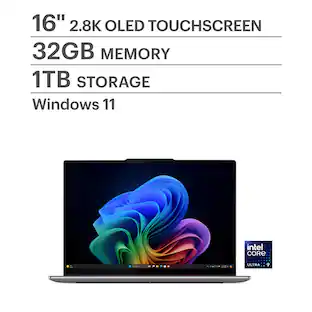 $1,929.00The price was $1,949.99
 $2,394.99The price was $2,549.99


Today's top picks
 $789.99The price was $1,049.99
 $1,799.99The price was $2,199.99
 $1,564.99The price was $1,774.99
- $1,539.99The price was $2,219.99
 $1,849.99The price was $2,149.99
- $1,869.99The price was $1,899.99
 $1,299.99The price was $1,599.99
- $2,599.99The price was $2,629.99
- $2,394.99The price was $2,549.99
 $1,459.99The price was $1,649.99
 $2,199.99The price was $2,699.99