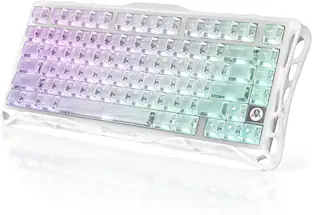
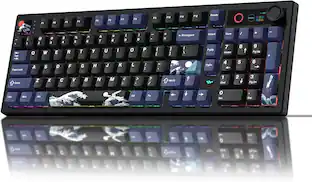
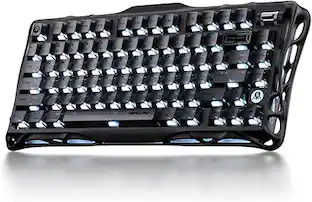
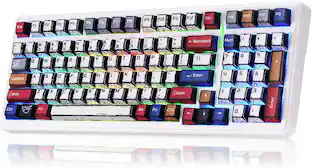
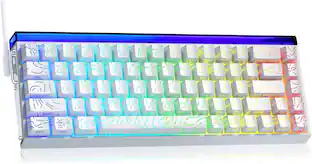
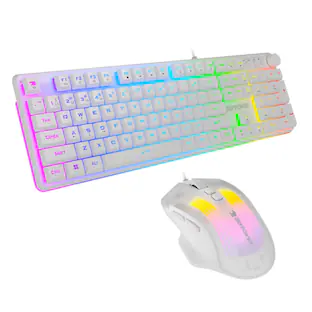
AULA - F99 Pro 99-Key Wireless Hot-Swappable Mechanical Gaming Keyboard with Multifunction Knob and RGB and 8000mAh Battery - Blue
About this product
The F99 Pro is a 99-key wireless mechanical gaming keyboard that connects via Bluetooth 5.0, 2.4GHz wireless, or USB Type-C, pairing with up to five devices and switching between them instantly using FN key combinations. A built-in 8000mAh rechargeable battery keeps you powered through extended gaming and work sessions, while the multifunction knob puts volume control, backlight adjustments, and office-to-gaming mode switching all within a single turn. Every key is hot-swappable, letting you change LEOBOG Nimbus switches freely without soldering, and the gasket structure combined with five layers of sound-dampening material gives each keystroke a cushioned, stable feel with minimal resonance. The RGB system delivers 16.8 million colors across 16 preset effects, fully adjustable through the knob or FN shortcuts, with driver software support for macros, key remapping, and custom lighting.
Color
BlueThree-Way Wireless with Multi-Device Support
Connect via Bluetooth 5.0, 2.4GHz wireless, or USB Type-C and pair with up to five devices at once. Switch between them on the fly using FN key combinations — no reconnecting, no interruptions.
Hot-Swappable with LEOBOG Nimbus Switches
Swap any switch without soldering — the hot-swap PCB supports both 3-pin and 5-pin switches. LEOBOG Nimbus switches come pre-installed for smooth, precise actuation right out of the box.
Multifunction Control Knob
Toggle between office and gaming mode, adjust volume, and fine-tune backlight settings with a single dedicated knob. One control, multiple functions — no reaching for software mid-session.
16.8 Million RGB Colors
Choose from 16 preset lighting effects and adjust brightness and speed through the knob or FN shortcuts. Pair with driver software for full macro recording, key remapping, and custom lighting profiles.
Five-Layer Sound Dampening
Five layers of sound-dampening material, a gasket structure, and PCB single-key slotting work together to reduce cavity noise and deliver a soft, stable keystroke feel — whether you're deep in a game or grinding through a workday.
- Lighting TypeRGBForm Factor96%Keyboard TechnologyMechanicalConnection TypeWireless
Reviews
Rating 5 out of 5 stars with 3 reviews
The vast majority of our reviews come from verified purchases. Reviews from customers may include My Best Buy members, employees, and Tech Insider Network members (as tagged). Select reviewers may receive discounted products, promotional considerations or entries into drawings for honest, helpful reviews.
Compare similar products

The F99 Pro is a 99-key wireless mechanical gaming keyboard that connects via Bluetooth 5.0, 2.4GHz wireless, or USB Type-C, pairing with up to five devices and switching between them instantly using FN key combinations. A built-in 8000mAh rechargeable battery keeps you powered through extended gaming and work sessions, while the multifunction knob puts volume control, backlight adjustments, and office-to-gaming mode switching all within a single turn. Every key is hot-swappable, letting you change LEOBOG Nimbus switches freely without soldering, and the gasket structure combined with five layers of sound-dampening material gives each keystroke a cushioned, stable feel with minimal resonance. The RGB system delivers 16.8 million colors across 16 preset effects, fully adjustable through the knob or FN shortcuts, with driver software support for macros, key remapping, and custom lighting.
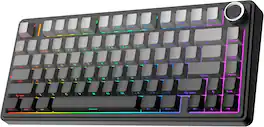
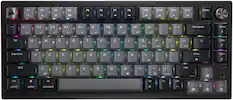
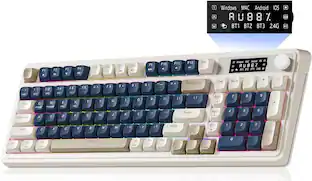
The F75 combines space efficiency and comfort with its 75% compact layout and innovative gasket structure for a flexible, firm typing experience. Its five-layer padding design reduces noise and resonance, creating a quiet typing environment. The 1.2mm PCB and pre-lubricated mechanical switches ensure precise, smooth key registration. With Bluetooth, 2.4GHz wireless, and wired USB connectivity, plus a 4000mAh battery for long-lasting use, the F75 is versatile for any setup. The multimedia control knob and full-key hot-swappable functionality offer easy customization for gaming, typing, or creative tasks.
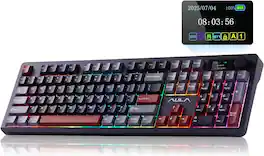
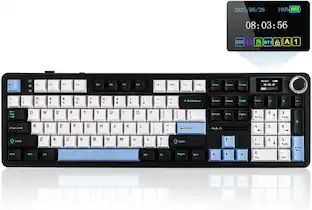
The AULA F106 PRO is a high-performance, 104-key full-size mechanical keyboard engineered for gamers and professionals who refuse to compromise on functionality. This powerhouse features a built-in intelligent TFT color display and a multi-function knob, allowing you to monitor battery life, toggle connection modes, and even upload custom GIFs for a personalized aesthetic. At its core is a massive 8000mAh rechargeable battery, providing up to 200 hours of use, paired with versatile tri-mode connectivity that links up to five devices via Bluetooth, 2.4GHz wireless, or USB-C. Experience a signature "creamy" typing sensation thanks to pre-lubricated stabilizers and hot-swappable Blaze switches that allow for effortless customization without soldering. Wrapped in premium, oil-resistant PBT double-shot keycaps and illuminated by 16.8M RGB colors, the F106 PRO combines a classic full-size layout with cutting-edge technology. Whether you're crunching numbers with the dedicated Numpad or dominating in-game, this keyboard delivers the perfect blend of tactile comfort and smart utility across Windows, Mac, and mobile platforms.
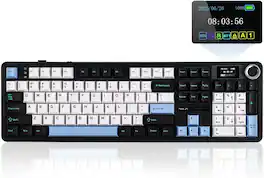
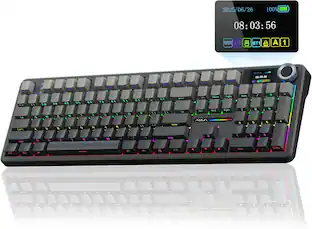
100% in Size, Performance and Comfort: Meet the 100% full size variation of the EPOMAKER X AULA F75 Max, the F108 PRO Mechanical keyboard that offers the same creamy sound and unparalleled performance as F75 Max but in upgraded full-size layout with customizable Screen. The 104 anti-ghosting keys deliver accuracy and greater possibilities in configuration and controlling, ideal for multitasking and fast response in gaming and office.
Specs
Customers often buy these together

Logitech - MK540 Full-size Advanced Wireless Membrane Keyboard and Mouse Combo for PC - Black
60th Anniversary Deal$39.99The price was $59.99


![Sure, here is the corrected and grouped text from the image:
**Top Row:**
- ESC
- F1
- F2
- F3
- F4
- F5
- F6
- F7
- F8
- F9
- F10
- F11
- F12
- PRTSC
- DEL
**Number Row:**
- 1
- 2
- 3
- 4
- 5
- 6
- 7
- 8
- 9
- 0
- -
- =
- \
**Letter Row:**
- TAB
- Q
- W
- E
- R
- T
- Y
- U
- I
- O
- P
- [
- ]
- \
**Letter Row:**
- CAPS
- A
- S
- D
- F
- G
- H
- J
- K
- L
- ;
- '
**Letter Row:**
- SHIFT
- Z
- X
- C
- V
- B
- N
- M
- ,
- .
- /
**Function Row:**
-](https://pisces.bbystatic.com/image2/BestBuy_US/images/products/9be10b95-8e90-4a5d-b85f-cbc6a7d8e8df.png;maxHeight=232;maxWidth=233?format=webp)


![esc F1 F2 F3 F4 F5 F6 F7 F8 F9 F10 F11 F12 1 2 3 4 5 6 7 8 9 0 - = backspace tab Q W E R T Y U I O P [ ] \ caps lock A S D F G H J K L ; ' shift Z X C V B N M , . / shift ctrl alt logi](https://pisces.bbystatic.com/image2/BestBuy_US/images/products/6411/6411501_sd.jpg;maxHeight=232;maxWidth=233?format=webp)

![esc 1 ! 2 @ 3 # 4 $ 5 % 6 ^ 7 & 8 * 9 ( 0 ) - = | F1 F2 F3 F4 F5 F6 F7 F8 F9 F10 F11 F12 tab Q W E R T Y U I O P [ ] { } | caps A S D F G H J K L : : enter shift Z X C V B N M , < > ? shift ctrl alt fn ctrl](https://pisces.bbystatic.com/image2/BestBuy_US/images/products/bc5bce35-ca08-45da-bcc3-8d6fb215154b.jpg;maxHeight=232;maxWidth=233?format=webp)
![Sure, here is the corrected and grouped text:
```
ESC F1 F2 F3 F4 F5 F6 F7 F8 F9 F10 F11 F12 1 2 3 logitech - - 1 2 # $ 4 % 5 6 & 7 8 9 0 - - back insert home page up num lock clear / . tab Q W E R T Y U I O P { [ } ] / delete end page down 7 home 8 A 9 P9 up + caps lock A S D F G H J K L : ; a enter 4 5 6 shift Z X C V B N M < > ? shift 1 end 2 3 pg dn enter ctrl fn start alt opt alt crnd x alt cmd x fn ctrl alt opt 0 ins del 1 logitech
```](https://pisces.bbystatic.com/image2/BestBuy_US/images/products/5761/5761911_sd.jpg;maxHeight=232;maxWidth=233?format=webp)
![Sure, here is the corrected and grouped text from the image:
---
**Top Row:**
- Esc
- F1 F2 F3 F4 F5 F6 F7 F8 F9 F10 F11 F12
**Second Row:**
- 1 ! 2 @ 3 # 4 $ 5 % 6 ^ 7 & 8 * 9 ( 0 ) - _ + =
**Third Row:**
- Tab Q W E R T Y U I O P [ { ] } \
**Fourth Row:**
- Caps Lock A S D F G H J K L ; ' Enter
**Fifth Row:**
- Shift Z X C V B N M , . / Shift
**Function Keys:**
- F1 F2 F3 F4 F5 F6 F7 F8 F9 F10 F11 F12
**Right Side:**
- Insert Home Page Up Delete End Page Down
**Bottom Row:**
- Ctrl Alt Spacebar Alt Ctrl
**Additional Keys:**
- Logi
- Scroll Lock
- Pause Break
---
This should match the layout of the keyboard in the image.](https://pisces.bbystatic.com/image2/BestBuy_US/images/products/0ce0f170-380c-41e4-8d6a-fa0aadbd534c.jpg;maxHeight=232;maxWidth=233?format=webp)

![Esc F1 F2 F3 F4 F5 F6 F7 F8 F9 F10 F11 F12 Print Screen Scroll Lock Pause Break 1 2 3 4 5 6 7 8 9 0 - + = Backspace Insert Home H Page Up A Num Look 1 I Tab Q W E R T Y U I o P { [ } ] I I Delete End IN Page Down 7 Home 8 9 Pg Up Caps A Lock A S D F G H J K L ; : DE g Enter 4 5 6 Shift Z X C V N M < > ? I Shift 1 End 2 3 Pp Dn Enter Ctrl Alt Alt Ctrl 0 Ins Del](https://pisces.bbystatic.com/image2/BestBuy_US/images/products/a588d446-5678-40ae-86b8-1f15e0026e66.jpg;maxHeight=232;maxWidth=233?format=webp)

More to consider
 $37.99The price was $58.99
 $39.99The price was $45.99
 $80.99The price was $89.99


Explore tech essentials Sponsored
 60th Anniversary Deal$299.99The price was $349.99
 60th Anniversary Deal$79.99The price was $149.99
 60th Anniversary Deal$89.99The price was $99.99
 60th Anniversary Deal$193.99The price was $239.99

Discover related products
 60th Anniversary Deal$11.99The price was $19.99
 $429.99The price was $455.99
 $249.99The price was $275.00
 $30.99The price was $32.99
 60th Anniversary Deal$78.99The price was $99.99









Keep exploring
 $101.99The price was $105.04
- $37.99The price was $58.99
 $129.95The price was $159.95