Best Buy essentials™ - Mini DisplayPort to HDMI Adapter - White - Open Box - fair
Best Buy essentials™ - Mini DisplayPort to HDMI Adapter - White - Open Box - fair
- Works like new.
- May have larger dents or scratches.
- May be missing parts, accessories, or packaging.
$5.49 shipping to
Sign in or create an account for Free shippingMore Buying Options
About This Item
About Open Box
Reviews
Customers are saying
Customers praise the Mini DisplayPort to HDMI Adapter for its simplicity, affordability, and broad compatibility, noting it performs its intended function effectively. Users appreciate its connectivity with devices like MacBooks and its suitability for HDMI usage with products like Surface Pros. While overwhelmingly positive, a few users mentioned limitations with high-resolution 4K displays.
Customer Images
The vast majority of our reviews come from verified purchases. Reviews from customers may include My Best Buy members, employees, and Tech Insider Network members (as tagged). Select reviewers may receive discounted products, promotional considerations or entries into drawings for honest, helpful reviews.
Compare similar products

This Best Buy Essentials Mini DisplayPort to HDMI Adapter can mirror or extend the display from your Mini DisplayPort device to an HDMI-supported monitor. It supports resolutions up to 1920 × 1080 for high-quality video (and audio is supported when provided by the source). It has 24K gold plating to help guard against corrosion and loss of quality.

Improve your workstation by connecting your laptop to an external monitor with this Insignia Mini DisplayPort to HDMI Adapter. The adapter supports 4K Ultra HD to prevent loss in quality when transferring between screens. It features a sleek braided cable jacket that flexes and bends to easily connect, and the plug-and-play design makes setup a breeze.
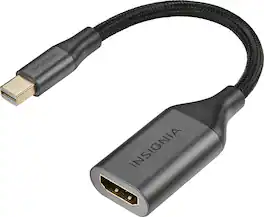
This mini DisplayPort to HDMI adapter converts a mini DisplayPort output to an HDMI input, letting you connect your iMac, MacBook or other Mini DisplayPort device to an HDMI-enabled TV, monitor or projector. Resolutions up to 4K deliver outstanding presentations or movie showings with crystal clear video quality. Plus, the compact design makes it easy to carry.

This Best Buy Essentials 6' Mini DisplayPort to HDMI Cable can mirror or extend the display from your Mini DisplayPort device to an HDMI-supported monitor—without the use of a separate cable or adapter. It supports resolutions up to 1920 × 1080 for high-quality video (and audio is supported when provided by the source). It has 24K gold plating to help guard against corrosion and loss of quality.
| Pros for Best Buy essentials™ - Mini DisplayPort to HDMI Adapter - White | |||
|---|---|---|---|
| Ease of use, Price, Compatibility, HDMI, Performance | There were no pros for this product— | Ease of use, Compatibility, Price, Overall Performance, Connectivity | Compatibility, HDMI, Ease of use, Quality, Cable Length |
| Cons for Best Buy essentials™ - Mini DisplayPort to HDMI Adapter - White | |||
| Resolution | There were no cons for this product— | Length | Resolution, Connectivity |